Configure an origin server
DCDN supports OSS, IP-based, and domain name-based origin servers. You can configure multiple origin addresses for each type and set priority and weight to enable load balancing and failover.
Before you begin
You are responsible for any data transfer or bandwidth costs incurred by the origin server during origin fetch. For example, you are charged for traffic and bandwidth from your own data center, or for data transfer fees from an OSS bucket.
DCDN supports failover between primary and secondary origin servers. When multiple origin servers are configured, DCDN first attempts an origin fetch from the server with Priority set to Primary. If the primary origin server fails three consecutive health checks, DCDN fails over to a server with Priority set to Secondary. If the primary origin server passes a subsequent health check, DCDN marks it as available and restores its primary status. If all origin servers have the same priority, DCDN uses round-robin scheduling for origin fetches.
NoteHealth checks: DCDN performs active Layer 4 health checks by probing port 80, port 443, or any custom ports you have configured on the origin server. DCDN sends probes every 2.5 seconds and marks an origin server as unavailable after three consecutive failed probes.
Add or modify an origin server
-
Log on to the DCDN console.
-
In the left-side navigation pane, click Domain Names.
-
On the Domain Names page, find the domain name that you want to manage and click Configure in the Actions column.
On the Basic Settings tab, find the Origin Information section.
In the Origin Information section, add a new origin server or modify an existing one.
To add an origin server, click Add Origin Server.
To modify an existing origin server, find it in the list and click Modify in the Actions column.
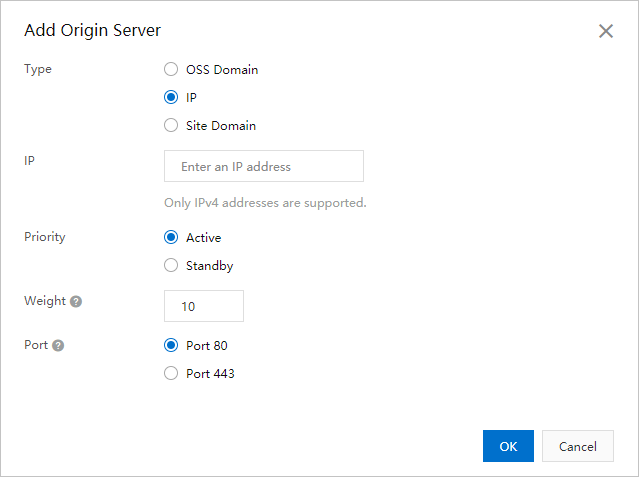
Parameter
Description
Type
Select the origin server type and enter its address (up to 67 characters). You can add up to 20 origin servers per domain name.
OSS Domain
If you use an Object Storage Service (OSS) bucket as the origin server, you can enter the public domain name of the OSS bucket, such as
***.oss-cn-hangzhou.aliyundoc.com.You can obtain the public domain name of an OSS bucket in the OSS console. You can also select the domain name of an OSS bucket that belongs to the current Alibaba Cloud account from the Domain Name drop-down list.
IP: You can configure one or more IP addresses for an origin server. Internal IP addresses are not supported. IPv4 addresses and IPv6 addresses are supported. At least one of the IP addresses must be an IPv4 address. If you use a public IP address of an Alibaba Cloud Elastic Compute Service (ECS) instance as the address of the origin server, the IP address is exempt from manual review. You need to obtain the permissions to configure origin fetch over IPv6 in advance. Otherwise, updates to settings about IPv6 will be ineffective. For more information, see Configure origin fetch over IPv6.
Origin Domain: You can configure one or more origin domain names.
Priority
You can configure primary and secondary origins. When a user request triggers an origin fetch, Alibaba Cloud CDN first tries the primary origin. If the primary origin fails (TCP connection between CDN node and origin fails), it falls back to the secondary origin. Priority values range from 0 to 127. The lower the number, the higher the priority. The default priority for a primary origin is 20; for a secondary origin, it is 30. To configure a priority value other than the defaults, submit a ticket.
For example, if you have two origins, A and B, with origin A set as primary and origin B as backup, user requests that perform an origin fetch through Alibaba Cloud CDN will be directed to origin A first. If origin A fails (the TCP connection between the CDN node and the origin fails), the request will be redirected to origin B. When origin A recovers, traffic will switch back from origin B to origin A.
Weight
When multiple origins share the same priority, Alibaba Cloud CDN distributes user requests across origins proportionally based on their weights, enabling weighted load balancing. Set weights according to your business needs.
Range: 1–100. Higher values mean a larger share of requests.
Default value: 10.
Example: Origins A and B both have primary priority. A has weight 80; B has weight 20. Requests are distributed in an 8:2 ratio between A and B.
NoteWeight-based routing applies only to static content by default. To apply it to dynamic content, enable dynamic load balancing. Configure back-to-origin routing to retrieve dynamic content.
The actual request distribution may not match configured weights in some cases:
Low back-to-origin QPS (for example, less than 10 QPS) can cause uneven distribution.
If requests come from one or a few IP addresses, DCDN routes them to the same node and may direct most requests to one origin server due to persistent TCP connections.
To verify weight distribution, use a third-party monitoring tool with probe clients across diverse locations and ISPs.
Port
Select a port that your origin server supports.
Port 80: DCDN retrieves content from the origin server through port 80.
Port 443: DCDN retrieves content from the origin server through port 443. The origin server must support HTTPS.
NoteDCDN supports only ports 80 and 443 by default. To use a custom port, submit a ticket.
Click OK.
Origin server status
DCDN automatically probes your origin servers and displays a health status to help you identify issues quickly. DCDN nodes check connectivity by establishing TCP connections and consider a failed connection an anomaly. After configuring an origin server, you can view its Origin Server Status in the origin server list.
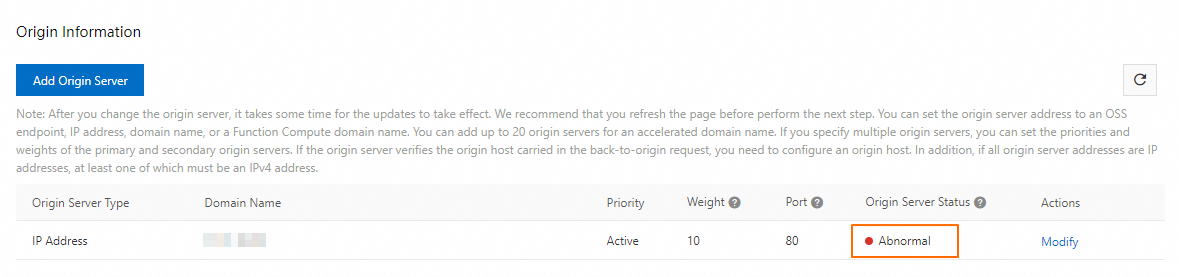
The following table describes each status.
Status | Description |
Healthy | No issues detected. An IP-based origin with multiple ports is considered healthy if at least one port is reachable. A domain name-based origin is considered healthy if more than 80% of its resolved IP addresses are reachable. |
Partially Healthy | Some issues may be present. The health score is below 80%. Check whether your origin server is operating normally. |
Abnormal | The origin server is at high risk. The health score is below 20%. Inspect your origin server and online services immediately. |
Unknown | The origin server was recently added or modified, and no probe data is available yet. You can wait a few minutes and then refresh the page. |
The health status is for reference only and may occasionally be incorrect. Rely on your service's actual performance for final verification.
Origin fetch retries, origin fetch timeouts, and origin probing
Origin fetch retry order:
Origin server addresses are retried in order of priority, from highest to lowest.
If multiple origin server addresses have the same priority, the node retries them according to their configured weight.
Origin fetch retry granularity:
Retries are performed at the IP address level. If an origin server is specified by a domain name, the system retries all IP addresses resolved from the domain name. A node attempts to connect to another available origin server only if connections to all IP addresses for the current origin server fail.
During a retry, the system automatically filters out unavailable origin servers listed in the dead table.
Status codes for origin fetch retries:
A or DCDN node triggers an origin fetch retry when it receives a 5xx status code from the origin server.
Origin fetch timeout: If the origin server proactively returns a retry status code, the DCDN node retries as soon as it receives the status code. If the origin server does not return a retry status code, the DCDN node retries after the origin fetch timeout period is reached.
TCP connection timeout: 10 seconds.
Origin write timeout: 30 seconds by default (timeout for writing content to the origin server after a connection is established).
Origin read timeout: 30 seconds by default (the timeout for a or DCDN node to receive the complete response from the origin server after a connection is established).
You can adjust the origin write timeout and origin read timeout by configuring the origin fetch HTTP request timeout.
Origin probing logic:
TCP connection failure: If a TCP connection between a or DCDN node and an origin server IP address fails twice consecutively (for example, connection establishment fails or the connection times out), the or DCDN node removes the IP address from the list of available origin servers and adds it to the dead table. This prevents subsequent requests from being sent to this IP address. The or DCDN node then probes the IP address every 5 seconds by attempting to establish a TCP connection. If the probe is successful, the node restores the IP address to the list of available origin servers.
Normal TCP connection: If the Layer 4 TCP connection between a or DCDN node and an origin server IP address is stable, but the node receives a status code that triggers a retry (such as a 5xx error), the node triggers an origin fetch retry. However, the IP address of the origin server remains in the list of available servers, and subsequent requests may be sent to it based on its weight. By default, Layer 7 HTTP request failures do not block the origin server's IP address. To block an origin server IP address in the case of Layer 7 HTTP request failures, submit a ticket to enable this feature.
Related documents
For more information about origin servers, see Origin server.
If you use multiple origin servers, configure the origin host to direct requests to different backends. For more information, see Configure a default origin host.
To customize the protocol (HTTP or HTTPS) for origin fetch, see Configure the protocol policy for origin fetch.
If your website serves dynamic content, enable DCDN's dynamic acceleration so that DCDN retrieves dynamic content over optimal routes while accelerating static content from edge caches. For more information, see Overview of rules for dynamic and static content acceleration.
Configure cache TTL rules for static content to maximize caching efficiency and reduce requests to your origin server. For more information, see Configure cache TTL.
If you use a private Alibaba Cloud OSS bucket as an origin server, you must authorize DCDN to fetch content from it. For more information, see Allow origin fetch from private OSS buckets.
If your origin server uses a single IP for multiple domains and the origin fetch protocol is HTTPS, you must configure origin SNI. For more information, see Configure origin SNI.