Deploy policies with rule templates
ESA provides pre-configured rule templates for common attack types and use cases, such as region-based blacklists, empty Referer blocking, and IP-based rate limiting. With these templates, you can deploy a protection policy by configuring only a few parameters, which simplifies WAF configuration and streamlines security management.
Template details
Region blacklist
Integrates a high-precision IP geolocation database to identify the geographic origin of requests and automatically block traffic from specified regions.
Use cases
-
Defend against traffic-based attacks: Block traffic from countries or regions identified as historical attack sources.
-
Compliance traffic control: Meet data sovereignty requirements by blocking unauthorized access requests from specific jurisdictions.
-
Business scenario optimization: Temporarily block traffic from high-latency regions during major e-commerce promotions to reduce server resource consumption.
Block empty Referer requests
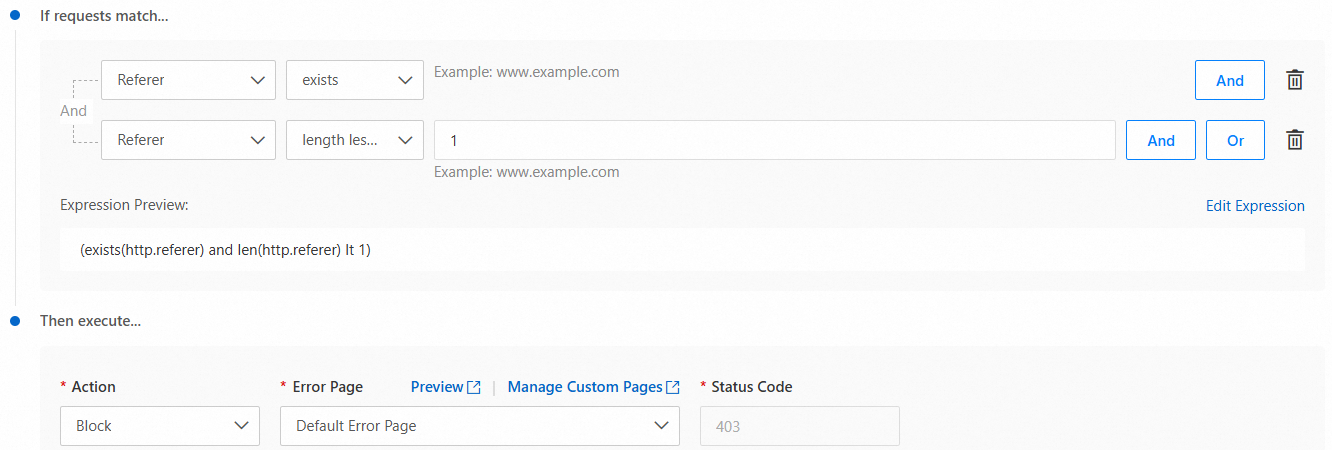
Inspects the Referer field in HTTP request headers and blocks requests with an empty Referer header.
Use cases
-
Malicious crawler protection: Most automated crawler tools, such as Scrapy and the Python requests library, do not include a
Refererheader by default or intentionally spoof an empty value by usingheaders={"Referer": ""}to evade anti-crawler mechanisms. -
Resource hotlinking prevention: Block third-party websites from directly embedding or linking to your system resources, such as images and CSS/JS files, to prevent excessive bandwidth consumption.
IP rate limiting
Controls the access rate from a single IP address. If a source IP sends more than 20 HTTP requests to a specified domain within 10 seconds, the IP is automatically blocked for one hour. You can adjust the frequency threshold (for example, from 20 requests/10 seconds to 40 requests/15 seconds) and the block duration to suit different business scenarios.
Use cases
-
DDoS defense: Effectively mitigates low-intensity reflective DDoS attacks where attackers send high-frequency GET requests to a target domain using spoofed IP addresses.
-
Crawler limiting: Suppresses the scanning behavior of automated crawlers, such as directory brute-forcing and data scraping. For example, a crawler tool might access the
/products/path at a rate of20 times/10 seconds. -
API abuse protection: Prevents third-party clients from abusing public API endpoints, such as by flooding an SMS verification code interface.
Dynamic request rate limiting
Identifies origin-fetch request patterns and applies differentiated rate limiting to requests that retrieve dynamic content from the origin server, protecting origin resources while allowing normal business traffic.
Use cases
-
API abuse protection: A SaaS platform uses this policy to limit third-party client access to the
/data/exportendpoint, blocking malicious data scraping requests. -
Resource exhaustion defense: A video streaming website enables dynamic request rate limiting during a live event, successfully preventing CPU overload on the origin server caused by high-frequency access.
-
Crawler suppression: A tiered rate limiting policy is applied to high-frequency calls (such as 200+ per second) made by automated tools to the
/searchendpoint to reduce server load.
Scanning protection
Uses behavioral analysis and pattern recognition to block requests from web directory scanning tools. Automatically blocks IP addresses that continuously scan directories returning 404 errors.
Use cases
-
Vulnerability scanning defense: A financial platform uses this policy to successfully block the
dirsearchtool from brute-forcing the/config/directory, intercepting 12,000 scan requests in a single day. -
Sensitive file protection: An e-commerce platform detects an attacker scanning the
.git/directory to steal source code. The policy is triggered and automatically blocks the attacker's IP address.
Brute-force protection
Analyzes managed rule trigger frequency and behavioral patterns to automatically block clients that frequently trigger basic protection rules, preventing account brute-force attacks.
Use cases
-
System account brute-force defense: An automated tool attacks a bank's online payment platform, attempting to crack user passwords through the
/loginendpoint. -
API endpoint protection: During a promotion, an e-commerce platform discovers that an attacker is using an automated script to make high-frequency calls to the
/api/couponendpoint to grab coupons.
Allow specified IPs
Allows traffic from trusted source IP addresses to bypass the WAF/Bots protection rule chain and proceed directly to the backend service.
Use cases
-
Internal system trust: A company configures a whitelist for internal network IP addresses, such as
192.0.XX.XX, to ensure that API calls between its OA and ERP systems bypass security checks. -
Partner integration: An e-commerce platform adds the IP address of a payment gateway, such as
192.0.XXX.XXX, to a whitelist to ensure low-latency responses for transaction interfaces.
Allow all static requests
Lets static resource requests pass through without WAF/Bots inspection, applying protection only to requests that fetch dynamic content from the origin server. This significantly reduces inspection overhead while maintaining security for dynamic content.
Use cases
-
High-concurrency events: During a major e-commerce promotion, enabling this policy successfully handles a peak of 100,000 image requests per second without triggering the origin server's rate limits.
-
Hybrid cloud architecture: A company allows front-end static resources (such as those in the
/public/directory) to pass through, and applies WAF protection only to the back-end API at/api/. This reduces security inspection costs in a hybrid cloud environment.
Path whitelist
Uses URL path exact matching to let requests for specific business paths bypass the WAF/Bots protection rule chain.
Use cases
-
Code repository uploads: An open-source platform configures a whitelist for the
/git/repo/submitpath to ensure that developer code submissions are not blocked by WAF. -
File management interface: A corporate cloud storage system configures a whitelist for the
/file/uploadpath to avoid triggering rate limits during large file uploads. -
Third-party integration debugging: A payment gateway configures a whitelist for the
/partner/testpath to facilitate API joint testing with partners.
Configuration example
An online advertising platform discovered a large volume of fraudulent click traffic that increased bandwidth costs. Analysis showed that attackers simulated user clicks by forging empty Referer requests, with daily volumes exceeding 150,000 and accounting for 30% of total traffic.
To resolve this issue, the platform used the ESA block empty Referer requests template to quickly deploy a protection rule that blocked the fraudulent traffic.
-
In the ESA console, select Websites, and in the Website column, click the target website.
-
In the left navigation bar, select .
-
On the Overview tab, click Create in the Block Requests with Empty Referer Header section.
-
Enter a Rule Name, keep the default parameters in the If requests match... and Then execute... sections, and click OK.
After the protection rule is configured, requests with an empty Referer header will be blocked.