SSL/TLS
ESA provides SSL/TLS configuration to encrypt your network traffic and prevent data theft and tampering.
Key concepts
SSL/TLS protocol and certificates
SSL is a security protocol between TCP/IP and application layers that authenticates servers and encrypts data. Its IETF-standardized version is TLS. Both are commonly called SSL/TLS.
An SSL/TLS certificate is a CA-issued digital certificate that verifies website identity and encrypts data in transit.
HTTPS uses an SSL/TLS certificate to establish an encrypted HTTP connection, authenticating the website and securing data in transit.
Why use HTTPS encryption?
-
Improve security: HTTPS prevents eavesdropping, tampering, and hijacking of sensitive data such as session IDs and cookies.
-
Enhance user experience: Browsers display "insecure" warnings for HTTP sites, eroding user trust.
-
Boost SEO: Major search engines prioritize HTTPS sites, improving your search ranking.
End-to-end HTTPS encryption
SSL/TLS configuration covers two segments: the access link and the origin-fetch link.
Access link
The access link encrypts traffic between a client and an ESA POP. Configure it with edge certificate and client certificate settings.
-
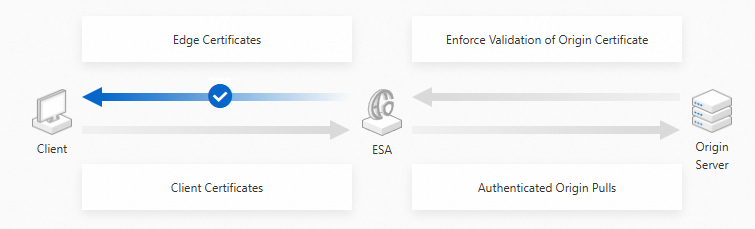
Edge certificate: Enables one-way authentication where the client verifies the ESA POP identity. Once configured on the ESA POP with SSL/TLS enabled, client-to-POP communication uses HTTPS.
Edge Certificates Encryption flow:
-
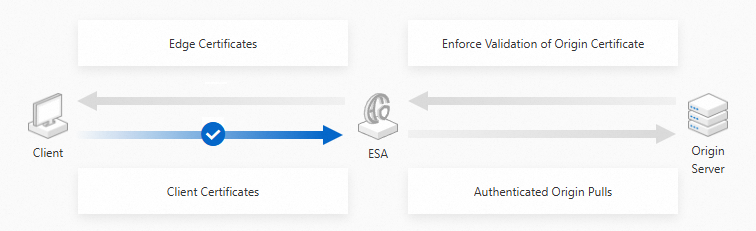
Client certificate: Enables mutual authentication (mTLS). Install an ESA-issued certificate on the client and enable verification. ESA then validates client certificates for mutual identity authentication.
Client Certificates Encryption flow:
Origin-fetch link
The origin-fetch link encrypts traffic between your origin server and the ESA node. Configure origin fetch protocol and port, origin certificate verification, and mutual authentication for origin fetch.
-
Origin protocol and port: Set the protocol (HTTP or HTTPS) and port for ESA-to-origin connections.
-
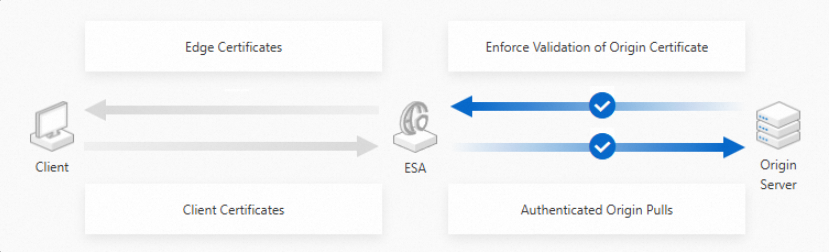
Origin Certificate Verification: When enabled, ESA validates the origin certificate (expiration, CA trust) and disconnects invalid connections.
-
Mutual authentication for origin fetch: When enabled, ESA sends its certificate to the origin server, which verifies ESA's identity.
Origin-fetch encryption flow:
Features
|
Feature |
Description |
|
|
Edge Certificate |
Add a CNAME record to your site's authoritative DNS to delegate the DCV check for free certificate applications to ESA. ESA automatically issues and renews free certificates. |
|
|
Force HTTP requests sent to Edge Security Acceleration (ESA) POPs to redirect to HTTPS. |
||
|
When a client sends an HTTPS request to an Edge Security Acceleration (ESA) POP, the client and POP negotiate a TLS cipher suite and protocol version through a TLS handshake. Configure these settings to balance security and compatibility. |
||
|
OCSP stapling allows Edge Security Acceleration (ESA) to pre-cache certificate validation results and deliver them to clients, eliminating direct CA queries and reducing certificate validation time. |
||
|
Opportunistic encryption allows browsers to access HTTP links over an encrypted TLS connection, enhancing security for sites that have not fully migrated to HTTPS. |
||
|
Enable HTTP Strict Transport Security (HSTS) to force clients such as browsers to connect to Edge Security Acceleration (ESA) POPs over HTTPS. |
||
|
Client Certificate |
Use the CA provided by ESA to create client certificates and deploy them to your mobile applications. ESA generates a unique CA per account, and all certificates from this CA are automatically trusted by ESA POPs. |
|
|
Bind a client certificate to hostnames to enable mTLS. Only clients with a valid certificate can access the bound hostnames. |
||
|
Configure a Web Application Firewall (WAF) rule to block requests that fail client certificate authentication. |
||
|
Origin Certificate |
Configure which protocol and port ESA POPs use when fetching resources from your origin server. |
|
|
By default, ESA does not validate origin certificates during HTTPS origin fetch. For high-security scenarios, enable Enforce Validation of Origin Certificate to prevent hijacking of origin traffic. When enabled, ESA validates the origin certificate's expiration date, domain name match, and root CA. If verification fails, the TLS handshake fails and a 502 status code is returned. |
||
|
Mutual TLS (mTLS) requires both client and server to authenticate each other. |
Availability by edition
Feature category | Feature | Free (CNY 0/month) | Basic (CNY 9.9/month) | Standard (CNY 375/month) | Advanced (CNY 3,600/month) | Enterprise (Contact sales for custom pricing) |
5 certificates | 10 certificates | 30 certificates | 50 certificates | 100 certificates | ||
1 certificate | 10 certificates | 20 certificates | 50 certificates | |||
2 certificates | 5 certificates | 10 certificates | 20 certificates | 50 certificates | ||
certificate availability check | ||||||
edge certificate - TLS cipher suite and protocol version configuration | ||||||