StarRocks supports multiple data models for various business scenarios, and all data must be organized according to a specific model. Learn the basic concepts, principles, system configurations, use cases, best practices, and FAQ for different import methods.
Background information
Data import cleans, transforms, and loads raw data into StarRocks based on a specific data model for querying. StarRocks provides multiple import methods that you can choose from based on data volume, import frequency, and other business requirements.
The following figure shows the relationship between StarRocks import methods and various data sources.
You can choose an import method based on the data source:
Offline data import: For data from Hive or HDFS, use Broker Load. If you have many data tables and the import process is complex, you can use Hive external tables. Although the performance is lower than Broker Load, this method avoids data migration.
Real-time data import: After synchronizing log data and binary logging from business databases to Kafka, use Routine Load to import data into StarRocks. If the import process involves complex table joins and extract, transform, and load (ETL) operations, use Flink (Flink Connector) for processing. Then, write the data to StarRocks using Stream Load.
Programmatic import: To programmatically write data to StarRocks, use Stream Load. For more information, see the Java or Python demos for Stream Load.
Text file import: To import data from text files, use Stream Load.
MySQL data import: Use MySQL external tables and import the data using the
insert into new_table select * from external_tablestatement.Internal import: Use the Insert method. This method can be used with external schedulers to perform simple ETL processing.
The images and some content in this topic are from the Import Overview documentation for open source StarRocks.
Precautions
When you import data into StarRocks, you typically use a program to establish a connection. Note the following:
-
Choose a suitable import method: Select an import method based on the data volume, import frequency, and data source location.
For example, if the source data is on HDFS, you can use Broker Load.
-
Determine the protocol for the import method: If you choose Broker Load, the external system must be able to use the MySQL protocol to periodically submit and check import jobs.
-
Determine the type of import method: Import methods are either synchronous or asynchronous. For an asynchronous import method, after you submit the import job, you must run a command to view the job status. The result of this command indicates whether the import was successful.
-
Create a label generation policy: The policy must ensure that each label is unique and fixed for each batch of data.
-
Ensure Exactly-Once semantics: The external system must ensure At-Least-Once data import. The StarRocks label mechanism ensures At-Most-Once data import. Together, these two mechanisms guarantee Exactly-Once semantics for the entire data import process.
Terms
Term | Description |
Import job | Reads, cleans, and transforms source data before importing it into StarRocks. After the import is complete, the data is available for queries. |
Label | A label identifies an import job. All import jobs have a label. A label can be user-specified or automatically generated by the system. Each label is unique within a database and can be used for only one successful import job. After an import job succeeds, its label cannot be reused to submit another job. If an import job fails, its label can be reused. This mechanism ensures that data for a label is imported at most once, which provides At-Most-Once semantics. |
Atomicity | All import methods in StarRocks provide atomicity. This means that for a single import job, either all valid data is imported, or none of it is. Partial imports do not occur. Valid data does not include data filtered out due to quality issues, such as type conversion errors. |
MySQL and HTTP protocols | StarRocks provides access protocol interfaces for both MySQL and HTTP to submit jobs. |
Broker Load | Broker Load reads data from an external data source, such as HDFS, through a deployed broker program and imports it into StarRocks. The broker process uses its own computing resources to pre-process and import the data. |
FE | Frontend (FE) is the metadata and scheduling node in the StarRocks system. In the import process, it is mainly responsible for generating import execution plans and scheduling import tasks. |
BE | Backend (BE) is the computing and storage node in the StarRocks system. In the import process, it is mainly responsible for data ETL and storage. |
Tablet | A tablet is a logical shard of a StarRocks table. A table can be divided into multiple tablets based on partitioning and bucketing rules. For more information, see Data distribution. |
Basic principles
The following figure shows the import execution flow.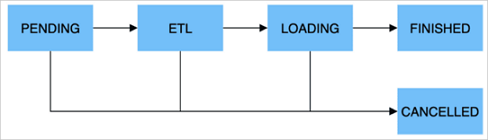
An import job has five main stages.
Stage | Description |
PENDING | Optional. In this stage, the import job has been submitted and is waiting for the FE to schedule its execution. |
ETL | Optional. This stage performs data pre-processing, including cleaning, partitioning, sorting, and aggregation. |
LOADING | In this stage, the data is first cleaned and transformed, then sent to the BE for processing. After all data is imported, the job enters a waiting state for the data to take effect. The job status remains LOADING during this time. |
FINISHED | After all data involved in the import job takes effect, the job status changes to FINISHED. Data from a FINISHED job is available for queries. FINISHED is the final state of a successful import job. |
CANCELLED | Before the job status changes to FINISHED, it can be canceled at any time and enter the CANCELLED state. This can happen if you manually cancel the job or if an error occurs. CANCELLED is also a final state for an import job. |
The following table describes the data import formats.
Type | Description |
Integer types | TINYINT, SMALLINT, INT, BIGINT, LARGEINT. Examples: 1, 1000, 1234. |
Floating-point types | FLOAT, DOUBLE, DECIMAL. Examples: 1.1, 0.23, 0.356. |
Date types | DATE, DATETIME. Examples: 2017-10-03, 2017-06-13 12:34:03. |
String types | CHAR, VARCHAR. Examples: I am a student, a. |
Import methods
To meet different data import needs, StarRocks provides several import methods. These methods support various data sources, such as HDFS, Kafka, and local files. StarRocks currently offers two types of data import: synchronous and asynchronous.
All import methods support the CSV data format. Broker Load also supports Parquet and ORC data formats.
Introduction to import methods
Import method | Description | Import type |
Broker Load | Accesses and reads external data sources through a broker process, then creates an import job in StarRocks using the MySQL protocol. The submitted job runs asynchronously. You can use the Broker Load is suitable for source data in a storage system accessible by the broker process, such as HDFS, with data volumes from tens to hundreds of gigabytes. For more information, see Broker Load. | Asynchronous import |
Stream Load | A synchronous import method. You can send an HTTP request to import a local file or data stream into StarRocks and wait for the system to return the import result status to determine if the import was successful. Stream Load is suitable for importing local files or data from data streams through a program. For more information, see Stream Load. | Synchronous import |
Routine Load | Routine Load provides a way to automatically import data from a specified data source. You can submit a routine load job through the MySQL protocol. This creates a persistent thread that continuously reads data from a source, such as Kafka, and imports it into StarRocks. For more information, see Routine Load. | Asynchronous import |
Insert Into | Similar to the `Insert` statement in MySQL, StarRocks provides | Synchronous import |
Import types
If an external program connects to the StarRocks import feature, you must first determine the import method type and then define the connection logic.
-
Synchronous import
In a synchronous import, StarRocks executes the task immediately and returns the result, which indicates whether the import succeeded.
Procedure:
-
The user (external system) creates an import task.
-
StarRocks returns the import result.
-
The user (external system) checks the import result. If the import fails, the user can create the import task again.
-
-
Asynchronous import
In an asynchronous import, StarRocks returns a creation-success message immediately, but the data is not yet imported. You must poll the job status by running a command. If task creation fails, you can retry based on the failure information.
Procedure:
-
The user (external system) creates an import task.
-
StarRocks returns the result of the task creation.
-
The user (external system) checks the task creation result. If the task is created successfully, proceed to step 4. Otherwise, return to step 1 and try to create the import task again.
-
The user (external system) polls the task status until it is FINISHED or CANCELLED.
-
Scenarios
Scenario | Description |
HDFS import | If the source data is stored in HDFS and the data volume is between tens and hundreds of gigabytes, use the Broker Load method to import data into StarRocks. The deployed broker process must be able to access the HDFS data source. The import job runs asynchronously. You can use the |
Local file import | If the data is stored in a local file and the data volume is less than 10 GB, use the Stream Load method to quickly import the data into StarRocks. Create the import job using the HTTP protocol. The job runs synchronously, and you can check the return value of the HTTP request to determine if the import was successful. |
Kafka import | If the data comes from a streaming data source like Kafka and you need to import real-time data into StarRocks, use the Routine Load method. Create a routine load job using the MySQL protocol. StarRocks will continuously read and import data from Kafka. |
Insert Into import | For manual testing and temporary data processing, use the The |
Memory limits
You can set parameters to limit the memory usage of a single import job. This prevents an import job from consuming too much memory and causing an out-of-memory (OOM) error. The method for limiting memory varies slightly among different import methods. For more information, see the documentation for each import method.
An import job is usually distributed across multiple BEs. The memory parameter limits the memory usage of an import job on a single BE, not across the entire cluster. Additionally, each BE has a total memory limit for all import jobs. For more information, see General system configurations. This configuration limits the total memory usage of all import tasks that are running on that BE.
A small memory limit can affect import efficiency because the process may frequently write data from memory to disk when the limit is reached. A large memory limit can lead to system OOM errors if there are many concurrent imports. Therefore, you must set the memory parameters reasonably based on your needs.
General system configurations
FE configurations
This section describes the system configurations for the FE. You can modify these configurations in the FE configuration file fe.conf.
|
Parameter |
Description |
|
max_load_timeout_second |
The maximum and minimum timeout period for an import job, in seconds. The default maximum timeout is 3 days, and the default minimum is 1 second. The custom timeout you set for an import job cannot exceed this range. This parameter applies to all types of import tasks. |
|
min_load_timeout_second |
|
|
desired_max_waiting_jobs |
The maximum number of import tasks that the waiting queue can hold. The default value is 100. For example, if the number of import tasks in the PENDING state (waiting for execution) on the FE reaches this value, new import requests are rejected. This configuration applies only to asynchronously executed imports. If the number of waiting asynchronous import tasks reaches the limit, subsequent requests to create import jobs are rejected. |
|
max_running_txn_num_per_db |
The maximum number of running import tasks in each database. This is counted across all import types. The default value is 100. When the number of running import tasks in a database exceeds the maximum value, subsequent import tasks are not executed. For synchronous jobs, the job is rejected. For asynchronous jobs, the job waits in the queue. |
|
label_keep_max_second |
The retention period for import task records. Records of completed (FINISHED or CANCELLED) import tasks are kept in the StarRocks system for a period of time determined by this parameter. The default value is 3 days. This parameter applies to all types of import tasks. |
BE configurations
This section describes the system configurations for the BE. You can modify these configurations in the BE configuration file be.conf.
|
Parameter |
Description |
|
push_write_mbytes_per_sec |
The write speed limit for a single tablet on a BE. The default value is 10, which means 10 MB/s. The maximum write speed for a single tablet on a BE is typically between 10 MB/s and 30 MB/s, depending on the schema and system. You can adjust this parameter to control the import speed. |
|
write_buffer_size |
During data import, data is first written to a memory block on the BE. When this memory block reaches a threshold, it is written to disk. The default value is 100 MB. A small threshold can cause many small files on the BE. You can increase this threshold to reduce the number of files. However, a large threshold can cause RPC timeouts. For more information, see the tablet_writer_rpc_timeout_sec parameter. |
|
tablet_writer_rpc_timeout_sec |
The RPC timeout for sending a batch (1024 rows) during the import process. The default is 600 seconds. This RPC may involve writing multiple tablet memory blocks to disk. Therefore, an RPC timeout can occur due to disk writing. You can adjust the timeout to reduce timeout errors, such as send batch fail. Also, if you increase the write_buffer_size parameter, you should also increase the tablet_writer_rpc_timeout_sec parameter. |
|
streaming_load_rpc_max_alive_time_sec |
During the import process, StarRocks starts a writer for each tablet to receive and write data. This parameter specifies the writer's wait timeout. The default is 600 seconds. If the writer does not receive any data within the specified time, it is automatically destroyed. When the system processing speed is slow, the writer may not receive the next batch of data for a long time, causing an import error: |
|
load_process_max_memory_limit_percent |
These parameters specify the maximum memory and maximum memory percentage, respectively. They limit the total memory that can be used for import tasks on a single BE. The system uses the smaller of the two values as the final memory limit for import tasks on the BE.
|
|
load_process_max_memory_limit_bytes |