You can call AI models through the Inference API in a Retrieval-Augmented Application (version 8.17) to enable advanced features, such as structured text extraction, document splitting, and text embedding. This deep integration with AI models improves search accuracy and response efficiency. It helps you build a more precise retrieval system with enhanced data analysis and semantic understanding for complex business scenarios.
Background
AI Search Open Platform is a sub-product of OpenSearch. It provides algorithmic services from the AI search pipeline as modular components, focusing on intelligent search and Retrieval-Augmented Generation (RAG) scenarios. The platform includes built-in services for document analysis, document splitting, text embedding, query analysis, recall, reranking, performance evaluation, and large language model (LLM) services. This allows developers to flexibly select components to build their search applications.
In a Retrieval-Augmented Application (version 8.17), you can call model services through the Inference API to perform operations such as data processing, query rewriting, and text generation.
Billing
AI model services are billed by AI Search Open Platform based on the number of model calls. You are not charged if the service is not used.
After charges are incurred, you can log in to the Costs and Billing system to view consumption details.
Prerequisites
You have created a Retrieval-Augmented Application (version 8.17).
Step 1: Activate and initialize AI models
Before you use AI models, you must activate the AI Search Open Platform service and complete the initialization process. After activation, the system automatically generates the information required to call the models and creates the corresponding models in your application.
Go to the application details page.
Log in to the Elasticsearch Serverless console and switch to the target region in the top menu bar.
In the left-side navigation pane, click Application Management. Then, click the name of the desired application to go to its details page.
In the left-side navigation pane, click to go to the Model Management page.
Activate and initialize the AI model service.
If your account has not yet activated AI Search Open Platform, click Activate Service and Initialize Models on the Model Management page and follow the on-screen instructions to activate the AI model service. After activation, the system automatically initializes, generating the API key, model service namespace, and model service endpoint required to call the models, and registers them with AI Search Open Platform. The system also creates the AI models supported by the Retrieval-Augmented Application (version 8.17), allowing you to call them directly for data processing.
NoteIf your Alibaba Cloud account has activated AI Search Open Platform, follow the on-screen instructions to initialize the models.
If the UI indicates that some models were not created after initialization completes, find the corresponding model in the model list and click Create Model in the Actions column to create it.
Activating AI Search Open Platform is free of charge. AI model usage is billed based on the number of calls. For more information, see Billing.
To ensure that models can be called correctly, do not delete or disable the generated model invocation information in AI Search Open Platform. Deleting this information will render the models in the Model List unusable. For a list of AI models supported by the Retrieval-Augmented Application (version 8.17), see Model List.
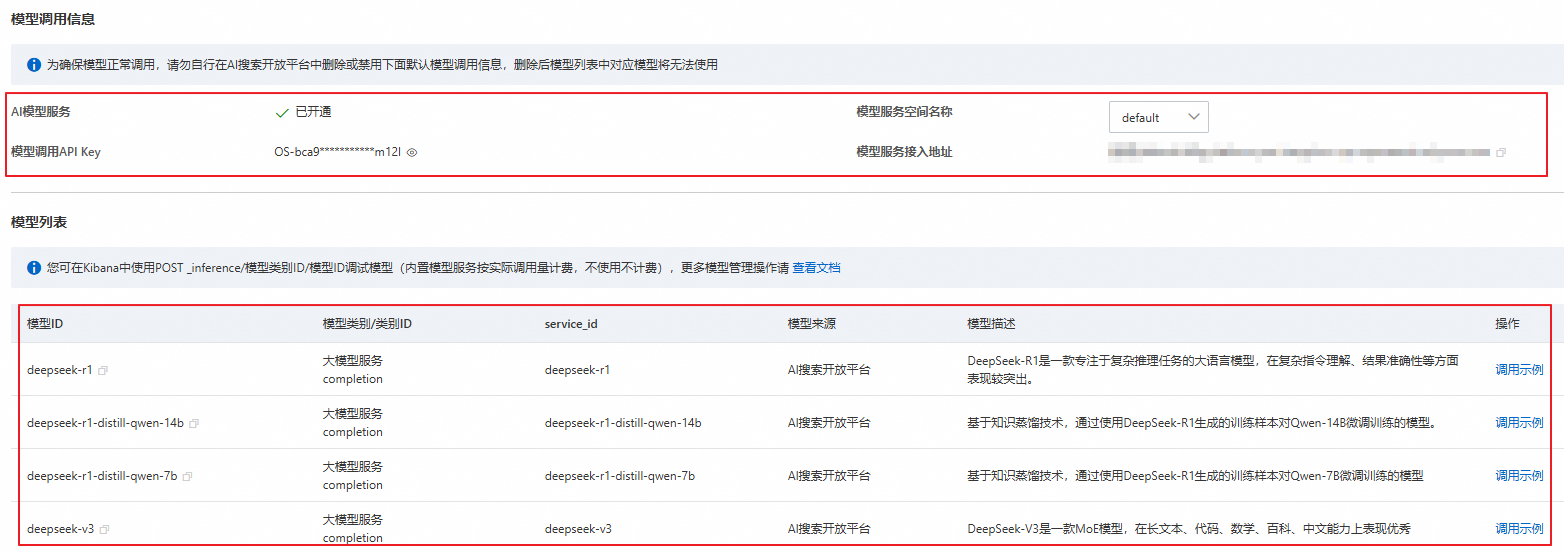
The following describes the model invocation information.
Model Service Namespace: A namespace is used to isolate and manage data. When you first activate AI Search Open Platform, the system automatically creates a default namespace named
Default. You can also create namespaces as needed.NoteIf you want to use a custom namespace, switch to it on the Model Management page and follow the on-screen instructions to reinitialize the models. This ensures the system generates the necessary API key for the current namespace and creates the supported AI models within it. You can use the models in the namespace only after they are created.
Model Invocation API Key: When calling an AI model using an API or SDK, use an API key for authentication to ensure secure and reliable calls.
Model Service Endpoint: The Retrieval-Augmented Application (version 8.17) can use this private network address to access AI Search Open Platform and call the relevant models. To call AI models over the public network, see Obtain a service endpoint.
NoteWhen you activate AI Search Open Platform for the first time, the system automatically generates an API key and a service endpoint. All applications under this account can use this API key and service endpoint to call models.
Step 2: Call AI models
After the models are initialized, you can call the appropriate model for various use cases, such as document analysis, document splitting, and query analysis. This article demonstrates how to use Kibana to call an AI model for inference operations.
Call an AI model
Go to the Kibana development page.
NoteBefore logging in to Kibana, ensure the device you are using has been added to the public or private network allowlist for Kibana. See Procedure for the logon account and password.
On the Model Management page, click Access Kibana in the upper-right corner and follow the on-screen instructions to go to the Kibana interface.
Click the
 icon in the upper-left corner and select to go to the Kibana development page.
Call the AI model.
You can directly use the system-created models in Kibana for inference operations. The request format for calling a model is as follows. You can find the model category ID and model ID in the Model List.
POST _inference/<model_category_id>/<model_id>The following example calls the
ops-query-analyze-001model for query analysis.POST _inference/query_analyze/ops-query-analyze-001NoteThe Retrieval-Augmented Application (version 8.17) supports various categories of Inference APIs and AI models to suit different needs.
For more information on creating and calling models, see Call built-in model services of AI Search Open Platform.
Examples
Example 1: Document analysis
Call the system-created ops-document-analyze-001 model in Kibana to parse unstructured document data and convert it into structured data.
You can choose between a synchronous or asynchronous call. The following is the request template.
Synchronous and asynchronous calls are execution modes for document analysis tasks.
Synchronous call: After you submit a document analysis task, Elasticsearch Serverless immediately blocks the current request thread and waits for AI Search Open Platform to process it. Once processing is complete, the result is returned directly to the client.
Asynchronous call: After you submit a document analysis task, Elasticsearch Serverless immediately returns a task ID without waiting for the processing result. The client must then query the task status and result in a separate request.
POST _inference/doc_analyze/ops-document-analyze-001
{
  "input": ["<document_url_or_content>"],
  "task_settings": {
    "document": {
      "input_type": "<url_or_content_or_task_id>",
      "file_name": "<optional_file_name>",
      "file_type": "<optional_file_type>"
    },
    "output": {
      "image_storage": "<base64_or_url>"
    },
    "is_async": "<true_or_false>"
  }
}
The following table describes the core parameters.
Parameter | Description |
input | The document to analyze. The input can be a URL, content, or a task ID. |
task_settings | The task settings. The sub-parameters within |
document.input_type | The document type. Valid values are:
|
document.file_name | The file name. If this parameter is not provided, the system infers the file name from the URL. This parameter is required if the URL is also empty. |
document.file_type | The file type. If this parameter is empty, the system infers it from the suffix of the |
output.image_storage | The storage method for images. Valid values are:
|
is_async | Specifies whether the call is asynchronous. Valid values are:
|
Synchronous call example
NoteThe system returns the processing result directly.
POST _inference/doc_analyze/ops-document-analyze-001
{
  "input": ["http://opensearch-shanghai.oss-cn-shanghai.aliyuncs.com/chatos/rag/file-parser/samples/GB10767.pdf"]
}
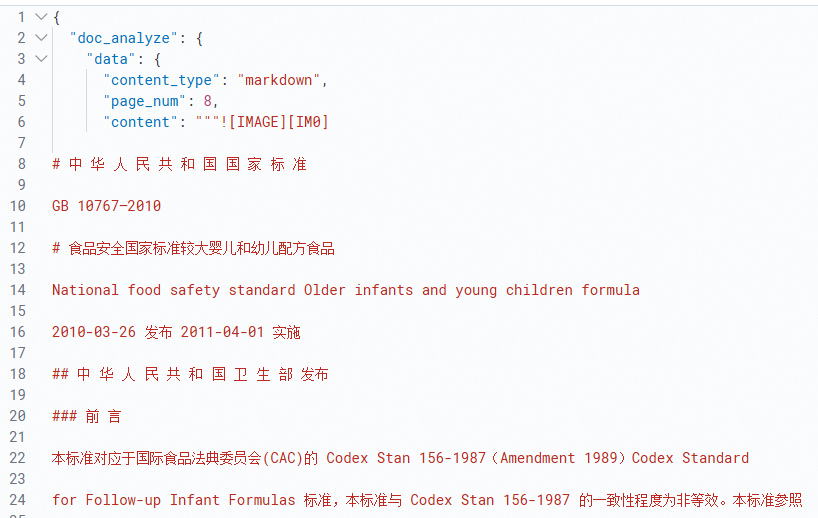
The following figure shows an example response.
Asynchronous call example
Make the call. The following is sample code.
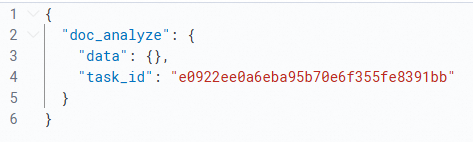
NoteThe system returns a
task_id(the ID of the asynchronous task), which you can use to query the task result.POST _inference/doc_analyze/ops-document-analyze-001 { "input": ["http://opensearch-shanghai.oss-cn-shanghai.aliyuncs.com/chatos/rag/file-parser/samples/GB10767.pdf"], "task_settings": { "document": { "input_type": "url" }, "is_async": true } }The following figure shows an example response.
Get the asynchronous result. The following is sample code.
# The input here is the task_id returned in the previous step.
POST _inference/doc_analyze/ops-document-analyze-001
{
  "input": ["e0922ee0a6eba95b70e6f355fe8391bb"],
  "task_settings": {
       "input_type": "task_id",
       "is_async": true
  }
}
The following figure shows an example response.

Example 2: Document splitting
Call the system-created ops-document-split-001 model in Kibana to split an input document.
The following is the request template. The input contains the text content to be split.
According to the JSON standard, if a string field contains the characters \\, \", \/, \b, \f, \n, \r, or \t, they must be escaped. JSON strings generated by common JSON libraries are automatically escaped.
POST _inference/doc_split/ops-document-split-001
{
  "input":"<input>"
}
The following is an example call.
POST _inference/doc_split/ops-document-split-001
{
  "input":"Elasticsearch is an open-source search engine built on top of the Apache Lucene™ full-text search engine library. Lucene is arguably the most advanced, high-performance, and full-featured search engine library available today—whether open source or proprietary. But Lucene is just a library. To make full use of its features, you need to use Java and integrate Lucene directly into your application. Worse, you might need an information retrieval degree to understand how it works. Lucene is very complex. Elasticsearch is also written in Java and uses Lucene internally for indexing and searching, but its goal is to make full-text search simple by hiding the complexity of Lucene and providing a simple and consistent RESTful API instead. However, Elasticsearch is more than just Lucene, and it's more than just a full-text search engine. It can be accurately described as: a distributed, real-time document store where every field can be indexed and searched; a distributed, real-time analytics search engine; capable of scaling to hundreds of nodes and supporting petabytes of structured or unstructured data. Elasticsearch packages all its features into a single service, so you can communicate with it through its simple RESTful API. You can use your favorite programming language as a web client, or even use the command line. With Elasticsearch, getting started is easy. For beginners, it provides sensible defaults and hides complex search theory. It works out of the box. Just a little understanding is needed to quickly become productive. As your knowledge grows, you can leverage more of Elasticsearch's advanced features. Its entire engine is configurable and flexible. You can pick and choose from its many advanced features to tailor Elasticsearch to solve your specific problems. You can download, use, and modify Elasticsearch for free. It is released under the Apache 2 license, one of the most flexible open-source licenses. The source code for Elasticsearch is hosted on Github at github.com/elastic/elasticsearch. If you want to join our amazing community of contributors, see Contributing to Elasticsearch. If you have any questions about Elasticsearch, including specific features, language clients, or plugins, you can join the discussion at discuss.elastic.co."
}
The following is an example response.
{
  "doc_split": {
    "rich_texts": [],
    "nodes": [
      {
        "parent_id": "cfe3181f03344e208a6e63efd4a674ff",
        "id": "cfe3181f03344e208a6e63efd4a674ff",
        "type": "root"
      },
      {
        "parent_id": "cfe3181f03344e208a6e63efd4a674ff",
        "id": "7574e031dd8c4880b42975f601783305",
        "type": "sentence_node"
      },
      {
        "parent_id": "cfe3181f03344e208a6e63efd4a674ff",
        "id": "8ca382cf6d8f4cb38f4a2f6433de47af",
        "type": "sentence_node"
      }
    ],
    "chunks": [
      {
        "meta": {
          "parent_id": "cfe3181f03344e208a6e63efd4a674ff",
          "hierarchy": [],
          "id": "7574e031dd8c4880b42975f601783305",
          "type": "text",
          "token": 298
        },
        "content": "Elasticsearch is an open-source search engine built on top of the Apache Lucene™ full-text search engine library. Lucene is arguably the most advanced, high-performance, and full-featured search engine library available today—whether open source or proprietary. But Lucene is just a library. To make full use of its features, you need to use Java and integrate Lucene directly into your application. Worse, you might need an information retrieval degree to understand how it works. Lucene is very complex. Elasticsearch is also written in Java and uses Lucene internally for indexing and searching, but its goal is to make full-text search simple by hiding the complexity of Lucene and providing a simple and consistent RESTful API instead. However, Elasticsearch is more than just Lucene, and it's more than just a full-text search engine. It can be accurately described as: a distributed, real-time document store where every field can be indexed and searched; a distributed, real-time analytics search engine; capable of scaling to hundreds of nodes and supporting petabytes of structured or unstructured data. Elasticsearch packages all its features into a single service, so you can communicate with it through its simple RESTful API. You can use your favorite programming language as a web client, or even use the command line. With Elasticsearch, getting started is easy. For beginners, it provides sensible defaults and hides complex search theory. It works out of the box."
      },
      {
        "meta": {
          "parent_id": "cfe3181f03344e208a6e63efd4a674ff",
          "hierarchy": [],
          "id": "8ca382cf6d8f4cb38f4a2f6433de47af",
          "type": "text",
          "token": 160
        },
        "content": "Just a little understanding is needed to quickly become productive. As your knowledge grows, you can leverage more of Elasticsearch's advanced features. Its entire engine is configurable and flexible. You can pick and choose from its many advanced features to tailor Elasticsearch to solve your specific problems. You can download, use, and modify Elasticsearch for free. It is released under the Apache 2 license, one of the most flexible open-source licenses. The source code for Elasticsearch is hosted on Github at github.com/elastic/elasticsearch. If you want to join our amazing community of contributors, see Contributing to Elasticsearch. If you have any questions about Elasticsearch, including specific features, language clients, or plugins, you can join the discussion at discuss.elastic.co."
      }
    ],
    "sentences": []
  }
}
Example 3: Text embedding
Call the system-created ops-text-embedding-001 model in Kibana to convert input text into numerical vectors. The output vectors capture the semantic information of the text, which can be used for downstream tasks such as similarity calculation, clustering, and classification.
The following is the request template. The input contains the text content to be embedded.
Each request supports a maximum of 32 texts. Each text can be up to 300 tokens long and cannot be an empty string. Text length limits vary by model. For more information, see Model List.
POST _inference/text_embedding/ops-text-embedding-001
{
  "input":[<input>]
}
The following is an example call.
POST _inference/text_embedding/ops-text-embedding-001
{
  "input":["Science and technology are the primary productive force",
        "Elasticsearch product documentation"]
}
The following is an example response.
{
  "text_embedding": [
    {
      "embedding": [
        -0.029408421,
        0.061318535,
        ...
        ]
    },
    {
      "embedding": [
        0.01568979,
        0.065073475,
        ...
        ]
    }
  ]
}
Appendix 1: Supported inference APIs
The following table lists the Inference APIs supported by the Retrieval-Augmented Application (version 8.17).
API | Description |
Extracts logical structures like titles and paragraphs, as well as text, tables, and images from unstructured documents, and outputs the information in a structured format. | |
| |
Provides a general-purpose text splitting strategy. It can split structured data in HTML, Markdown, and TXT formats based on document paragraph formatting, text semantics, or specified rules. It also supports extracting code, images, and tables from rich text. | |
Converts text data into dense vector representations for use in scenarios like information retrieval, text classification, and similarity comparison. | |
Converts text data into sparse vector representations. Sparse vectors require less storage space and are often used to represent keywords and term frequencies. They can be used with dense vectors for hybrid search to improve retrieval performance. | |
Provides a query analysis service. It uses large language models and NLP capabilities to perform intent recognition, similar query expansion, and NL2SQL processing on your input queries, effectively improving retrieval and Q&A performance in RAG scenarios. | |
Provides a general-purpose document scoring capability. It can rerank documents in descending order based on the relevance between the query and the document content, and output the corresponding scores. | |
Provides a dedicated RAG large model service that has been fine-tuned based on Alibaba's self-developed foundation models. It can be combined with document processing and retrieval services and is widely used in RAG scenarios to improve answer accuracy and reduce hallucinations. |
Appendix 2: Model list
The following table lists the AI models integrated into the Retrieval-Augmented Application (version 8.17).
Model category | Model category ID | Model ID | Description |
Large model service | completion | deepseek-r1 | A large language model focused on complex reasoning tasks, with outstanding performance in understanding complex instructions and ensuring result accuracy. |
deepseek-r1-distill-qwen-14b | A model generated by applying knowledge distillation and using training samples from | ||
deepseek-r1-distill-qwen-7b | A model generated by applying knowledge distillation and using training samples from | ||
deepseek-v3 | A Mixture-of-Experts (MoE) model that excels in handling long text, code, mathematics, encyclopedic knowledge, and Chinese. | ||
ops-qwen-turbo | This model uses the | ||
qwen-max | Qwen | ||
qwen-plus | An enhanced version of the Qwen large language model that supports inputs in various languages, including Chinese and English. | ||
qwen-turbo | The Qwen large language model that supports inputs in various languages, including Chinese and English. | ||
Multimodal embedding | multi_modal_embedding | ops-gme-qwen2-vl-2b-instruct | A multimodal embedding service trained on the |
ops-m2-encoder | A bilingual (Chinese and English) multimodal service. It is trained on | ||
ops-m2-encoder-large | A bilingual (Chinese and English) multimodal service. It has a larger parameter count than the | ||
Reranking | rerank | ops-bge-reranker-larger | Provides a document scoring service based on the BGE model. It can rerank documents in descending order based on the relevance between the query and the document content, and output the corresponding scores.
|
ops-text-reranker-001 | A self-developed reranking model from OpenSearch. It is trained on datasets from multiple industries to provide a high-level reranking service. It reranks documents in descending order of their semantic relevance to the query.
| ||
Document analysis | doc_analyze | ops-document-analyze-001 | Provides a general-purpose document analysis service. It supports extracting logical structures like titles and paragraphs, as well as text, tables, and images from unstructured documents, and outputs the information in a structured format. |
Document splitting | doc_split | ops-document-split-001 | Provides a general-purpose text splitting strategy. It can split structured data in HTML, Markdown, and TXT formats based on document paragraph formatting, text semantics, or specified rules. It also supports extracting code, images, and tables from rich text. |
Image content analysis | img_analyze | ops-image-analyze-ocr-001 | Provides an Optical Character Recognition (OCR) service for image content. It can recognize and extract text from images using OCR capabilities for use in image retrieval and Q&A scenarios. |
ops-image-analyze-vlm-001 | Provides an image content analysis service. It can parse image content and recognize text based on a large multimodal model. The parsed text can be used for image retrieval and Q&A scenarios. | ||
Query analysis | query_analyze | ops-query-analyze-001 | Provides a general-purpose query analysis service. It can understand the intent of your input query and expand it to similar questions based on a large language model. |
Text embedding | text_embedding | ops-text-embedding-001 | Provides text embedding services for over 40 languages. The maximum input text length is |
ops-text-embedding-002 | Provides text embedding services for over 100 languages. The maximum input text length is | ||
ops-text-embedding-en-001 | Provides English text embedding services. The maximum input text length is | ||
ops-text-embedding-zh-001 | Provides Chinese text embedding services. The maximum input text length is | ||
Text sparse embedding | sparse_embedding | ops-text-sparse-embedding-001 | Provides text embedding services for over 100 languages. The maximum input text length is |
Related documents
For more information about AI search and its use cases, see: