Use case: Mobile number attribution
In marketing campaigns, you often need to filter target customers based on their geographical location. For example, you can issue Online-to-Offline (O2O) coupons to users in specific cities or restrict users from certain regions from participating in flash sales. In such scenarios, using the location associated with a user's mobile number is a common filtering condition. The Decision Engine platform's rich, built-in functions and models let you quickly configure and deploy a mobile number attribution lookup application.
Overview
The Variable Center in Decision Engine offers dozens of common risk control variables, including the province and city of a mobile number and the province of an IP address. Using these variables, you can quickly build a location-based filtering policy that meets your business requirements.
Prerequisites
-
You must have an enterprise-verified Alibaba Cloud account.
-
You must have an active subscription for any edition of Risk Identification, including the test version. If you do not have one, see Learn about Risk Identification subscriptions.
To try the Risk Identification product, join our DingTalk group (ID: 31350039) for support from Alibaba Cloud experts.
Procedure
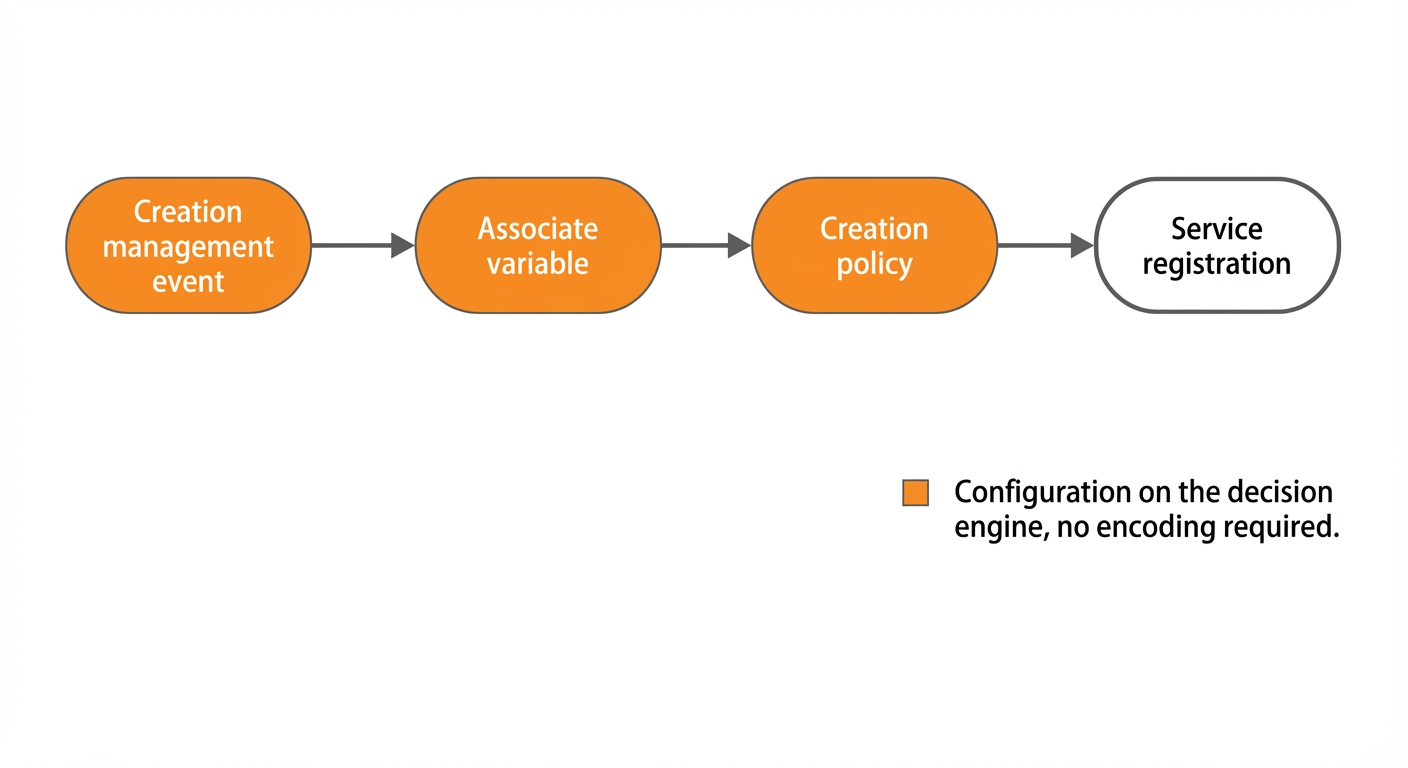
Step 1: Create an event
Go to Custom Event Management and create an event for mobile number attribution verification. Ensure the event fields support a mobile number as an input parameter. The number can be in plaintext, MD5-hashed, or SHA256-hashed.
The event fields include three default system fields: mobile (mobile number), mobileMd5 (MD5 hash of the mobile number), and mobileSha256 (SHA256 hash of the mobile number). All these fields are of the string type.
Step 2: Associate variables
Go to the Variable Center, select the built-in variables Mobile number attribution_province name and Mobile number attribution_city name, and then click **Next**.
On the Variable Association page, select the mobile number attribution verification event that you created in step 1 from the associated event drop-down list. Confirm that the mapping between the input parameter (such as the mobile number) and the variable is correct, then click **OK** to complete the variable association.
Step 3: Create a policy
Go to Policy Management and create a policy for mobile number attribution verification. To ensure a valid event output, we recommend adding a condition to check that the mobile number field is not empty before you configure the output variables.
In the Policy Calculation Logic area, add a new condition. Set Condition Name to Mobile number not empty. For the condition logic, select Event Field > Mobile number and the is not empty operator.
If this event only needs to output the mobile number attribution results, you can configure the province and city directly in the Output Variable module. The Key you set on the page becomes the key in the API's JSON response.
In the Output Variable area, configure three key-value pairs: map the key province to the system variable Mobile number attribution_province name, map the key city to the system variable Mobile number attribution_city name, and map the key carrier to the system variable Mobile number operator name.
After you submit the policy, change its status to Running. You have now configured a basic mobile number attribution verification event.
Verification
You can verify the configured event in Risk Identification OpenAPI Explorer.
In OpenAPI Explorer, call the ExecuteRequest API. Select China (Hangzhou) for the endpoint, enter saf_de for Service, and provide the JSON parameters for ServiceParameters, such as {"eventCode":"de_ayfeks8347","mobile":"188xxxx4321"}. A successful call returns a 200 OK response. The extend field in the Data object of the response contains the carrier, province, and city information, and the Code field is 200.
1. Example request
{
  "eventCode":"de_ayfeks8347", // Replace this with the code of the event that you created.
  "mobile":"188****4321"
}
2. Example response
{
  "Message": "OK",
  "RequestId": "D65A24F1-85D6-54FD-8D89-22D73ED04F96",
  "Data": {
    "extend": "{\"carrier\":\"China Mobile\",\"province\":\"Zhejiang\",\"city\":\"Hangzhou\"}",
    "tags": ""
  },
  "Code": 200
}