HTTP handlers let you run existing HTTP web applications in Function Compute without rewriting them. Function Compute supports HTTP handlers only for custom container functions with CAPort configured.
How it works
When a request arrives, Function Compute forwards it to the HTTP server running in your container. The forwarded request preserves all original attributes: method, path, query parameters, request headers, request body, and common headers generated by Function Compute.
Your container's HTTP server processes the request and returns a response. Function Compute then forwards that response to the caller.
Invoke an HTTP handler
Send requests to an HTTP handler the same way you call any web API — using cURL, Postman, or a browser.
When accessing an HTTP trigger from a browser, the response may be downloaded as a file instead of rendered. For details, see When I use a web browser to access a function with an HTTP trigger, why do I need to download the response?
The following Node.js Express example routes GET and POST requests to separate handlers. Map any path to the handler you need.
'use strict';

const express = require('express');

// Constants
const PORT = 9000;
const HOST = '0.0.0.0';

const app = express();
// Parse request body as JSON
app.use(express.json());

app.get('/*', (req, res) => {
  console.log(req.body);
  res.send('Hello FunctionCompute, http GET');
});

app.post('/*', (req, res) => {
  console.log(req.body);
  res.send('Hello FunctionCompute, http POST');
});

app.listen(PORT, HOST);
console.log(`Running on http://${HOST}:${PORT}`);
For additional examples in other runtimes, see Examples.
Request and response headers
Special request headers
Function Compute adds the following headers to requests forwarded to your container.
| Header | Required | Description |
|---|---|---|
x-fc-base-path | Optional | The base path prepended to the request path. If no custom domain name is configured, the value is /2016-08-15/proxy/${servicename}/${functionname}/. |
x-fc-status | Optional | Applicable to HTTP functions created by calling a web API operation that are not migrated to Function Compute. Include this field in the response header to report invocation status back to Function Compute. |
How `x-fc-status` affects observability:
x-fc-status in response | Behavior |
|---|---|
| Not set | Function Compute treats the invocation as successful. Errors during function execution are not reported to Function Compute — business logic is unaffected, but FC observability is impacted. 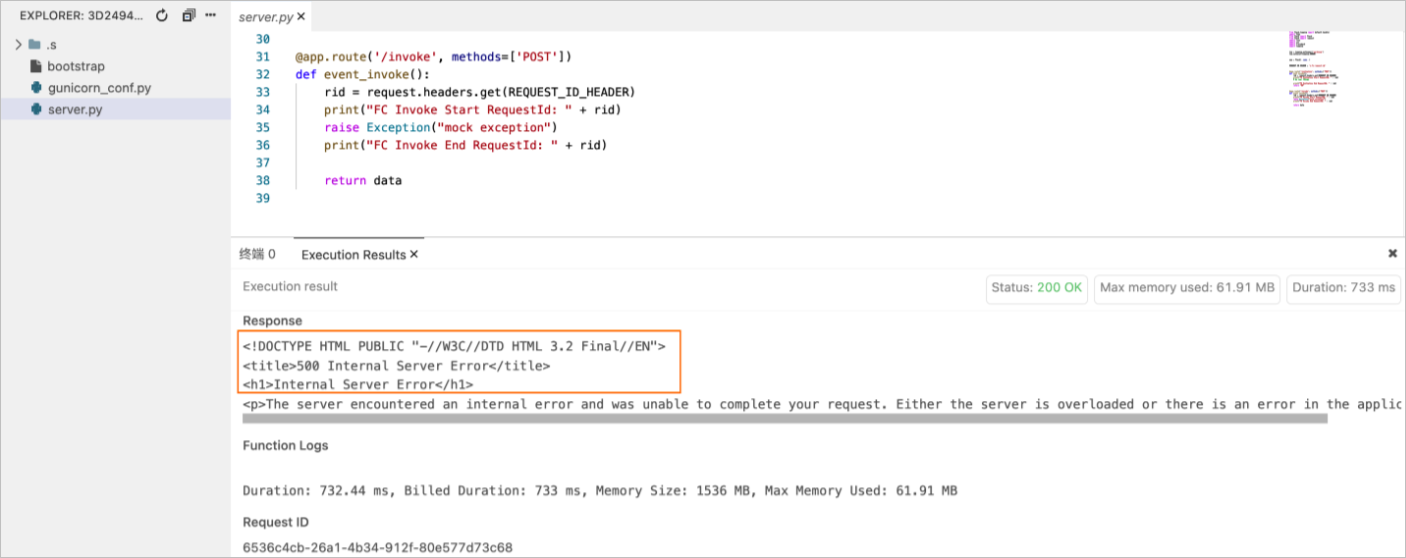 |
| Set | Function invocation failures are reported to Function Compute via x-fc-status. Error stack information is recorded in logs. 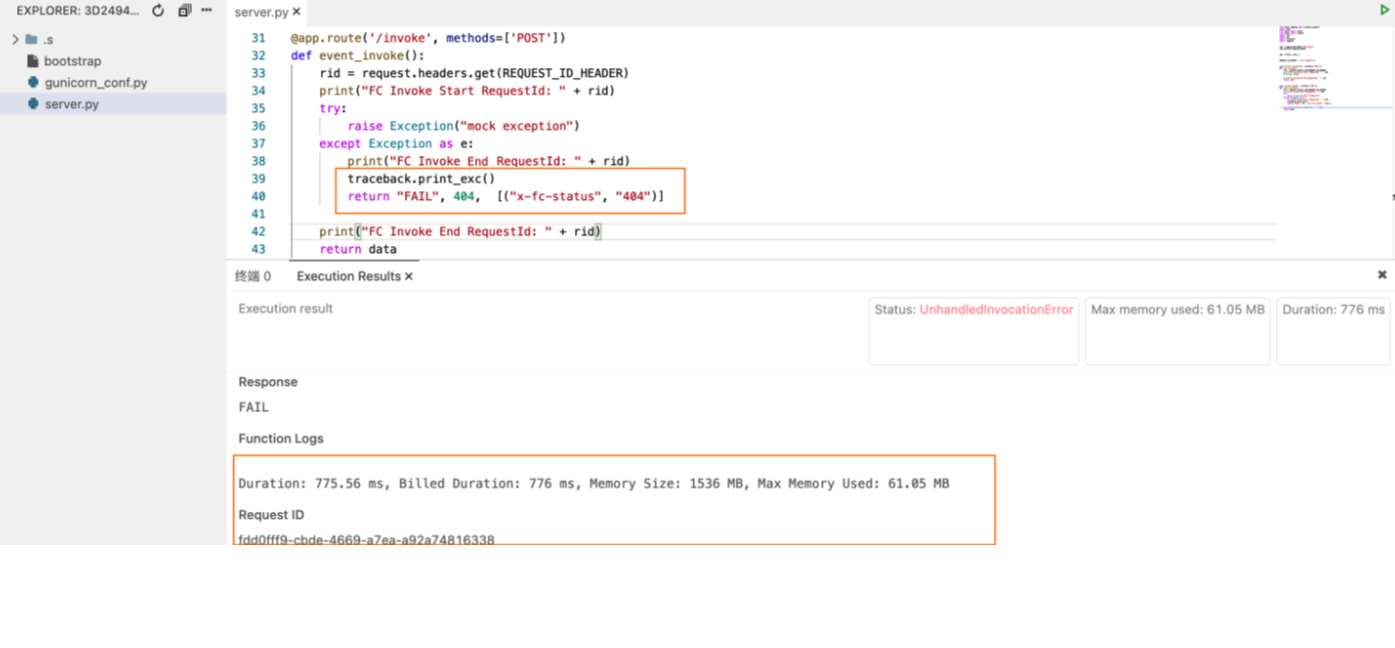 |
Set both StatusCode and x-fc-status in your HTTP response to maintain full observability.
Restricted headers
The following headers cannot be used in requests or responses.
Requests — the following headers are not supported as custom fields:
Any field starting with
x-fc-connectionkeep-alive
Responses — the following headers are not supported as custom fields:
Any field starting with
x-fc-connectioncontent-lengthdatekeep-aliveservercontent-disposition:attachment
When using the default Function Compute domain (aliyuncs.com), the server automatically addscontent-disposition: attachmentto all responses, causing browsers to download them as files. To remove this restriction, configure a custom domain name.
Limits
HTTP trigger limit
Each version or alias of an HTTP function supports only one HTTP trigger. For details, see Manage versions and Manage aliases.
Request and response size limits
| Category | Limit | Value | Error on exceeded |
|---|---|---|---|
| Request | Header size (all keys + values) | 8 KB | 400 InvalidArgument |
| Request | Path size (including all query parameters) | 4 KB | 400 InvalidArgument |
| Request | Body size — synchronous invocation | 32 MB | 400 InvalidArgument |
| Request | Body size — asynchronous invocation | 128 KB | 400 InvalidArgument |
| Response | Header size (all keys + values) | 8 KB | 502 BadResponse |
Custom domain names and API Gateway
Bind custom domain names to your HTTP functions to map different URL paths to different functions. See Configure a custom domain name.
Alternatively, use API Gateway with its backend service type set to HTTP and the HTTP function path as the backend service address. See Use Function Compute as the backend service of an API operation.