DELETE
The DELETE statement removes rows from a table that match a specified condition.
Syntax
DELETE FROM <table_name> [ * ] [ [ AS ] <alias> ]
[ WHERE <condition> ]| Parameter | Description |
|---|---|
table_name | The name of the table to delete rows from. |
alias | An alias for the table. |
condition | The condition for deleting rows. |
How it works
DELETE in Hologres uses a Log-Structured Merge-tree (LSM) storage structure. Rows are not removed immediately — deletion happens in two phases.
Phase 1: Mark for deletion
When you run DELETE, Hologres writes deletion markers to a memory table (Mem Table), then flushes them to disk.
Row-oriented tables: The deletion record is flushed to a new small file, which is later merged into a file block during compaction.
Column-oriented tables: The system writes a tag table in memory that records the file ID and row ID of each row to be deleted. This tag table is flushed to disk and merged during compaction.
Limitations
Partitioned tables: DELETE cannot target a parent table directly. Delete from each child table individually.
Bulk deletion: To remove all rows from a table, use TRUNCATE instead. TRUNCATE is significantly faster than DELETE for this use case.
Storage behavior: The DELETE command in Hologres works the same as in PostgreSQL — it marks rows for deletion, and storage space is released only after the next compaction. Because Hologres uses LSM, some temporary data that has not yet reached the compaction threshold may remain and continue to occupy storage space after a DELETE operation. To remove all data immediately, use TRUNCATE.
When to use DELETE vs. TRUNCATE
| Scenario | Recommended approach |
|---|---|
| Delete specific rows matching a condition | DELETE |
| Remove all rows from a table | TRUNCATE |
| Need immediate storage reclaim | TRUNCATE |
Improve DELETE performance
Use a fixed plan to reduce query planning overhead for repeated DELETE patterns. For more information, see Accelerate SQL execution with fixed plan.
Example
The following example creates a table, inserts rows, and then deletes rows using different conditions.
CREATE TABLE delete_test (
    id INT PRIMARY KEY,
    a INT,
    b text
);

INSERT INTO delete_test VALUES
(1, 10, 'a'),
(2, 30, 'b'),
(3, 50,  ''),
(4, 70, null);

-- Delete a row where a = 10
DELETE FROM delete_test AS dt WHERE dt.a = 10;

-- Delete rows where b is NULL
DELETE FROM delete_test AS dt WHERE dt.b is null;

-- Delete rows where b is an empty string
DELETE FROM delete_test AS dt WHERE dt.b='';
For the full DELETE syntax reference, see PostgreSQL DELETE.
FAQ
Why does storage usage spike during a DELETE and then drop afterward?
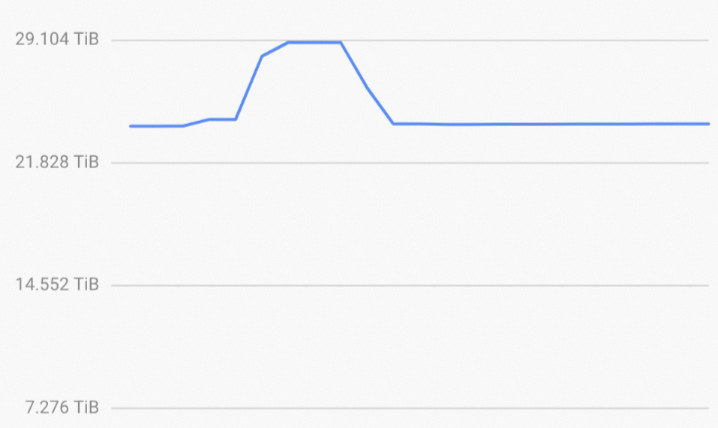
This is expected behavior. DELETE marks rows for deletion and writes that information to new small files on disk — it does not remove data in place. In the background, Hologres runs compaction to merge and clean up those files, which is when storage usage drops. The spike you see is the temporary overhead from those small deletion marker files before compaction completes. For more information, see How it works.