COPY
Use COPY FROM STDIN to load data into Hologres and COPY TO STDOUT to export it. Hologres extends the standard PostgreSQL COPY syntax with two Hologres-specific parameters: STREAM_MODE (fixed copy mode) and ON_CONFLICT (primary key conflict policy).
All COPY statements must run on a PostgreSQL client. For connection details, see PostgreSQL client.
To monitor COPY operations, query hologres.hg_query_log. In Hologres V3.0 and later, each COPY operation generates two log records — one for the COPY command and one for the underlying INSERT statement — linked by transaction ID. For details, see Query log.
Limitations
-
COPY FROMwrites only to child partitioned tables, not parent partitioned tables. -
COPY FROM STDINsupports tables with a DEFAULT constraint or SERIAL columns starting in Hologres V1.1.43. Earlier versions do not support these table types.
Syntax
/* Import data */
COPY table_name [ ( column_name [, ...] ) ]
    FROM STDIN
    [ [ WITH ] ( option [, ...] ) ]

/* Export data */
COPY { ( query ) }
    TO STDOUT
    [ [ WITH ] ( option [, ...] ) ]
Where option can be one of:
FORMAT format_name                        -- TEXT (default), CSV, or BINARY
DELIMITER 'delimiter_character'
NULL 'null_string'
HEADER [ boolean ]                        -- CSV only
QUOTE 'quote_character'                   -- CSV only
ESCAPE 'escape_character'                 -- CSV only
FORCE_QUOTE { ( column_name [, ...] ) | * }  -- CSV, COPY TO only
FORCE_NOT_NULL ( column_name [, ...] )    -- CSV, COPY FROM only
ENCODING 'encoding_name'
STREAM_MODE [ boolean ]                   -- Hologres-specific; COPY FROM only
ON_CONFLICT 'none|ignore|update'          -- Hologres-specific; COPY FROM only
Parameters
| Parameter | Description |
|---|---|
table_name |
The Hologres table to import data into. |
query |
A SELECT statement whose results are exported. |
STDIN |
Reads input from the client's standard input. |
STDOUT |
Writes output to the client's standard output. |
FORMAT |
File format: TEXT (default), CSV, or BINARY. BINARY import is only supported in fixed copy mode (STREAM_MODE TRUE). |
DELIMITER |
Column separator. Default: tab (\t) for TEXT, comma (,) for CSV. Example: DELIMITER AS ','. |
NULL |
String representing a null value. Default: \N for TEXT, empty unquoted string for CSV. Not supported for BINARY. |
HEADER |
Whether the file includes a header row. CSV only. |
QUOTE |
Single-byte character used to quote field values. CSV only. Default: ". |
ESCAPE |
Single-byte character preceding a QUOTE match. CSV only. Default: same as QUOTE. |
FORCE_QUOTE |
Forces quoting for all non-NULL values in the specified columns. CSV, COPY TO only. |
FORCE_NOT_NULL |
Treats null-representation strings as zero-length strings instead of NULL. CSV, COPY FROM only. |
ENCODING |
File encoding. Default: the client's encoding. |
STREAM_MODE |
Enables fixed copy mode for imports. Default: FALSE. When TRUE, uses a fixed execution plan with a row-level lock instead of a table-level lock. COPY FROM only. |
ON_CONFLICT |
Conflict policy when a primary key collision occurs. Values are case-insensitive without quotes; with single quotes, use lowercase (e.g., 'none'). COPY FROM only. See ON_CONFLICT behavior by version. |
ON_CONFLICT values:
| Value | Behavior | When to use |
|---|---|---|
NONE |
Reports an error on conflict. | Strict data integrity — every row must be new. |
IGNORE |
Skips the conflicting row. | Idempotent loads where duplicates are expected and the existing record should be preserved. |
UPDATE |
Overwrites the conflicting row. | Upsert patterns where the latest value should win. |
ON_CONFLICT behavior by version
-
Before V3.0.4:
ON_CONFLICTtakes effect only whenSTREAM_MODE TRUE. -
V3.0.4 and later:
ON_CONFLICTalso takes effect whenSTREAM_MODE FALSE, with the GUC parameterhg_experimental_copy_enable_on_conflictenabled. WhenSTREAM_MODE FALSE,UPDATErequires writing all columns. -
V3.1.1 and later: When
STREAM_MODE FALSE,UPDATEsupports partial-column imports (hg_experimental_copy_enable_on_conflictis enabled by default).
Atomicity
Standard COPY (STREAM_MODE FALSE) guarantees atomicity: the entire operation either succeeds or is rolled back.
Fixed copy mode (STREAM_MODE TRUE) uses a row-level lock instead of a table-level lock, so atomicity is not guaranteed. If a row contains invalid data, an error is reported for that row only — the remaining rows may be partially written or not written at all.
Query log
In Hologres V3.0 and later, each COPY operation generates two records in hologres.hg_query_log: one for the COPY command and one for the INSERT it executes internally. Link them using the transaction ID:
SELECT
    query_id,
    query,
    extended_info
FROM
    hologres.hg_query_log
WHERE
    extended_info ->> 'source_trx' = '<transaction_id>'  -- Get the transaction ID from the trans_id field in the COPY log record
ORDER BY
    query_start;
In versions earlier than V3.0, each COPY operation generates a single record.
Import data into Hologres
Import from a PostgreSQL client (stdin)
The PostgreSQL client can only read from stdin. The HoloWeb console does not support stdin imports.
Example 1: Import delimited text
-- Create the target table
CREATE TABLE copy_test (
    id    int,
    age   int,
    name  text
);

-- Import data from stdin
COPY copy_test FROM STDIN WITH DELIMITER AS ',' NULL AS '';
53444,24,wangming
55444,38,ligang
55444,38,luyong
\.

-- Verify
SELECT * FROM copy_test;
Example 2: Import a CSV file
-- Create the target table
CREATE TABLE partsupp (
    ps_partkey     integer NOT NULL,
    ps_suppkey     integer NOT NULL,
    ps_availqty    integer NOT NULL,
    ps_supplycost  float   NOT NULL,
    ps_comment     text    NOT NULL
);

-- Import CSV from stdin
COPY partsupp FROM STDIN WITH DELIMITER '|' CSV;
1|2|3325|771.64|final theodolites
1|25002|8076|993.49|ven ideas
\.

-- Verify
SELECT * FROM partsupp;
Example 3: Import a local file using psql
Redirect a local file to stdin with the psql shell redirect operator:
psql -U <username> -p <port> -h <endpoint> -d <databasename> \
-c "COPY <table> FROM STDIN WITH DELIMITER '|' CSV;" <<filename>;| Parameter | Description | Example |
|---|---|---|
username |
Alibaba Cloud account: AccessKey ID. Custom account: username (e.g., BASIC$abc). Store the AccessKey ID in an environment variable to avoid exposing it in commands. |
— |
port |
Public port of the Hologres instance. | 80 |
endpoint |
Public endpoint of the Hologres instance. | xxx-cn-hangzhou.hologres.aliyuncs.com |
databasename |
Name of the Hologres database. | mydb |
table |
Name of the target table. | — |
filename |
Path to the local file. | D:\tmp\copy_test.csv |
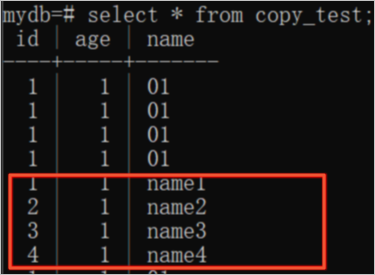
The following example imports the local file copy_test using this command:

The file contains:
01,01,name1
02,01,name2
03,01,name3
04,01,name4
After the import, query the results in psql:
Import from a JDBC client using CopyManager
Java Database Connectivity (JDBC) clients can use CopyManager — the PostgreSQL JDBC driver's API wrapper for COPY — to stream files into Hologres.
package com.aliyun.hologram.test.jdbc;

import java.io.FileInputStream;
import java.io.FileOutputStream;
import java.io.IOException;
import java.sql.*;
import java.util.Properties;

import org.postgresql.copy.CopyManager;
import org.postgresql.core.BaseConnection;

public class jdbcCopyFile {

    public static void main(String args[]) throws Exception {
        System.out.println(copyFromFile(getConnection(), "/Users/feng/Workspace/region.tbl", "region"));
    }

    public static Connection getConnection() throws Exception {
        Class.forName("org.postgresql.Driver");
        String url = "jdbc:postgresql://endpoint:port/dbname";
        Properties props = new Properties();
        // Store credentials in environment variables to avoid hardcoding them
        props.setProperty("user", System.getenv("ALIBABA_CLOUD_ACCESS_KEY_ID"));         // AccessKey ID
        props.setProperty("password", System.getenv("ALIBABA_CLOUD_ACCESS_KEY_SECRET")); // AccessKey secret
        return DriverManager.getConnection(url, props);
    }

    /**
     * Streams a local file into Hologres via COPY FROM STDIN.
     *
     * @param connection  Active JDBC connection
     * @param filePath    Path to the local file
     * @param tableName   Target Hologres table
     * @return Number of rows imported
     */
    public static long copyFromFile(Connection connection, String filePath, String tableName)
            throws SQLException, IOException {
        long count = 0;
        FileInputStream fileInputStream = null;

        try {
            CopyManager copyManager = new CopyManager((BaseConnection) connection);
            fileInputStream = new FileInputStream(filePath);
            count = copyManager.copyIn("COPY " + tableName + " FROM STDIN delimiter '|' csv", fileInputStream);
        } finally {
            if (fileInputStream != null) {
                try {
                    fileInputStream.close();
                } catch (IOException e) {
                    e.printStackTrace();
                }
            }
        }
        return count;
    }
}
Fixed copy mode
Fixed copy mode (STREAM_MODE TRUE) uses pre-compiled fixed execution plans to accelerate repeated COPY imports. It is a Hologres-specific optimization available since V1.3.17 and applies to imports only. For a comparison with other batch write modes, see Comparison of batch write modes. For the underlying mechanism, see Accelerate SQL execution with fixed plan.
Writing to a subset of columns — partial update
When ON_CONFLICT UPDATE is set and the COPY writes to only some columns, columns not included in the COPY list are not modified:
CREATE TABLE t0 (id int NOT NULL, name text, age int, primary key(id));

COPY t0(id, name) FROM STDIN
WITH (
    STREAM_MODE TRUE,
    ON_CONFLICT UPDATE
);

-- Equivalent INSERT INTO statement:
INSERT INTO t0(id, name) VALUES(?, ?)
ON CONFLICT(id) DO UPDATE SET
    id = excluded.id, name = excluded.name;
Writing to a subset of columns — columns with defaults
When a column not included in the COPY list has a DEFAULT value, Hologres applies the default only for new rows. Existing rows that match on the primary key are not updated for that column:
CREATE TABLE t0 (id int NOT NULL, name text, age int DEFAULT 0, primary key(id));

COPY t0(id, name) FROM STDIN
WITH (
    STREAM_MODE TRUE,
    ON_CONFLICT UPDATE
);

-- Equivalent INSERT INTO statement:
-- For a new row (no matching id), age is set to its default value.
-- For an existing row (matching id), age is not updated.
INSERT INTO t0(id, name, age) VALUES(?, ?, DEFAULT)
ON CONFLICT(id) DO UPDATE SET
    id = excluded.id, name = excluded.name;
Export data from Hologres
Export to a local file
Both methods below are available on the PostgreSQL client only.
Using the `\copy` meta-command (psql)
-- Create and populate a table
CREATE TABLE copy_to_local (
    id    int,
    age   int,
    name  text
);

INSERT INTO copy_to_local VALUES
    (1, 1, 'a'),
    (1, 2, 'b'),
    (1, 3, 'c'),
    (1, 4, 'd');

-- Export to a local file
\COPY (SELECT * FROM copy_to_local) TO '/root/localfile.txt';
Using stdout redirection (psql)
psql -U <username> -p <port> -h <endpoint> -d <databasename> \
    -c "COPY (SELECT * FROM <tablename>) TO STDOUT WITH DELIMITER '|' CSV;" > <filename>
Export to Object Storage Service (OSS)
Use the hg_dump_to_oss program with COPY TO PROGRAM to export Hologres data to an OSS bucket. Each export is limited to 5 GB.
Prerequisites
Only superusers and users with the pg_execute_server_program role can run hg_dump_to_oss. Grant the role as follows:
-- Simple permission model (SPM)
CALL spm_grant('pg_execute_server_program', '<Alibaba Cloud account ID, email address, or RAM user account>');

-- Standard PostgreSQL authorization model
GRANT pg_execute_server_program TO <account>;
Syntax
COPY (query) TO PROGRAM 'hg_dump_to_oss
    --AccessKeyId <access_key_id>
    --AccessKeySecret <access_key_secret>
    --Endpoint <oss_classic_network_endpoint>
    --BucketName <bucket_name>
    --DirName <directory>
    [--FileName <file_name>]
    [--BatchSize <n>]'
(DELIMITER ',', HEADER true, FORMAT CSV);DirName cannot start with / or \.
Parameters
| Parameter | Description | Example |
|---|---|---|
query |
SELECT statement whose results are exported. | SELECT * FROM dual; |
AccessKeyId |
AccessKey ID. Store in an environment variable to avoid exposing credentials. | — |
AccessKeySecret |
AccessKey secret. Store in an environment variable. | — |
Endpoint |
Classic network endpoint of the OSS bucket. Use the classic network endpoint, not the public or VPC endpoint. Find it on the bucket details page or in Regions and endpoints. | oss-cn-beijing-internal.aliyuncs.com |
BucketName |
Name of the OSS bucket. | dummy_bucket |
DirName |
OSS directory path. Cannot start with / or \. |
testdemo/ |
FileName |
(Optional) Name of the output file in OSS. The file name cannot contain any of the following characters: ;#`|?~<()"$\{}[]&*\n\r. |
file_name |
BatchSize |
Rows processed per batch. Default: 1000. |
5000 |
DELIMITER |
Field separator in the output file. Default: tab (\t). |
, |
Examples
-- Export from a Hologres internal table to OSS
COPY (SELECT * FROM holo_test LIMIT 2)
TO PROGRAM 'hg_dump_to_oss
    --AccessKeyId <access_id>
    --AccessKeySecret <access_key>
    --Endpoint oss-cn-hangzhou-internal.aliyuncs.com
    --BucketName hologres-demo
    --DirName holotest/
    --FileName file_name
    --BatchSize 3000'
DELIMITER ',';

-- Export from a Hologres foreign table to OSS
COPY (SELECT * FROM foreign_holo_test LIMIT 20)
TO PROGRAM 'hg_dump_to_oss
    --AccessKeyId <access_id>
    --AccessKeySecret <access_key>
    --Endpoint oss-cn-hangzhou-internal.aliyuncs.com
    --BucketName hologres-demo
    --DirName holotest/
    --FileName file_name
    --BatchSize 3000'
(DELIMITER ',', HEADER true);

-- Export to an OSS bucket in a different region
-- (e.g., from a Hologres instance in China (Hangzhou) to an OSS bucket in China (Beijing))
COPY (SELECT * FROM holo_test_1 LIMIT 20)
TO PROGRAM 'hg_dump_to_oss
    --AccessKeyId <access_id>
    --AccessKeySecret <access_key>
    --Endpoint oss-cn-beijing-internal.aliyuncs.com
    --BucketName hologres-demo
    --DirName holotest/
    --FileName file_name
    --BatchSize 3000'
(DELIMITER ',', HEADER true, FORMAT CSV);
Troubleshooting
| Error | Cause | Solution |
|---|---|---|
ERROR: syntax error at or near ")" LINE 1: COPY (select 1,2,3 from ) TO PROGRAM 'hg_dump_to_oss2 --Acce... |
The query parameter contains an invalid SQL statement. |
Fix the query syntax. |
DETAIL: child process exited with exit code 255 |
The OSS endpoint uses the wrong network type. | Use the classic network endpoint of the OSS bucket. |
DETAIL: command not found |
The PROGRAM argument is not set to hg_dump_to_oss. |
Correct the program name. |
DETAIL: child process exited with exit code 101 |
Invalid AccessKeyId. |
Use a valid AccessKey ID. |
DETAIL: child process exited with exit code 102 |
Invalid AccessKeySecret. |
Use the correct AccessKey secret. |
DETAIL: child process exited with exit code 103 |
Invalid Endpoint. |
Use the classic network endpoint for the OSS bucket. |
DETAIL: child process exited with exit code 104 |
Invalid BucketName. |
Verify the bucket name. |
DETAIL: child process exited with exit code 105 |
A required parameter is missing. | Check that all required parameters are specified. |
ERROR: program "hg_dump_to_oss ..." failed DETAIL: child process exited with exit code 255 |
The Hologres instance cannot reach the OSS network. | Switch to the classic network endpoint. For endpoint details, see Regions and endpoints. |
Export from a JDBC client using CopyManager
import org.postgresql.copy.CopyManager;
import org.postgresql.core.BaseConnection;

import java.io.FileOutputStream;
import java.io.IOException;
import java.sql.Connection;
import java.sql.DriverManager;
import java.sql.SQLException;
import java.util.Properties;

public class copy_to_local_file {

    public static void main(String args[]) throws Exception {
        System.out.println(copyToFile(getConnection(), "/Users/feng/Workspace/region.tbl", "select * from region"));
    }

    public static Connection getConnection() throws Exception {
        Class.forName("org.postgresql.Driver");
        String url = "jdbc:postgresql://endpoint:port/dbname";
        Properties props = new Properties();
        // Store credentials in environment variables to avoid hardcoding them
        props.setProperty("user", System.getenv("ALIBABA_CLOUD_ACCESS_KEY_ID"));         // AccessKey ID
        props.setProperty("password", System.getenv("ALIBABA_CLOUD_ACCESS_KEY_SECRET")); // AccessKey secret
        return DriverManager.getConnection(url, props);
    }

    /**
     * Streams a Hologres query result into a local file via COPY TO STDOUT.
     *
     * @param connection  Active JDBC connection
     * @param filePath    Destination file path
     * @param SQL_Query   SELECT statement to export
     * @return Path of the written file
     */
    public static String copyToFile(Connection connection, String filePath, String SQL_Query)
            throws SQLException, IOException {

        FileOutputStream fileOutputStream = null;

        try {
            CopyManager copyManager = new CopyManager((BaseConnection) connection);
            fileOutputStream = new FileOutputStream(filePath);
            copyManager.copyOut("COPY (" + SQL_Query + ") TO STDOUT DELIMITER '|' csv", fileOutputStream);
        } finally {
            if (fileOutputStream != null) {
                try {
                    fileOutputStream.close();
                } catch (IOException e) {
                    e.printStackTrace();
                }
            }
        }
        return filePath;
    }
}
What's next
-
Data types overview — Supported data types for COPY operations
-
Accelerate SQL execution with fixed plan — How fixed plans work
-
Comparison of batch write modes — When to use COPY vs other write methods