Distribution key
If you frequently perform GROUP BY or JOIN operations on a table or want to prevent data skew, you can set a distribution key when you create the table. A suitable distribution key distributes data evenly across all compute nodes, significantly improving computing and query performance. This topic describes how to set a distribution key for a table in Hologres.
Introduction
In Hologres, the distribution_key table property specifies the data distribution strategy for a table. The system guarantees that records with the same distribution key value are allocated to the same shard. You can set this property when you create a table with the following syntax:
-- Syntax supported by Hologres V2.1 and later
CREATE TABLE <table_name> (...) WITH (distribution_key = '[<columnName>[,...]]');
-- Syntax supported by all versions
BEGIN;
CREATE TABLE <table_name> (...);
call set_table_property('<table_name>', 'distribution_key', '[<columnName>[,...]]');
COMMIT;
The following table describes the parameters.
|
Parameter |
Description |
|
table_name |
The name of the table for which you want to set the distribution key. |
|
columnName |
The name of the column to be used as the distribution key. |
A correctly configured distribution key offers the following benefits:
-
Improved computing performance
Computations can run in parallel across different shards, improving overall computing performance.
-
Improved queries per second (QPS)
When you use the distribution key as a filter condition, Hologres can scan only the relevant shards. Otherwise, Hologres must scan all shards, which reduces the QPS.
-
Significantly improved join performance
When two tables are in the same table group and their join columns are also their distribution keys, Hologres ensures that data with matching join keys is located on the same shard. This allows a local join, where each node joins its own data without moving it between nodes, dramatically improving execution efficiency.
Usage guidelines
Follow these principles when you set a distribution key:
-
Choose columns with high cardinality and an even data distribution for the distribution key. Uneven data distribution causes data skew and an unbalanced workload, reducing query efficiency. To troubleshoot data skew, see Detect and handle workload skew.
-
Choose columns that are frequently used in
GROUP BYclauses as the distribution key. -
For join operations, set the join columns as the distribution keys to enable a local join and avoid data shuffle. The tables being joined must be in the same table group.
-
We recommend setting a distribution key with no more than two columns. If you use a multi-column key, queries might cause data shuffle if they do not include filters on all key columns. Avoid using a composite distribution key with redundant columns, such as two columns that always have the same value. This can cause data skew if the underlying data also has low cardinality.
-
You can set a single column or multiple columns as the distribution key. If you use a single column, do not add extra spaces in the command. If you use multiple columns, separate the column names with commas (,) and do not add extra spaces. The order of columns in a multi-column distribution key does not affect the data layout or query performance.
-
If a table has a primary key (PK), the distribution key must be the PK or a subset of the PK columns. A distribution key cannot be empty, which means you must specify at least one column. This requirement ensures that all data for a single record belongs to only one shard. If you do not explicitly specify a distribution key, Hologres uses the PK as the default distribution key.
Limitations
-
You must set the distribution key when you create a table. To modify the distribution key of an existing table, you must recreate the table and import the data.
-
You cannot update values in distribution key columns. To change these values, you must recreate the table.
-
You cannot set columns of the following data types as a distribution key: FLOAT, DOUBLE, NUMERIC, ARRAY, JSON, or other complex data types.
-
For a table without a primary key, the distribution key can be empty, which distributes data randomly across all shards. However, starting from Hologres V1.3.28, setting an explicitly empty distribution key is prohibited. The following syntax is an example of what is prohibited:
--This syntax is prohibited in Hologres V1.3.28 and later. CALL SET_TABLE_PROPERTY('<tablename>', 'distribution_key', ''); -
If a distribution key column contains
nullvalues, Hologres treats them as empty strings"". This means all null values are mapped to the same key and distributed to the same shard.
How it works
A distribution key specifies the data distribution strategy for a table. The behavior varies based on how it is configured in different use cases.
Setting a distribution key
When you set a distribution key for a table, Hologres allocates data to different shards based on the key. Hologres uses the Hash(distribution_key) % shard_count algorithm to determine the target shard for each record. The system guarantees that records with the same distribution key value are placed on the same shard. The following examples show how to set a distribution key.
-
Syntax supported by Hologres V2.1 and later:
-- Set column 'a' as the distribution key. The system hashes the values in column 'a' and then applies a modulo operation: hash(a) % shard_count = shard_id. Records with the same result are distributed to the same shard. CREATE TABLE tbl ( a int NOT NULL, b text NOT NULL ) WITH ( distribution_key = 'a' ); -- Set columns 'a' and 'b' as the distribution key. The system hashes the values from both columns and then applies a modulo operation: hash(a,b) % shard_count = shard_id. Records with the same result are distributed to the same shard. CREATE TABLE tbl ( a int NOT NULL, b text NOT NULL ) WITH ( distribution_key = 'a,b' ); -
Syntax supported by all versions:
-- Set column 'a' as the distribution key. The system hashes the values in column 'a' and then applies a modulo operation: hash(a) % shard_count = shard_id. Records with the same result are distributed to the same shard.
begin;
create table tbl (
a int not null,
b text not null
);
call set_table_property('tbl', 'distribution_key', 'a');
commit;
-- Set columns 'a' and 'b' as the distribution key. The system hashes the values from both columns and then applies a modulo operation: hash(a,b) % shard_count = shard_id. Records with the same result are distributed to the same shard.
begin;
create table tbl (
  a int not null,
  b text not null
);
call set_table_property('tbl', 'distribution_key', 'a,b');
commit;
The following figure illustrates this data distribution. 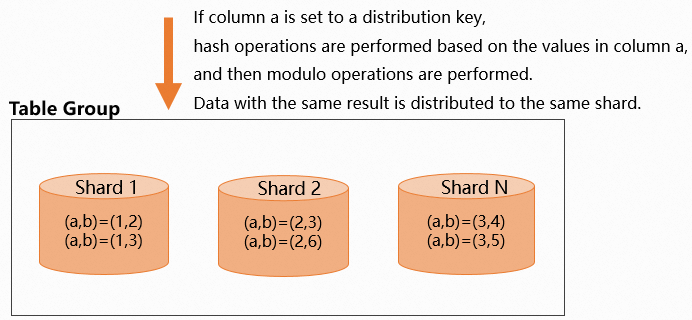 When you set a distribution key, choose columns that distribute data evenly. In Hologres, the number of shards is related to the number of worker nodes. For more information, see Basic concepts. If you choose a key that results in uneven data distribution, data concentrates in a few shards. This forces a small number of worker nodes to handle most of the computational work, which can cause the long tail effect and reduce query efficiency. For information about how to identify and resolve data skew, see Detect and handle workload skew.
Omitting the distribution key
If you do not set a distribution key, data is distributed randomly across the shards. Records with the same value might be placed on the same shard or on different shards. The following example shows how to create a table without a distribution key.
-- Do not set a distribution key.
begin;
create table tbl (
a int not null,
b text not null
);
commit;
The following figure illustrates this random data distribution.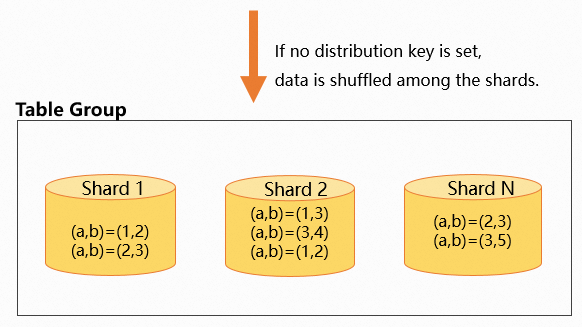
Distribution key for GROUP BY aggregation
If you set a distribution key, records with the same key value are located on the same shard. For GROUP BY aggregation queries, the system redistributes data based on the grouping keys. By setting the distribution key to the columns frequently used in GROUP BY clauses, you ensure that the data is already co-located on each shard. This reduces data redistribution between shards and improves query performance. The following example shows how to do this.
-
Syntax supported by Hologres V2.1 and later:
CREATE TABLE agg_tbl ( a int NOT NULL, b int NOT NULL ) WITH ( distribution_key = 'a' ); -- Example query: aggregate on column a. select a,sum(b) from agg_tbl group by a; -
Syntax supported by all versions:
begin;
create table agg_tbl (
a int not null,
b int not null
);
call set_table_property('agg_tbl', 'distribution_key', 'a');
commit;
-- Example query: aggregate on column a.
select a,sum(b) from agg_tbl group by a;
Running the EXPLAIN command shows an execution plan with no redistribution operator. Because the table's distribution key (a) matches the GROUP BY column, Hologres can perform aggregation directly within each shard, which avoids data redistribution.
Distribution key for two-table joins
-
Set join columns as distribution keys
In a two-table join scenario, if you set the join columns of both tables as their respective distribution keys, Hologres guarantees that data with the same join key value resides on the same shard. This enables a local join and accelerates query execution. The following example demonstrates this.
-
DDL for creating tables:
-
Syntax supported by Hologres V2.1 and later:
-- Data in tbl1 is distributed by column 'a', and data in tbl2 is distributed by column 'c'. When tbl1 and tbl2 are joined on a=c, the corresponding data resides on the same shard, allowing a local join for faster query performance. BEGIN; CREATE TABLE tbl1 ( a int NOT NULL, b text NOT NULL ) WITH ( distribution_key = 'a' ); CREATE TABLE tbl2 ( c int NOT NULL, d text NOT NULL ) WITH ( distribution_key = 'c' ); COMMIT; -
Syntax supported by all versions:
-- Data in tbl1 is distributed by column 'a', and data in tbl2 is distributed by column 'c'. When tbl1 and tbl2 are joined on a=c, the corresponding data resides on the same shard, allowing a local join for faster query performance.
begin;
create table tbl1(
a int not null,
b text not null
);
call set_table_property('tbl1', 'distribution_key', 'a');
create table tbl2(
c int not null,
d text not null
);
call set_table_property('tbl2', 'distribution_key', 'c');
commit;
-
-
Query statement:
select * from tbl1 join tbl2 on tbl1.a=tbl2.c;
The following figure shows the data distribution.
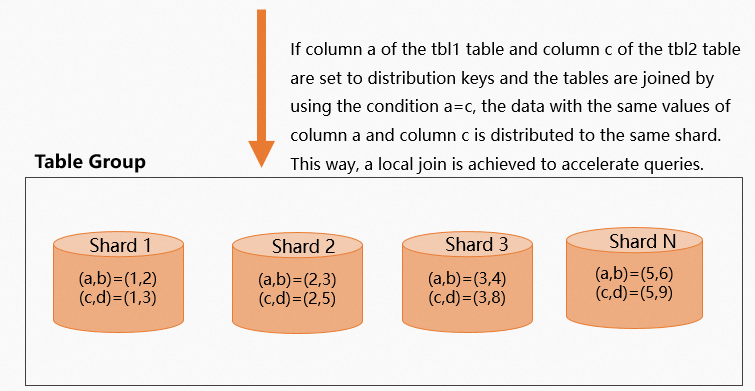 By inspecting the execution plan (EXPLAIN SQL), you can see that the plan does not include a
 redistributionoperator, which confirms that no data redistribution occurred.QUERY PLAN Gather (cost=0.00..10.27 rows=1000 width=24) -> Hash Join (cost=0.00..10.21 rows=1000 width=24) Hash Cond: (tbl1.a = tbl2.c) -> Exchange (Gather Exchange) (cost=0.00..5.10 rows=1000 width=12) -> Decode (cost=0.00..5.10 rows=1000 width=12) -> Seq Scan on tbl1 (cost=0.00..5.00 rows=1000 width=12) -> Hash (cost=5.10..5.10 rows=1000 width=12) -> Exchange (Gather Exchange) (cost=0.00..5.10 rows=1000 width=12) -> Decode (cost=0.00..5.10 rows=1000 width=12) -> Seq Scan on tbl2 (cost=0.00..5.00 rows=1000 width=12) Optimizer: HQO version 1.3.0 -
-
Join columns are not both set as distribution keys
In a two-table join scenario, if the join columns are not both set as distribution keys, Hologres shuffles data across shards during the query. The optimizer determines whether to perform a shuffle or a broadcast based on the sizes of the two tables. In the following example, the distribution key for
tbl1is columna, and the distribution key fortbl2is columnd. The join condition isa=c. Because columncis not the distribution key fortbl2, its data must be shuffled across every shard, which degrades query performance.-
DDL for creating tables:
-
Syntax supported by Hologres V2.1 and later:
BEGIN; CREATE TABLE tbl1 ( a int NOT NULL, b text NOT NULL ) WITH ( distribution_key = 'a' ); CREATE TABLE tbl2 ( c int NOT NULL, d text NOT NULL ) WITH ( distribution_key = 'd' ); COMMIT; -
Syntax supported by all versions:
begin;
create table tbl1(
a int not null,
b text not null
);
call set_table_property('tbl1', 'distribution_key', 'a');
create table tbl2(
c int not null,
d text not null
);
call set_table_property('tbl2', 'distribution_key', 'd');
commit;
-
-
Query statement:
select * from tbl1 join tbl2 on tbl1.a=tbl2.c;
The following figure shows the data distribution.
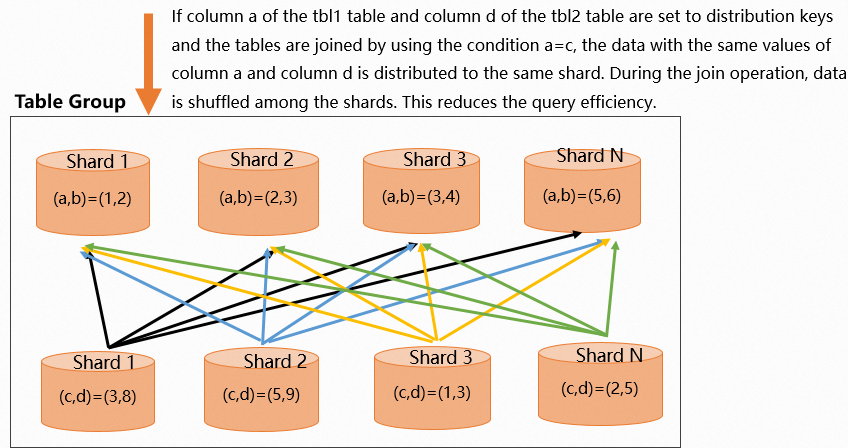 The execution plan includes a
 redistributionoperator, indicating that data is being reshuffled across shards. This signifies a suboptimal distribution key configuration that leads to extra data movement and degraded performance.QUERY PLAN Gather (cost=0.00..10.27 rows=1000 width=24) -> Hash Join (cost=0.00..10.21 rows=1000 width=24) Hash Cond: (tbl2.c = tbl1.a) -> Redistribution (cost=0.00..5.10 rows=1000 width=12) Hash Key: tbl2.c -> Exchange (Gather Exchange) (cost=0.00..5.10 rows=1000 width=12) -> Decode (cost=0.00..5.10 rows=1000 width=12) -> Seq Scan on tbl2 (cost=0.00..5.00 rows=1000 width=12) -> Hash (cost=5.10..5.10 rows=1 width=12) -> Exchange (Gather Exchange) (cost=0.00..5.10 rows=1 width=12) -> Decode (cost=0.00..5.10 rows=1 width=12) -> Seq Scan on tbl1 (cost=0.00..5.00 rows=1 width=12) Optimizer: HQO version 1.3.0 -
Distribution key for multi-table joins
Multi-table joins are more complex. Follow these general principles:
-
If all tables are joined on the same columns, set those join columns as the distribution key for each table.
-
If the tables are joined on different columns, prioritize the join between the largest tables. Set the join columns of the largest tables as their distribution keys.
The following examples use a three-table join to illustrate these cases. You can apply the same logic to joins involving more than three tables.
-
All three tables have the same join columns
If all three tables are joined on the same columns, the scenario is straightforward. You can set the common join columns as the distribution key for all three tables to enable a local join.
-
Syntax supported by Hologres V2.1 and later:
BEGIN; CREATE TABLE join_tbl1 ( a int NOT NULL, b text NOT NULL ) WITH ( distribution_key = 'a' ); CREATE TABLE join_tbl2 ( a int NOT NULL, d text NOT NULL, e text NOT NULL ) WITH ( distribution_key = 'a' ); CREATE TABLE join_tbl3 ( a int NOT NULL, e text NOT NULL, f text NOT NULL, g text NOT NULL ) WITH ( distribution_key = 'a' ); COMMIT; -- 3-table join query SELECT * FROM join_tbl1 INNER JOIN join_tbl2 ON join_tbl2.a = join_tbl1.a INNER JOIN join_tbl3 ON join_tbl2.a = join_tbl3.a; -
Syntax supported by all versions:
begin;
create table join_tbl1(
a int not null,
b text not null
);
call set_table_property('join_tbl1', 'distribution_key', 'a');
create table join_tbl2(
a int not null,
d text not null,
e text not null
);
call set_table_property('join_tbl2', 'distribution_key', 'a');
create table join_tbl3(
a int not null,
e text not null,
f text not null,
g text not null
);
call set_table_property('join_tbl3', 'distribution_key', 'a');
commit;
--3-table join query
SELECT * FROM join_tbl1
INNER JOIN join_tbl2 ON join_tbl2.a = join_tbl1.a
INNER JOIN join_tbl3 ON join_tbl2.a = join_tbl3.a;
The execution plan (EXPLAIN SQL) shows the following:
-
There is no
redistributionoperator. This indicates that data was not reshuffled and a local join was performed. -
The
exchangeoperator moves data between execution stages or nodes. This process improves query efficiency by ensuring that only data from the relevant shard is processed.
QUERY PLAN Gather (cost=0.00..16.44 rows=10000 width=36) -> Hash Join (cost=0.00..15.57 rows=10000 width=36) Hash Cond: ((join_tbl2.a = join_tbl3.a) AND (join_tbl1.a = join_tbl3.a)) -> Hash Join (cost=0.00..10.31 rows=10000 width=20) Hash Cond: (join_tbl2.a = join_tbl1.a) -> Exchange (Gather Exchange) (cost=0.00..5.11 rows=10000 width=12) -> Decode (cost=0.00..5.11 rows=10000 width=12) -> Seq Scan on join_tbl2 (cost=0.00..5.00 rows=10000 width=12) -> Hash (cost=5.11..5.11 rows=10000 width=8) -> Exchange (Gather Exchange) (cost=0.00..5.11 rows=10000 width=8) -> Decode (cost=0.00..5.11 rows=10000 width=8) -> Seq Scan on join_tbl1 (cost=0.00..5.00 rows=10000 width=8) -> Hash (cost=5.12..5.12 rows=10000 width=16) -> Exchange (Gather Exchange) (cost=0.00..5.12 rows=10000 width=16) -> Decode (cost=0.00..5.12 rows=10000 width=16) -> Seq Scan on join_tbl3 (cost=0.00..5.00 rows=10000 width=16) Optimizer: HQO version 1.3.0 -
-
The three tables have different join columns
In practice, the join columns in a multi-table join might be different. In this case, use the following principles to set the distribution key:
-
The core optimization principle is to prioritize the join between the largest tables. Set the join columns of the large tables as the distribution key. Small tables contain less data, so their distribution strategy is a lower priority.
-
If the tables have roughly the same amount of data, set the distribution key to the join columns that are most frequently used in
GROUP BYclauses.
In the following example, three tables are joined, and their join columns are not identical. The best strategy is to choose the join columns of the largest table as the distribution key. The
join_tbl_1table has 10 million rows, whilejoin_tbl_2andjoin_tbl_3each have 1 million rows. Therefore,join_tbl_1is the primary target for optimization.-
Syntax supported by Hologres V2.1 and later:
BEGIN; -- join_tbl_1 contains 10 million rows. CREATE TABLE join_tbl_1 ( a int NOT NULL, b text NOT NULL ) WITH ( distribution_key = 'a' ); -- join_tbl_2 contains 1 million rows. CREATE TABLE join_tbl_2 ( a int NOT NULL, d text NOT NULL, e text NOT NULL ) WITH ( distribution_key = 'a' ); -- join_tbl_3 contains 1 million rows. CREATE TABLE join_tbl_3 ( a int NOT NULL, e text NOT NULL, f text NOT NULL, g text NOT NULL ) WITH ( distribution_key = 'a' ); COMMIT; -- When join keys are different, choose the join key of the largest table as the distribution key. SELECT * FROM join_tbl_1 INNER JOIN join_tbl_2 ON join_tbl_2.a = join_tbl_1.a INNER JOIN join_tbl_3 ON join_tbl_2.d = join_tbl_3.f; -
Syntax supported by all versions:
begin;
--join_tbl_1 contains 10 million rows.
create table join_tbl_1(
a int not null,
b text not null
);
call set_table_property('join_tbl_1', 'distribution_key', 'a');
--join_tbl_2 contains 1 million rows.
create table join_tbl_2(
a int not null,
d text not null,
e text not null
);
call set_table_property('join_tbl_2', 'distribution_key', 'a');
--join_tbl_3 contains 1 million rows.
create table join_tbl_3(
a int not null,
e text not null,
f text not null,
g text not null
);
call set_table_property('join_tbl_3', 'distribution_key', 'a');
commit;
-- When join keys are different, choose the join key of the largest table as the distribution key.
SELECT * FROM join_tbl_1
INNER JOIN join_tbl_2 ON join_tbl_2.a = join_tbl_1.a
INNER JOIN join_tbl_3 ON join_tbl_2.d = join_tbl_3.f;
The execution plan (EXPLAIN SQL) shows the following:
-
A
redistributionoperator appears for the join betweenjoin_tbl_2andjoin_tbl_3. Becausejoin_tbl_3is a smaller table and its join column does not match its distribution key, Hologres redistributes its data. -
There is no
redistributionoperator for the join betweenjoin_tbl_1andjoin_tbl_2. Because both tables use their common join column as the distribution key, this part of the join requires no data redistribution.
QUERY PLAN Gather (cost=0.00..183.90 rows=1000000 width=49) -> Hash Join (cost=0.00..64.87 rows=1000000 width=49) Hash Cond: (join_tbl_2.d = join_tbl_3.f) -> Redistribution (cost=0.00..40.22 rows=1000000 width=27) Hash Key: join_tbl_2.d -> Hash Join (cost=0.00..35.99 rows=1000000 width=27) Hash Cond: (join_tbl_1.a = join_tbl_2.a) -> Exchange (Gather Exchange) (cost=0.00..18.45 rows=10000000 width=11) -> Decode (cost=0.00..18.08 rows=10000000 width=11) -> Seq Scan on join_tbl_1 (cost=0.00..7.75 rows=10000000 width=11) -> Hash (cost=6.93..6.93 rows=1000000 width=16) -> Exchange (Gather Exchange) (cost=0.00..6.93 rows=1000000 width=16) -> Decode (cost=0.00..6.88 rows=1000000 width=16) -> Seq Scan on join_tbl_2 (cost=0.00..5.29 rows=1000000 width=16) -> Hash (cost=10.97..10.97 rows=1000000 width=22) -> Redistribution (cost=0.00..10.97 rows=1000000 width=22) Hash Key: join_tbl_3.f -> Exchange (Gather Exchange) (cost=0.00..7.53 rows=1000000 width=22) -> Decode (cost=0.00..7.45 rows=1000000 width=22) -> Seq Scan on join_tbl_3 (cost=0.00..5.31 rows=1000000 width=22) Optimizer: HQO version 1.3.0 -
Examples
-
Syntax supported by Hologres V2.1 and later:
-- Set a single-column distribution key. CREATE TABLE tbl ( a int NOT NULL, b text NOT NULL ) WITH ( distribution_key = 'a' ); -- Set a multi-column distribution key. CREATE TABLE tbl ( a int NOT NULL, b text NOT NULL ) WITH ( distribution_key = 'a,b' ); -- Set join keys as distribution keys in a join scenario. BEGIN; CREATE TABLE tbl1 ( a int NOT NULL, b text NOT NULL ) WITH ( distribution_key = 'a' ); CREATE TABLE tbl2 ( c int NOT NULL, d text NOT NULL ) WITH ( distribution_key = 'c' ); COMMIT; SELECT b, count(*) FROM tbl1 JOIN tbl2 ON tbl1.a = tbl2.c GROUP BY b; -
Syntax supported by all versions:
-- Set a single-column distribution key.
begin;
create table tbl (a int not null, b text not null);
call set_table_property('tbl', 'distribution_key', 'a');
commit;
-- Set a multi-column distribution key.
begin;
create table tbl (a int not null, b text not null);
call set_table_property('tbl', 'distribution_key', 'a,b');
commit;
-- Set join keys as distribution keys in a join scenario.
begin;
create table tbl1(a int not null, b text not null);
call set_table_property('tbl1', 'distribution_key', 'a');
create table tbl2(c int not null, d text not null);
call set_table_property('tbl2', 'distribution_key', 'c');
commit;
select b, count(*) from tbl1 join tbl2 on tbl1.a = tbl2.c group by b;
Related documentation
-
For guidance on setting table properties based on your business scenarios, see Scenario-based guide for table design.
-
For more information about best practices for optimizing query performance on Hologres internal tables, see Optimize query performance.
-
For DDL statements related to Hologres internal tables, see: