Integration process
This integration method is for developers who want to integrate the Financial-grade Face Verification service into an existing mobile app for online user verification. This topic describes how to integrate the service by using the client SDK.
Integration
Alibaba Cloud provides SDKs for multiple programming languages, including Java, C#, Go, Python, Node.js/TypeScript, PHP, and C++. You can integrate an SDK to call the service's API operations. The SDKs simplify development by encapsulating the signature mechanism, timeout mechanism, and retry mechanism, and returning structured Response objects.
If the SDK-based approach does not meet your business needs, you can call the service APIs natively over HTTP or HTTPS. This requires you to build custom requests and handle the signature mechanism. The Alibaba Cloud SDKs already implement the signature algorithm. For more details, see V3 RPC-style request body & signature mechanism.
Background
The following sequence diagram shows the overall integration flow for a mobile app.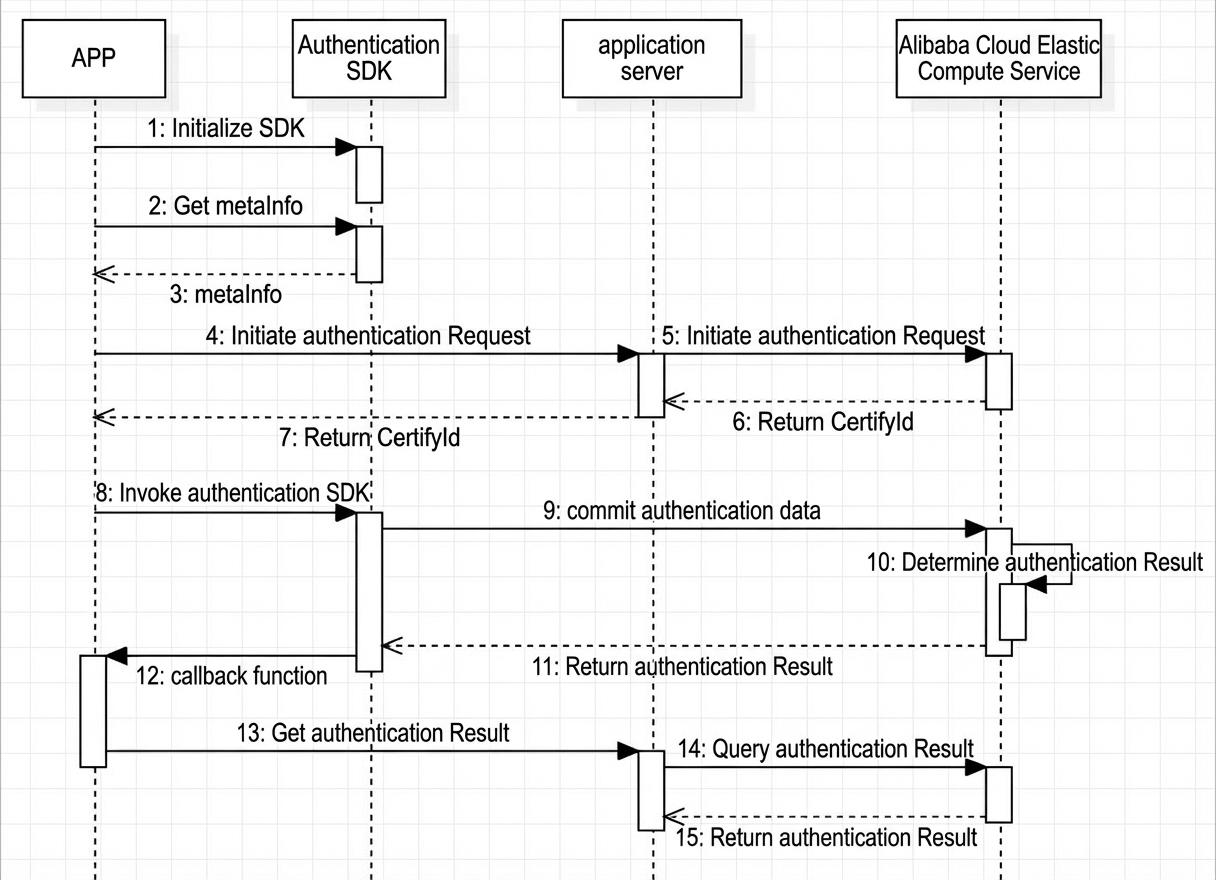
Table 1. System call sequence
Step | Description |
1 | Initialize the authentication SDK. |
2 | The app calls the authentication SDK to obtain the MetaInfo. |
3 | The authentication SDK returns MetaInfo. |
4 | The app sends an authentication request with the MetaInfo to the application server. |
5 | The application server calls the authentication request API on the Alibaba Cloud backend. |
6 | The Alibaba Cloud backend returns a CertifyId to the application server. |
7 | The application server passes the CertifyId to the app. |
8 | The app calls the authentication SDK with the CertifyId. |
9 | The authentication SDK sends the user-submitted authentication materials to the Alibaba Cloud backend. |
10 | The Alibaba Cloud backend determines the authentication result based on the submitted materials. |
11 | The Alibaba Cloud backend returns a completion status to the authentication SDK. |
12 | The authentication SDK triggers a callback function to signal the app to retrieve the authentication result. |
13 | The app queries the application server for the authentication result. |
14 | The application server queries the Alibaba Cloud backend for the authentication result. |
15 | The Alibaba Cloud backend returns the authentication result to the application server. |
Procedure
- Note
When adding a verification scenario, you can authorize Alibaba Cloud to access a specified OSS bucket to store images from the verification process. For more information, see Activate and authorize OSS storage.
Integrate the service into your app.
Call the server initialization interface InitFaceVerify.Call the server-side initialization API .
The CertifyId is the unique identifier for the real-person authentication process. It is used to associate all API calls in an authentication request and is required to start the application by using the SDK. For more information, see InitFaceVerify - Initiate an authentication request.
Integrate the client SDK.
This step implements the in-app face verification workflow. For platform-specific instructions, see:
Call the server-side query API
DescribeFaceVerify.After the verification completes, call this API on your server to retrieve the verification status and verification materials. For more information, see DescribeFaceVerify - Query the verification result.