Biometric authentication (WebAuthn)
This guide explains how to integrate the WebAuthn SDK for web applications.
1. Overview
WebAuthn enables seamless passwordless login on PCs by using a device's native biometric authentication to sign in to websites.
2. Prerequisites
2.1 Preparations
Ensure that you have created an application in the IDaaS console and enabled the WebAuthn authentication method.
In the Add application panel, set Application type to Web. Enter the Application name, Application ID, and domain name. Under Authentication method, select WebAuthn authentication, turn on the Enable switch, and then click Save.
2.2 Environment requirements
-
Systems and devices
-
MacBook Pro or Air with Touch ID, running macOS Big Sur or later
-
Windows 10 19H1 or later with Windows Hello installed
-
Browser
-
Google Chrome 67 or later
-
Microsoft Edge 85 or later
-
Safari 14 or later
2.3 Including the SDK
For browsers
To use the SDK in a browser, include the SDK file directly with a script tag. This makes the IDaaSWebAuthnSDK global variable available.
<script src="https://g.alicdn.com/idaas-frontend/idaas-auth-sdk/1.0.0/index.js"></script>3. Use cases
3.1 Registration scenario
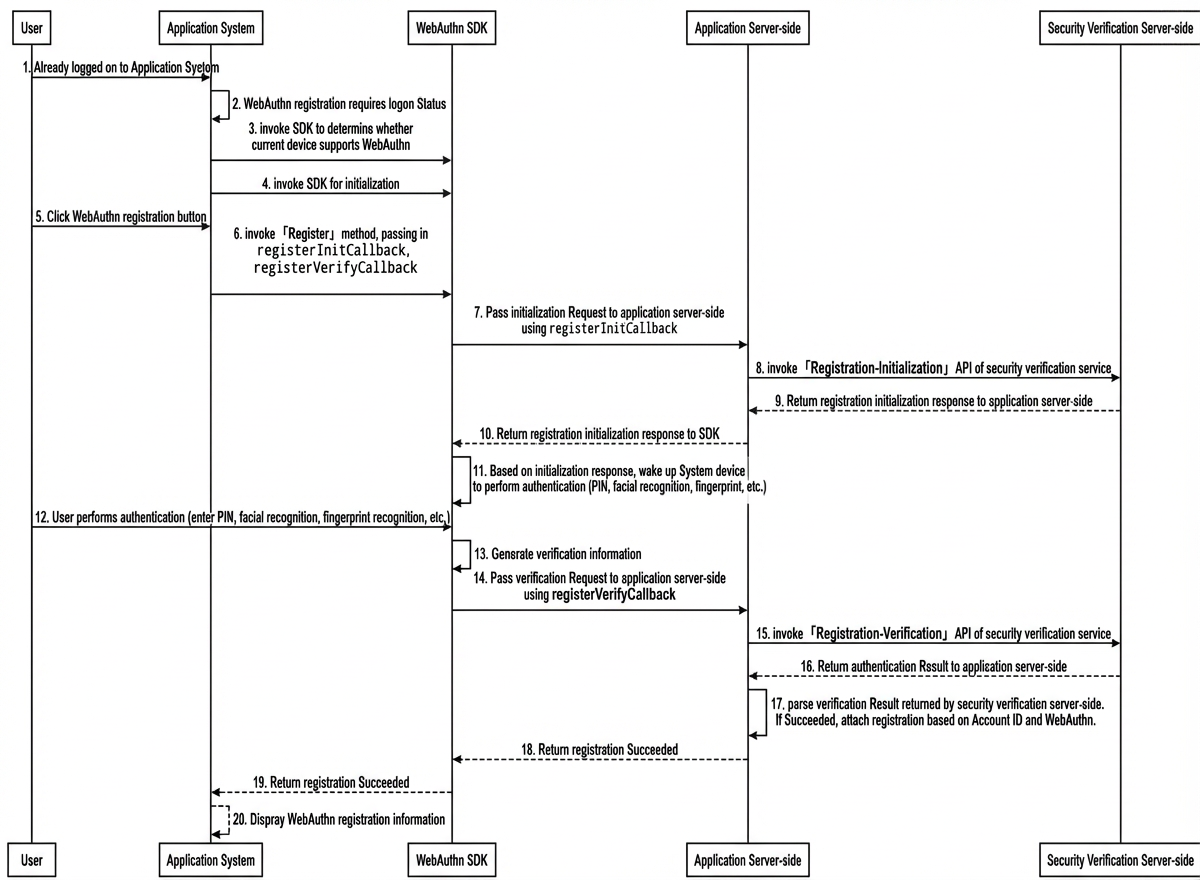
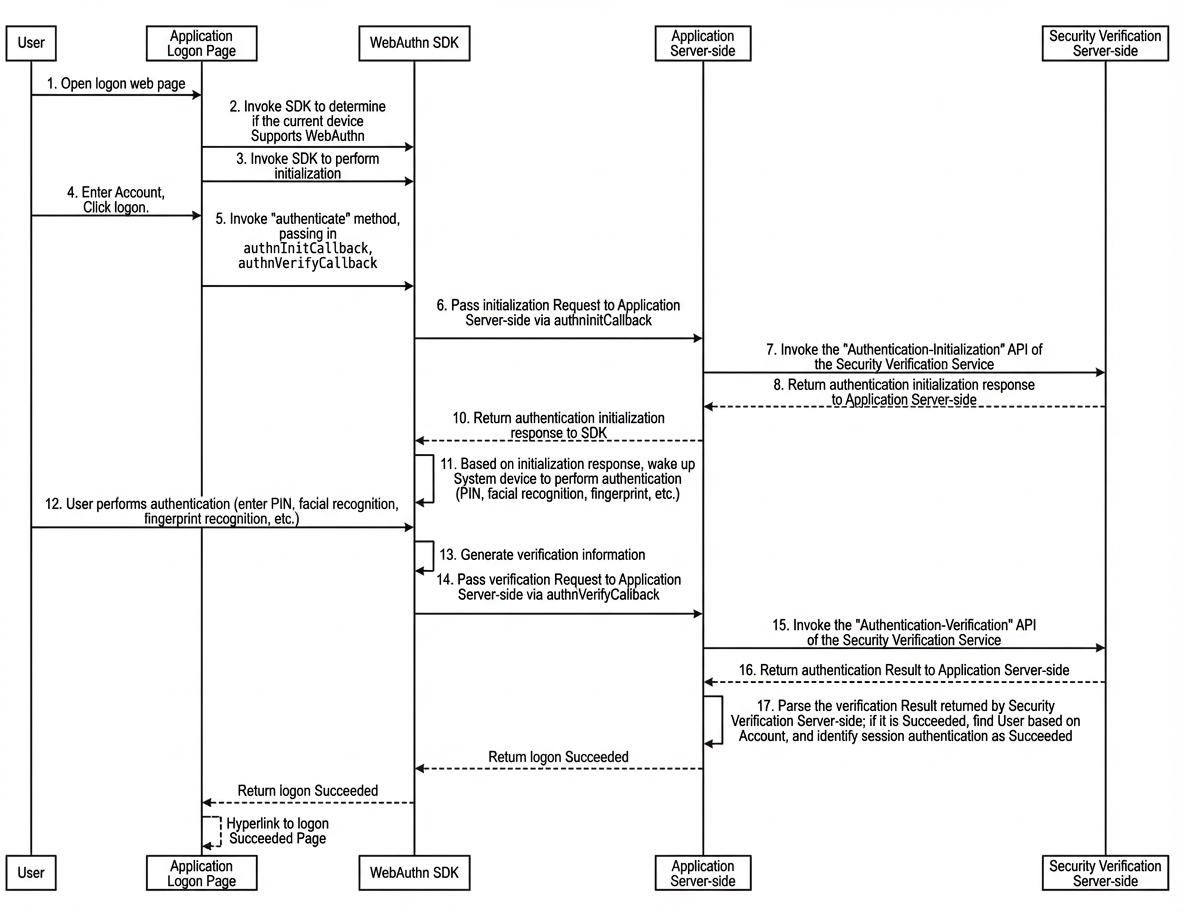
3.2 Authentication scenario
-
Passwordless authentication
A user visits your application, enters their account name, and selects a WebAuthn authentication method. After successful verification, the application signs the user in.
4. SDK methods
4.1 Initialize the SDK
const IDaaSAuthnSDK = new IDaaSWebAuthnSDK();4.2 Get the SDK version
IDaaSWebAuthnSDK.VERSION4.3 Check for WebAuthn support
// This is an asynchronous operation. Use Promise.then() or await to get the result.
await IDaaSWebAuthnSDK.supportsPlatformWebAuthn();
4.4 Authenticator - Registration
// authenticator name
const credentialName = "My Authenticator";
/**
 * @method: registerInitCallback()
 * @description: Authenticator registration - initialization.
 */
async function registerInitCallback(){
  // Implement the registration-initialization API on your server.
  let registerInitAPI = await fetch("https://<example.com>/authentication/register_init_API",{ method:"POST" })
  let registerInitResponse =  await registerInitAPI.json();
  /* The SDK requires that the registerInitResponse data have the following format:
    {
      code:200, // Response status. The SDK checks if code === 200 to determine if the call was successful. If the code is not 200, the SDK throws an error.
      data:{
        // challengeBase64: A challenge to prevent replay attacks.
        "challengeBase64":"AAAAAXzAn9aPMTIzMjMxMjMxMg==",
        // options: The options for creating the authenticator, containing basic WebAuthn information. This must be returned to the SDK as a JSON string.
        "options":"{\"attestation\":\"none\",\"authenticatorSelection\":{\"userVerification\":\"required\"},\"challengeBase64\":\"AAAAAXzAn9aPMTIzMjMxMjMxMg==\",\"excludeCredentials\":[],\"pubKeyCredParams\":[{\"alg\":-7,\"type\":\"public-key\"},{\"alg\":-257,\"type\":\"public-key\"}],\"rp\":{\"id\":\"localhost\",\"name\":\"Test (do not delete)\"},\"timeout\":60000,\"user\":{\"displayName\":\"1232312312\",\"id\":\"1232312312\",\"name\":\"1232312312\"}}"
      }
    }
  */
  return registerInitResponse;
}
/**
 * @method: registerVerifyCallback()
 * @description: Authenticator registration - verification.
 * @param {*} name: The authenticator name.
 * @param {*} registrationContext: The registration information generated by the SDK, as a JSON string.
 */
async function registerVerifyCallback({name,registrationContext}){
   // params: The input parameters required for the registration-verification API.
  const params = {
    name,
    registrationContext
  };
  const registerVerifyAPI = await fetch("https://<example.com>/authentication/register_verify_API",{ body:JSON.stringify(params), method:"POST" });
  let registerVerifyResponse = await registerVerifyAPI.json();
  // Implement logic to handle the result after WebAuthn registration.
  /*
    if(registerVerifyResponse.code == 200){
       alert("WebAuthn registration successful!")
    }else{
       alert("WebAuthn registration failed.")
    }
  */
}
// This is an asynchronous operation. Use Promise.then() or await to get the result.
await IDaaSWebAuthnSDK.register(credentialName,registerInitCallback,registerVerifyCallback);
4.5 Authenticator - Authentication
// user ID
const userId = "user-test-1";
/**
 * @method: authnInitCallback()
 * @description: Authenticator authentication - initialization.
 */
async function authnInitCallback(){
  // Implement the authentication-initialization API on your server.
  let authnInitAPI = await fetch("https://<example.com>/authentication/authn_init_API",{ method:"POST" , body:JSON.stringify({userId}) })
  // You should check the HTTP status code of the API response, for example, by verifying if status === 200.
  let authnInitResponse =  await authnInitAPI.json();
  /* The SDK requires that the authnInitResponse data have the following format:
    {
      code:200, // Response status. The SDK checks if code === 200 to determine if the call was successful. If the code is not 200, the SDK throws an error.
      data:{
        // challengeBase64: A challenge to prevent replay attacks.
        "challengeBase64": "AQAAAXydKjV+NlhrSlpPMHAxeHZPWlFJQTBiNXlRWU5s",
        // options: The options for the authentication challenge, containing basic WebAuthn information. This must be returned to the SDK as a JSON string.
        "options": "{\"allowCredentials\":[{\"idBase64\":\"Z0MkHYJnRDbGfa0LvWvvO6UqcNjFwCIR6mpNTl8jfTA\",\"transports\":[],\"type\":\"public-key\"}],\"challengeBase64\":\"AQAAAXydKjV+NlhrSlpPMHAxeHZPWlFJQTBiNXlRWU5s\",\"rpId\":\"localhost\",\"timeout\":60000,\"userVerification\":\"preferred\"}"
      }
    }
  */
  return authnInitResponse;
}
/**
 * @method: authnVerifyCallback()
 * @description: Authenticator authentication - verification. This function passes the authentication context to your server for validation.
 * @param {*} name: The authenticator name.
 * @param {*} registrationContext: The authentication context generated by the SDK, as a JSON string.
 */
async function authnVerifyCallback({name,registrationContext}){
   // params: The input parameters required for the authentication-verification API.
  const params = {
    userId,
    registrationContext
  };
  const authnVerifyAPI = await fetch("https://<example.com>/authentication/authn_verify_API",{ body:JSON.stringify(params), method:"POST" });
  let authnVerifyResponse = await authnVerifyAPI.json();
  // Implement your own logic for handling a successful sign-in.
  /*
   if(authnVerifyResponse.code == 200){
        window.location.href = "/path/to/success_page"
    }else{
       alert("Authentication failed.")
    }
  */
}
// This is an asynchronous operation. Use Promise.then() or await to get the result.
await IDaaSWebAuthnSDK.authenticate(userId, authnInitCallback, authnVerifyCallback)