Integrate Bometric Authentication (IFAA) SDK for iOS
1. Download the SDK
Download the SDK package from the official website and decompress the SDK package. The following folders are extracted from the SDK package:
IDaaSDoraemonSDK.framework: the static library for security authentication.
SDKs for specific authentication features, including biometric authentication of Internet Finance Authentication alliance (IFAA) and mobile number-based authentication
2. Before you start
2.1 Make preparations
Make sure that an application is created in the Security Authentication console and the biometric authentication (IFAA) feature is enabled.
2.2 Understand the integration process
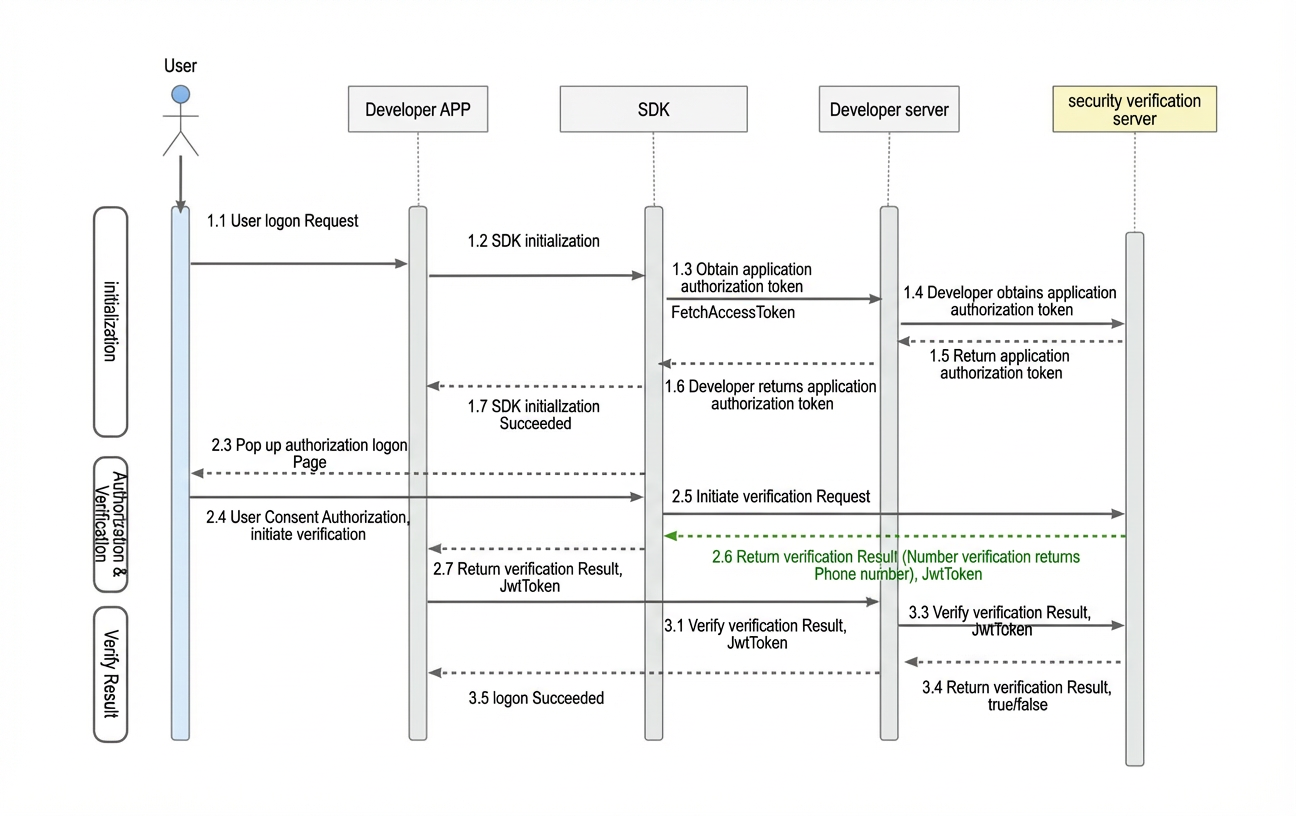
2.3 Run the demo project
Decompress the IDaaSDoraemonDemo demo project. Change the bundle ID and the application key to the actual values.
2.4 Build a development environment
The operating system on which the application runs must be iOS 11.0 or later.
The supported programming languages are Objective C and Swift.
2.4.1 Add a primary library
Choose Targets > General > Linked Frameworks and Libraries and add the primary library.
IDaaSDoraemonSDK.frameworkIf you want to add an additional primary library for authentication, perform the following steps:
Step 1: Choose Targets > General > Linked Frameworks and Libraries and add the primary library.
IFAAAuthenticator.framework
etasSdk.framework
APOpenSSL.framework
APSecCrypto.framework
Step 2: Add system libraries.
Security.framework
AVFoundation.framework
LocalAuthentication.framework
Foundation.framework
libc++.tbd
Step 3: Choose Targets > Build Phases > Copy Bundle Resources and add the resource file.
etasSdk.bundleIf another OpenSSL library is integrated into your project and a conflict occurs, you can delete the library APOpenSSL.framework.
The library AlipaySDK.framework conflicts with the library APSecCrypto.framework. Delete the library APSecCrypto.framework if you integrate the library AlipaySDK.framework into the project.
2.4.2 Configure the build settings
Choose Targets > BuildSettings and add the -ObjC prefix to the parameters in the Other Linker Flags section. Make sure that the prefix is added and the letter C is in the uppercase. Otherwise, a crash occurs when you run the demo project.
3. Use Bometric Authentication (IFAA) SDK
3.1 Methods and properties of the IDaaSDoraemonManager class
3.1.1 Obtain an authentication instance
  /**
  * Method: sharedInstance
  * @param None.
  * Return value: the shared instance of the class.
  */
+ (instancetype _Nonnull )sharedInstance;
3.1.2 Obtain the SDK version
/**
* Method: getVersion
* @param None.
* Return value: the SDK version number in the string format.
*/
- (NSString *_Nonnull)getVersion;
3.1.3 Initialize the security authentication service
/**
 * Initialize the security authentication service
 *  @param applicationExternalId The external ID of the application.
 *  @param appKey The application key.
 *  @param complete The callback to return the result to the main thread.
 */
-(void)SDKInitWithApplicationExternalId:(NSString *)applicationExternalId appKey:(NSString *)appKey complete:(void (^)(NSDictionary *resultDic))complete;
3.1.4 Obtain an access token
Call the FetchAccessToken operation of the server SDK and pass the token to the client SDK.
/** Obtain a token */
@property (nonatomic,copy) NSDictionary *(^fetchAccessTokenCallBack)(NSString *mobileExtendParamsJson, NSString *mobileExtendParamsJsonSign);3.2 SDK return codes
Return code |
Value |
Description |
IFAA_SUCCESS |
0 |
The operation succeeded. |
IFAA_STATUS_SUPPORT_OTHERS |
1 |
Authentication methods excluding fingerprint and facial recognition are supported. For example, PIN or gesture-based authentication is supported. |
IFAA_STATUS_NOT_ENROLLED |
4 |
No information about the fingerprint or face is found. Record the fingerprint or face before you perform this operation. |
IFAA_STATUS_PASSCODE_NOT_SET |
7 |
The screen lock password is not configured. Configure the screen lock before you use IFAA authentication. Otherwise, your device is insecure. |
IFAA_CLIENT_ERROR |
8 |
An exception occurs on the client. |
IFAA_SERVER_ERROR |
9 |
An error occurs on the server. |
IFAA_POLICY_REJECTED |
12 |
The operation is denied by the security policy. |
IFAA_USER_REJECTED |
13 |
You do not have the permissions to perform the operation. |
IFAA_APPID_NOT_FOUND |
14 |
The application ID is not included in the whitelist. |
IFAA_DEVICE_MODEL_NOT_FOUND |
15 |
The specified device model does not exist. |
IFAA_SIGNATURE_FAIL |
16 |
Failed to obtain the signature data. |
IFAA_STATUS_DELETED |
17 |
The fingerprint is registered, but the module that is used to register the fingerprint is deleted. This return code is applicable only to Android. |
IFAA_CLIENT_ERROR_MULTI_FP_NOT_SUPP ORT |
18 |
The device does not support multi-touch. This return code is applicable only to Android. |
IFAA_STATUS_RESULT_CANCELED |
19 |
The operation is cancelled. |
IFAA_STATUS_RESULT_TIMEOUT |
20 |
The operation times out. This return code is appliable only to Android. |
IFAA_STATUS_RESULT_AUTH_FAIL |
21 |
Verification fails. The fingerprint does not match. |
IFAA_STATUS_RESULT_SYSTEM_BLOCK |
22 |
Verification failed multiple times. The fingerprint authentication is locked. This return code is applicable only to Android. |
IFAA_STATUS_RESULT_FALLBACK |
23 |
The FALLBACK button is tapped. |
IFAA_STATUS_RESULT_TEE_ERROR |
24 |
An error occurs in the trusted execution environment (TEE). This return code is applicable only to Android. |
IFAA_STATUS_RESULT_SYSTEM_ERROR |
25 |
The operating system is not supported. Upgrade the operating system. This return code is applicable only to Android. |
IFAA PERMISSION DENIED |
26 |
Android: The application does not have the camera permissions. |
IFAA_AUTHENTICATOR_DISABLE |
27 |
iOS: The application does not have the FaceID permissions. |
IFAA_AUTHENTICATOR_NOT_FOUND |
28 |
The authenticator is disabled. |
IFAA_DEVICE_KEY_NOT_FOUND |
29 |
The authenticator is not found. |
IFAA_PROTECT_PAYLOAD_NOT_MATCH |
30 |
The device key is disabled. |
4. Examples of authentication
4.1 IFAA authenticator registration and authentication
4.1.1 IFAA authenticator registration
 [[IDaaSDoraemonManager sharedInstance]authenticatorServiceWithAuthMethod:@"IFAA" action:DoraemonAuthTypeRegister userId:@"zhangsan"complete:^(NSDictionary *resultDic) {

        HKLog(@"IFAA authenticator - Registration result %@",resultDic);
 }];
4.1.2 Authentication by using the IFAA authenticator
 [[IDaaSDoraemonManager sharedInstance]authenticatorServiceWithAuthMethod:@"IFAA" action:DoraemonAuthTypeAuth userId:@"zhangsan"complete:^(NSDictionary *resultDic) {

        NSLog(@"IFAA authenticator - Authentication result %@",resultDic);
 }];
4.2 Verify a JWT token
You need to verify a JSON Web Token (JWT) token to ensure that the verification result is valid.