Connect a gateway to IoT Platform
This topic describes how a gateway and its connected sub-devices connect to IoT Platform.
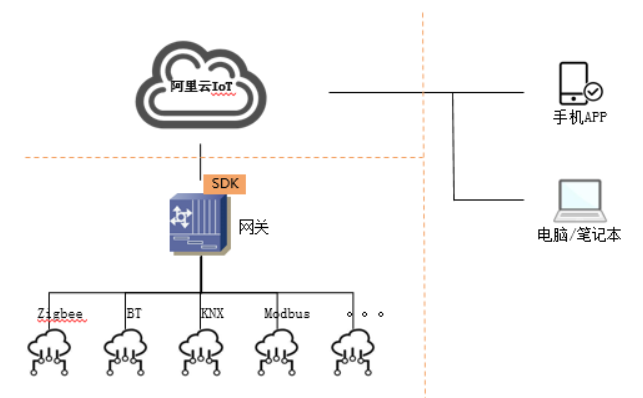
- Sub-device: A device that does not have the Link SDK integrated. These devices typically do not have an IP address and cannot connect directly to Alibaba Cloud IoT Platform. Examples include Zigbee and KNX devices.
- Gateway: A device that has the Link SDK integrated. It can connect to IoT Platform and act as a proxy for sub-devices to connect to Alibaba Cloud IoT Platform.
- Gateway access network: The network that a gateway uses to connect to sub-devices, often using protocols such as Zigbee, KNX, Z-Wave, or RS-485.
A gateway must first connect to Alibaba Cloud IoT Platform. When a sub-device connects to the network through the gateway, the gateway informs IoT Platform that it is acting as a proxy for that sub-device. The gateway reports the identity authentication, online status, and offline status of the sub-device to IoT Platform. All data uploaded by the sub-device and data sent from the cloud to the sub-device are relayed through the gateway.
When a gateway informs IoT Platform that it is acting as a proxy for a sub-device, IoT Platform adds the sub-device to the gateway's sub-device topology table.
Cloud-side development
- Gateway
- Gateway cloud data processing
After a gateway uploads data to IoT Platform, you can forward the data to your business servers or another device on IoT Platform.
To send data to a gateway, you must call the API operations that are provided by IoT Platform.
Note The ProductKey and ProductSecret generated when you create a gateway product, and the DeviceSecret and DeviceName generated when you create a test device, are collectively known as device credentials. Make sure to save the device credentials. - Gateway cloud data processing
- Sub-device
Sub-device cloud data processing
After a sub-device uploads data to IoT Platform through a gateway, you must process the uploaded data in the cloud.
To send data to a sub-device from the cloud, you can call the API operations that are provided by IoT Platform to send the data to the sub-device.
Gateway development
All features for the gateway and its sub-devices are implemented on the gateway. Because the Link SDK is not integrated on sub-devices, no development work is required on them. For more information, see the following development guides:
- SDKs that support gateway development
You must develop gateway features based on the programming language or platform used for gateway development. The usage of SDKs varies by language. The following list provides links to obtain the SDKs and their programming documents for supported languages and platforms. We recommend that you read this topic before you read the development documents for a specific SDK:
- Develop gateway-specific features
Gateway-specific features include identity authentication when the gateway connects to IoT Platform and other feature implementations. For example, if the gateway is also a light, you must implement features to report changes in the light's status and process commands from IoT Platform to turn the light on or off.
Therefore, the gateway must first connect to IoT Platform before it can add, delete, or report the status of sub-devices.
- SDK dependencies
The gateway manufacturer must implement the following features on the product. These features are not provided by the SDK:
- If the gateway connects to the network over Wi-Fi, the device manufacturer must implement a feature to enter the SSID and password of a Wi-Fi hot spot. This allows the gateway to connect to a Wi-Fi network.
- Implement a feature to obtain an IP address from a router using a DHCP client or to manually specify an IP address.
- Implement the logic for discovering sub-devices, connecting sub-devices to the gateway, detecting when sub-devices go offline, receiving data from sub-devices, and sending data to sub-devices. The SDK is responsible only for communication between the gateway and Alibaba Cloud IoT Platform, not for communication between the gateway and sub-devices.
Developers must design a method to save the device credentials on each device. We recommend that you encrypt the credentials and store them in a specific location on the device, such as in its flash memory or a file. When the device powers on, it reads the credentials from the specified location and passes them to the SDK.
- Gateway development methods
Many gateways only implement the feature of connecting sub-devices to the network and do not have other features. If a gateway has its own features, for example, if it is also a light, you must also develop these features.
You can develop gateway-specific features in the following two ways:
- Send and receive data based on topics
When you define a product in IoT Platform, you can add topics to publish data (upload gateway data) and subscribe to data (receive data from the cloud). You can also define the topics and the data format for data transmitted over the topics as needed.
- Develop gateway features based on a Thing Specification Language model
In IoT Platform, you can use a Thing Specification Language (TSL) model to define a product. This involves defining the properties, services, and events that the product supports. The definitions are as follows:
Concept Description Property Represents a readable or read/write parameter that the device supports, such as the brightness of a light. Service Represents a feature that the device supports, such as restarting the device. Event Information that a device actively reports when a specific situation occurs. For example, a smart lock can report a brute-force lock picking event to the cloud to trigger an alarm. The benefit of developing a device using a TSL model is that the device's features are formatted in JSON. This makes the data exchanged between the device and the cloud highly readable and developer-friendly for cloud services. Alibaba Cloud IoT Platform has also defined TSL models for common products. You can use these predefined TSL models for device development. This way, if an application service provider wants to manage the device, you can provide them with the TSL model definition.
- Send and receive data based on topics
- Logic for connecting sub-devices on a gateway
For sub-device connections, the SDK provides API operations for sub-device identity authentication, reporting online and offline status, uploading data, and processing downstream data from the cloud. However, the gateway manufacturer must implement most of the other logic.
The following sections describe the recommended logic for a gateway when it connects to sub-devices.
- Initialization
We recommend that the gateway maintains the following data structures. These data structures must be implemented by the gateway manufacturer:
- Local topology list (LocalTopoList): Records the sub-devices that the gateway has reported to IoT Platform as proxied, along with their credentials. This information requires persistence, which means it must still exist after the gateway reboots.
- List of connected sub-devices (LocalDevList): Represents the sub-devices that are currently connected to the gateway's access network. These sub-devices may or may not have been reported to IoT Platform. This list does not require persistence.
- List of locally deleted sub-devices (RemovedDevList): Represents the list of sub-devices that were locally deleted by a user through a gateway operation while the gateway was disconnected from IoT Platform. The gateway has not yet informed IoT Platform about these deleted devices. This list requires persistence.
After the gateway powers on, you must perform the following operations:
- Build these data structures.
- Obtain the gateway's IP address.
- After the device obtains an IP address, call the SDK's API operations to connect to IoT Platform.
- Obtain sub-device credentials
Many sub-devices cannot store the credentials assigned by Alibaba Cloud IoT Platform. Therefore, all sub-device credentials must be saved on the gateway.
Sub-devices often have their own product models and unique device IDs, such as MAC addresses or serial numbers. Therefore, the gateway must implement a mapping from the sub-device's product model to the IoT Platform ProductKey and ProductSecret. It also needs to implement a mapping from the device's unique ID to the IoT Platform DeviceName and DeviceSecret.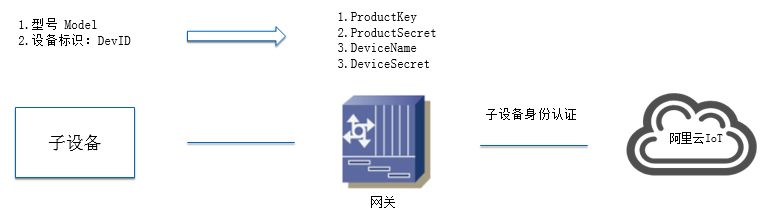
If you can pre-enter the models, device IDs, and corresponding credentials of the sub-devices that will connect during gateway deployment, the gateway can call the SDK's API operations to inform IoT Platform to act as a proxy for a new sub-device when it connects through the access network.
If you cannot pre-configure the models, device IDs, and corresponding credentials of the sub-devices to be connected, the gateway must implement logic to obtain the credentials when a new sub-device connects. When a new sub-device connects, it provides its model and device ID. Alibaba Cloud provides a solution that gateway manufacturers can reference and adopt:
- The gateway's firmware must record a mapping table between the supported sub-device models and the ProductKey and ProductSecret of the sub-device products. This mapping table must be implemented by the gateway manufacturer.
- Use the device ID (DevID) as the DeviceName for the device in Alibaba Cloud IoT Platform. The gateway manufacturer must upload the device IDs to IoT Platform in advance. In this case, the device IDs act as a whitelist on IoT Platform.
- When the gateway connects to a new sub-device through the access network, it obtains the device's model and device ID using the protocol defined between the gateway and the sub-device. It then retrieves the corresponding ProductKey and ProductSecret. After that, it calls the SDK's API operations to use the ProductKey, ProductSecret, and DeviceName to check if the sub-device is in the whitelist on IoT Platform. If the sub-device is in the whitelist, IoT Platform sends the sub-device's DeviceSecret to the gateway.Important After IoT Platform sends the sub-device's DeviceSecret to the gateway, any subsequent attempts by the gateway to obtain the DeviceSecret will fail.
- After the gateway receives the sub-device's DeviceSecret from IoT Platform, it has the complete credentials for that sub-device. The gateway can then call the SDK's API operations to add the sub-device to IoT Platform.Important The gateway must ensure the persistence of the sub-device's DeviceSecret. This means the gateway does not need to obtain the DeviceSecret from IoT Platform again after a restart.
- Logic after the gateway connects to IoT Platform
When the gateway connects to IoT Platform, the SDK notifies the gateway that the connection is established. At this point, we recommend that the gateway perform the following operations:
- Check whether a sub-device was deleted by a user through IoT Platform
Scenario: The gateway is powered off. A user then deletes a sub-device from the gateway using a mobile app or an IoT Platform API operation. IoT Platform deletes the sub-device from the gateway's topology table. However, because the gateway is offline, it does not receive this information and still considers the device as added to IoT Platform.
The gateway calls the SDK's API operations to pull the gateway's topology table from IoT Platform and compares it with the local topology table on the gateway. If a sub-device exists in the gateway's local topology table but not in the topology table retrieved from the cloud, the user has deleted the sub-device using an API operation provided by IoT Platform. The gateway must remove the sub-device from its local topology table and delete it from the gateway's access network.
- Notify IoT Platform that proxied sub-devices are online
Call the SDK's API operations to notify IoT Platform to set the online sub-devices that are still in the gateway's local topology table to the online state. You do not need to notify IoT Platform about offline sub-devices because IoT Platform already set all sub-devices to offline when the gateway went offline.
- Notify IoT Platform to add unproxied sub-devices
If a device is connected to the gateway's access network but is not in the gateway's local topology table, you can call the SDK's API operations to inform IoT Platform that the gateway needs to act as a proxy for the sub-device. After the sub-device is successfully proxied, add it to the gateway's local topology table.
- Inform IoT Platform to remove locally deleted sub-devices
Scenario: The connection between the gateway and IoT Platform is disconnected. For example, the network cable that connects the gateway to the router is unplugged. A user then deletes a sub-device using the gateway's web server, Telnet, or another operation. In this case, IoT Platform is unaware that the device has been deleted.
For each sub-device in the list of deleted devices, call the SDK's API operations to inform IoT Platform to delete the sub-device's topology. Then, remove the sub-device from the gateway's local list of deleted sub-devices.
- Check whether a sub-device was deleted by a user through IoT Platform
- The gateway disconnects from IoT Platform
When the connection between the gateway and IoT Platform is disconnected, if a user deletes a sub-device on the gateway (not through IoT Platform), the gateway must record these sub-devices in its local list of deleted sub-devices. It must also remove the sub-device from its local topology table and the list of connected sub-devices.
- The gateway adds a new sub-device
Scenario: A new sub-device is added to the gateway's access network.
When a new sub-device is added to the gateway's access network, add the sub-device to the gateway's list of connected sub-devices.
- If the connection between the gateway and IoT Platform is established, call the SDK's API operations to inform IoT Platform to add the sub-device. If the addition is successful:
- Call the SDK's API operations to inform IoT Platform to set the sub-device to online.
- Add the sub-device to the gateway's local topology table.
- If the gateway has not established a connection with IoT Platform, no special operation is required. You can wait until the connection is established to notify IoT Platform to add the sub-device and report its status.
- If the connection between the gateway and IoT Platform is established, call the SDK's API operations to inform IoT Platform to add the sub-device. If the addition is successful:
- The gateway deletes a sub-device
Scenario: A user deletes a sub-device from the gateway's access network using a command or another operation provided by the gateway.
- First, remove the sub-device from the list of connected sub-devices.
- Second, if the sub-device is in the gateway's local topology table, add it to the list of deleted sub-devices.
- Then, if the gateway is connected to IoT Platform, inform IoT Platform to delete the sub-device and remove it from the list of deleted sub-devices. If the gateway is not connected to IoT Platform, no action is required.
- A sub-device comes online
Scenario: A sub-device that was previously connected to the gateway reconnects to the gateway's access network.
- First, add it to the gateway's list of connected sub-devices and set its status to online.
- If the gateway is connected to IoT Platform:
- If the sub-device is not in the gateway's local topology table, call the SDK's API operations to have IoT Platform add the sub-device to the gateway's topology table. After the sub-device is successfully added, add it to the gateway's local topology table, and then call the SDK's API operations to inform IoT Platform that the sub-device is online.
- If the sub-device is in the gateway's local topology table, call the SDK's API operations to inform IoT Platform that the sub-device is online.
- A sub-device goes offline
- Set the sub-device's status to offline.
- If the sub-device is in the gateway's local topology table and the gateway is connected to IoT Platform, call the SDK's API operations to inform IoT Platform that the device is offline.
- Sub-device data upload
When the gateway receives data from a sub-device, it encodes the data using an MQTT topic or a TSL model and sends the data to IoT Platform.
- Process data for a sub-device from the cloud
When the gateway receives data sent from IoT Platform to a specific sub-device, it must parse the data and then send the data to the sub-device. The method for encoding and sending this data to the sub-device must be implemented by the gateway.
- Initialization
References
The following list provides links to documents related to gateway programming.
- Implement data sending and receiving based on Ubuntu, C, and MQTT topics
See "Connect a device using an MQTT topic" in Quick starts. This section describes a use case for using the C SDK on Ubuntu to send data to and receive data from IoT Platform.
For more information, see Custom MQTT topic programming.
- Implement an adder based on Ubuntu, C, MQTT, and a TSL model
See "Connect a device using TSL model programming" in Quick starts. This section describes the logic for a device that supports addition, implemented using the C SDK on Ubuntu.
For information about TSL model programming and related API operations, see TSL model programming guide for C.
Important SDKs for languages other than C also have gateway programming documents. The link for the C language is provided here because most gateways are developed on embedded Linux using C. - Implement OTA based on Ubuntu, C, and MQTT
Over-the-air (OTA) is used for device firmware upgrades. The `src/ota/examples/ota_example_mqtt.c` directory in the C SDK provides an example of an OTA implementation.
- Implement dynamic registration based on Ubuntu, C, and MQTT
If you burn the ProductKey, ProductSecret, DeviceName, and DeviceSecret into each gateway on the production line, the DeviceName and DeviceSecret are different for each device. This requires manufacturers to modify their production lines. Some manufacturers are unwilling to modify their production line tools. To solve this problem, Alibaba Cloud IoT Platform provides dynamic registration. You can burn the gateway device's ProductKey and ProductSecret and use the device's MAC address or serial number as the DeviceName to avoid modifying production line tools.
The `src/dynamic_register/examples/dynreg_example.c` directory in the C SDK provides an example of how to dynamically obtain a device's DeviceSecret and then connect to Alibaba Cloud IoT Platform.
For more information, see "Product-level secret" in the Device authentication programming document for C.
Mass production of devices
The following sections describe how to add devices.
- Gateway
After the gateway features are debugged and running correctly, the device enters the mass production stage. During mass production, device manufacturers burn the product firmware and the credentials for each device into the device.
You must design your production lines to quickly burn the device credentials into each device.
You must request device credentials for all gateway devices in the Alibaba Cloud IoT Platform console. To do this, in the navigation pane, choose . Select the desired product and click Batch Add to obtain device credentials in batches.
- Sub-device
Although connecting sub-devices to Alibaba Cloud IoT Platform does not require special development, you still need to request device credentials for each sub-device. You must request device credentials for all sub-devices in the Alibaba Cloud IoT Platform console. To do this, in the navigation pane, choose . Select the desired product and click Batch Add to obtain device credentials in batches.
If sub-devices use dynamic registration, the sub-device manufacturer must upload the device IDs of the sub-devices to IoT Platform.