Data compression
The data compression feature compresses messages transmitted between devices and IoT Platform. This process reduces device traffic and increases transmission speed. This topic describes how to use this feature.
Prerequisites
Limits
Data compression is supported only on Premium Enterprise instances and Standard Enterprise instances. For more information, see Purchase an Enterprise instance.
How it works
A device first connects to IoT Platform over the Message Queuing Telemetry Transport (MQTT) protocol and reports a list of topics that require compression or decompression. After IoT Platform sends a reply, messages for the topics on that list are compressed before transmission. If you use the C Link SDK Extended, the SDK performs the compression and decompression. The device application sends and receives only uncompressed data.
The following time series chart shows how an application implements this feature, using the device application ./demos/compress_basic_demo.c as an example.
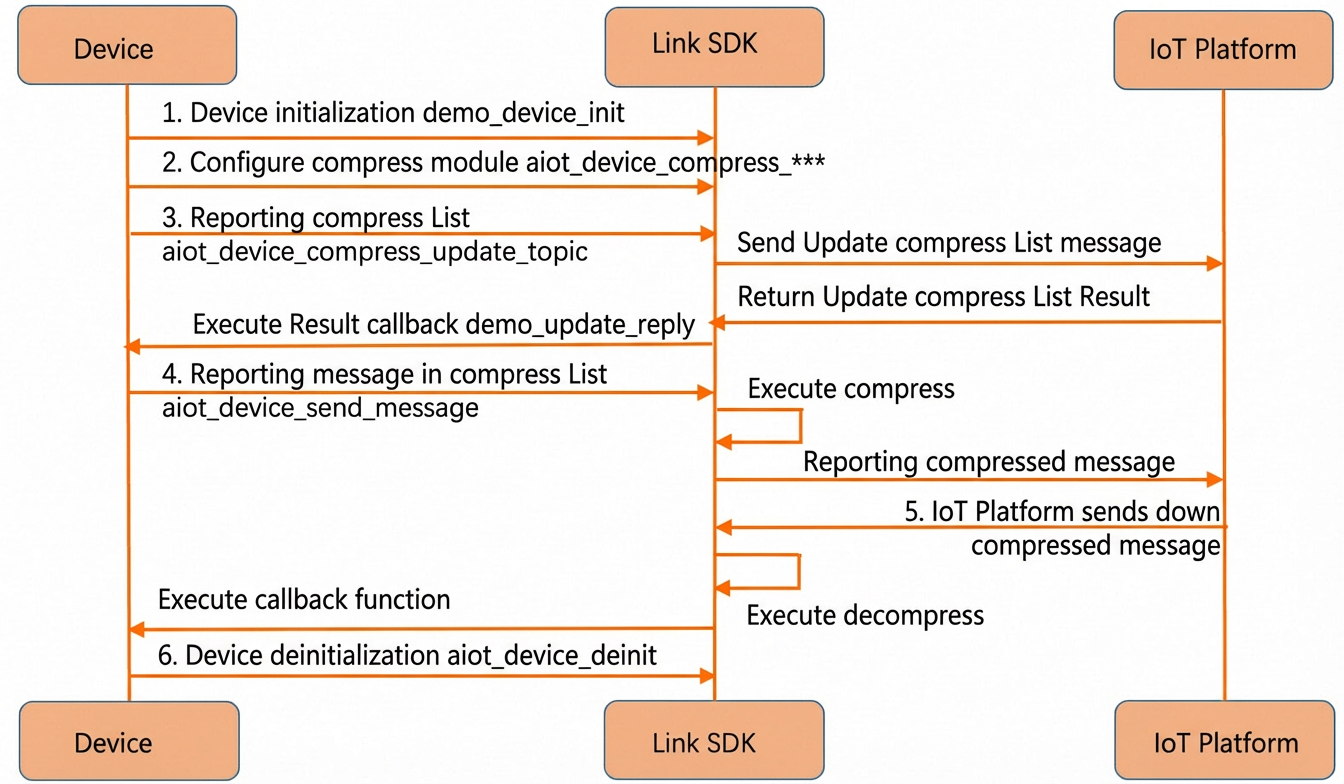
Step 1: Initialize the device
Create a device handle and establish a connection.
static void* demo_device_init(char *product_key, char *device_name, char *device_secret, char *host, uint16_t port)
{
    int32_t res = STATE_SUCCESS;
    /* Create a device. */
    void *device = aiot_device_create(product_key, device_name);
	....
    ....

    res = aiot_device_connect(device);

	....
    ....
    return device;
}
Step 2: Configure the compression module
Define the topic lists.
/* TODO: Replace this with the list of mobile originated message topics that you want to compress. The topics must be full topic paths. Wildcards are not supported. */
char *compr_list[] = {
    "/"PRODUCT_KEY"/"DEVICE_NAME"/user/update",
    "/sys/"PRODUCT_KEY"/"DEVICE_NAME"/thing/event/property/post",
};

/* TODO: Replace this with the list of mobile terminated message topics that you want to decompress. The topics must be full topic paths. Wildcards are not supported. */
char *decompr_list[] = {
    "/"PRODUCT_KEY"/"DEVICE_NAME"/user/update_reply",
    "/sys/"PRODUCT_KEY"/"DEVICE_NAME"/thing/event/property/post_reply",
};
Set the topic lists.
    /* Set the list of topics for compression. This list mainly contains mobile originated message topics. */
    aiot_device_compress_set_compr_list(device, compr_list, sizeof(compr_list)/sizeof(char *));
    /* Set the list of topics for decompression. This list mainly contains mobile terminated message topics. */
    aiot_device_compress_set_decompr_list(device, decompr_list, sizeof(decompr_list)/sizeof(char *));
Set the callback function for the compression module.
aiot_device_compress_set_callback(device, demo_update_reply, &code);
(Optional) Step 3: Report the compression topic list
Report the compression topic list to IoT Platform. A device typically needs to report the list only once because IoT Platform persists the list.
/* Report the compression or decompression topic list to IoT Platform. You only need to report this once. The setting remains valid after a restart. */
aiot_device_compress_update_topic(device);
Step 4: Report a message for a topic in the compression list
When you publish a message to a topic that is on the compression list, the C Link SDK Extended automatically compresses the message.
    char *pub_topic = "/sys/"PRODUCT_KEY"/"DEVICE_NAME"/thing/event/property/post";
    char *pub_payload = "{\"id\":\"1\",\"version\":\"1.0\",\"params\":{\"LightSwitch\":0}}";
    aiot_msg_t *pub_message = aiot_msg_create_raw(pub_topic, (uint8_t *)pub_payload, strlen(pub_payload));

    /* Send the message. */
    aiot_device_send_message(device, pub_message);
    /* Delete the message. */
    aiot_msg_delete(pub_message);
Step 5: Deliver the messages in the compression list
If a mobile terminated message is sent to a topic on the compression list, IoT Platform compresses the message. The C Link SDK Extended then decompresses the message. The data passed to the callback function is the decompressed data.
static void demo_msg_callback(void *device, const aiot_msg_t *message, void *userdata)
{
    /* When the device receives a message, it only prints the message by default. */
    printf("[message] <<, topic: %s\n", message->topic);
    printf("[message] <<, payload: %.*s\n", message->payload_lenth, message->payload);
}
Step 6: Deinitialize the device
    /* Disconnect the device and revoke its resources. */
    demo_device_deinit(device);