Multiple connections for a single device
If the number of queries per second (QPS) for device messages exceeds the platform limit of 30, excess messages are dropped. The multiple connections feature of IoT Platform lets you increase this QPS limit. This topic describes the multiple connections feature of IoT Platform.
Prerequisites
Limits
This feature is currently supported only in the China (Beijing) region.
How it works
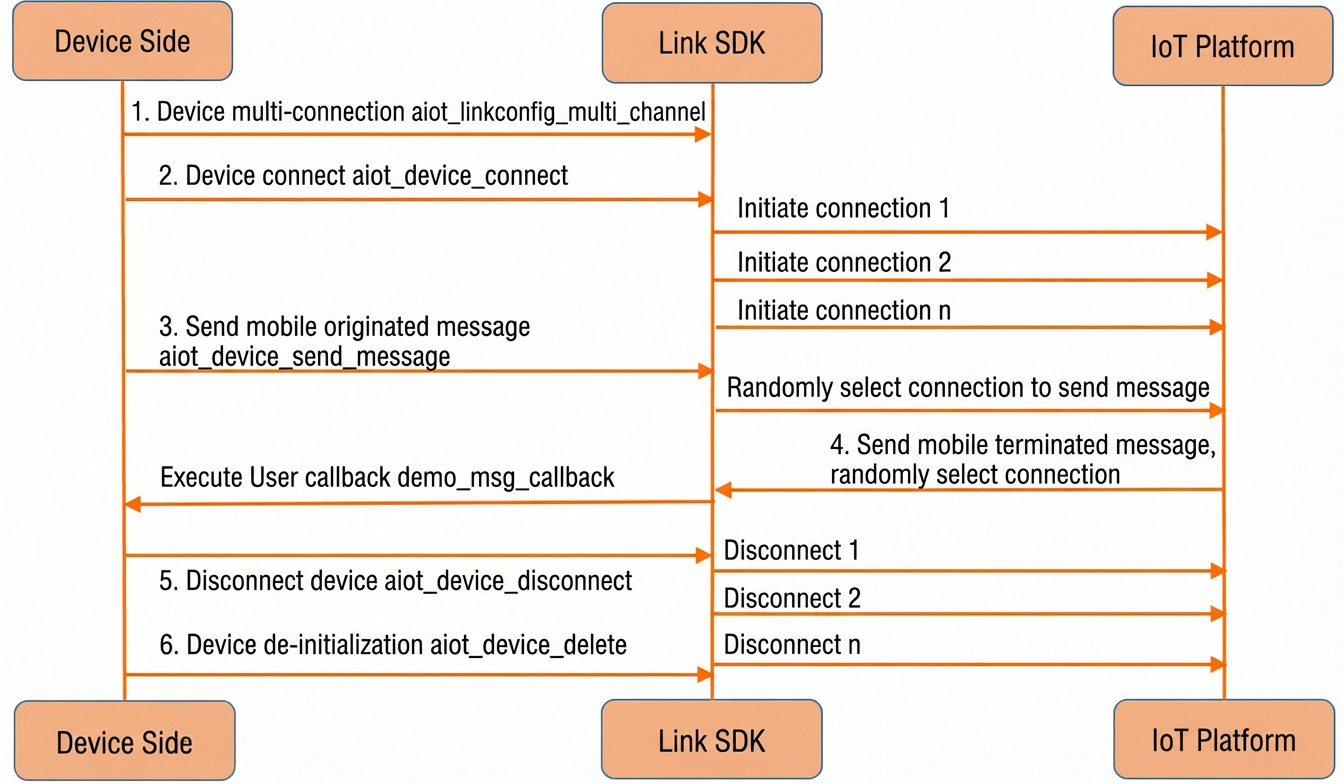
The multiple connections feature is implemented and managed by the LinkSDK. You do not need to manage the implementation details.
Device connection: If at least one connection is active, the device is considered online. You receive a callback that the device is successfully connected.
Device disconnection: When all connections are disconnected, the device is considered offline. You receive a callback that the device is disconnected.
Uplink messages: A random connection is selected to report messages. This does not apply to sub-device messages, which are attached to a specific connection.
Downlink messages: A random connection is selected to deliver messages. This does not apply to sub-device messages, which are attached to a specific connection.
Usage
During device initialization, set the initial connection ID and the number of connections. The other connection parameters are the same as those for a single connection.
/* Set up 5 connections. The connection IDs start from 1. */
aiot_linkconfig_multi_channel(config, 1, 5);
Parameter | Description |
config | The handle for device connection parameter settings. |
1 | Sets the initial connection ID to 1. The value is typically a number less than 100. |
5 | The number of channels. The maximum value is 100. |