Secure tunnel communication protocol
This topic describes the secure tunnel communication protocol defined by IoT Platform.
Background information
The following figure shows how data is encapsulated for transmission over the communication protocol.
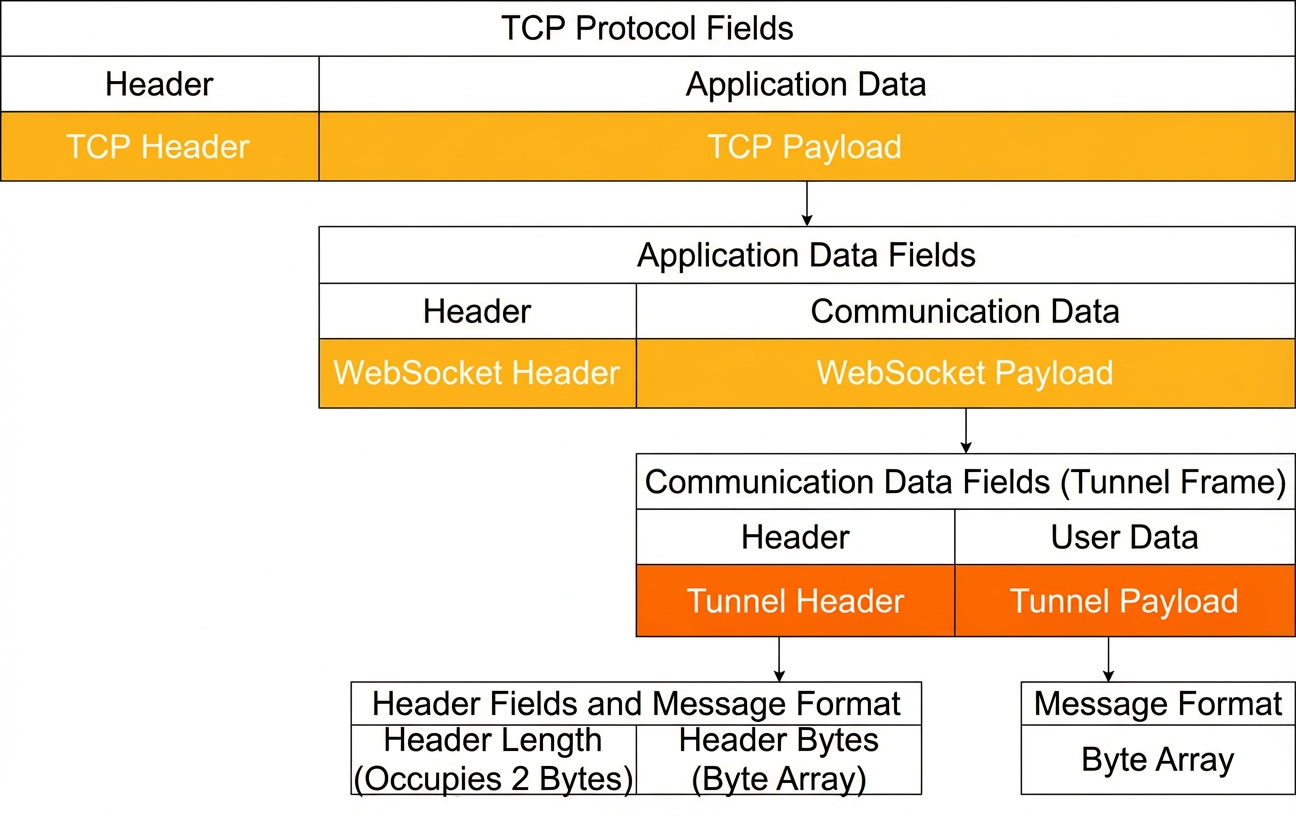
After a device and an access client connect to the secure tunnel, they use the tunnel's communication protocol for remote access. All communication, session management, and data transfer between the device and the access client rely on tunnel frames. A tunnel frame is the payload of a binary WebSocket data frame.
You must design and develop the application layer communication protocol for both the access client application and the device-side target application. This protocol enables communication between the access client and the device.
Communication Data Format
A tunnel frame consists of two parts:
- Tunnel Header: Contains metadata for the secure tunnel session.
Field Description Header Length The length of the Tunnel Header content as a byte array. The maximum length is 2048 bytes. This value must occupy 2 bytes, with the high-order byte first. For example, if the UTF-8 encoded byte array of the Tunnel Header content has a length of 87 (decimal), which is 57 (hexadecimal), the high-order byte is 0x00 and the low-order byte is 0x57.
Header Bytes The Tunnel Header content, which is a UTF-8 encoded byte array of the JSON content. For more information about the JSON data, see the following table Tunnel Header JSON data. Table 1. Tunnel Header JSON data Parameter Data type Description frame_type Integer The type of the tunnel frame. Valid values: - 1: common_response. The response data.
- 2: session_create. Creates a session.
- 3: session_release. Closes a session.
- 4: data_transport. Transmits data within a session.
session_id String The session ID. This ID is unique within the secure tunnel. When the access client sends a request to create a session, this parameter is not required. IoT Platform assigns a session ID and sends it to the device. For all other tunnel frame types, both the access client and the device must include the session ID.
frame_id Long The frame ID set by the access client or device when sending data. The value can range from 0 to (263 - 1). Use an incrementing frame ID for both the device and the access client to distinguish data within each session_id.
service_type String A custom service type for the session. The value can contain letters, underscores (_), hyphens (-), and periods (.). The first character must be a letter. The maximum length is 16 characters. - Tunnel Payload: Contains the session payload. The length cannot exceed 4 KB. The data format depends on the frame_type. For more information, see Session details.
Session details
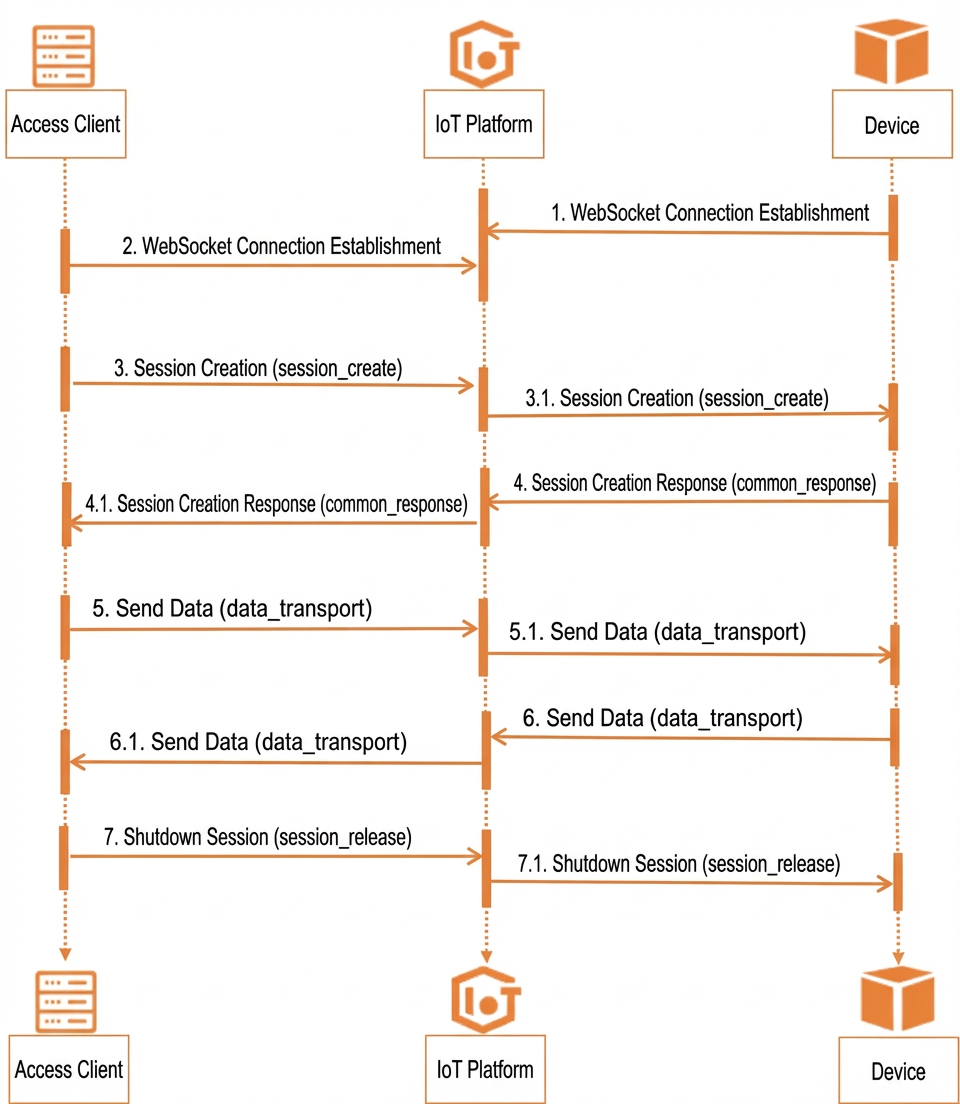
The following flowchart shows the session communication process between a device and an access client.
| Ordinal Number | Process | Description |
| 1 and 2 | Establish a WebSocket connection. | The device and the access client establish a secure WebSocket channel. |
| 3 | Create a session. | The access client sends a session creation request to the device. Important If the device does not return a response within 10 seconds after the session creation tunnel frame is sent, the access client receives a timeout error. |
| 4 | Creates response data. | IoT Platform or the device returns a response to the access client. Note Response data can be created for different types of tunnel frames. |
| 5 and 6 | Session data transmission. | The device and the access client can use the session for data communication. Important IoT Platform does not parse the Tunnel Payload data. The platform forwards the data directly to the device or the access client. |
| 7 | Close the session. | Common scenarios:
|
The following table describes the required JSON data in the Tunnel Header and Tunnel Payload for different session operations.
| Field | Create session | Response data | In-Session Data Transmission | Close session |
| frame_type | Set to 2. | Set to 1. | Set to 4. | Set to 3. |
| session_id | Not required. When a session is created, IoT Platform generates this ID and sends it to the device. | Required. Use the session_id that IoT Platform sent to the device when the session was created. | Required. Use the session_id that IoT Platform generated when the session was created. | Required. Use the session_id that IoT Platform generated when the session was created. |
| frame_id | Required. Set this parameter as described in the parameter description section above. | Required. Use the frame_id from the session creation request that the device received. | Required. Set this parameter as described in the parameter description section above. | Required. Set this parameter as described in the parameter description section above. |
| service_type | Required. Set this parameter as described in the parameter description section above. After the access client specifies a service type, the device can use this type to connect to the specified target application when it receives the session creation request. | Required. Use the service_type from the session creation request that the device received. | Required. Use the service_type that was specified when the session was created. | Not applicable. |
| payload | Not applicable. | JSON data with the following content:For more information about the parameters, see the payload parameters for a response table below. | A custom byte array. The length cannot exceed 4 KB. | JSON data with the following content:For more information about the parameters, see the payload parameters for closing a session table below. |
| Parameter | Data type | Description |
| code | Integer | The response code. The value can range from 0 to 255. Codes 0 to 15 are reserved by the system. You can customize codes from 16 to 255.
|
| msg | String | The error message returned if the creation fails. |
| Parameter | Data type | Description |
| code | Integer | The reason for closing the session. Valid values:
|
| msg | String | Information about closing the session. |