Service overview
Device Location Service is a free, value-added service of Alibaba Cloud IoT Platform that helps you build location-based solutions.
Features
-
Accurate multi-mode positioning
Pinpoints device locations using multiple methods, including GPS, Wi-Fi, and cellular base stations, to provide timely location data.
-
Real-time location visualization
Displays real-time device locations and operational statuses on a map, ideal for data dashboards and large-screen displays.
-
Visualized track analysis
Dynamically plays back a device's movement on a map over a specified time range, providing a richer and more intuitive visualization.
-
Device tracking and alerting
Monitors the geographic location of devices. This feature is ideal for scenarios with geographical restrictions, such as alerting when a child's smartwatch or a piece of campus equipment leaves a designated area.
-
This service is available only to users who have previously activated it. New activations for Device Location Service are no longer supported.
-
The service returns location information as latitude and longitude coordinates only.
Positioning flowchart
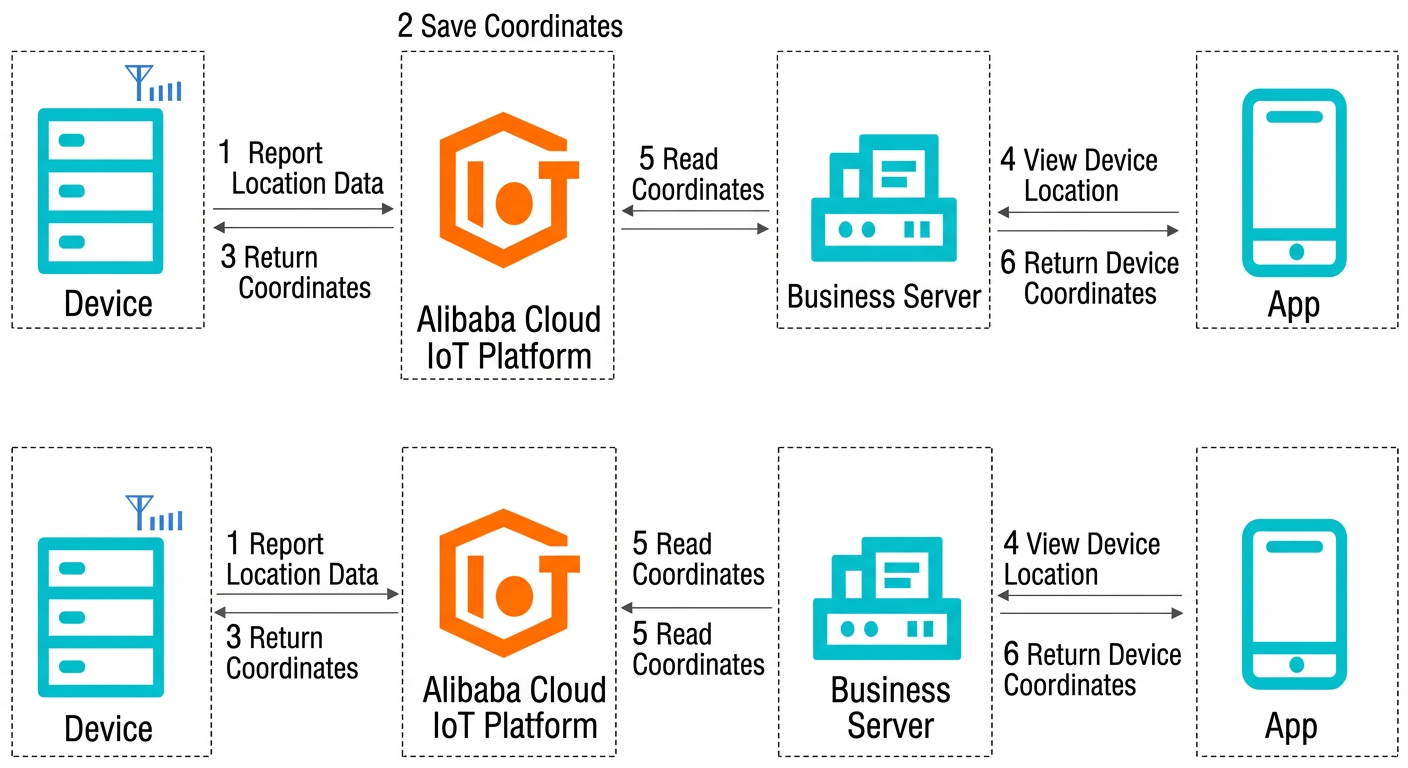
The workflow is as follows:
-
A device reports its location data, such as information from cellular base stations, Wi-Fi access points, or its IP address, to Alibaba Cloud IoT Platform.
-
Alibaba Cloud IoT Platform saves the device's latitude and longitude in a property of its Thing Model.
-
Alibaba Cloud IoT Platform returns the latitude and longitude to the device for assisted positioning.
-
Your application calls an Alibaba Cloud IoT Platform API to retrieve the device's location.
-
Your business server reads the device's latitude and longitude stored in Alibaba Cloud IoT Platform.
-
Your business server returns the device's latitude and longitude to your application.
-
After a device obtains its latitude and longitude, it does not need to upload this data to your business server. This reduced interaction improves location retrieval speed and conserves resources.
-
In the figure above, 1, 2, and 3 correspond to Step 4 in the Procedure, and 4, 5, and 6 correspond to Step 5 in the Procedure.
Procedure
To use Device Location Service, you must connect your device to Alibaba Cloud IoT Platform.
-
In the Alibaba Cloud IoT Platform console, create a product and create a device.
-
Add a Thing Model. Add a custom property for the device with the identifier
GeoLocation. Set the following parameters for the property: for feature type, select property; for feature name, enter Latitude and Longitude; for data type, select struct; and for read/write type, select Read/Write.The following table describes the JSON object parameters.
Parameter
Identifier
Type
Value
Step
Description
Longitude
longitude
double
-180 to 180
1
The longitude of the device.
Latitude
latitude
double
-90 to 90
1
The latitude of the device.
Altitude
altitude
double
-1000 to 8000
1
The altitude of the device.
Coordinate system
CoordinateSystem
enum
1: WGS-84
2: GCJ-02
Not applicable
The coordinate system that is used to describe and determine a location. The following coordinate systems are supported:
A coordinate system is required to describe and determine locations, and the following coordinate types are supported:
-
WGS-84: The World Geodetic System 1984, an international standard for latitude and longitude coordinates.
-
GCJ-02: A coordinate system standard established by the China State Bureau of Surveying and Mapping. It is an encrypted coordinate type.
-
-
Connect the device to Alibaba Cloud IoT Platform to obtain a token. For more information, see Obtain a token for a device.
-
Obtain the latitude and longitude for the device.
After obtaining a token, the device reports its location information to Alibaba Cloud IoT Platform over HTTPS. The platform then returns the latitude and longitude to the device for assisted positioning. For more information, see Obtain the latitude and longitude of a device over HTTPS.
-
Call an Alibaba Cloud IoT Platform API to obtain device location data.
Your application calls the
QueryDevicePropertyDataoperation, which returns the value of the device'sGeoLocationproperty.For more information about how to use APIs, see the Cloud Development Guide.
-
Create a scene to display the real-time operational status of associated devices on a map. For details, see Real-time Device Display.
After you create a scene, you can configure and manage the devices in it:
-
Set a geofence to monitor the device's location.
-
Query the historical track of a device over a specific time range.
-
Share a scene with other users to let them view or control the status of the corresponding devices.
-