Server-side integration
Interactive messaging enhances communication in live rooms by enabling capabilities such as comments, bullet comments, and likes. ApsaraVideo Live provides easy-to-integrate SDKs for adding these features to your live streaming applications.
Prerequisites
-
An Alibaba Cloud account that can access the ApsaraVideo Live API is created, and a Resource Access Management (RAM) user to which relevant permissions are granted is created. For more information, see Create a RAM user and grant permissions to the RAM user.
-
An interactive messaging application is created, and relevant information about the application is recorded. If no interactive messaging application is available, create one in the ApsaraVideo Live console.
Deploy an AppServer
-
After an interactive messaging application is created, you can obtain the following information about the application:
-
Application ID (AppID)
-
Application key (AppKey)
-
Application signature (AppSign)
-
The region in which the application resides, which is the live center where the application is deployed.
Record this information in your backend storage.
-
-
Implement your AppServer.For more information, see,seeAppServer Demo。
An AppServer provides credentials for clients to log on to Alibaba Cloud interactive messaging.
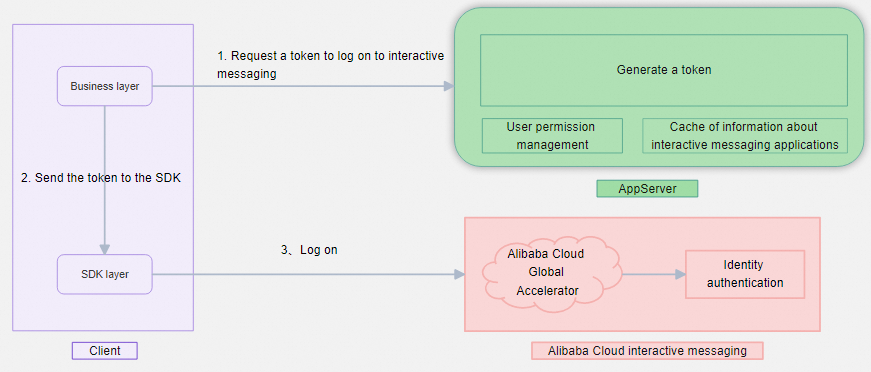
A token is generated by using the following algorithm. For more information about roles, see the "Identity-based permissions" section.
token = sha256(appId + appKey + userId + nonce + timestamp + role)Field
Description
Limit
appId
The application ID.
The ID is returned by the console when you create the application.
appKey
The AppKey.
The key is returned by the console when you create the application.
userId
The user ID.
The ID can be up to 64 characters in length and can contain only letters, digits, and underscores (_).
nonce
The nonce. It is in the AK-String format and can be up to 64 bytes in length.
The value of this field can contain only letters, digits, and underscores (_). This field can also be left empty.
role
The role. A value of admin indicates that the user can perform management operations.
This field can be left empty. If you want to grant the user the administrator permissions, set the value to admin. A value other than admin indicates that the user cannot perform management operations. For more information, see the "Identity-based permissions" section of this topic.
timestamp
The expiration time. Unit: seconds. Expiration time = Current time + Validity period.
The value is a Unix timestamp, which is equal to the number of seconds that have elapsed since 00:00:00 UTC on January 1, 1970 until token expiration.
After the token is generated, send the token, appId, userId, nonce, role, timestamp, and the application signature to the client. Sample code:
{
    "auth": {
        "nonce": "The nonce that is specified when you generate the token.",
        "timestamp": 131231234, //<The timestamp that is specified when you generate the token, which is a numeric value.>
        "role": "The role that is specified when you generate the token.",
        "user_id": "The user ID that is specified when you generate the token."
    },
    "app_id": "{Your application ID.}",
    "app_sign": "{Your application signature.}",
    "app_token": "{The generated token.}"
}
Identity-based permissions
Logon roles
A user's logon role is specified at logon.
|
Role name |
Value |
Description |
|
Regular user |
A value other than admin |
A user of this role can perform regular operations, such as joining a group and sending a message. |
|
Administrator |
admin |
A user of this role can perform regular operations and management operations, such as creating a group. |
Group-related roles
|
Role name |
Assignment method |
Description |
|
Group creator |
This role is automatically assigned to the user who creates the group. |
A user of this role can perform management operations, such as muting a user or the group and deleting the group. If the group is muted, a user of this role can still send messages. |
|
Group administrator |
This role is assigned to a user by the group creator when the group is created or by calling the API operation that is used to modify the group information. |
A user of this role can perform management operations, such as muting a user or the group and deleting the group. If the group is muted, a user of this role can still send messages. |
|
Others |
This role is automatically assigned to a user who is not the group creator or a group administrator when the user joins the group. If the user logs off or exits due to an exception, the user automatically leaves the group. |
A user of this role can perform operations such as joining a group, leaving a group, and sending a message. If the group is muted, a user of this role cannot send messages. |
Integrate interactive messaging on the server side
Integrate the server-side API in your business server or AppServer. For more information about the API operations, see Interactive Messaging (New). Click Debug on an operation page in OpenAPI Explorer to view the SDK integration information.
-
ApsaraVideo Live provides SDKs (including interactive messaging SDK) in versions 1.0 and 2.0. We recommend using V2.0.
-
In the following sample code, specify the region in which the application that you create resides. Valid values: cn-shanghai and ap-southeast-1 (Singapore).
-
When you create the application, select the region based on your business requirements. Data in different regions is isolated from each other.
-
When you call an API operation, the region that you specify must be the same as the region in which the application resides. Otherwise, your call is invalid.
-
 // Configure Credentials authentication information, including ak, secret, token
        StaticCredentialProvider provider = StaticCredentialProvider.create(Credential.builder()
                // Please ensure that the environment variables ALIBABA_CLOUD_ACCESS_KEY_ID and ALIBABA_CLOUD_ACCESS_KEY_SECRET are set.
                .accessKeyId(System.getenv("ALIBABA_CLOUD_ACCESS_KEY_ID"))
                .accessKeySecret(System.getenv("ALIBABA_CLOUD_ACCESS_KEY_SECRET"))
                //.securityToken(System.getenv("ALIBABA_CLOUD_SECURITY_TOKEN")) // use STS token
                .build());

        // Configure the Client
        AsyncClient client = AsyncClient.builder()
                .region("cn-qingdao") // Region ID
                //.httpClient(httpClient) // Use the configured HttpClient, otherwise use the default HttpClient (Apache HttpClient)
                .credentialsProvider(provider)
                //.serviceConfiguration(Configuration.create()) // Service-level configuration
                // Client-level configuration rewrite, can set Endpoint, Http request parameters, etc.
                .overrideConfiguration(
                        ClientOverrideConfiguration.create()
                                  // Endpoint. Visit https://api.alibabacloud.com/product/live for reference.
                                .setEndpointOverride("live.aliyuncs.com")
                        //.setConnectTimeout(Duration.ofSeconds(30))
                )
                .build();
Server-side API call permissions
After you integrate the ApsaraVideo Live server SDK, you can call API operations from your business server, such as sending messages to groups. For more information, see Interactive messaging (new).
Server-side calls and client-side calls have the following differences:
-
The server performs authentication based on RAM users.
-
A server-side call has the highest privilege, which gives you the administrator and creator permissions.
-
If a group is muted, you can still make a server-side call to send a message in the group. A message that is sent by making a server-side call does not require content moderation.
Callbacks
Configure callbacks to listen to application events such as logon, logoff, joining a group, and leaving a group. For more information, see CreateLiveMessageApp.
Content moderation
Content security moderation is divided into two levels:,Appapp-level and message-level。
AppApp-level moderation settings
There are three security moderation methods::built-in、custom、no moderation。You can select based on your actual needs.。Built-in security moderation uses Alibaba Cloud Content Security moderation service,Group messages use thePublic Chat Comment Content Detectionservice,Private messages use thePrivate Chat Interactive Content Detectionservice。For more information about the moderation service, seeUse Text Moderation Enhanced to identify text violation risks。
Message-level moderation settings
If you enable content moderation for the application, you can configure the following moderation settings at the message level.,For more information, see the client group message sending、single message sending API,as shown inIOSiOS Integration.
-
Specify whether to moderate a message that is sent. For example, you can choose to not moderate custom non-chat content such as gift messages.
-
Separate the sent message from part of the content in the message that you want to moderate. For example, if the text of a custom message that you send is "hello", but the message contains additional information such as the user avatar, you can separate the sent message from the additional information that is pending moderation.