Integrate AUI Kits with a WeChat mini program
This topic describes how to integrate the portrait mode component of AUI Kits with a WeChat mini program. This topic also provides usage notes of the integration process and sample code.
Prerequisites
AppServer
An AppServer is deployed, and the endpoint of the AppServer is obtained. For more information, see Server-side configuration and operation.
Streamer
A WeChat mini program includes only the viewer module and does not support stream ingest and co-streaming features. If you want to use the features, you must integrate the mobile AUI Kits with the WeChat mini program. For more information, see Android and iOS.
Permissions on a WeChat mini program
To use the tags of a WeChat mini program during the integration of the AUI Kits SDK for interactive streaming, related permissions are required. Therefore, you must obtain the permissions to use the categories and tags of a WeChat mini program before you integrate AUI Kits with the WeChat mini program. Otherwise, you cannot use the WeChat mini program.
To obtain the permissions, perform the following steps:
Register a WeChat mini program as an enterprise. The stream ingest and streaming tags are only available to enterprise WeChat mini programs. In this case, you must select Enterprise as the entity when you register a WeChat mini program. The following figure shows the parameter configurations.
Obtain the tag permissions. The permissions to use the stream ingest and streaming tags are available to specific categories. Make sure that your WeChat mini program meets the category requirements. Then, you can perform the following operations to obtain the permissions on related components: Go to the WeChat Official Accounts Platform. In the left-side navigation pane, choose Development > Development Management. On the page that appears, select the components that you need. The following figure shows the process of obtaining the permissions.
Development framework
The uni-app framework based on the Vue technology stack is used to develop the project. This way, one set of codes can support multiple mini program platforms. For more information about the uni-app framework, see the documentation on the official website of uni-app. The WeChat mini program platform and HTML5 platform are supported. More mini program platforms will be supported in the future.
Procedure
Prepare the environment
Prepare the development environment
We recommend that you use the HBuilderX visual editor to develop the project, and download and install the WeChat developer tool. For more information, see Quick Start on the official website of uni-app to configure these tools.
WeChat version requirements
iOS WeChat application: 7.0.9 or later
Android WeChat application: 7.0.8 or later
Mini program base library: 2.10.0 or later
A mini program test account does not have permissions to use the <live-pusher> and <live-player> tags. You must obtain the required permissions for development by using a mini program enterprise account.
The WeChat developer tool does not support native components, such as components of the <live-pusher> and <live-player> tags. In this case, you must run the project on your device.
Download the source code
Open source projects provide sample code in the portrait and landscape modes based on the player. You can select a project based on your business requirements.
The following figure shows the effect of the portrait mode. For more information, see AUIInteractionLive.
The following figure shows the effect of the landscape mode. For more information, see AUIEnterpriseLive.
Configure the project
After you build the development environment, open the downloaded source code project in HBuilderX and configure the project.
Configure the AppServer
Configure the required parameters in the config.js file. You can configure the endpoint of the AppServer.
export default {
  // The endpoint of the AppServer. The value cannot end with a forward slash (/).
  appServer: 'https://your-appserver-origin',
};
Configure the AppID of the mini program
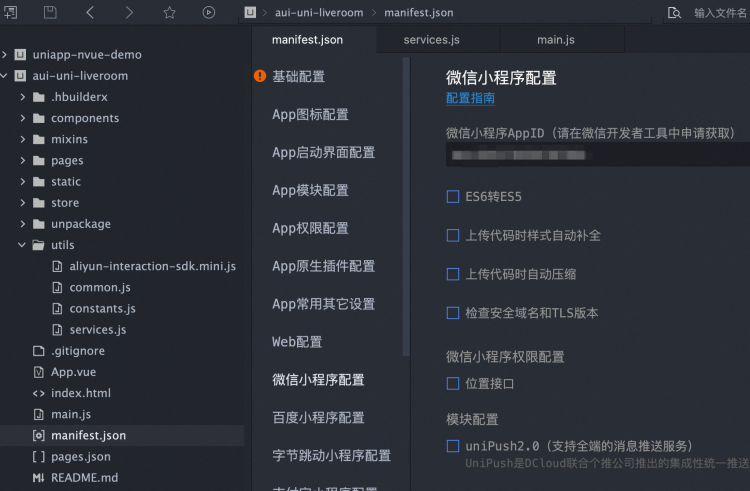
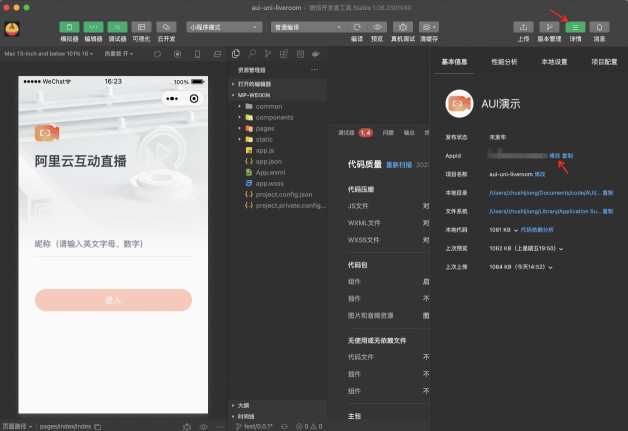
Configure the AppID of your mini program in the manifest.json file. If you do not have a mini program in the initial stage of the project, you can leave this parameter empty. You can also obtain the AppID by using a mini program developer tool.
Run the project on an on-premises device
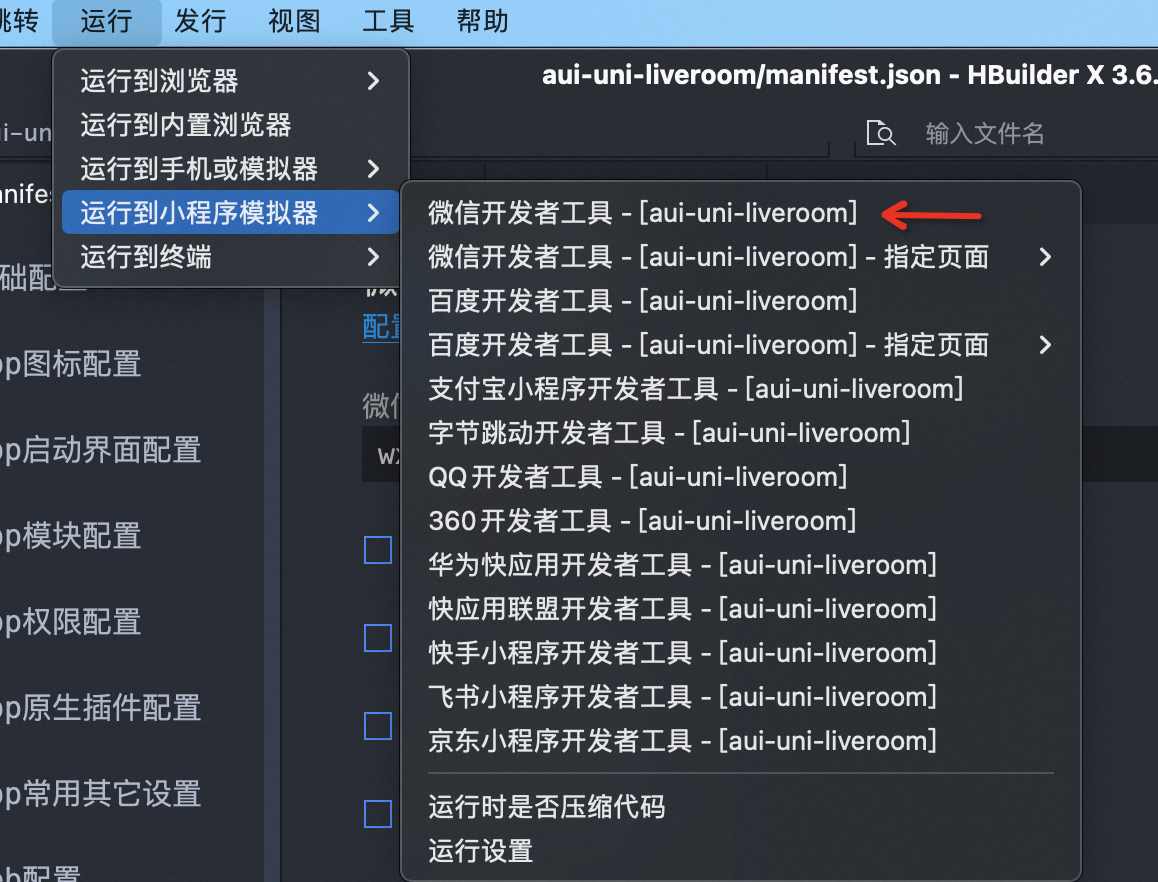
After you configure the parameters, choose Run > Miniprogram > WeChat devtools in the top navigation bar. The system automatically packages the code and opens the WeChat developer tool to run the project.
Publish the mini program
Configure the endpoint
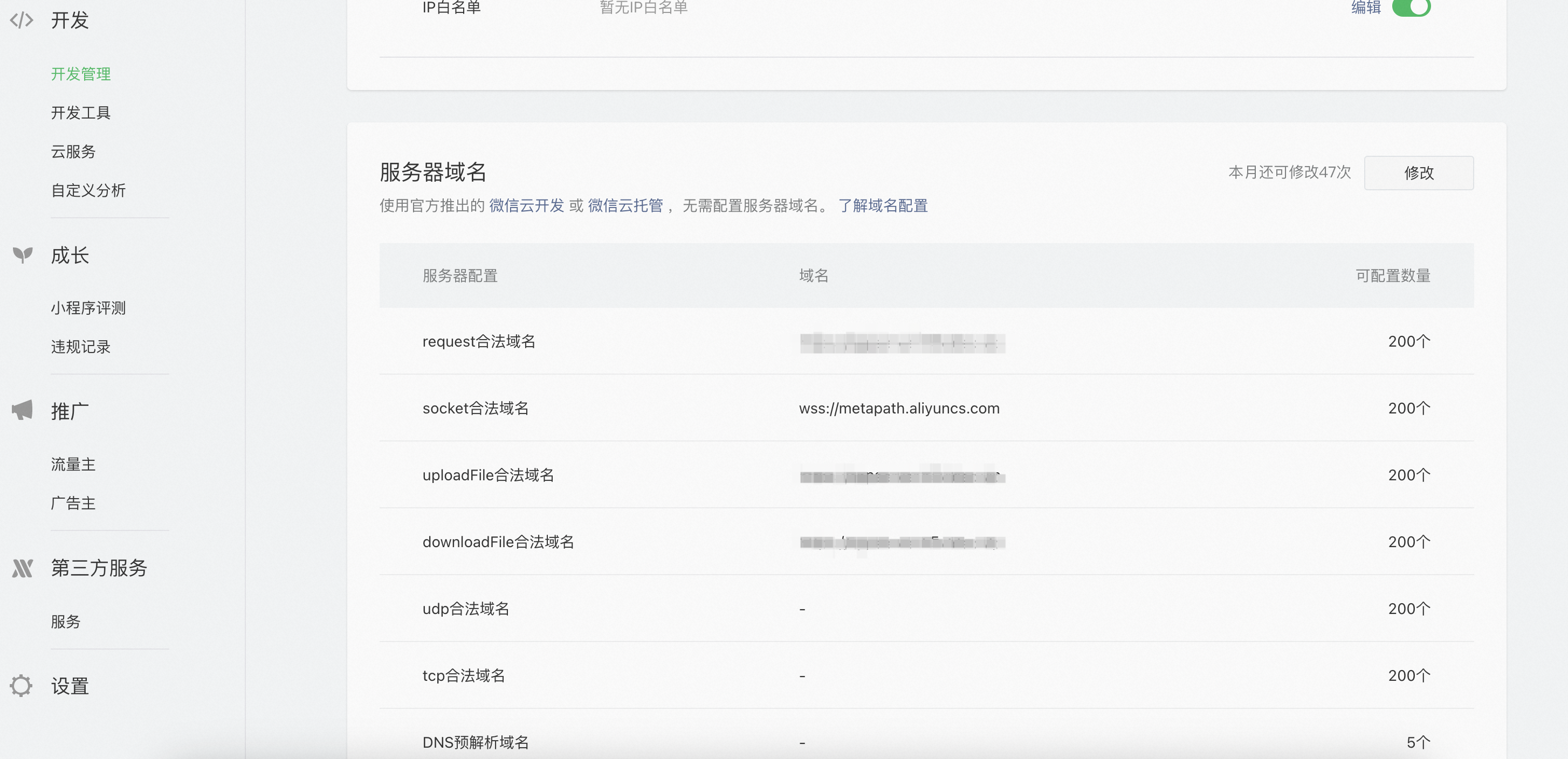
The server endpoint must be configured in the background of the mini program. Otherwise, the mini program cannot call the related operations as expected. To configure the server endpoint, perform the following operations: Go to the WeChat Public Platform. In the left-side navigation pane, choose Development > Development Management. On the page that appears, configure the endpoint in the Server Endpoint section.
You must specify the endpoint of the AppServer in the domain name of the request. Note that the request must be initiated over HTTPS. If the mini program fails to initiate the request after you configure the endpoint, refer to request:fail -202:: net::ERR_CERT_AUTHORI, and delete and reload the mini program on WeChat.
You must configure the wss domain name for interactive messaging in the domain name of a socket. Otherwise, the interactive messaging feature cannot be used as expected. The wss domain name is wss://metapath.aliyuncs.com
Release the code
You can publish the mini program in HBuilderX or upload the mini program to a WeChat developer tool. For more information, see Publish as a WeChat mini program in the uni-app documentation and Publish a WeChat mini program in the WeChat documentation.
Related configurations
This project focuses on the development of the live channel module. Before you use this project to provide services for end users, you must configure other related modules based on your business requirements.
Logon
The logon module in this project is provided as sample code. In this module, the AppServer provides an API operation in the live channel. Users can send a username and a password in plaintext to obtain a token by calling the API operation. This sample code can be used only for on-premises development and experience. Do not use the sample code in the production environment. For more information about how to implement the logon feature, see Mini program logon in the WeChat documentation.
Live channel list
The project code for the live channel list page is stored in the pages > roomList path. The code logic is relatively simple and you can optimize the code based on your business requirements.
Compile the project as HTML5 pages
The uni-app project can also be compiled as HTML5 pages.
Run the project in the local environment
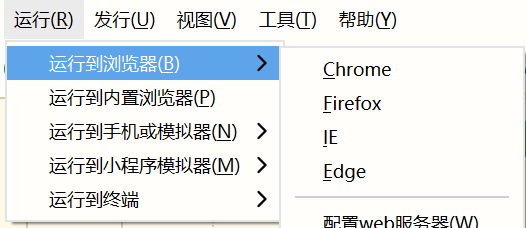
After you build the development environment and configure the parameters, choose Run > Browser in the top navigation bar and select a browser to experience the project.
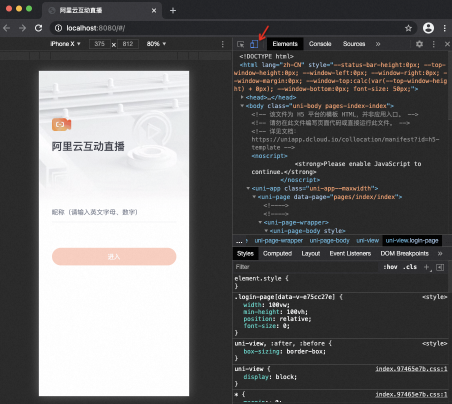
The pages are HTML5 pages in portrait mode. Therefore, you can go to the console by using a browser and switch to the mobile terminal mode.
Publish the uni-app project
For more information, see Publish as a web site.