Overview of Open Storage
MaxCompute provides the Storage API to improve integration with the big data ecosystem and allow external engines to access data in MaxCompute. Mainstream third-party compute engines can call the Storage API to directly access the underlying storage of MaxCompute. This significantly improves the efficiency of data access and interaction.
Overview
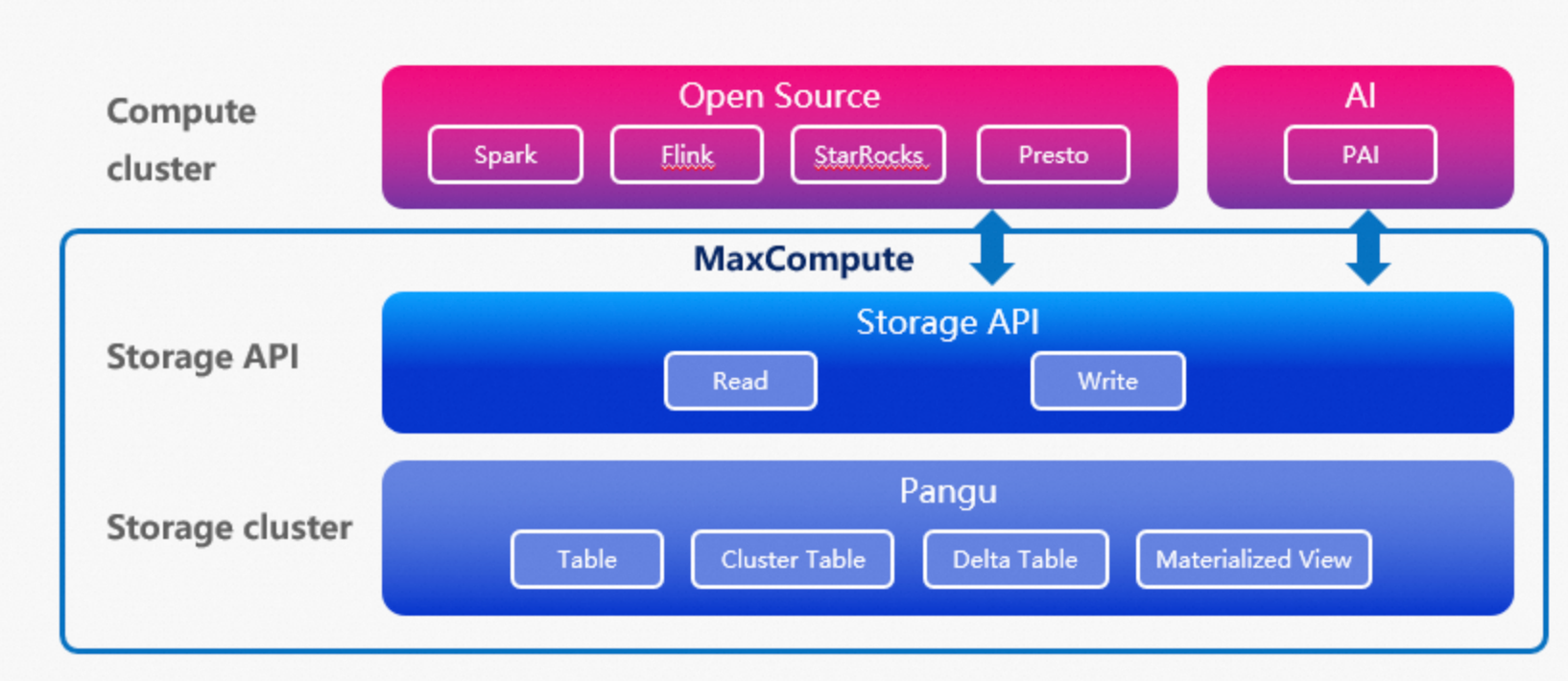
The Storage API is a data service interface that provides an efficient, low-latency, and secure method for data access. It allows mainstream third-party compute engines to access the MaxCompute storage system. This improves the integration and data processing efficiency between MaxCompute and open source compute engines or machine learning engines. Compute engines such as Spark, StarRocks, Presto, and Flink can use a connector to directly access data stored in MaxCompute. This simplifies the data usage process and improves data access performance. The following figure shows the architecture.
Use cases
The Storage API is ideal for scenarios that require data accessibility and multi-engine computing. If enterprises or developers need to flexibly switch between computing frameworks or use specific engine features to process data in MaxCompute, the Storage API acts as a bridge to facilitate data exchange and enable diverse data processing.
Key features
High throughput: The Storage API supports efficient columnar data reads, predicate pushdown for data filtering before transmission, and the Arrow data format.
Secure and user-friendly: Offers direct readaccess to the underlying storage with table semantics. This abstracts away storage complexities while adhering to security policies such as project isolation, access control, and data encryption.
Ecosystem integration: Spark on EMR and StarRocks can use a connector to directly access data in MaxCompute. This simplifies compute engine integration.
Usage notes
Third-party engines that access MaxCompute can read standard tables, partitioned tables, clustered tables, Delta Tables, and materialized views. However, they cannot read external tables or logical views in MaxCompute.
Reading data of the JSON type is not supported.
For the pay-as-you-go Storage API, the number of concurrent requests is limited to 1,000 per tenant, and the transmission rate is limited to 10 MB/s per concurrent request.
Data transmission resources
When a third-party engine uses the MaxCompute Storage API for data transmission tasks, you can use either exclusive resource groups for Data Transmission Service (subscription) or pay-as-you-go Storage API resources. The following table describes the resources.
Resource group name | Billing description | Supported regions | Usage instructions |
This resource group is based on the subscription billing method. You are charged based on the number of concurrent instances that you purchase. |
| Purchase and use an exclusive resource group for Data Transmission Service | |
This resource is pay-as-you-go. Each tenant receives a free monthly quota of 1 TB for data reads and writes. If the free quota is used up, you are charged for the logical size of data that is read or written. |
|
On the Resource Observation page, you can view usage details for exclusive resource groups for Data Transmission Service (subscription) and pay-as-you-go Storage API resources. For more information, see Resource Observation.
Use the pay-as-you-go Storage API
Enable the Storage API Switch switch.
Log in to the MaxCompute console and select a region in the upper-left corner.
In the left-side navigation pane, choose .
On the Tenants page, click the Tenant Property tab.
On the Tenant Property tab, enable the Storage API Switch switch.
The name of the pay-as-you-go Storage API resource is
pay-as-you-go. For more information, see Tenant Properties.
Grant permissions
By default, no accounts, including Alibaba Cloud accounts or roles, have the permissions to specify a quota at the job level. You must grant the required permissions.
Add a role.
Log in to the MaxCompute console and select a region in the upper-left corner.
In the left-side navigation pane, choose .
On the Tenants page, click the Roles tab.
On the Roles tab, click Add Role. In the Add Role dialog box, enter a custom Role Name, provide the Policy Content, and then click OK.
{
    "Statement": [{
            "Action": [
                "odps:List",
                "odps:Usage"],
            "Effect": "Allow",
            "Resource": ["acs:odps:*:regions/*/quotas/pay-as-you-go"]}],
    "Version": "1"
}
Metric description:
Action: The operation permission that you want to grant. You can specify multiple operations in a single authorization statement. If you specify multiple operations, separate them with commas (,). For more information about the valid values, see MaxCompute permissions. For more information about the parameters in a policy document, see Basic elements of an access policy.
Resource: The scope of the authorized resource. The format is
["acs:odps:Tenant/${tenant_id}:regions/${region_id}/quotas/${quota_name}"].["acs:odps:*:regions/*/quotas/pay-as-you-go"]specifies the pay-as-you-go quota for the Storage API in all regions of the current tenant.
Grant the role to the account that you use to specify a quota at the job level.
By default, an Alibaba Cloud account or a RAM user who has the Super_Administrator role at the tenant level can grant permissions.
The authorization object determines which of the following two scenarios occurs.
Grant permissions to an Alibaba Cloud account.
Run the following command to grant permissions to an Alibaba Cloud account.
-- Add an Alibaba Cloud account to the tenant and grant a role to the Alibaba Cloud account.
Add tenant user <Aliyun$xxxx>;
Grant tenant role <role_name> to user <Aliyun$xxxx>;
-- View the permissions of a role or user in the tenant.
Show grants for tenant role <role_name>;
Show grants for tenant user <user_name>;
Show principals for tenant [role] <role_name>;
Grant permissions to a RAM user.
Log in to the MaxCompute console and select a region in the upper-left corner.
In the left-side navigation pane, choose .
On the Tenants page, click the Users tab.
In the Edit Role dialog box, move the desired roles from the Available Roles section to the Added Roles section, and then click OK.
Use pay-as-you-go Storage API resources
When a third-party engine accesses MaxCompute, you can set the quota name to
pay-as-you-go. The following example uses the Java SDK.// The AccessKey ID and AccessKey secret of your Alibaba Cloud account or RAM user. // An AccessKey pair of an Alibaba Cloud account has permissions to call all API operations. Using these credentials to perform operations in Alibaba Cloud services is a high-risk operation. We recommend that you create a RAM user to call API operations or perform routine O&M. To create a RAM user, log on to the RAM console. // In this example, the AccessKey ID and AccessKey secret are stored in environment variables. You can also store the AccessKey pair in a configuration file as needed. // To prevent security risks, we recommend that you do not hard-code the AccessKey pair in your code. private static String accessId = System.getenv("ALIBABA_CLOUD_ACCESS_KEY_ID"); private static String accessKey = System.getenv("ALIBABA_CLOUD_ACCESS_KEY_SECRET"); // The name of the pay-as-you-go quota that is used to access MaxCompute. String quotaName = "pay-as-you-go"; // The name of the MaxCompute project. String project = "<project>"; // Create an Odps object to connect to the MaxCompute service. Account account = new AliyunAccount(accessId, accessKey); Odps odps = new Odps(account); odps.setDefaultProject(project); // The endpoint of the MaxCompute service. Only VPCs are supported. odps.setEndpoint(endpoint); Credentials credentials = Credentials.newBuilder().withAccount(odps.getAccount()).withAppAccount(odps.getAppAccount()).build(); EnvironmentSettings settings = EnvironmentSettings.newBuilder().withCredentials(credentials).withServiceEndpoint(odps.getEndpoint()).withQuotaName(quotaName).build();NoteConfigure an endpoint based on the region and network connectivity that you selected when you created the MaxCompute project. For more information about the endpoints for each region and network type, see Endpoints.
Examples
Access MaxCompute using a connector. For more information, see the following topics:
Access MaxCompute using an SDK. For more information, see the following topics:
Arrow data type mapping
The MaxCompute Storage API uses Apache Arrow data types to ensure an efficient and structured representation of data during storage and transmission. When you write data using the MaxCompute Storage API, the data is not computed or processed. For example, duplicate keys are not removed from Map data. The original data structure is retained unless the storage engine has specific restrictions.
The following table describes the mappings between MaxCompute and Apache Arrow data types.
MaxCompute data type | Arrow data type |
TINYINT | Int8Type |
SMALLINT | Int16Type |
INT | Int32Type |
BIGINT | Int64Type |
FLOAT | FloatType |
DOUBLE | DoubleType |
BOOLEAN | BooleanType |
DECIMAL | Decimal128Type Note The precision of the MaxCompute DECIMAL type is higher than that of the Storage API Decimal128Type.
|
DECIMAL(precision, scale) | Decimal128Type |
STRING | StringType |
BINARY | BinaryType |
VARCHAR | StringType |
CHAR | StringType |
DATETIME | TimestampType[1] The time unit is milliseconds, and the timezone is UTC. |
TIMESTAMP | TimestampType[2] The time unit is nanoseconds, and the timezone is UTC. Note The TIMESTAMP type supports a wider value range. If you use the Storage API to read or write TIMESTAMP data that is beyond the precision range of TimestampType, the high-precision part of the value is truncated. This causes a loss of precision. |
DATE | Date32Type |
INTERVAL_DAY_TIME | DayTimeIntervalType Note The INTERVAL_DAY_TIME type is accurate to nanoseconds. The Storage API DayTimeIntervalType type is accurate to milliseconds. If you use the Storage API to read or write INTERVAL_DAY_TIME data, the nanosecond part is truncated. This causes a loss of precision. |
INTERVAL_YEAR_MONTH | MonthIntervalType |
ARRAY | ListType |
MAP | MapType Note If a MAP contains duplicate keys:
For example, if you write the raw data |
STRUCT | StructType |
JSON | StringType |