MaxCompute charges for each project based on its storage, compute, and download usage. This topic describes the cost breakdown, billable items, billing methods, and how to choose the right plan for your needs.
Billable items and billing methods
The following table describes the billable items and billing methods of MaxCompute.
Billing method | Description |
| |
MaxCompute supports pay-as-you-go billing for SQL, MapReduce, Spark, and Mars compute jobs. Note The pay-as-you-go developer edition is no longer available for new purchases and was discontinued at 00:00:00 on October 31, 2023 (UTC+8). For more information, see Announcement on Discontinuation of New Purchases for Specific MaxCompute Product Editions on September 23, 2022. | |
The subscription billing method for MaxCompute lets you reserve a portion of resources in advance and pay for them before use. Subscription computing resources are divided into reserved computing resources and non-reserved computing resources. These resources are required for jobs such as SQL, MapReduce, Spark, and Mars. Note Subscription-based non-reserved computing resources are no longer available for new purchases and were discontinued at 00:00:00 on October 31, 2023 (UTC+8). For more information, see Announcement on Discontinuation of New Purchases for Specific MaxCompute Product Editions on September 23, 2022. | |
The pay-per-hour billing method for MaxCompute provides elastic reserved resources on top of a base subscription plan. You can scale compute resources up or down on an hourly basis based on your business needs. You are billed for scaled-out resources based on their quantity and duration of use. Once scaled out, the resources are reserved until they are scaled in. Elastic reserved resources are used for compute jobs such as SQL, MapReduce, Spark, and Mars. | |
MaxCompute AI computing resources are a new type of computing quota, also known as GU Quota. You can subscribe to these resources based on your business cycle on a pay-before-you-use basis. They can be used for scenarios such as entity extraction, multimodal data processing, and graph and text parsing. Note Due to the special nature of the resources, the Service-Level Agreement (SLA) for MaxCompute AI computing resources is defined separately. For more information, see MaxCompute Service Level Agreement (SLA). | |
The MaxCompute model computing service provides large model inference capabilities. It is a pay-as-you-go service where you are billed based on the number of input and output tokens for the out-of-the-box models provided by MaxCompute. | |
| |
MaxCompute provides a free public Data Transmission Service resource group for all users. You can also purchase a dedicated Data Transmission Service resource group to have exclusive access to data transmission services. This allows for more concurrent data transmissions, ensures resource exclusivity, and improves the stability of data output. | |
For the pay-per-hour billing method, MaxCompute uses the number of concurrent data transmission slots and the usage duration as billing metrics. Fees are charged after the number of concurrent slots is scaled in. This meets the resource demands during peak business hours. | |
After you enable open storage (pay-as-you-go), you can use third-party engines such as Spark on EMR, StarRocks, Presto, PAI, and Hologres to read data from MaxCompute by calling the Storage API. | |
After you use the cross-region disaster recovery feature of MaxCompute, fees are incurred for cross-region data replication and cross-region data storage. | |
MaxCompute storage fees include storage billing and backup storage billing. After you enable zone-disaster recovery for storage, the storage fees for the project are calculated based on the storage disaster recovery billing rules. The billing method for backup storage remains unchanged. |
Fee composition
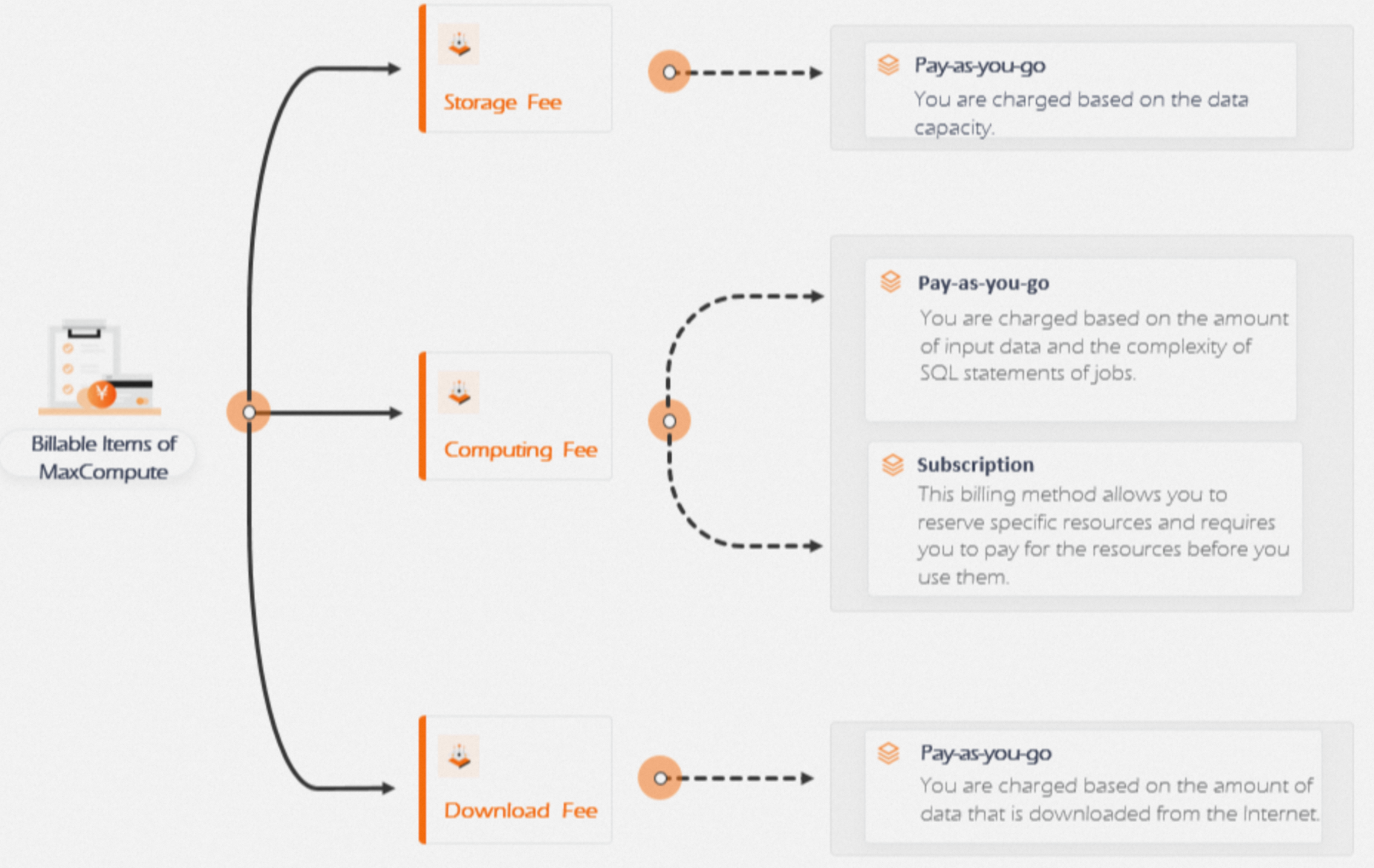
The following figure shows the billable items for MaxCompute.
Billing method selection
MaxCompute provides pay-as-you-go and subscription billing methods.
If you are a new user, we recommend that you start with the pay-as-you-go billing method. When you first start using MaxCompute, you typically consume fewer resources. Purchasing reserved computing resources can lead to idle capacity, which makes the pay-as-you-go method more cost-effective.
If your project is in the testing phase, has low computing requirements, and does not require high stability, the pay-as-you-go method is more cost-effective.
If your project is live in a production environment and requires high job stability, we recommend that you use subscription-based reserved computing resources. These are fixed resources, so you do not need to compete for them in a shared pool. This ensures that your jobs run smoothly.
If your workload requires a stable amount of resources most of the time but has predictable demand spikes, we recommend that you combine a subscription plan with the pay-per-hour method. This allows you to temporarily scale out compute resources for a top-level subscription quota during specific times of the day to meet peak demand.
You can use the Pricing Calculator to estimate costs and choose a suitable billing method. Download the MaxCompute Pricing Calculator.
Data transfer fee description
Internet download fees
Data downloaded from an Internet Endpoint is charged on a pay-as-you-go basis. For more information about Internet Endpoints, see Endpoint.
Shared resource group
Each project has a limit on the number of free concurrent data transmissions. If this limit is exceeded, an error is reported. For more information about the concurrency limit, see Limits on free Data Transmission Service resources.
MaxCompute does not guarantee the available capacity of this shared pool or the throughput that you can achieve. If you require full resource assurance, you can select a dedicated resource group (subscription).
The shared resource group for Data Transmission Service does not support a queuing policy. If resources are insufficient, an error is returned.
You can use a combination of shared and dedicated resource groups. For example, some of your projects can use shared resource groups while others use dedicated resource groups.
Dedicated resource group (subscription)
This resource group guarantees exclusive resources. You can purchase it as needed.
It supports access only from VPCs and does not currently support access from the Internet.
It supports data transmission only within the same region and does not currently support cross-region data transmission.
The dedicated resource group for Data Transmission Service does not support a queuing policy. If resources are insufficient, an error is returned.
You can use a combination of shared and dedicated resource groups. For example, some of your projects can use shared resource groups while others use dedicated resource groups.
Dedicated resource group (pay-per-hour)
This method lets you elastically scale the number of reserved concurrent transmissions on top of a subscription plan. You can temporarily scale out concurrent resources for a top-level subscription quota during specific times of the day.
Billing starts after a successful scale-out and stops after a successful scale-in.
Dedicated resource groups are currently available in the China (Hangzhou), China (Shanghai), China (Beijing), and China (Shenzhen) regions.