Writing a user-defined table function (UDTF) in Java is an effective way to handle complex data processing tasks and implement custom logic. By leveraging the features of the Java language, you can better meet specific data processing requirements, improving both development efficiency and processing performance. This topic describes the code structure, usage, and examples of Java UDTFs.
UDTF code structure
You can write UDTF code in Java using IntelliJ IDEA (Maven) or MaxCompute Studio. The code must include the following components:
-
Java package: Optional.
You can organize your Java classes into a package to make them easier to find and use.
-
Extend the UDTF class: Required.
The required classes are
com.aliyun.odps.udf.UDTF,com.aliyun.odps.udf.annotation.Resolve(for the@Resolveannotation), andcom.aliyun.odps.udf.UDFException(for methods in the Java class). If you need to use other UDTF classes or complex data types, add the required classes according to MaxCompute UDF overview. -
Custom Java class: Required.
This is the organizational unit for the UDTF code. It defines the variables and methods that implement your business logic.
-
@Resolveannotation: Required.The format is
@Resolve(<signature>).signatureis a function signature that defines the data types of the input parameters and return value. A UDTF cannot obtain the function signature through reflection and must use the@Resolveannotation to specify it, for example,@Resolve("smallint->varchar(10)"). For more information about the@Resolveannotation, see @Resolve annotation. -
Implement methods in the Java class: Required.
The Java class implementation includes the following four methods. You can choose to implement them based on your needs.
API
Description
public void setup(ExecutionContext ctx) throws UDFExceptionThe initialization method. MaxCompute calls your custom initialization logic before the UDTF starts processing input data. The
setupmethod is called once per worker.public void process(Object[] args) throws UDFExceptionThe
processfunction is called once for each record in an SQL query. The parameters of theprocessfunction are the input parameters that are specified for the UDTF in the SQL statement. The input parameters are passed as anObject[]array, and the output is generated by using theforwardfunction. You must call theforwardfunction within theprocessfunction to determine the output.NoteFailure to call
forwardfrom theprocessor close method can cause data loss. For example, if a background thread executes aforwardcall, you must ensure theprocessmethod does not finish until theforwardcall completes to prevent data loss.public void close() throws UDFExceptionThe termination method for the UDTF. It is called only once, after the last record has been processed.
public void forward(Object …o) throws UDFExceptionCall the
forwardmethod to output data, where each call toforwardoutputs one record. When you call a UDTF in a SQL query, you can use theasclause to rename the output offorward.When writing a Java UDTF, you can use Java Type or Java Writable Type. For a detailed mapping between the data types supported by MaxCompute and Java data types, see Data types.
The following is an example UDTF.
// Organize the defined Java class in the org.alidata.odps.udtf.examples package.
package org.alidata.odps.udtf.examples;
// Extend the UDTF class.
import com.aliyun.odps.udf.UDTF;
import com.aliyun.odps.udf.UDTFCollector;
import com.aliyun.odps.udf.annotation.Resolve;
import com.aliyun.odps.udf.UDFException;
// Custom Java class.
//@Resolve annotation.
@Resolve("string,bigint->string,bigint")
public class MyUDTF extends UDTF {
     // Implement the methods of the Java class.
     @Override
     public void process(Object[] args) throws UDFException {
         String a = (String) args[0];
         Long b = (Long) args[1];
         for (String t: a.split("\\s+")) {
         forward(t, b);
       }
     }
   }
Limitations
-
Internet access: UDFs cannot access the Internet by default. To enable Internet access, fill in the network connection application form. After approval, the MaxCompute technical support team will contact you to establish the connection. For details, see Network connection process.
-
No other columns in the same `SELECT`: A
SELECTstatement that calls a UDTF cannot reference other columns or expressions. The following statement is invalid:-- Invalid: mixes a UDTF with another column select value, user_udtf(key) as mycol ... -
No nesting: UDTFs cannot be nested inside other UDTFs. The following statement is invalid:
-- Invalid: user_udtf2 is nested inside user_udtf1 select user_udtf1(user_udtf2(key)) as mycol...; -
Incompatible with `GROUP BY`, `DISTRIBUTE BY`, and `SORT BY`: A UDTF cannot appear in the same
SELECTstatement as these clauses. The following statement is invalid:-- Invalid: UDTF used with GROUP BY select user_udtf(key) as mycol ... group by mycol;
Considerations
When you write a Java UDTF, note the following:
-
Avoid defining classes that have the same name but different implementation logic in different UDTF JAR packages. For example, assume UDTF1 and UDTF2 correspond to the JAR package resources udtf1.jar and udtf2.jar, respectively. If both JAR packages contain a class named
com.aliyun.UserFunction.classwith different logic, MaxCompute randomly loads one of the classes when UDTF1 and UDTF2 are called in the same SQL statement. This can cause unexpected results or compilation failures. -
Input parameters and return values must use Java object types, such as
StringandLong, instead of primitive types. -
This is because SQL
NULLvalues are passed as Javanull, which primitive types cannot represent.
@Resolve annotation
The format of the @Resolve annotation is as follows.
@Resolve(<signature>)The signature string specifies the data types of the UDTF's input parameters and return values. During query parsing, MaxCompute validates calls against this signature and reports an error if a type mismatch is found. The format is as follows.
'arg_type_list -> type_list'Where:
-
type_list: Represents the data types of the return values. A UDTF can return multiple columns. Supported data types are BIGINT, STRING, DOUBLE, BOOLEAN, DATETIME, DECIMAL, FLOAT, BINARY, DATE, DECIMAL(precision,scale), complex data types (ARRAY, MAP, STRUCT), and nested complex data types. -
arg_type_list: Represents the data types of the input parameters. Multiple input parameters can be specified, separated by commas (,). Supported data types are BIGINT, STRING, DOUBLE, BOOLEAN, DATETIME, DECIMAL, FLOAT, BINARY, DATE, DECIMAL(precision,scale), CHAR, VARCHAR, complex data types (ARRAY, MAP, STRUCT), and nested complex data types.arg_type_listalso supports an asterisk (*) or an empty string ('').-
If
arg_type_listis an asterisk (*), it indicates that the function accepts any number of input parameters. -
If
arg_type_listis an empty string (''), it indicates that the function has no input parameters.
For more information about the extended syntax of the Resolve annotation, see Dynamic parameters for UDAFs and UDTFs.
-
The following table shows examples of valid @Resolve annotations.
|
Example |
Description |
|
|
The input parameter types are BIGINT and BOOLEAN. The return value types are STRING and DATETIME. |
|
|
The function accepts any number of input parameters. The return value types are STRING and DATETIME. |
|
|
The function has no input parameters. The return value types are DOUBLE, BIGINT, and STRING. |
|
|
The input parameter types are ARRAY, STRUCT, and STRING. The return value types are MAP and STRUCT. |
Data types
MaxCompute data support varies by edition. Version 2.0 and later add support for more types, including the complex data types ARRAY, MAP, and STRUCT. For more information about MaxCompute data type editions, see Data type editions.
When writing a Java UDTF, ensure the data types you use map correctly to those supported by MaxCompute. The following table describes these mappings.
|
MaxCompute type |
Java type |
Java writable type |
|
TINYINT |
java.lang.Byte |
ByteWritable |
|
SMALLINT |
java.lang.Short |
ShortWritable |
|
INT |
java.lang.Integer |
IntWritable |
|
BIGINT |
java.lang.Long |
LongWritable |
|
FLOAT |
java.lang.Float |
FloatWritable |
|
DOUBLE |
java.lang.Double |
DoubleWritable |
|
DECIMAL |
java.math.BigDecimal |
BigDecimalWritable |
|
BOOLEAN |
java.lang.Boolean |
BooleanWritable |
|
STRING |
java.lang.String |
Text |
|
VARCHAR |
com.aliyun.odps.data.Varchar |
VarcharWritable |
|
BINARY |
com.aliyun.odps.data.Binary |
BytesWritable |
|
DATE |
java.sql.Date |
DateWritable |
|
DATETIME |
java.util.Date |
DatetimeWritable |
|
TIMESTAMP |
java.sql.Timestamp |
TimestampWritable |
|
INTERVAL_YEAR_MONTH |
N/A |
IntervalYearMonthWritable |
|
INTERVAL_DAY_TIME |
N/A |
IntervalDayTimeWritable |
|
ARRAY |
java.util.List |
N/A |
|
MAP |
java.util.Map |
N/A |
|
STRUCT |
com.aliyun.odps.data.Struct |
N/A |
To use Java Writable Types for UDTF input or return values, your MaxCompute project must use the MaxCompute 2.0 data type edition.
Usage
After you develop a Java UDTF by following the development process, you can call it in MaxCompute SQL.
To use a user-defined function in its home MaxCompute project, call it in the same way as a built-in function.
To use a user-defined function from another project, prefix the function call with the source project name, such as
select B:udf_in_other_project(arg0, arg1) as res from table_t;. For more information about cross-project sharing, see Access resources across projects based on packages.
For a complete walkthrough of developing and calling a Java UDTF using MaxCompute Studio, see Usage example.
Usage example
The following procedure walks you through developing and calling a Java UDTF using MaxCompute Studio:
-
Prepare your environment.
Before you develop and debug a UDF in MaxCompute Studio, you must install MaxCompute Studio and connect it to a MaxCompute project. For more information, see:
-
Write the UDTF code.
-
In the Project view, right-click the source code directory of the module () and select .
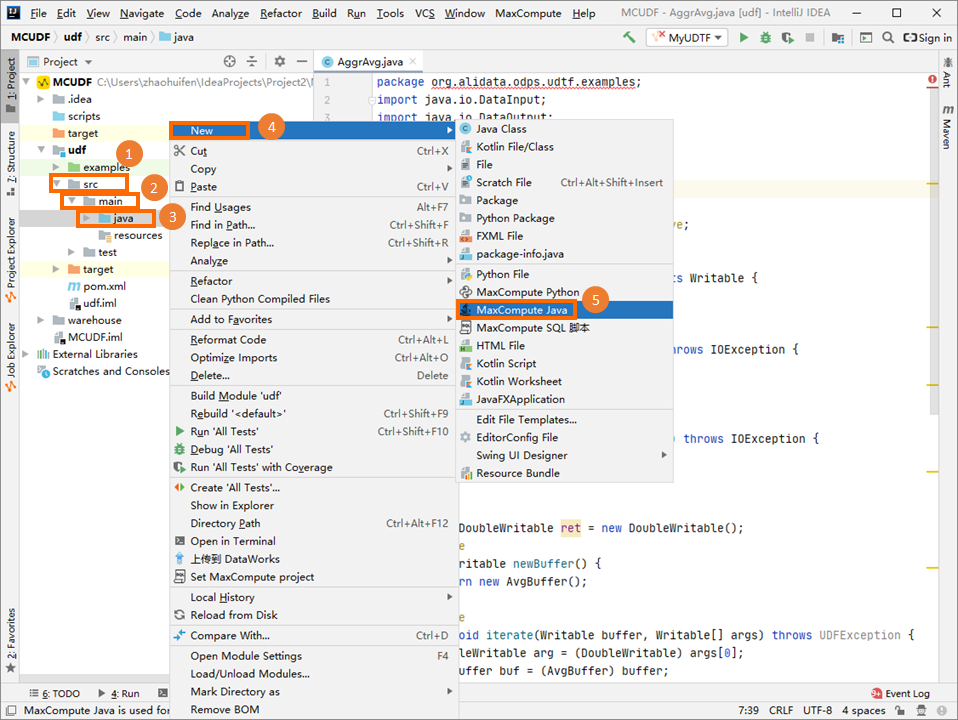
-
In the Create new MaxCompute java class dialog box, click UDTF, enter a Name, and press Enter. For example, name the Java class MyUDTF.
Name is the name of the MaxCompute Java class to be created. If a package has not been created, you can enter packagename.classname here to automatically generate a package.
-
In the code editor, enter the following code. This is an example of UDTF code.
package org.alidata.odps.udtf.examples;
import com.aliyun.odps.udf.UDTF;
import com.aliyun.odps.udf.UDTFCollector;
import com.aliyun.odps.udf.annotation.Resolve;
import com.aliyun.odps.udf.UDFException;
// TODO define input and output types, e.g., "string,string->string,bigint".
   @Resolve("string,bigint->string,bigint")
   public class MyUDTF extends UDTF {
     @Override
     public void process(Object[] args) throws UDFException {
       String a = (String) args[0];
       Long b = (Long) args[1];
       for (String t: a.split("\\s+")) {
         forward(t, b);
       }
     }
   }
-
-
Run and debug the UDTF locally to ensure the code works as expected.
For more information about debugging, see Run and debug a UDF locally.
Right-click the MyUDTF file in the project tree and select Run 'MyUDTF.main()'. In the Run/Debug Configurations dialog box, set MaxCompute project to
local, MaxCompute table towc_in2, Table partition top2=1,p1=2, Table columns tocolc,colb, Download Record limit to100, and Data Column Separator to|. Then, click OK.NoteYou can use the preceding parameters for the sample run.
-
Package the UDTF into a JAR package, upload it to your MaxCompute project, and register the function. For this example, name the function
user_udtf.For more information about packaging, see Procedure.
In the IntelliJ IDEA project tree, right-click the UDTF Java file (for example, MyUDTF) and select Deploy to server.... In the Package a jar, submit resource and register function dialog box, select the target MaxCompute project, confirm the Resource file path, set Main class to the corresponding UDTF class (for example,
org.alidata.odps.udtf.examples.MyUDTF), enteruser_udtffor Function name, select Force update if already exists, and click OK to complete the deployment. -
In the left-side navigation pane of MaxCompute Studio, click Project Explorer. Right-click the target MaxCompute project, start the MaxCompute client, and run an SQL command to call the newly created UDTF.
Assume the target table, my_table, contains the following data:
+------------+------------+
| col0       | col1       |
+------------+------------+
| A B        | 1          |
| C D        | 2          |
+------------+------------+
Run the following SQL command to call the UDTF.
select user_udtf(col0, col1) as (c0, c1) from my_table;The following result is returned.
+----+------------+
| c0 | c1         |
+----+------------+
| A  | 1          |
| B  | 1          |
| C  | 2          |
| D  | 2          |
+----+------------+
Related documentation
For more usage examples of Java UDTFs, see Java UDTF examples.