Digital Human Real-time Interaction OpenAPI
Version history
Version | Description | Time |
v1.7 | Updates:
| 2025-03-13 |
v1.6 | Updates: 1. Start session API: Added the customUserId and channelToken parameters. 2. Save digital human project API: Added the resolution parameter.
| 2025-01-20 |
v1.5 | New:
| 2024-12-17 |
v1.4 | Updates:
| 2024-11-14 |
v1.3 | New:
Updates:
Updated the SDK. | 2024-10-25 |
v1.2 | Batch query digital human project information. | 2024-09-29 |
v1.1 | Upgraded the SDK version. | 2024-09-10 |
v1.0 | Added the WebSocket real-time interaction link. | 2024-09-09 |
v0.3 | Start session API: Added webSocketUrl. | 2024-08-22 |
v0.2 | Added the Maven dependency for the POP API SDK. | 2024-08-19 |
v0.1 | Feature release. | 2024-07-01 |
Overview
Interaction example
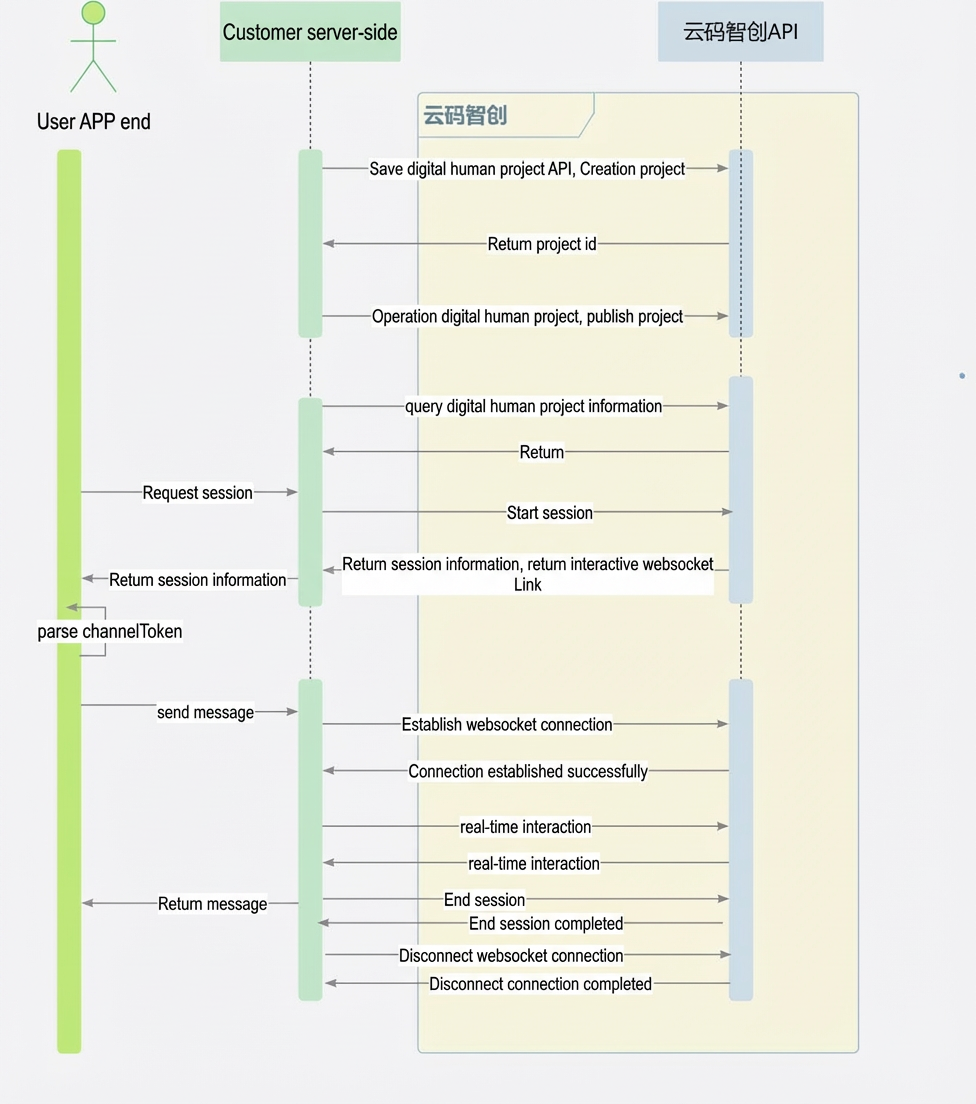
Prerequisites
Create an Alibaba Cloud account and use a RAM user to generate an AccessKey pair (AccessKey ID and AccessKey secret).
Grant the necessary RAM permissions to the RAM user that generated the AccessKey pair.
Log on to the platform using your Alibaba Cloud account and accept the relevant legal agreements.
API details
1. Batch query digital human project information
Request parameters: ListAvatarProject
Parameter name | Type | Required | Description |
projectIdList | Array | Yes | A collection of project IDs. |
Response parameters
Parameter | Type | Description |
queryAvatarProjectResultList | Array<Object> | A collection of project information. |
Object field descriptions
Parameter | Type | Description |
status | String | Start result: DRAFT: The project is a draft. DELETED DEPLOYED: The project is published. DEPLOY_FAIL: The project failed to be published. Offline |
projectName | String | Name |
projectId | String | Project ID |
agentId | String | Agent ID |
errorMsg | String | Error message |
2. Query digital human project details
2.1. Request parameters: QueryAvatarProjectRequest
Parameter name | Type | Required | Description |
projectId | String | Yes | Project ID |
2.2. Response parameters: QueryAvatarProjectResponse
Parameter | Type | Description |
status | String | Start result: DRAFT Deleted DEPLOYED: The project is published. DEPLOY_FAIL: The project failed to be published. Offline |
projectName | String | Name |
agentId | String | Agent ID |
errorMsg | String | Error message |
scaleType | String | Aspect ratio: 9:16: width 1080, height 1920 16:9: width 1920, height 1080 |
resSpecType | String | Resource specification: STANDARD: 2D Digital Human Real-time Interaction (Basic Edition) ADVANCED: 2D Digital Human Real-time Interaction (Premium Edition) |
frames | Array | Frame information |
2.2.1. frame parameter description
Parameter Name | Type | Required | Description |
layers | Array | Yes | Layer information |
videoScript | Object | Yes | Frame script information |
2.2.2. layer parameter description
Parameter name | Type | Required | Description |
type | String | Yes | BACKGROUND: Background ANCHOR: Streamer |
positionX | Integer | BACKGROUND: Not required ANCHOR: Required | X-coordinate |
positionY | Integer | BACKGROUND: Not required ANCHOR: Required | Y-coordinate |
width | Integer | BACKGROUND: Not required ANCHOR: Required | Image width |
height | Integer | BACKGROUND: Not required ANCHOR: Required | Image height |
material | Object | Yes | Material information |
2.2.3. material parameter description
Parameter Name | Type | Required | Description |
id | String | BACKGROUND: Not required ANCHOR: Required | Streamer ID |
url | String | BACKGROUND: Required | Material URL (HTTP address) |
format | String | BACKGROUND: Required | Asset format: video/mp4, image/png image/jpeg, image/jpg |
2.2.4. videoScript parameter description
Parameter | Type | Required | Description |
voiceTemplateId | String | Yes | Voice model ID. Must match the streamer. |
speedRate | String | Yes | Speech rate multiplier. Range: [0.8, 2.0]. A value of 1 indicates the normal speed. Only one decimal place is supported. |
textContent | String | No | Audio text. This is a preset script. Labtex syntax is supported when ttsVersion is 3. |
pitchRate | String | No | Pitch. Range: [-12, 12]. Default value: 0. Supported only when ttsVersion is 3 or 4. |
emotion | String | No | Emotion. Range: ["happy", "sad", "angry", "fearful", "disgusted", "surprised", "neutral"]. Supported only when ttsVersion is 3 or 4. |
voiceLanguage | String | Yes | Language. Pass the language field returned by the query voice template API. |
3. Start a session
Request parameters: StartAvatarSessionRequest
Parameter Name | Type | Required | Description |
projectId | String | Yes | Project ID |
requestId | String | Yes | Request ID for idempotence. |
customPushUrl | String | No | Ingest URL for stream forwarding. |
channelToken | String | No | User's own channel information. |
customUserId | String | No | Custom user ID. |
Response parameters: StartAvatarSessionResponse
Parameter Name | Type | Description |
sessionId | String | Session ID |
channelToken | String | Channel information |
webSocketUrl | String | Streamed interaction link |
Parsing the channelToken field
{
  "channelId":"123", // Channel ID
  "token":"", // Token
  "expireTime":600, // Deprecated. Time-to-live (TTL) in seconds. Corresponds to the timestamp in the ARTC join information.
  "timestamp": 600, // Expiration timestamp in seconds. Replaces the expireTime field.
  "nonce":"", // Random number. Not required for custom channel tokens.
  "userId":"", // User ID
  "appId":"" // Application ID
}
4. Stop a session
Request parameters: StopAvatarSessionRequest
Parameter name | Type | Required | Description |
projectId | String | Yes | Project ID |
sessionId | String | Yes | Session ID |
Response parameters: StopAvatarSessionResponse
Parameter | Type | Description |
status | String | Stop result: Stopped: The session is stopped. StoppedFail - The stop operation failed |
5. Effective resource query
Request parameters: QueryAvatarResourceRequest
Parameter | Type | Required | Description |
QueryAvatarResourceResponse
Parameter Name | Type | Description |
queryResourceInfoList | List<QueryResourceInfo> | Resource information |
QueryResourceInfo
Parameter | Type | Description |
resourceId | String | Resource ID |
type | String | Resource type: STANDARD: 2D Digital Human Real-time Interaction (Basic Edition) ADVANCED: 2D Digital Human Real-time Interaction (Premium Edition) |
validPeriodTime | String | Validity period (timestamp). Example: 1719904342237 |
6. Save a digital human project
6.1. Request parameters: SaveAvatarProjectRequest
Parameter name | Type | Required | Description |
operateType | String | Yes | Operation type: CREATE: Create and publish. EDIT: Edit and publish. |
projectId | String | CREATE: Not required EDIT: Required | Project ID |
projectName | String | CREATE: Required EDIT: Optional | Project name |
scaleType | String | CREATE: Required EDIT: Not required | Aspect ratio: 9:16: width 1080, height 1920 16:9: width 1920, height 1080 |
resSpecType | String | CREATE: Required EDIT: Not required | Resource specification: STANDARD: 2D Digital Human Real-time Interaction (Basic Edition) ADVANCED: 2D Digital Human Real-time Interaction (Premium Edition) |
agentId | String | CREATE: Optional EDIT: Optional | Agent ID |
frames | Array | CREATE: Required EDIT: Required | Frame information |
resolution | String | No | Resolution: 720P or 1080P. Default value: 720P. |
frameRate | String | No | Frame rate. For more information, see the frame rate and bitrate reference table. |
bitRate | String | No | Bitrate. For more information, see the frame rate and bitrate reference table. |
synchronizedDisplay | String | No | Synchronized display: true or false. |
6.1.1. frame parameter description
Parameter Name | Type | Required | Description |
layers | Array | Yes | Layer information |
videoScript | Object | Yes | Frame script information |
6.1.2. layer parameter description
Parameter Name | Type | Required | Description |
type | String | Yes | BACKGROUND: Background ANCHOR: Streamer |
positionX | Integer | BACKGROUND: Not required ANCHOR: Required | X-coordinate. For more information, see Coordinate description. |
positionY | Integer | BACKGROUND: Not required ANCHOR: Required | Y-coordinate. For more information, see Coordinate description. |
width | Integer | BACKGROUND: Not required ANCHOR: Required | Image width. Cannot exceed the frame width. |
height | Integer | BACKGROUND: Not required ANCHOR: Required | Image height. Cannot exceed the frame height. |
material | Object | Yes | Material information |
6.1.3. material parameter description
Parameter Name | Type | Required | Description |
id | String | BACKGROUND: Not required ANCHOR: Required | Streamer ID |
url | String | BACKGROUND: Required | Material URL (HTTP address) |
format | String | BACKGROUND: Required | Material format: image/png image/jpeg, image/jpg |
6.1.4. videoScript parameter description
Parameter Name | Type | Required | Description |
voiceTemplateId | String | Yes | Voice model ID. Must match the streamer. |
speedRate | String | Yes | Speech rate multiplier. Range: [0.8, 2.0]. A value of 1 indicates the normal speed. Only one decimal place is supported. |
voiceLanguage | String | Yes | Language. Pass the language field returned by the query voice template API. |
6.1.5. Coordinate description
The coordinate parameters specify the offset from the top-left corner of the frame to the top-left corner of the image.
If a coordinate value contains a decimal, truncate the decimal part. For example, in the following figure, X is 470 and Y is 700.

6.1.6. Frame rate and bitrate reference table
Resolution | Frame rate (fps) | Min bitrate (Kbps) | Recommended bitrate (Kbps) | Max bitrate (Kbps) |
1280 × 720 | 5 | 400 | 400 | 600 |
1280 × 720 | 10 | 800 | 800 | 1200 |
1280 × 720 | 15 | 1200 | 1200 | 1800 |
1280 × 720 | 20 | 1600 | 1600 | 2400 |
1280 × 720 | 25 | 2000 | 2000 | 3000 |
1280 × 720 | 30 | 2400 | 2400 | 3600 |
1920 × 1080 | 5 | 500 | 500 | 750 |
1920 × 1080 | 10 | 1000 | 1000 | 1500 |
1920 × 1080 | 15 | 1500 | 1500 | 2250 |
1920 × 1080 | 20 | 2000 | 2000 | 3000 |
1920 × 1080 | 25 | 2500 | 2500 | 3750 |
1920 × 1080 | 30 | 3000 | 3000 | 4500 |
6.2. Response parameters
Parameter name | Type | Description |
status | String | Start result: DRAFT Deleted DEPLOYED: The project is published. DEPLOY_FAIL: The project failed to be published. |
projectId | String | Project ID |
projectName | String | Name |
agentId | String | Agent ID |
errorMsg | String | Error message |
7. Manage a digital human project
7.1. Request parameters: OperateAvatarProjectRequest
Parameter | Type | Required | Description |
projectId | String | Yes | Project ID |
operateType | String | Yes | Operation type: DELETE: Delete OFFLINE: Unpublish DEPLOY: Publish |
resChannelNum | Integer | No | Number of ingest endpoints to publish. Default value: 1. |
resType | String | Required for the publish operation. | Resource type: FREE: Free resource. FORMAL: Official resource. |
7.2. Response parameters
Parameter | Type | Description |
success | Boolean | Result: true indicates success. |
8. Query project session status
8.1. Request parameters: QuerySessionInfoRequest
Parameter name | Type | Required | Description |
projectId | String | Yes | Project ID |
statusList | Array | Yes | A collection of statuses to query: Started STOPPED: Stopped |
pageNo | Integer | Yes | Page number |
pageSize | Integer | No | The number of entries per page. Default value: 10. |
8.2. Response parameters
Parameter name | Type | Description |
total | Long | The total number of sessions that meet the criteria. |
queryResourceInfoList | Array | Session information |
Session information
Parameter | Type | Description |
sessionId | String | Session ID |
status | String | Session status: FREE: Idle (The Premium Edition digital human does not have an idle state). BUSY: Busy STOPPED: Stopped |
9. Query digital human avatar models
ListAnchor
9.1. Request parameters
Parameter name | Type | Required | Description |
coverRate | string | No | Streamer avatar aspect ratio. 9:16: Portrait 16:9: Landscape |
anchorType | string | No | Streamer type: PUBLIC_MODEL: Public model PRIVATE_MODEL: Private model By default, public models are queried. |
digitalHumanType | string | No | Streamer category: dynamicReality: Dynamic real-scene digital human (temporarily unavailable). staticTransparency: Static digital human. |
useScene | string | Yes | Scenarios realTimeInteractivity: Real-time interaction. |
resSpecType | String | Yes | Resource specification: BASIC_MODEL: 2D Digital Human Real-time Interaction (Basic Edition) avatar ADVANCED_MODEL: 2D Digital Human Real-time Interaction (Premium Edition) avatar |
pageSize | int | No | The number of entries per page. Default value: 10. |
pageNumber | int | No | Page number. Default value: 1. |
9.2. Response parameters
Parameter name | Type | Description |
total | int | Total |
list | array: AnchorResponse | An array of streamer avatar objects. |
success | Boolean | Indicates whether the call was successful. |
errorMessage | String | Error message |
errorCode | String | Error code |
AnchorResponse
Parameter name | Type | Description |
anchoId | String | Streamer ID |
anchorMaterialName | String | Streamer name |
anchorType | String | Streamer type: PUBLIC_MODEL: Public model PRIVATE_MODEL: Private model |
coverUrl | String | Model thumbnail |
coverThumbnailUrl | String | Model thumbnail (small) |
coverWeight | int | Thumbnail width in pixels. |
coverHeight | int | Thumbnail height in pixels. |
coverRate | String | Thumbnail aspect ratio |
status | String | Status: Usable: Published |
digitalHumanType | String | Streamer category: dynamicReality: Dynamic real-scene digital human (temporarily unavailable). staticTransparency: Static digital human. |
useScene | String | Scenario: realTimeInteractivity: Real-time interaction |
resourceTypeDesc | String | Resource specification description |
gender | String | Gender: F or M. Must be consistent with the gender of the voice template. |
supportBgChange | Integer | Indicates whether background changes are supported. 0: No. 1: Yes. |
10. Query voice templates
ListVoiceModels
10.1. Request parameters
Parameter name | Parameter type | Required | Description |
voiceType | String | No | Voice type: PRIVATE_VOICE: Private model voice. PUBLIC_VOICE: Public model voice. By default, public model voices are queried. |
useScene | string | Yes | Scenario: realTimeInteractivity: Real-time interaction |
resSpecType | String | Yes | Resource specification: BASIC_VOICE: 2D Digital Human Real-time Interaction (Basic Edition) voice model ADVANCED_VOICE: 2D Digital Human Real-time Interaction (Premium Edition) voice model |
voiceLanguage | String | No | Language. Default value: zh (Chinese). Enumeration: Chinese (zh) English Spanish: Spanish French Korean: Korean German Russian Korean: Korean Indonesian: Indonesian Japanese |
pageSize | int | No | The number of entries per page. Default value: 10. |
pageNumber | int | No | Page number. Default value: 1. |
10.2. Response parameters
Parameter | Type | Description |
total | int | Total |
list | array: VoiceModelResult | A collection of audio script templates. |
success | Boolean | Indicates whether the call was successful. |
errorMessage | String | Error message |
errorCode | String | Error code |
VoiceModelResponse
Parameter name | Parameter type | Parameters |
voiceId | bigInt | Voice template ID |
voiceName | String | Voice name |
voiceModel | String | Voice model (parameter value) |
voiceGender | String | M: Male. F: Female. Must be consistent with the avatar gender. |
voiceUrl | String | Sample audio URL |
voiceLanguage | String | zh/en |
voiceDesc | String | Voice model description |
useScene | String | Scenarios realTimeInteractivity: Real-time interaction |
resourceTypeDesc | String | Resource specification description |
ttsVersion | Integer | TTS version: 0, 1, 2, 3, or 4. |
WebSocket real-time interaction
WebSocket connection workflow
Start a session to obtain the WebSocket URL and Alibaba Real-Time Communication (ARTC) channel information.
Establish a WebSocket connection.
Continuously send "channel ready" packets until you receive a "channel ready completed" response.
Use the ARTC SDK and channel information to pull the video stream.
(Optional) Send an opening remark driver packet to initiate an opening interaction.
(Optional) Send a text driver packet to drive the digital human with text.
(Optional) Send an audio driver header packet, data packets, and a trailer packet to drive the digital human based on audio recognition results.
(Optional) Send an audio driver data packet to drive the digital human with audio.
Stop the session.
Close the WebSocket connection.
Example of establishing a WebSocket connection:
@ClientEndpoint
public class WebSocketClient {

    private Session userSession = null;

    public WebSocketClient(URI endpointURI) {
        try {
            WebSocketContainer container = ContainerProvider.getWebSocketContainer();
            container.connectToServer(this, endpointURI);
        } catch (Exception e) {
            e.printStackTrace();
        }
    }

    @OnOpen
    public void onOpen(Session userSession) {
        this.userSession = userSession;
        System.out.println("Connected to server");
    }

    @OnClose
    public void onClose(Session userSession, CloseReason reason) {
        this.userSession = null;
        System.out.println("Disconnected from server: " + reason);
    }

    @OnMessage
    public void onMessage(byte[] message) {

        // 1. Get the frame number from the first byte.
        int frame = Byte.toUnsignedInt(message[0]);

        // 2. Get the data type from the second byte.
        int dataType = Byte.toUnsignedInt(message[1]);

        // 3. Get the business type from the third byte.
        int bizType = Byte.toUnsignedInt(message[2]);

        // 4. Get the serial number from bytes 4 to 11.
        byte[] serialNumberBytes = Arrays.copyOfRange(message, 3, 11);
        String serialNumberString = new String(serialNumberBytes, StandardCharsets.UTF_8);

        // 5. Get the remaining content data. The data structure depends on the specific business type.
        byte[] contentJsonBytes = Arrays.copyOfRange(message, 11, message.length);
        String contentJsonString = new String(contentJsonBytes, StandardCharsets.UTF_8);

        // 6. Execute the corresponding business logic...
    }

    public void sendMessage(byte[] message) {
        try {
            if (this.userSession != null) {
                this.userSession.getBasicRemote().sendBinary(ByteBuffer.wrap(message));
            }
        } catch (Exception e) {
            e.printStackTrace();
        }
    }

    public static void main(String[] args) throws InterruptedException {

        // 1. Establish a WebSocket connection.
        WebSocketClient client = new WebSocketClient(URI.create("ws://127.0.0.1:7005/v1/interaction?token=eyJ0eXAiOiJKV1QiLCJhbGciOiJIUzI1NiJ9.eyJzZXNzaW9uSWQiOiI4ZjM3YmVhOC1lNDYxLTRhNzktODczZS00Yzg2ZTI2OWU4YTAiLCJleHAiOjE3MjU1MTY3NTIsImFsaXl1bk1haW5JZCI6IjE1Mzk3MDQ3MDY0MTMyNzgifQ.PAvCT7gY1VWNGJQc1cmubVLd76INRVZnhHdoBRV9-Rc&sessionId=8f37bea8-e461-4a79-873e-4c86e269e8a0"));

        // 2. Channel preparation.
        //      2.1 Assemble the data packet.
        byte frameId = (byte) 0;
        byte dataType = (byte) 1;
        byte bizType = (byte) 131;
        // For normal business, you can use a randomly generated 8-byte serial number.
        byte[] serialNumber = new byte[8];
        byte[] contentBytes = new byte[0];

        byte[] message = new byte[11 + contentBytes.length];
        ByteBuffer bf = ByteBuffer.wrap(message)
        .put(frameId)
        .put(dataType)
        .put(bizType)
        .put(serialNumber)
        .put(contentBytes);
        message = bf.array();

        // 3. Send the data packet.
        client.sendMessage(message);

    }

}
WebSocket message structure
1. Overall structure
The overall packet format is an 11-byte packet header followed by N bytes of packet content.
The 11-byte packet header consists of a 1-byte frame type, a 1-byte data type, a 1-byte business type, and an 8-byte serial number. The serial number is randomly generated by the client and is used for troubleshooting.
public class InteractionWebSocketProtocol {

    // 1-byte frame type
    private InteractionProtocolFrameEnum interactionProtocolFrameEnum;

    // 1-byte data type
    private DataTypeEnum dataType;

    // 1-byte business type
    private BusinessTypeEnum businessType;

    // 8-byte serial number
    private String serialNumber;

    // N-byte message in binary format
    private byte[] messageBytes;

}
2. Frame types
bit | Description | Notes |
0000 0000 | Control frame | Used by the client to send control instructions. |
0000 0001 | Data frame | Used by the server to return business data. |
0000 0010 | Message frame | Used by the server to return error messages. |
0000 1110 | Heartbeat frame (ping) | Initiated by the client for heartbeat. |
0000 1111 | Heartbeat frame (pong) | Returned by the server for heartbeat. |
3. Data types
bit | Description | Notes |
0000 0000 | binary | Used for binary audio data. |
0000 0001 | json |
4. Business types
Business types:
bit | Description | Notes |
0000 0000 | Query opening remark | Queries the digital human's opening remark. |
0000 0010 | Interrupt | Interrupts the digital human's video stream. |
0000 0011 | Forced session shutdown | The session is closed because the line has expired or for other reasons. |
0000 0100 | Line abnormal, recovering | The session is recovering because underlying resources are unavailable or for other reasons. |
1000 0000 | Text Driver | Drives the digital human to speak based on text input. |
1000 0010 | Audio recognition and driver [Start, End] | Sends start and end signals for audio recognition and driving. |
1000 0001 | Audio recognition and driver [Data] | Sends binary data for audio recognition and driving. |
1000 0011 | Channel ready | Pushing RTC channel data |
1000 0110 | Audio driver | Sends audio to drive the digital human to speak. |
1111 1111 | General business type | The general business type is used for client-sent pings and server-returned pongs and messages. |
Format of input and output parameters:
4.1. Query opening remark
Request:
Field | Type | Required | Notes |
sessionId | String | Yes | Session ID |
Returns:
Field name | Type | Notes |
success | Boolean | Success flag |
sessionId | String | Session ID |
content | String | Response content |
finish | Boolean | End flag for streamed response |
relatedImages | String[] | List of related image URLs |
relatedVideos | String[] | List of related video URLs |
messageId | String | Message ID |
4.2. Interrupt the digital human's speech
Request:
Field name | Type | Required | Notes |
sessionId | String | Yes | Session ID |
This operation does not return a value.
4.3. Drive the digital human with text
Request:
Field | Type | Required | Notes |
sessionId | String | Yes | Session ID |
text | String | Yes | Driver text |
askType | Integer | Yes | Question format: 1: Ask a question. 2: Make an announcement. |
messageId | String | Yes | Identifier for the text driver. We recommend that you use a UUID. Specify the same messageId for each segment of streamed text. |
type | String | No | Text driver type. Default value: TEXT. Text TEXT_STREAM: Streamed text (currently, streamed text is supported only in announcement mode). |
dataFlag | String | No | Streamed text segment type. Required when the text driver type is streamed text. START: Start CONTENT: Content END: End |
Returns:
Field name | Type | Notes |
success | Boolean | Success flag |
sessionId | String | Session ID |
content | String | Response content |
finish | Boolean | End flag |
relatedImages | String[] | List of related image URLs |
relatedVideos | String[] | List of related video URLs |
messageId | String | Message ID |
4.4. Audio recognition and driver [Start]
Request:
Field name | Type | Required | Notes |
sessionId | String | Yes | Session ID |
type | String | Yes | Static field: startAsrAudio |
askType | Integer | Yes | How to ask a question: 1: Ask a question. 2: Make an announcement. |
Returns
Field name | Type | Notes |
sessionId | String | Session ID |
success | Boolean | Success flag |
4.5. Audio recognition and driver [Data]
Request: Binary data in PCM format.
Response: For more information about the audio recognition result in question mode, see API description. No response is returned in announcement mode.
For the text response from the digital human, see the response described in the "Drive the digital human with text" section.
4.6. Audio recognition and driver [End]
Request:
Field | Type | Required | Notes |
sessionId | String | Yes | Session ID |
type | String | Yes | Static field: endAsrAudio |
Return value: None
4.7. Channel ready
Request:
Field name | Type | Required | Notes |
sessionId | String | Yes | Session ID |
Returns:
Field name | Type | Notes |
sessionId | String | Session ID |
status | String | INIT: Preparing FAIL: Abnormal READY: Preparation successful |
4.8. Audio driver
Request:
Field | Type | Required | Notes |
sessionId | String | Yes | Session ID |
messageId | String | Yes | Identifier for the audio driver. We recommend that you use a UUID. Specify the same messageId for each segment of streamed audio. |
audio | String | Yes | A byte array of the raw audio data, encoded in Base64. Supported formats: PCM format, 16 kHz sample rate, 16-bit sample depth, and single sound channel. |
type | String | No | Driver type. Default value: AUDIO_STREAM. AUDIO_STREAM: Streamed audio |
dataFlag | String | No | Streamed audio segment type. Required when the audio driver type is streamed audio. START CONTENT: Content END |
Response: None
4.9. General business type
Message format:
Field | Type | Description |
code | int | Error code |
message | string | Error description |
Error codes:
code | Description |
10000 | System error |
10001 | Insufficient permissions |
WebSocket connection examples
1. Opening remark
Client sends:
    public void sendOpenning() {
        byte frameId = (byte) 0; // Frame type: Control frame
        byte dataType = (byte) 1; // Data type: json
        byte bizType = (byte) 0; // Opening remark business type: 0
        byte[] serialNumber = new byte[8]; // For normal business, you can use a randomly generated 8-byte serial number.

        String content = "{\"sessionId\":\"xxx\"}"; // Replace with your sessionId
        byte[] contentBytes = content.getBytes();

        byte[] message = new byte[11 + contentBytes.length];
        ByteBuffer bf = ByteBuffer.wrap(message)
        .put(frameId)
        .put(dataType)
        .put(bizType)
        .put(serialNumber)
        .put(contentBytes);
        message = bf.array();

        // 3. Send the data packet.
        client.sendMessage(message);
    }
Client receives:
    @OnMessage
    public void onMessage(byte[] message) {

        // 1. Get the frame number from the first byte.
        int frame = Byte.toUnsignedInt(message[0]);

        // 2. Get the data type from the second byte.
        int dataType = Byte.toUnsignedInt(message[1]);

        // 3. Get the business type from the third byte.
        int bizType = Byte.toUnsignedInt(message[2]);

        // 4. Get the serial number from bytes 4 to 11.
        byte[] serialNumberBytes = Arrays.copyOfRange(message, 3, 11);
        String serialNumberString = new String(serialNumberBytes, StandardCharsets.UTF_8);

        // 5. Get the remaining content data. The data structure depends on the specific business type.
        // If it is an opening remark business
        if (bizType == 0) {
            byte[] contentJsonBytes = Arrays.copyOfRange(message, 11, message.length);
            String contentJsonString = new String(contentJsonBytes, StandardCharsets.UTF_8);
            // 6. Execute the corresponding business logic...
        }

    }
2. Interrupt
Client sends:
    public void sendOpenning() {
        byte frameId = (byte) 0; // Frame type: Control frame
        byte dataType = (byte) 1; // Data type: json
        byte bizType = (byte) 2; // Interrupt business type: 2
        byte[] serialNumber = new byte[8]; // For normal business, you can use a randomly generated 8-byte serial number.

        String content = "{\"sessionId\":\"xxx\"}"; // Replace with your sessionId
        byte[] contentBytes = content.getBytes();

        byte[] message = new byte[11 + contentBytes.length];
        ByteBuffer bf = ByteBuffer.wrap(message)
        .put(frameId)
        .put(dataType)
        .put(bizType)
        .put(serialNumber)
        .put(contentBytes);
        message = bf.array();

        // 3. Send the data packet.
        client.sendMessage(message);
    }
Client receives: None
3. Text driver
Client sends:
    public void sendText() {
        byte frameId = (byte) 0; // Frame type: Control frame
        byte dataType = (byte) 1; // Data type: json
        byte bizType = (byte) 128; // Text driver business type: 128
        byte[] serialNumber = new byte[8]; // For normal business, you can use a randomly generated 8-byte serial number.

        String content = "{\n" +
                "  \"sessionId\":\"xxx\",\n" + // Replace with your sessionId
                "  \"text\":\"xxx\",\n" + // Replace with your text
                "  \"askType\":1 \n" + // 1: Ask a question; 2: Make an announcement
                "}";
        byte[] contentBytes = content.getBytes();

        byte[] message = new byte[11 + contentBytes.length];
        ByteBuffer bf = ByteBuffer.wrap(message)
        .put(frameId)
        .put(dataType)
        .put(bizType)
        .put(serialNumber)
        .put(contentBytes);
        message = bf.array();

        // 3. Send the data packet.
        client.sendMessage(message);
    }
Client receives:
    @OnMessage
    public void onMessage(byte[] message) {

        // 1. Get the frame number from the first byte.
        int frame = Byte.toUnsignedInt(message[0]);

        // 2. Get the data type from the second byte.
        int dataType = Byte.toUnsignedInt(message[1]);

        // 3. Get the business type from the third byte.
        int bizType = Byte.toUnsignedInt(message[2]);

        // 4. Get the serial number from bytes 4 to 11.
        byte[] serialNumberBytes = Arrays.copyOfRange(message, 3, 11);
        String serialNumberString = new String(serialNumberBytes, StandardCharsets.UTF_8);

        // 5. Get the remaining content data. The data structure depends on the specific business type.
        // Text driver business
        if (bizType == 128) {
            byte[] contentJsonBytes = Arrays.copyOfRange(message, 11, message.length);
            String contentJsonString = new String(contentJsonBytes, StandardCharsets.UTF_8);
            // 6. Execute the corresponding business logic...
        }

    }
4. Audio recognition and driver
Client sends:
    public void sendAudio() {

        // 1. Send the audio driver header packet.
        byte frameId = (byte) 0; // Frame type: Control frame
        byte dataType = (byte) 1; // Data type: json
        byte bizType = (byte) 130; // Audio driver header/trailer business type: 130
        byte[] serialNumber = new byte[8]; // For normal business, you can use a randomly generated 8-byte serial number.
        String content = "{\n" +
                "\t\"sessionId\":\"xxx\",\n" +
                "\t\"type\": \"startAsrAudio\",\n" +
                "\t\"askType\":1 " +
                "}";
        byte[] contentBytes = content.getBytes();
        byte[] message = new byte[11 + contentBytes.length];
        ByteBuffer bf = ByteBuffer.wrap(message)
        .put(frameId)
        .put(dataType)
        .put(bizType)
        .put(serialNumber)
        .put(contentBytes);
        message = bf.array();
        client.sendMessage(message);

        // 2. Send the binary audio data multiple times.
        byte frameId = (byte) 0; // Frame type: Control frame
        byte dataType = (byte) 0; // Data type: binary
        byte bizType = (byte) 129; // Audio driver data business type: 129
        byte[] serialNumber = new byte[8]; // For normal business, you can use a randomly generated 8-byte serial number.
        byte[] audioData = new Byte[1024]; // Replace with your audio data
        byte[] contentBytes = audioData;
        byte[] message = new byte[11 + contentBytes.length];
        ByteBuffer bf = ByteBuffer.wrap(message)
        .put(frameId)
        .put(dataType)
        .put(bizType)
        .put(serialNumber)
        .put(contentBytes);
        message = bf.array();
        client.sendMessage(message);

        // 3. Send the audio driver trailer packet.
        byte frameId = (byte) 0; // Frame type: Control frame
        byte dataType = (byte) 1; // Data type: json
        byte bizType = (byte) 130; // Audio driver header/trailer business type: 130
        byte[] serialNumber = new byte[8]; // For normal business, you can use a randomly generated 8-byte serial number.
        String content = "{\n" +
                "\t\"sessionId\":\"xxx\",\n" +
                "\t\"type\":\"endAsrAudio\",\n" +
                "\t\"askType\": 1 " +
                "}";
        byte[] contentBytes = content.getBytes();
        byte[] message = new byte[11 + contentBytes.length];
        ByteBuffer bf = ByteBuffer.wrap(message)
        .put(frameId)
        .put(dataType)
        .put(bizType)
        .put(serialNumber)
        .put(contentBytes);
        message = bf.array();
        client.sendMessage(message);
    }
Client receives:
    @OnMessage
    public void onMessage(byte[] message) {

        // 1. Get the frame number from the first byte.
        int frame = Byte.toUnsignedInt(message[0]);

        // 2. Get the data type from the second byte.
        int dataType = Byte.toUnsignedInt(message[1]);

        // 3. Get the business type from the third byte.
        int bizType = Byte.toUnsignedInt(message[2]);

        // 4. Get the serial number from bytes 4 to 11.
        byte[] serialNumberBytes = Arrays.copyOfRange(message, 3, 11);
        String serialNumberString = new String(serialNumberBytes, StandardCharsets.UTF_8);

        // 5. Get the remaining content data. The data structure depends on the specific business type.
        // Get the audio driver response
        if (bizType == 129) {
            byte[] contentJsonBytes = Arrays.copyOfRange(message, 11, message.length);
            String contentJsonString = new String(contentJsonBytes, StandardCharsets.UTF_8);
            // 6. Execute the corresponding business logic...
        }

    }
5. Channel ready
Client sends:
    public void channelReady() {
        byte frameId = (byte) 0; // Frame type: Control frame
        byte dataType = (byte) 1; // Data type: json
        byte bizType = (byte) 131; // Channel ready business type: 131
        byte[] serialNumber = new byte[8]; // For normal business, you can use a randomly generated 8-byte serial number.

        String content = "{\"sessionId\":\"xxx\"}"; // Replace with your sessionId
        byte[] contentBytes = content.getBytes(); // For normal business, you can use a randomly generated 8-byte serial number.

        byte[] message = new byte[11 + contentBytes.length];
        ByteBuffer bf = ByteBuffer.wrap(message)
        .put(frameId)
        .put(dataType)
        .put(bizType)
        .put(serialNumber)
        .put(contentBytes);
        message = bf.array();

        // 3. Send the data packet.
        client.sendMessage(message);
    }
Client receives:
    @OnMessage
    public void onMessage(byte[] message) {

        // 1. Get the frame number from the first byte.
        int frame = Byte.toUnsignedInt(message[0]);

        // 2. Get the data type from the second byte.
        int dataType = Byte.toUnsignedInt(message[1]);

        // 3. Get the business type from the third byte.
        int bizType = Byte.toUnsignedInt(message[2]);

        // 4. Get the serial number from bytes 4 to 11.
        byte[] serialNumberBytes = Arrays.copyOfRange(message, 3, 11);
        String serialNumberString = new String(serialNumberBytes, StandardCharsets.UTF_8);

        // 5. Get the remaining content data. The data structure depends on the specific business type.
        // Channel ready
        if (bizType == 131) {
            byte[] contentJsonBytes = Arrays.copyOfRange(message, 11, message.length);
            String contentJsonString = new String(contentJsonBytes, StandardCharsets.UTF_8);
            // 6. Execute the corresponding business logic...
        }

    }
6. Heartbeat
Client sends:
    public void sendPing() {
        byte frameId = (byte) 14; // Frame type: Control frame
        byte dataType = (byte) 1; // Data type: json
        byte bizType = (byte) 255; // General heartbeat business type: 255
        byte[] serialNumber = new byte[8]; // For normal business, you can use a randomly generated 8-byte serial number.

        String content = "{}"; // Not required
        byte[] contentBytes = content.getBytes();

        byte[] message = new byte[11 + contentBytes.length];
        ByteBuffer bf = ByteBuffer.wrap(message)
        .put(frameId)
        .put(dataType)
        .put(bizType)
        .put(serialNumber)
        .put(contentBytes);
        message = bf.array();

        // 3. Send the data packet.
        client.sendMessage(message);
    }
Client receives: None
Integration details
PHP
Integration example
require 'vendor/autoload.php';
use AlibabaCloud\SDK\Imarketing\V20220704\Models\GetOssUploadSignatureRequest;
use AlibabaCloud\SDK\IntelligentCreation\V20240313\IntelligentCreation;
use Darabonba\OpenApi\Models\Config as AlibabaConfig;

$config = new AlibabaConfig();
$config->accessKeyId = '****';
$config->accessKeySecret = '****';
$config->endpoint = "intelligentcreation.cn-zhangjiakou.aliyuncs.com";

$intelligentCreationClient = new IntelligentCreation($config);

$request = new QueryAvatarProjectRequest();
$request->projectId = '111';
try {
  $response = $intelligentCreationClient->queryAvatarProject($request);
  var_dump($response->toMap());
} catch (TeaError $e) {
  Log::error($e);
}
2.12.0
composer require alibabacloud/intelligentcreation-20240313 2.12.0Java
Integration example
package com.aliyun.intelligentcreation20240313;

import com.aliyun.intelligentcreation20240313.models.*;
import com.aliyun.tea.TeaException;
import com.aliyun.teaopenapi.models.Config;
import com.google.gson.Gson;

import java.util.HashMap;
import java.util.Map;

public class TestAvatarTest {

    public TestAvatarTest() throws Exception {
    }

    public static void main(String[] args) throws Exception {
        TestAvatarTest avatarTest = new TestAvatarTest();

        try {
            String projectId = "780931376329506816";
            avatarTest.queryAvatarProjectTest(projectId);
        } catch (TeaException e) {
            Gson gson = new Gson();
            System.out.println(e.getMessage());
            System.out.println(gson.toJson(e.getData()));
        }

    }

    String url = "intelligentcreation.cn-zhangjiakou.aliyuncs.com";
    // Initialize the configuration
    String ak = "**";
    String sk = "**";
    Config config = new Config().setAccessKeyId(ak)
            .setAccessKeySecret(sk)
            .setEndpoint(url);
    // Create a client
    Client client = new Client(config);

    void queryAvatarProjectTest(String projectId) throws Exception {
        Gson gson = new Gson();
        Map<String, Object> map = new HashMap<>();
        map.put("projectId",projectId);
        QueryAvatarProjectRequest request = QueryAvatarProjectRequest.build(map);
        // Call the API
        QueryAvatarProjectResponse response = client.queryAvatarProject(request);

        System.out.println(gson.toJson(response));

        if (response.getStatusCode().equals(200)) {
            System.out.println("queryAvatarProjectTest request successful");
        }
    }

    String startAvatarSessionRequest(String projectId) throws Exception {
        Gson gson = new Gson();
        Map<String, Object> map = new HashMap<>();
        map.put("projectId",projectId);
        StartAvatarSessionRequest startAvatarSessionRequest = StartAvatarSessionRequest.build(map);
        StartAvatarSessionResponse response = client.startAvatarSession(startAvatarSessionRequest);

        System.out.println(gson.toJson(response));
        if (response.getStatusCode().equals(200)) {
            System.out.println("startAvatarSessionRequest request successful");
            return response.getBody().getSessionId();
        }
        return null;
    }

    void stopAvatarSessionRequest(String projectId, String sessionId) throws Exception {
        Gson gson = new Gson();
        Map<String, Object> map = new HashMap<>();
        map.put("projectId",projectId);
        map.put("sessionId",sessionId);
        StopAvatarSessionRequest request = StopAvatarSessionRequest.build(map);
        StopAvatarSessionResponse response = client.stopAvatarSession(request);

        System.out.println(gson.toJson(response));
        if (response.getStatusCode().equals(200)) {
            System.out.println("stopAvatarSessionRequest request successful");
        }
    }

    void queryAvatarResourceRequest(String projectId) throws Exception {
        Gson gson = new Gson();
        Map<String, Object> map = new HashMap<>();
        QueryAvatarResourceRequest request = QueryAvatarResourceRequest.build(map);
        QueryAvatarResourceResponse response = client.queryAvatarResource(request);

        System.out.println(gson.toJson(response));
        if (response.getStatusCode().equals(200)) {
            System.out.println("queryAvatarResourceRequest request successful");
        }
    }

}
2.12.0
<dependency>
  <groupId>com.aliyun</groupId>
  <artifactId>intelligentcreation20240313</artifactId>
  <version>2.12.0</version>
</dependency>
Android (Deprecated)
ApsaraVideo Real-time Communication SDK Integration Guide: Android Platform
Note: mLocalSurfaceContainer is the display container for the video stream.
Note: projectId is the project ID.
Add the Maven repository.
maven(url = "https://maven.aliyun.com/nexus/content/repositories/releases")Add the Push SDK dependency.
implementation("com.aliyun.aio:AliVCSDK_ARTC:6.8.7")
implementation("com.aliyun:intelligentcreation20240313:2.1.0")
implementation("com.aliyun:tea-openapi:0.3.4")
Initialize the stream pulling engine.
private fun createEngine() {
    mAliRtcEngine = AliRtcEngine.getInstance(applicationContext)
    mAliRtcEngine?.setRtcEngineEventListener(object : AliRtcEngineEventListener() {
        /* Notification of the connection status between the SDK and the server. You must handle connection failures. */
        override fun onConnectionStatusChange(
            aliRtcConnectionStatus: AliRtcEngine.AliRtcConnectionStatus,
        aliRtcConnectionStatusChangeReason: AliRtcEngine.AliRtcConnectionStatusChangeReason
        ) {
            super.onConnectionStatusChange(
                aliRtcConnectionStatus,
                aliRtcConnectionStatusChangeReason
            )
            if (aliRtcConnectionStatus == AliRtcEngine.AliRtcConnectionStatus.AliRtcConnectionStatusFailed) {
                /* TODO: You must handle this. We recommend that you prompt the customer. This is reported only when the SDK has tried various recovery policies and can no longer be used. */
            } else {
                /* TODO: Optional. Add business code, which is generally used for data statistics or UI changes. */
            }
        }

        /* The SDK attempts to handle exceptions on the on-premises device. */
        override fun OnLocalDeviceException(
            aliRtcEngineLocalDeviceType: AliRtcEngine.AliRtcEngineLocalDeviceType,
        aliRtcEngineLocalDeviceExceptionType: AliRtcEngine.AliRtcEngineLocalDeviceExceptionType,
        s: String
        ) {
            //TODO: When this exception occurs, the app must check whether the permissions are granted and whether the device hardware is normal.
        }

        override fun onJoinChannelResult(
            result: Int,
            channel: String,
            userId: String,
            elapsed: Int
        ) {
            super.onJoinChannelResult(result, channel, userId, elapsed)
            Log.i(TAG, "onJoinChannelResult result=$result,channel=$channel,userId=$userId,elapsed=$elapsed")
        }

        override fun onLeaveChannelResult(result: Int, stats: AliRtcEngine.AliRtcStats) {
            super.onLeaveChannelResult(result, stats)
            Log.i(TAG, "onLeaveChannelResult result=$result")
        }
    })

    mAliRtcEngine?.setRtcEngineNotify(object : AliRtcEngineNotify() {
        /* This callback is triggered 30 seconds before the authentication expires. You must refresh the authentication time. */
        override fun onAuthInfoWillExpire() {
            super.onAuthInfoWillExpire()
            /* TODO: You must handle this. The business triggers re-acquisition of the authentication information for the current channel and user, and then sets refreshAuthInfo. */

        }

        /* The business may trigger a kick-out action, so you must also handle this. */
        override fun onBye(code: Int) {
            super.onBye(code)
            /* TODO: We recommend that you handle this based on your scenario. */
        }

        override fun onRemoteUserOnLineNotify(uid: String, elapsed: Int) {
            super.onRemoteUserOnLineNotify(uid, elapsed)
            Log.i(TAG, "onRemoteUserOnLineNotify uid=$uid,elapsed=$elapsed")
        }

        override fun onRemoteUserOffLineNotify(
            uid: String,
            aliRtcUserOfflineReason: AliRtcEngine.AliRtcUserOfflineReason
        ) {
            super.onRemoteUserOffLineNotify(uid, aliRtcUserOfflineReason)
            Log.i(TAG, "onRemoteUserOnLineNotify uid=$uid,aliRtcUserOfflineReason=$aliRtcUserOfflineReason")
        }

        override fun onRemoteTrackAvailableNotify(
            uid: String,
            aliRtcAudioTrack: AliRtcEngine.AliRtcAudioTrack,
            aliRtcVideoTrack: AliRtcEngine.AliRtcVideoTrack
        ) {
            super.onRemoteTrackAvailableNotify(uid, aliRtcAudioTrack, aliRtcVideoTrack)
            Log.i(TAG, "onRemoteUserOnLineNotify uid=$uid,aliRtcAudioTrack=$aliRtcAudioTrack,aliRtcVideoTrack=$aliRtcVideoTrack")
            mLocalSurfaceContainer.post{
                if (aliRtcVideoTrack == AliRtcEngine.AliRtcVideoTrack.AliRtcVideoTrackCamera
                    || aliRtcVideoTrack == AliRtcEngine.AliRtcVideoTrack.AliRtcVideoTrackBoth
                ) {
                    val remote_canvas = AliRtcVideoCanvas()
                    val remoteView = mAliRtcEngine?.createRenderSurfaceView(this@PreviewActivity)
                    if (remoteView != null) {
                        remoteView.setZOrderOnTop(true)
                        remoteView.setZOrderMediaOverlay(true)
                    }
                    remote_canvas.view = remoteView
                    mLocalSurfaceContainer.addView(
                        remote_canvas.view, FrameLayout.LayoutParams(
                            mLocalSurfaceContainer.width,
                            mLocalSurfaceContainer.height
                        )
                    )
                    mAliRtcEngine?.setRemoteViewConfig(
                        remote_canvas,
                        uid,
                        AliRtcEngine.AliRtcVideoTrack.AliRtcVideoTrackCamera
                    )
                } else {
                    mAliRtcEngine?.setRemoteViewConfig(
                        null,
                        uid,
                        AliRtcEngine.AliRtcVideoTrack.AliRtcVideoTrackCamera
                    )
                }
            }
        }
    })
}
Configure the engine parameters before you join a session.
private fun initEngineBeforeJoin() {
    /* Optional: Parameter settings before joining the session. */
    mAliRtcEngine?.setChannelProfile(AliRtcEngine.AliRTCSdkChannelProfile.AliRTCSdkInteractiveLive)
    mAliRtcEngine?.setClientRole(AliRtcEngine.AliRTCSdkClientRole.AliRTCSdkLive)
    /* Set the audio properties. */
    mAliRtcEngine?.setAudioProfile(
        AliRtcEngine.AliRtcAudioProfile.AliRtcEngineStereoHighQualityMode,
        AliRtcEngine.AliRtcAudioScenario.AliRtcSceneMusicMode
    )

    /* Optional: Camera preview. Stream ingest will proceed even if this is not set. */
    val canvas = AliRtcVideoCanvas()
    canvas.view = mAliRtcEngine?.createRenderSurfaceView(this)
    mLocalSurfaceContainer.removeAllViews()
    if (canvas.view != null) {
        mLocalSurfaceContainer.addView(
            canvas.view,
            FrameLayout.LayoutParams(
                FrameLayout.LayoutParams.MATCH_PARENT,
                FrameLayout.LayoutParams.MATCH_PARENT
            )
        )
    }
    mAliRtcEngine?.setLocalViewConfig(
        canvas,
        AliRtcEngine.AliRtcVideoTrack.AliRtcVideoTrackCamera
    )
}
Initialize the POP API SDK.
private fun initPopApiClient(){
    val config = Config()
        .setAccessKeyId(KEY_ID)
        .setAccessKeySecret(KEY_SECRET)
        .setEndpoint(HOST)
    client = Client(config)
}
Retrieve project information.
private suspend fun getProjectInfo() = withContext(Dispatchers.IO) {
    val map: Map<String , String> = mutableMapOf<String, String>().apply {
        put(PROJECT_ID , projectId?:"")
    }
    client?.queryAvatarProject(QueryAvatarProjectRequest.build(map))?.apply {
        Log.e(TAG , "statusCode:${statusCode}")
        if (statusCode == 200) {
            Log.e(TAG , "projectName:${body.projectName}")
            tvProjectName.post {
                tvProjectName.text = body.projectName
            }
        }
    }
}
Retrieve session information.
private suspend fun getMeetingInfo() = withContext(Dispatchers.IO){
    val map: Map<String , String> = mutableMapOf<String, String>().apply {
        put(PROJECT_ID , projectId?:"")
    }
    val response: StartAvatarSessionResponse? = client?.startAvatarSession(StartAvatarSessionRequest.build(map))

    response?.apply {
        Log.e(TAG , "statusCode:${statusCode}")
        if (statusCode == 200) {
            Log.e(TAG , "sessionId:${body.sessionId},channelToken:${body.channelToken}")
            sessionId = body.sessionId
            val meetingJsonObj = JSONObject(body.channelToken)
            var channelId = ""
            var token = ""
            var nonce = ""
            var userId = ""
            var appId = ""
            var expireTime = 0L
            var gslbList:MutableList<String> = mutableListOf()
            if (meetingJsonObj.has(CHANNEL_ID)){
                channelId = meetingJsonObj.optString(CHANNEL_ID)
            }
            if (meetingJsonObj.has(TOKEN)){
                token = meetingJsonObj.optString(TOKEN)
            }
            if (meetingJsonObj.has(NONCE)){
                nonce = meetingJsonObj.optString(NONCE)
            }
            if (meetingJsonObj.has(USER_ID)){
                userId = meetingJsonObj.optString(USER_ID)
            }
            if (meetingJsonObj.has(APP_ID)){
                appId = meetingJsonObj.optString(APP_ID)
            }
            if (meetingJsonObj.has(EXPIRE_TIME)){
                expireTime = meetingJsonObj.optLong(EXPIRE_TIME)
            }
            if (meetingJsonObj.has(GSLB_LIST)) {
                val gslbListJson = meetingJsonObj.optJSONArray(GSLB_LIST)
                for (i in 0 until gslbListJson.length()) {
                    gslbList.add(gslbListJson.optString(i))
                }
            }
            join(appId , channelId , userId , nonce,expireTime , token , gslbList.toTypedArray())
        }
    }
}
Join a meeting
private fun join(appId:String,channelId:String , userId:String ,
                     nonce:String , expireTime:Long,token:String,gslbList:Array<String>){
    val userInfo = AliRtcAuthInfo()
    userInfo.setAppId(appId)
    userInfo.setChannelId(channelId)
    userInfo.setUserId(userId)
    userInfo.setNonce(nonce)
    userInfo.setTimestamp(expireTime)
    userInfo.setGslb(gslbList)
    userInfo.setToken(token)
    mAliRtcEngine?.joinChannel(userInfo, "testUserName")

    resetCountDown()
}
Send a question.
private fun send(){
    val question = etInputQuestion.text.toString().trim()
    if (TextUtils.isEmpty(question)) {
        Toast.makeText(this , "question content cannot be null" , Toast.LENGTH_SHORT).show()
        return
    }
    GlobalScope.launch {
        sendText(question)
    }
}

private suspend fun sendText(text:String) = withContext(Dispatchers.IO){

    val map: Map<String , String> = mutableMapOf<String, String>().apply {
        put(PROJECT_ID , projectId?:"")
        put(SESSION_ID , sessionId)
        put(REQUEST_ID , (System.currentTimeMillis()/1000).toString())
        put(TEXT , text)
        put(TYPE , "1")
    }
    client?.sendTextMsg(SendTextMsgRequest.build(map))?.apply {
        onSendResponse(statusCode == 200 && body.status == "SUCCESS" , text)
    }
}

private fun onSendResponse(result:Boolean , text:String){
    tvExpireHint.post {
        if (result) {
            etInputQuestion.setText("")
            questionAdapter?.data?.add(0 , text)
            questionAdapter?.notifyItemInserted(0)
            rvQuestion.scrollToPosition(0)
            resetCountDown()
            Toast.makeText(this@PreviewActivity , "Sent successfully" , Toast.LENGTH_SHORT).show()
        }else {
            Toast.makeText(this@PreviewActivity , "Failed to send" , Toast.LENGTH_SHORT).show()
        }
    }
}
Leave the session.
private fun leave(){
    mAliRtcEngine?.leaveChannel()
    findViewById<LinearLayout>(R.id.llEnd).visibility = View.VISIBLE

    val map: Map<String , String> = mutableMapOf<String, String>().apply {
        put(PROJECT_ID , projectId?:"")
        put(SESSION_ID , sessionId)
    }

    GlobalScope.launch {
        async {
            client?.stopAvatarSession(StopAvatarSessionRequest.build(map))?.apply {
                Log.e(TAG , "statusCode = ${statusCode}, status = ${body.status}")
            }
        }
    }
}
Release resources.
override fun onDestroy() {
    super.onDestroy()
    mAliRtcEngine?.destroy()
    mAliRtcEngine = null
    handler.removeCallbacksAndMessages(null)
}
The session is automatically closed after 10 minutes of inactivity.
private var handler: Handler = Handler(Looper.getMainLooper())

private val mRunnable = Runnable {
    dealCountDown()
}

 private fun dealCountDown(){
    if (messageCount == 0) {
        // Leave the session
        leave()
        return
    }
    // If less than 1 minute, show a prompt
    val timeStr = when {
        60 == messageCount-> "01:00"
        (messageCount in 1..9) -> "00:0${messageCount}"
        else -> "00:${messageCount}"
    }
    llExpireHint.visibility = View.VISIBLE
    tvExpireHint.text = "No activity detected. The preview will automatically close in ${timeStr} to avoid occupying resources."
    messageCount--
    handler.postDelayed(mRunnable , 1000)
}

// Call after joining the session and sending a question
private fun resetCountDown(){
    handler.removeCallbacksAndMessages(null)
    messageCount = 60
    handler.postDelayed(mRunnable , 1000 * 60 * 9)
}