Panxi 2D & 3D Digital Human Runtime SDK
The runtime software development kit (SDK) contains the business logic for client-side interactions. The following diagram illustrates the overall interaction process:
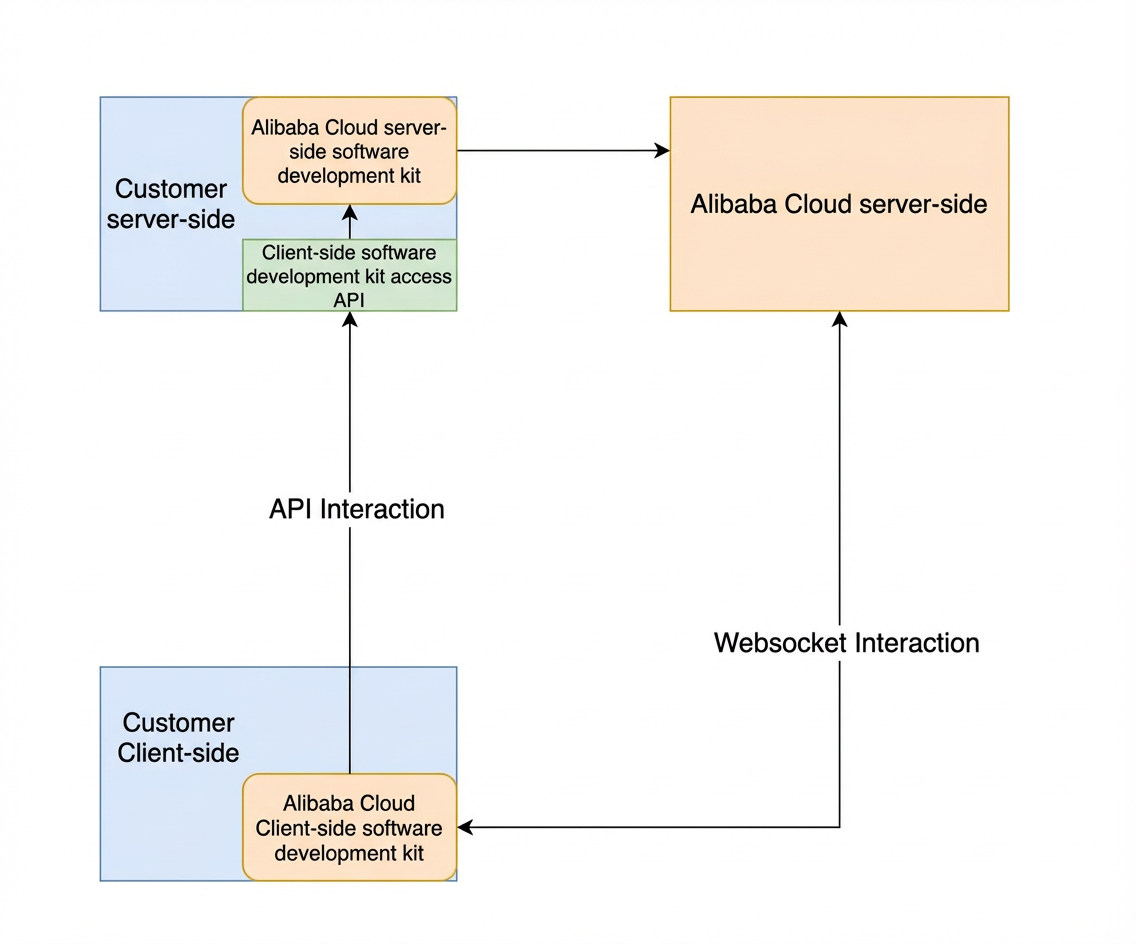
1. Server-side integration
Dependencies
<dependency>
  <groupId>com.aliyun</groupId>
  <artifactId>intelligentcreation20240313</artifactId>
  <version>2.11.0</version>
</dependency>
API: SendSdkMessage
{
  "moduleName":"",  // Pass-through SDK parameter
  "operationName":"", // Example: getProject, a pass-through SDK parameter
  "data":"",  // Data from the SDK. Pass it through to the Alibaba Cloud service.
  "userId":"" // Used for permission verification based on the client-side user.
}
{
"requestId":"",
"data":"", // Pass the data response back to the SDK.
"success":true,
"errorMessage":"",
"errorCode":""
}Code example
@RestController
@RequestMapping("/testApi")
public class TestApi {

    public TestApi() throws Exception {}

    String url = "intelligentcreation.cn-zhangjiakou.aliyuncs.com";

    /**
     * Initialize the configuration
     */
    Config config = new Config().setAccessKeyId("xxx")
            .setAccessKeySecret("xxx")
            .setEndpoint(url);

    /**
     * Create the client
      */
    Client client = new Client(config);

    @PostMapping("/send")
    public String send(@RequestBody SendParam param) throws Exception {
        Gson gson = new Gson();
        System.out.println(param.getMessage());
        //String message = "{\"moduleName\":\"avatar\",\"operationName\":\"getProject\",\"data\":\"834372344431362048\",\"userId\":\"123456\"}";

        Map<String, Object> map = gson.fromJson(param.getMessage(), new TypeToken<Map<String, Object>>() {}.getType());

        SendSdkMessageRequest request = SendSdkMessageRequest.build(map);
        // Request the API
        SendSdkMessageResponse response = client.sendSdkMessage(request);
        if (response.getStatusCode().equals(200)) {
            System.out.println("sendSdkMessage request successful");
            System.out.println(gson.toJson(response));
            System.out.println(gson.toJson(response.getHeaders()));
            System.out.println(gson.toJson(response.getBody()));
            Gson gson2 = new Gson();
            return gson2.toJson(response.getBody());
        } else {
            return response.getBody().toString();
        }
    }
}
2. Frontend integration
1. Installation
Install the prerequisites.
npm i @alifd/next @b-design/fusion moment react react-dom --saveYou can import the component library's CSS dependencies in the HTML template.
<link href="//gw.alipayobjects.com/os/lib/alifd/next/1.25.45/dist/next-noreset.var.css" rel="stylesheet" />
<link href="//gw.alipayobjects.com/os/lib/b-design/fusion/3.0.3/dist/index.css" rel="stylesheet" />
You can use the npm package manager to install the SDK.
npm install @alicloud-panxi/dhuman-sdk --save2. Quick Integration
1. Import the SDK
You can use the SDK in your JavaScript or TypeScript file:
import AIGCPreviewRuntimeSDK from '@alicloud-panxi/dhuman-sdk';

// Create a container DOM element
const container = document.getElementById('sdk-container') as HTMLElement;

// Configure the SDK parameters
const sdkOptions: SDKOptions = {
  // After server-side integration, the server exposes an API. The URL of this API is the apiPath.
  apiPath: 'https://xxx.com/path/to/server',
  // The container DOM node for rendering
  container: container,
  // Project ID
  projectId: 'your-project-id',
  // Scenario type
  type: '2d',
};

// Initialize and render the SDK instance
const sdkInstance = new AIGCPreviewRuntimeSDK(sdkOptions);

// When no longer needed, call the destroy method to destroy the SDK.
sdkInstance.destroy();
In addition to the required parameters, the SDK supports flexible configurations. The following is a complete example:
import AIGCPreviewRuntimeSDK from '@alicloud-panxi/dhuman-sdk';

// Create a container DOM element
const container = document.getElementById('sdk-container') as HTMLElement;

// Configure the SDK parameters
const sdkOptions: SDKOptions = {
  // After server-side integration, the server exposes an API. The URL of this API is the apiPath.
  apiPath: 'https://xxx.com/path/to/server',
  // The container DOM node for rendering
  container: container,
  // Project ID
  projectId: 'your-project-id',
  // Scenario type
  type: '2d',
  // Custom parameters - as needed
  options: {
    topPane: {
      isHideTitle: false,
      isHideCloseButton: false,
      isHideCountDown: true,
      ComponentView: {
        CustomInteractSwitch: MyCustomInteractSwitch,
      },
    },
    chatPane: {
      useTextOnly: true,
      useAudioOnly: false,
      ComponentView: {
        CustomChatInput: MyCustomChatInput,
        CustomAudioInput: MyCustomAudioInput,
        CustomMessageList: MyCustomMessageList,
      },
    },
    hooks: {
      chat: {
        useCustomModelWithCompleteInput: async (question) => {
          console.log('Processing question:', question);
          // Process the question in a custom service
          const responseText = await externalService(question);

          return {
            TotalResponse: {
              content: responseText,
              messageId: 'unique-id',
              finish: true,
            },
            processAudioStream: (callback) => {
              // To process audio data blocks, implement the logic here.
              const audioChunks = mockAudioChunks(responseText);
              audioChunks.forEach((chunk, index) => {
                const isEnd = index === audioChunks.length - 1;
                callback(chunk, isEnd);
              });
            },
          };
        },
      },
      audio: {
        useCustomModelWithCompleteInput: async (question) => {
          console.log('Processing audio question:', question);
          const responseText = await externalService(question);

          return {
            TotalResponse: {
              content: responseText,
              messageId: 'unique-id',
              finish: true,
            },
            processAudioStream: (callback) => {
              const audioChunks = createAudioChunks(responseText);
              audioChunks.forEach((chunk, index) => {
                const isEnd = index === audioChunks.length - 1;
                callback(chunk, isEnd);
              });
            },
          };
        },
        useCustomModelWithStreamASRInput: async (asrResult) => {
          console.log('ASR result:', asrResult);
          const processedText = await externalService(asrResult);

          const messageId = 'streaming-text-response-id';
          return {
            processTextStream: (callback) => {
              const textChunks = [
                { content: 'This is the first part', messageId, finish: false },
                { content: 'Continue with the second part', messageId, finish: false },
                { content: 'The final ending', messageId, finish: true },
              ];
              textChunks.forEach((chunk, index) => {
                const isEnd = chunk.finish;
                callback(chunk, isEnd);
              });
            },
          };
        },
      },
      asr: {
        useAudioData: async ({ audio, taskStatus, taskId }) => {
          if (taskStatus === 'taskStart') {
            console.log('Task started');
            return {
              processASRStream: (callback) => {
                callback(
                  {
                    header: { name: 'TranscriptionStarted', task_id: taskId.current },
                    payload: {},
                  },
                  false
                );
              },
            };
          }
          if (taskStatus === 'taskEnd') {
            console.log('Task ended');
            return {
              processASRStream: (callback) => {
                callback(
                  {
                    header: { name: 'TranscriptionCompleted', task_id: taskId.current },
                    payload: {},
                  },
                  true
                );
              },
            };
          }

          // Default return
          return {
            processASRStream: (callback) => {
              callback(
                {
                  header: { name: 'TranscriptionResultChanged', task_id: taskId.current },
                  payload: { result: 'Dynamic recognition result' },
                },
                false
              );
            },
          };
        },
      },
    },
  },
  onJoinChannel: ({ success }) => {
    console.log('Join channel success:', success);
  },
  onError: (error) => {
    console.error('Error occurred:', error);
  },
  onStart: () => {
    console.log('SDK started');
  },
  onEnd: () => {
    console.log('SDK ended');
  },
};

// Initialize and render the SDK instance
const sdkInstance = new AIGCPreviewRuntimeSDK(sdkOptions);

// When no longer needed, call the destroy method to destroy the SDK.
sdkInstance.destroy();
2. Metric description
Parameter | Description | Type | Required | Default |
apiPath | The backend server API endpoint URL. | string | Yes | - |
apiPathOptions | Configuration for apiPath requests, such as timeout, headers, method, withCredentials, and customRequestData. | Record<string, any> | No | - |
container | The container DOM node for rendering. | HTMLElement | Yes | - |
projectId | The project ID. | string | Yes | - |
type | The rendering type. Valid values include '2d' and 'hyperrealism'. | string | No | '2d' |
options | UI customization configurations and processing hooks. For more information, see the following sections. | object | Yes | - |
onJoinChannel | A callback function that is invoked after you successfully join a channel. It returns an object that contains the success status. | function | No | - |
onError | A callback function that is invoked when an error occurs. | function | No | - |
onStart | A callback function that is invoked after the SDK starts successfully. | function | No | - |
onEnd | A callback function that is invoked when the SDK session ends. | function | No | - |
3. Method description
Parameter name | Description | Type | Required | Default |
destroy | Destroys the current instance. | function | No | - |
speak | (3D only) Actively plays a piece of speech. `speak(text, { onStart,onEnd })` | function | No | - |
stopSpeak | (3D only) Stops the current speech playback. | function | No | - |
createSpeakStream | (3D only) Plays a text stream. `x=createSpeakStream({ onStart,onEnd });x.next('text');x.last('text')` | function | No | - |
4. Options configuration
The options object lets you customize the SDK's UI components and feature hooks. It supports the following custom configurations:
TopPaneConfig: Configures the appearance and features of the top pane.
Parameter name | Description | Type | Required | Default |
isHideTitle | Specifies whether to hide the title. | boolean | No | false |
isHideCloseButton | Specifies whether to hide the Close button. | boolean | No | false |
isHideCountDown | Specifies whether to hide the countdown. | boolean | No | false |
ComponentView | Custom components for the top pane, such as | react/vue component | No | - |
ChatPaneConfig: Used to customize the appearance and features of the chat pane.
Parameter name | Description | Type | Required | Default |
useTextOnly | Use only text input. | boolean | No | false |
useAudioOnly | Use only audio input. | boolean | No | false |
ComponentView | Custom chat components, such as | boolean | No | false |
Hooks: You can use hooks to customize interaction logic.
chat
- **`useCustomModelWithCompleteInput`**

  - **Type**: `(question: string) => Promise<CustomModelResponse>`
  - **Description**: For text input scenarios. Use the hook's input parameters to get the user's current conversation input. Call your services and return the processing results as defined by `CustomModelResponse`. The frontend SDK then renders the results.
  - **Example**:

- **`getUserInput`**

  - **Type**: `(question: string) => void`
  - **Description**: For text input scenarios. Use the hook's input parameters to get the user's current conversation input.
  - **Example**:

    ```typescript
    hooks: {
      chat: {
        getUserInput: async (question) => {
          console.log('Processing question:', question);
        };
      }
    }
    ```
audio
useCustomModelWithCompleteInputType:
(question: string) => Promise<CustomModelResponse>Description: For speech input scenarios, use the hook's input parameters to obtain the complete Automatic Speech Recognition (ASR) result of the user's speech input. Call your services and return the processing results as defined by
CustomModelResponse. The frontend SDK then renders the results.Example:
hooks: {
  audio: {
    useCustomModelWithCompleteInput: async (question) => {
      console.log('Processing audio question:', question);
      const responseText = await externalService(question);

      return {
        TotalResponse: {
          content: responseText,
          messageId: 'audio-message-id',
          finish: true
        },
        processAudioStream: (callback) => {
          const audioChunks = createAudioChunks(responseText);
          audioChunks.forEach((chunk, index) => {
            const isEnd = index === audioChunks.length - 1;
            callback(chunk, isEnd);
          });
        },
      };
    },
  }
}useCustomModelWithStreamASRInputType:
(asrResult: string) => Promise<CustomModelResponse>Description: This hook is for speech input scenarios. You can use the hook's input parameters to retrieve the streaming Automatic Speech Recognition (ASR) result of the user's speech. You can then call your services and return the processing results as defined by
CustomModelResponse. The frontend SDK then renders the results.Example:
hooks: {
  audio: {
    useCustomModelWithStreamASRInput: async (asrResult) => {
      console.log('ASR result:', asrResult);
      const processedText = await externalService(asrResult);

      return {
        processTextStream: (callback) => {
          const textChunks = [
            { content: 'Streaming text part 1', messageId: 'stream-id', finish: false },
            { content: 'Streaming text part 2', messageId: 'stream-id', finish: true },
          ];
          textChunks.forEach((chunk) => {
            callback(chunk, chunk.finish);
          });
        },
      };
    };
  }
}getASRResultInStreamType:
(asrResult: string) => voidDescription: Retrieves the streaming ASR result of the user's speech input in a speech input scenario.
getASRResultInTotalType:
(asrResult: string) => voidDescription: Retrieves the complete ASR result of the user's speech input in a speech input scenario.
asr
useAudioDataType:
({ audio, taskStatus, taskId }) => Promise<CustomASRModelResponse>Description: For custom Automatic Speech Recognition (ASR) services. Use the hook's input parameters to obtain the binary data of the user's speech input, the task status, and the task ID. The task status can be 'taskStart', 'taskRecording', or 'taskEnd'. The task ID identifies the current speech recognition task, where each session is treated as a single task. Call your services and return the results as defined by
CustomASRModelResponse. The frontend SDK then renders the results.Example:
hooks: {
  asr: {
    useAudioData: async ({ audio, taskStatus, taskId }) => {
      if (taskStatus === 'taskStart') {
        console.log('Task started');
        return {
          processASRStream: (callback) => {
            callback(
              {
                header: { name: 'TranscriptionStarted', task_id: taskId.current },
                payload: {},
              },
              false
            );
          },
        };
      }

      if (taskStatus === 'taskEnd') {
        console.log('Task ended');
        return {
          processASRStream: (callback) => {
            callback(
              {
                header: { name: 'TranscriptionCompleted', task_id: taskId.current },
                payload: {},
              },
              true
            );
          },
        };
      }

      // Processing status
      return {
        processASRStream: (callback) => {
          callback(
            {
              header: { name: 'TranscriptionResultChanged', task_id: taskId.current },
              payload: { result: 'Streaming dynamic recognition result' },
            },
            false
          );
        };
      };
    };
  }
}
CustomModelResponse
Type: The return type for custom Large Language Model (LLM) hooks.
Description: Contains the LLM's complete text, streaming audio, and streaming text responses.
interface IModelMessage {
  content: string; // Complete LLM response
  messageId: string; // uuid
  finish: boolean; // Set to true for a complete response.
  relatedImages?: string[]; // Related image resources
  relatedVideos?: string[]; // Related video resources
}

interface CustomModelResponse {
  TotalResponse?: IModelMessage;
  processAudioStream?: (callback: (audioChunk: ArrayBuffer, isEnd: boolean) => void) => void;
  processTextStream?: (callback: (textChunk: IModelMessage, isEnd: boolean) => void) => void;
}
CustomASRModelResponse
Type: The return type for custom ASR hooks.
Description: Contains the complete and streaming ASR results. The continuous audio input mode supports only
processASRStreamand does not supporttotalASRResult.
interface IASRMessage {
  header: {
    name: 'TranscriptionStarted' | 'SentenceBegin' | 'TranscriptionResultChanged' | 'SentenceEnd' | 'TranscriptionCompleted';
    task_id: string;
  };
  payload: {
    result?: string;
  };
}

interface CustomASRModelResponse {
  totalASRResult?: string; // Complete recognition result.
  processASRStream?: (callback: (asrChunk: IASRMessage, isEnd: boolean) => void) => void; // Streaming recognition result.
}
5. Version updates
For the latest changes, see the changelog.md file.
The AIGC Preview Runtime SDK lets you flexibly customize avatar preview sessions and integrate them into your existing systems. You can adjust the options settings to achieve your desired UI and features. Using hooks, you can insert custom processing at key logic points in the SDK. This makes application extensions and business integrations more flexible and efficient.
3. FAQ
1. The interface reports: Preview has stopped
Digital humans use different lines for previewing and publishing. For more information, see the description of the `type` parameter.
To publish, pass `prod` to the `type` parameter. If this parameter is not specified, the default line is used.