Computed properties
Computed properties allow you to define complex data transformation logic.
What is a computed property
A computed property contains a JavaScript script for data transformation. The result of the return statement becomes the value property of the computed property object. When the data that a computed property depends on changes, the computed property updates automatically.
Computed property scopes
Page-level computed properties
Page-level computed properties are scoped to the page on which they are defined. They can access the components and data on that page, along with global data.
Global computed properties
Global computed properties are available on all pages and can access global data.
Create a computed property
You can create page-level or global computed properties in the code panel on the left. The settings for a computed property include its computation logic and description.
Computation logic
The computation logic is a JavaScript script with no side effects that performs complex data transformations. The transformation result is returned by the return statement.
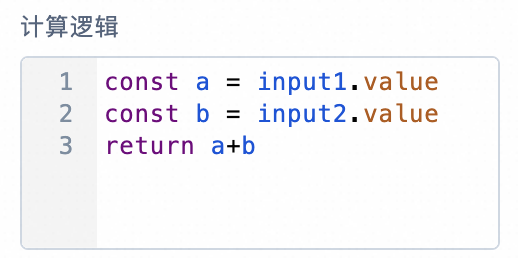
For example, if a page has two input box components, input1 and input2, you can combine their values and return the result by writing the computation logic as shown in the following figure.
Description
You can add a comment to explain the computed property.
Use a computed property
After you create a computed property, you can reference it by its name in expressions and JavaScript scripts within its scope.
For example, to bind the content of the text component text1 to the value of the computed property compute1, you can set the binding as shown in the following figure.
Notes
Side effects: The JavaScript script for a computed property must not perform operations that have side effects.
Synchronous execution: Computed properties are executed synchronously.
Saving: A computed property does not take effect until it is saved.
Infinite loops: Before saving a computed property, confirm that the JavaScript script does not contain an infinite loop. If you save a property that contains an infinite loop, the current tab becomes unresponsive. You must close the tab in your browser and reopen it.
Differences between computed properties, variables, and frontend functions
Computed properties, variables, and frontend functions differ significantly in their scenarios, APIs, and code restrictions.
Category |
Scenarios |
API |
Code restrictions |
Sync/Async |
Computed property |
Data transformation |
Can only read the value of the computed property |
JavaScript script with no side effects |
Synchronous |
Variable |
Temporary data storage and communication |
Can read or modify the value of the variable |
Initial value is an expression |
Synchronous |
Frontend function |
Write complex business logic |
Can execute the frontend function or read its properties |
JavaScript script that allows side effects |
Asynchronous |