Frontend functions
Use frontend functions to write complex business logic. The code for these functions runs in the user's browser.
What is a frontend function
The Mobi low-code development platform lets you write and reuse complex business logic using data objects that execute JavaScript. Because these scripts run in the browser, they are called frontend functions.
Frontend function scope
Page-level frontend functions
A page-level frontend function can be used only on its corresponding page. It can access and operate on the components and data of that page, along with global data.
Global frontend functions
A global frontend function can be used on all pages. It can access and operate on global data.
Create a frontend function
You can create page-level or global frontend functions in the code panel on the left. The settings for a frontend function include parameters, function body, success callback, failure callback, description, debounce, and execution condition.
Parameters
To define a frontend function with parameters, you must add one or more parameters. The definition for each parameter includes a name, type, default value, and description.
Parameter name: Required. The name must be unique and follow JavaScript identifier rules.
Parameter type: Required. This is consistent with variable type definitions. The default type is
string.Default value: Optional. You can enter an expression. If you do not define a default value, a default value is set based on the parameter type.
Parameter description: Optional. You can add a comment to describe the parameter.
Defined parameters can be referenced by name within the function body of the corresponding frontend function.
Function body
The function body contains the JavaScript script. The script can perform side effects and asynchronous operations. The return statement is optional. After the frontend function executes, the return value defined in the function body is recorded in the data property of the frontend function object.
Success and failure callbacks
After a frontend function executes, it triggers a success or failure event. The success and failure callbacks define the event handlers for these events. You can define multiple event handlers. Multiple event handlers execute concurrently, and their timing is not guaranteed.
For more information, see Events.
Description
You can add a comment to describe the frontend function.
Debounce
The debounce delay time in milliseconds for executing the frontend function. You can enter an expression. A default value of 0 indicates that no debounce is applied.
Execution prevention conditions
An expression that determines whether the function can be executed. If the expression's value is true, execution is blocked. The default value is false, which allows the function to execute normally.
Execute a frontend function
Frontend functions must be explicitly executed. You can execute a frontend function by clicking a button, triggering a frontend function event, or calling the function from code.
When you edit and view a frontend function in the bottom panel, you can click the Run button to execute it. The execution results appear on the right.
Manual clicks are mainly for debugging. In real scenarios, you typically execute frontend functions by triggering a frontend function event or calling the function from code. For example, you can configure a click event for a button component. Set the event action to a frontend function, select the identity of the function to call, and pass a parameter object.
You can also set the event action to execute a script. In the script, you can call the frontend function using function1.trigger().
To pass parameters, include a parameter object in the trigger call.
For a detailed description of the frontend function API, see Frontend Function API.
Notes
Asynchronous: Frontend functions execute asynchronously. You can use the
awaitkeyword in the function body. When you call a function usingtrigger, the return value is aPromise.Concurrent: Frontend functions execute concurrently. If you trigger the same frontend function multiple times, the execution order is not guaranteed.
FAQ
Q: How can I retrieve the result of a specific frontend function execution?
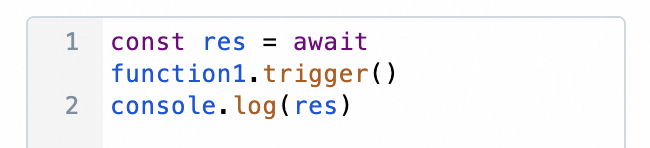
A: Frontend functions execute concurrently and are singleton objects. Because of this, you cannot use the data property to retrieve the result of a specific execution. To obtain the result of a specific execution, use the value returned by the trigger call directly in your code. The following figure shows an example.
Q: How do I write a recursive function?
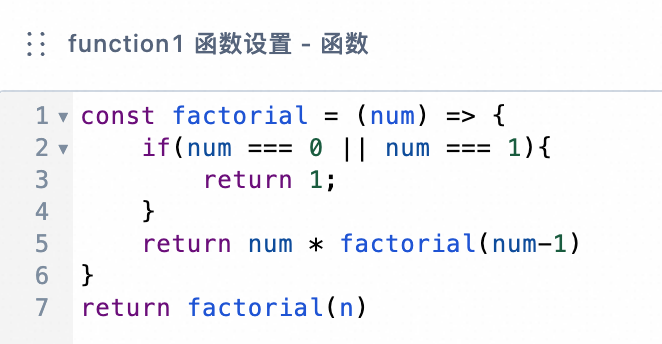
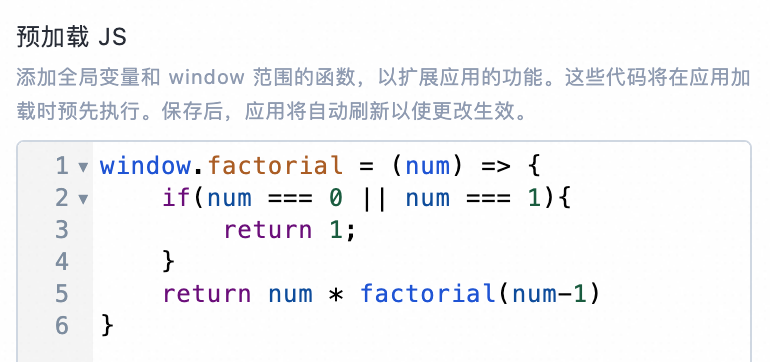
A: A frontend function cannot call itself from within its function body, which prevents infinite loops. Frontend functions are also asynchronous, which makes them a poor choice for direct recursion. To write a recursive function, declare an inner function within the function body, or define a function using the Preload JS feature. The following figures show examples.
Q: How do I write a synchronous function?
A: Frontend functions execute asynchronously. To write a synchronous function, define it using the Preload JS feature.