MiaoSou
MiaoSou is a multimodal search product built on a multi-agent architecture, delivering a diverse, efficient, and rich search experience.
Product advantages
- It offers an effective tool for information retrieval and processing across industries, using fine-grained optimization of the entire pipeline—such as query understanding and transformation, multi-path recall, and VL caption indexing—complemented by scenario-specific post-processing capabilities.
- MiaoSou supports vector retrieval from multiple data sources and various retrieval logics. It can connect to local knowledge bases, local search engines, local file repositories, and external search engines to maximize search coverage. This architecture enhances search capabilities while keeping all data on-premises.
Important
- MiaoSou uses a pay-as-you-go billing model based on the total tokens the model consumes. For more information, see MiaoSou Billing Documentation.
- Click this link to enable the pay-as-you-go API for the Quanmiao intelligent retrieval and generation application.
- You can use MiaoSou by calling its APIs directly (MiaoSou - Data source, MiaoSou - Intelligent Search) or by using the MiaoSou product console.
Product access
- Go to the App Square page in Alibaba Cloud Model Studio. On the All Applications tab, find the Quanmiao application and click its card to go to the product details page.
- Click MiaoSou to go to the MiaoSou product page. On the Quanmiao product details page, five functional modules are displayed in the middle of the page: MiaoCe, MiaoBi, MiaoSou, MiaoDu, and atomic capability. Find and click the MiaoSou card to access the corresponding feature.
Search types
Q&A search
- The large model selects and summarizes highly relevant materials based on your query to provide accurate, direct answers with citations.
- Supports in-depth follow-up searches based on the current query.
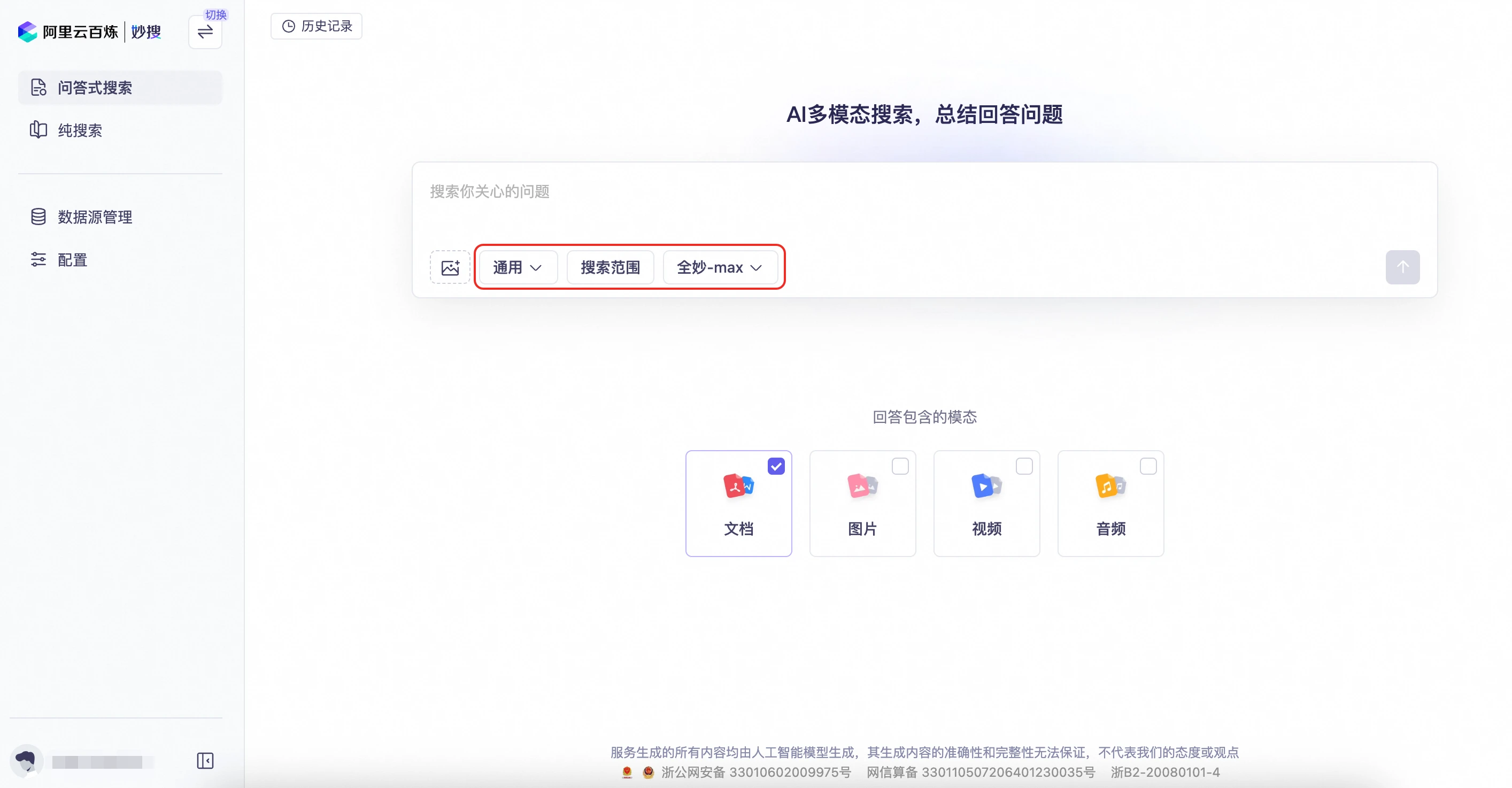
Parameters
You can upload images and configure the search type, search scope, model selection, and response modality.
-
Search type:
- General (default): Directly searches and summarizes results. Ideal for simple, clear questions.
- Deep: Rewrites and expands the query to search more materials. Suitable for complex questions.
- Research: Decomposes the query into steps like a human expert, gathers more extensive materials, and provides a comprehensive summary. Best for in-depth research.
- Auto: Dynamically switches between modes based on the context and nature of the question.
-
Search scope:
- Search source settings: Supports internet search and Fangcun Search. You can also configure custom data sources (multiple selections are supported).
- Response format: Options include generating a summarized answer, answering with original text, and summarizing by timeline.
- Time range for materials: Supports searching within the last 7 days, last 1 month, last 2 months, last 6 months, last 1 year, or a custom range.
-
Model selection: Supports Quanmiao-max (default) and Quanmiao-plus, along with their corresponding reasoning models.
-
Response modality: Supports documents, images, videos, and audio. You can select multiple modalities.
Pure search
Provides comprehensive search for large media asset libraries. After retrieval, you can organize and process the specified materials by clustering, generating answers from original text, summarizing timelines, or extracting key news elements.
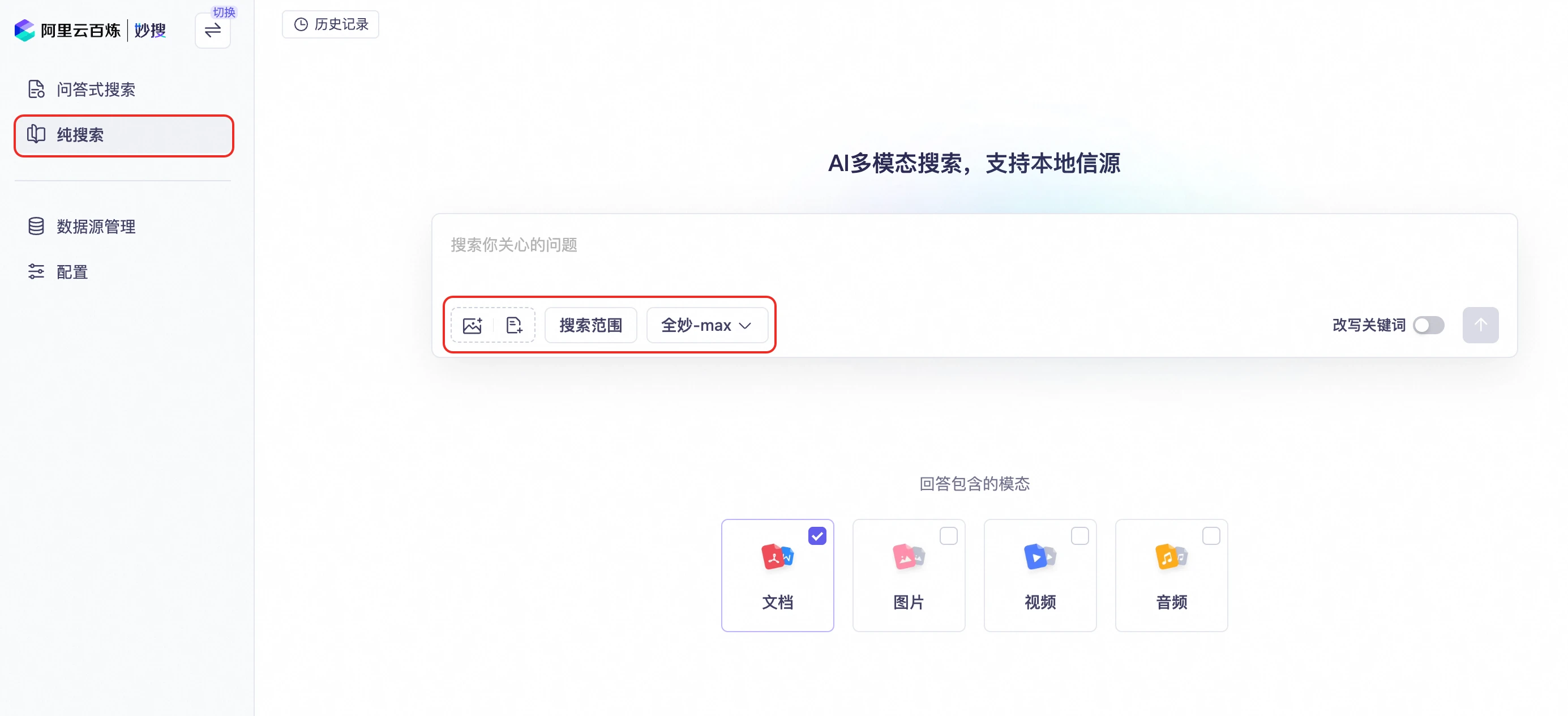
Parameters
You can upload images and documents, and configure the search scope, model selection, and response modality.
-
Search scope:
- Search source settings: Supports internet search and Fangcun Search by default. You can also configure custom data sources (multiple selections are supported).
- Time range for materials: Supports searching within the last 7 days, last 1 month, last 2 months, last 6 months, last 1 year, or a custom range.
-
Model selection: Supports Quanmiao-max (default) and Quanmiao-plus.
-
Response modality: Supports documents, images, videos, and audio. You can select multiple modalities.
Search data sources
New data source
You can add a data source to MiaoSou in four ways: manually create a data source, authorize OSS to connect a data source, import a data source through a video understanding agent, and import a data source through an API.
Manual creation
Upload files in groups to test search performance based on your data source. You can upload text, image, and video data sources.
- Click Manually create a data source and set a name for the data source.
- Under the new data source, click its name to go to the file upload page.
NoteEach UID can upload a maximum of one million documents. Each document is also subject to size limits based on its format. If your business needs require uploading more or larger documents, contact us to adjust the limits.
OSS connection
MiaoSou can connect to Object Storage Service (OSS) as a data source, enabling search and Q&A over its data. For detailed authorization steps, see Object Storage Service (OSS) Setup Guide.
Video understanding agent
For video materials that require more detailed content parsing, you can use the Film and Television Media video understanding agent to perform deep analysis. The agent's analysis results are imported into MiaoSou as a metadata source, which is then fused with native storage data for searches and Q&A.
NoteFor instructions on using the agent, see Film and Television Media Video Understanding.
API import
Integrate a data source by connecting to an API.
- Click Configure API and set a name for the data source.
- Modify the configuration to connect to the external API data source. For more information, see MiaoSou - Import a data source through an API.
Manage metadata and tags
For all types of data sources, you can view and maintain metadata and tag information, both of which are used in retrieval and Q&A. You can also search for data within a data source.
-
For data of different modalities, you can maintain tags and metadata for each item. Currently, metadata can only be uploaded by using the
CreateDatasetAPI. Both tags and metadata are used during search.- Text, Image: Supports adding tags and metadata (key-value pairs).
- Audio: Supports adding tags and metadata (key-value pairs and ASR).
- Video: Supports adding tags and metadata (key-value pairs, ASR, and analysis results from the video understanding agent).
On the data source details page, you can filter data by File name, File type, and Date range. In the file list, click Tag or Metadata in the Actions column to go to the corresponding management page.
Applying data sources
MiaoSou connects to an internet search data source by default. On the Configure page, select Enabled data sources to include them as sources for Q&A Search or Pure Search.
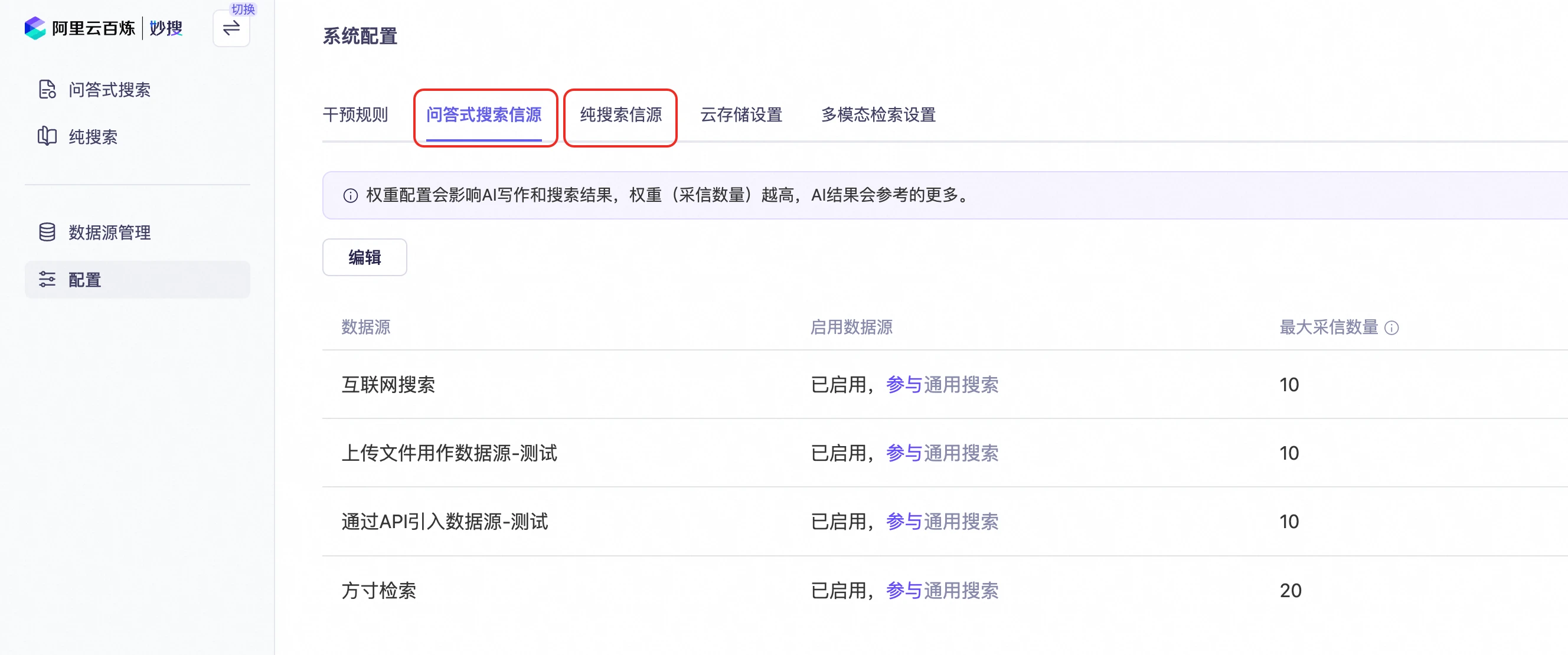
Search and Q&A
You can input a search query and configure parameters such as the search mode, target data sources, response format, large model, and desired response modality. Confirm your settings to start the search.
On the search results page, the upper-left area displays the Summarized Answer, which is a summary automatically generated by the large model based on the retrieved content. Below this, thumbnails of matching video clips and their ASR transcripts are shown. The Data Sources panel on the right lists the reranked results. Relevant keywords in the cited text are highlighted in purple. At the bottom of the page, an input box allows you to ask follow-up questions on the current topic.
Visualize metadata and tags
After a Q&A Search or Pure Search, click the audio or video content to view its video understanding analysis and ASR metadata. The system then highlights the most relevant segments and keywords within the metadata that correspond to the query and answer.
FAQ
1. Supported file types and size limits
-
Supported file types: MiaoSou data sources support uploading files in the following common formats: HTML, PDF, Word, Excel, CSV, image, audio, and video.
-
Upload limits for each file type:
- HTML: Up to 20 MB
- PDF: Up to 50 MB
- Word: Up to 20 MB
- Excel: Up to 20 MB
- CSV: Up to 15 MB
- Image: Up to 40 MB
- Audio: Up to 100 MB
- Video: Up to 2 GB
NoteThe preceding file size limits apply to the current production environment. If you require higher limits, contact us for an adjustment.
2. Configuring OSS data sources
Yes. For specific configuration steps, see the Object Storage Service (OSS) Setup Guide.