Alibaba Cloud OSS Setup Guide
Terminology
- Object Storage Service (OSS)
Alibaba Cloud Object Storage Service. This topic refers specifically to Alibaba Cloud OSS.
- OSS authorization configuration
The complete process of granting permissions and configuring parameters in the Quanmiao console. This includes RAM role authorization and bucket parameter settings. After completion, Quanmiao gains secure read and write access to the /aimiaobi subdirectory in a specified OSS bucket.
NoteMiaosou uses its own storage by default. Enabling OSS is optional. For Miaosou usage instructions, see Miaosou.
Why configure OSS authorization?
Scenario | Description |
|---|---|
Security and compliance | Store sensitive business data in your own cloud environment to meet requirements such as China’s Multi-Level Protection Standard, industry regulations, or internal IT policies. |
Resource control | Manage storage permissions, lifecycle rules, access logs, and audit capabilities yourself. Avoid risks from third-party storage dependencies. |
Cost optimization | Reuse existing OSS resources, such as subscription-based storage capacity or CDN origin bandwidth, to reduce long-term storage and traffic costs. |
End-to-end OSS authorization configuration
Step 1: Prepare OSS resources
① Enable OSS
Log on to the OSS console. Confirm that OSS is enabled for your account.
② Create a bucket
Create a new bucket. The recommended region is cn-beijing (China North 2). You may also reuse an existing bucket.
③ Create the root directory
In the bucket, manually create the path: /aimiaobi.
NoteYou must complete this step. Quanmiao receives read and write permissions only for files under this prefix, following the principle of least privilege.
④ Configure CORS
NoteThis step requires configuration. Without it, you cannot preview or upload from the console.
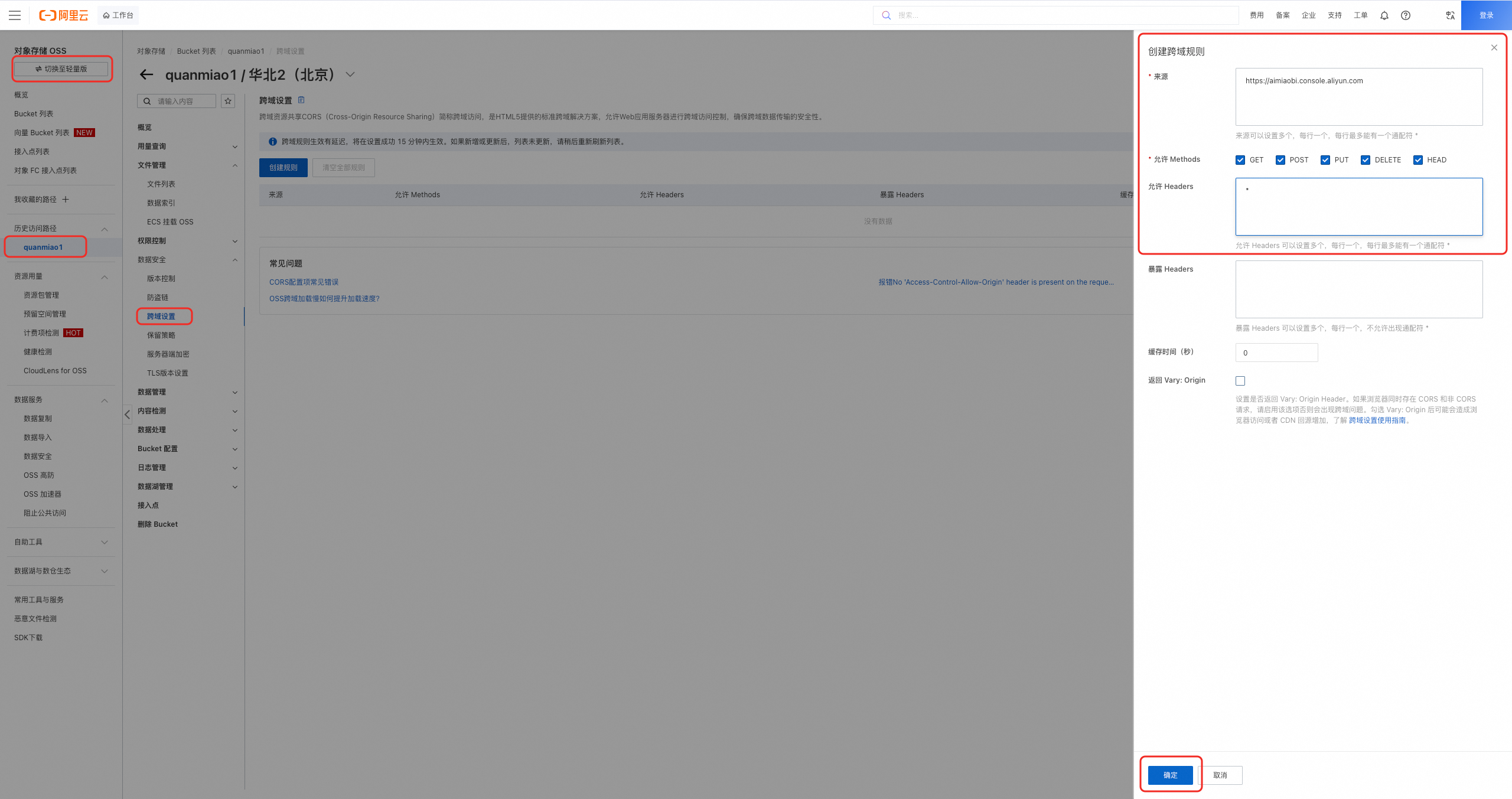
- Path: OSS console > Bucket > Data Security > CORS Settings. Or access it at
https://oss.console.aliyun.com/bucket/oss-{region}/{bucket}/data-security/cors(replace{region}and{bucket}with your actual values). - CORS rule settings (enter exactly as shown):
Field | Value | Description |
|---|---|---|
Origin | Quanmiao console domain name. Include the protocol. | |
Allowed Methods |
| Select All |
Allowed Headers |
| Allow any request header, including |
Other | Use default values. |
Step 2: Authorize and configure in Miaosou
Go to the Miaosou console, then go to Settings and configure authorization and settings under Cloud Storage.
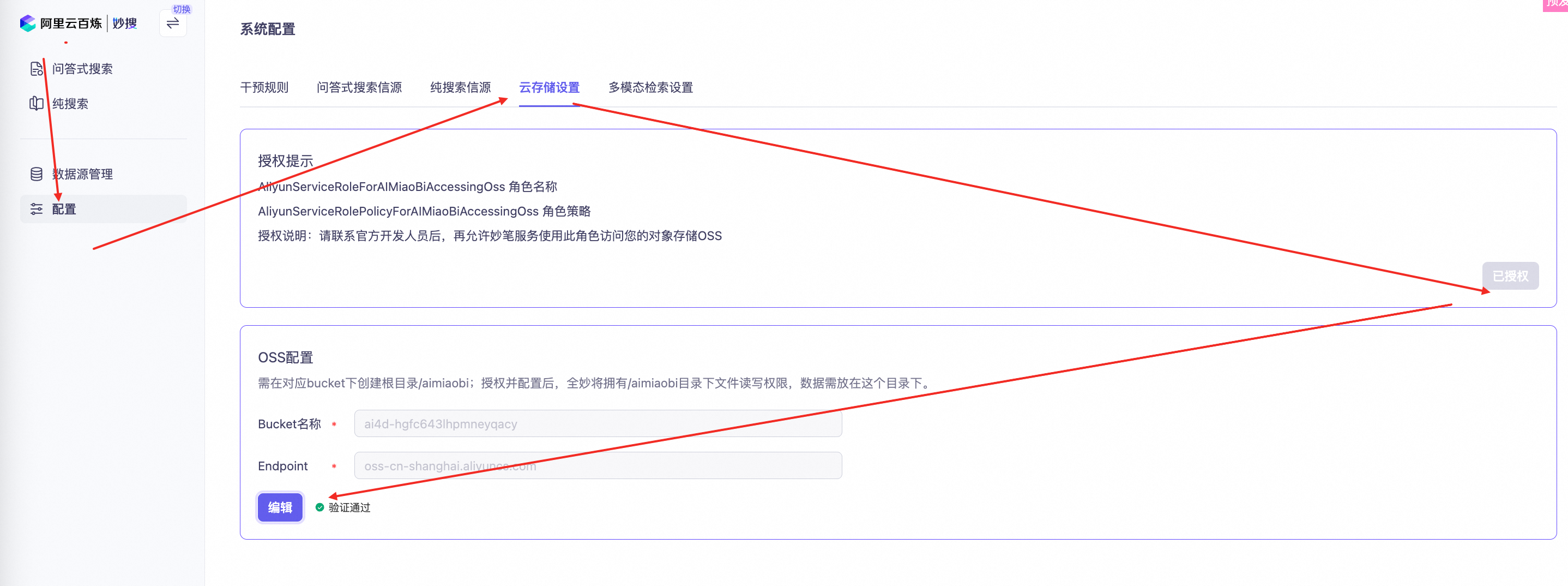
① Authorize (attach RAM role)
Click the Authorize button. After successful authorization, the button changes to Authorized. Quanmiao now has read and write access to the /aimiaobi directory in all buckets. However, files still upload to Miaosou’s own storage because bucket parameters are not yet configured.
② Configure (attach bucket)
-
Enter the following two values and click Save:
- Endpoint: OSS service endpoint, such as
oss-cn-shanghai.aliyuncs.com. - Bucket name: The name of the bucket you created, such as
quanmiao-xxxx.
- Endpoint: OSS service endpoint, such as
-
On saving, the system automatically uploads a test file to
/aimiaobiand verifies read and write access. If you see Verification passed, then OSS connectivity, permissions, and CORS are all working correctly.
Cancel OSS authorization configuration
Go to RAM Access Management > Roles. Search for the role named AliyunServiceRoleForAIMiaoBiAccessingOss, then delete it.
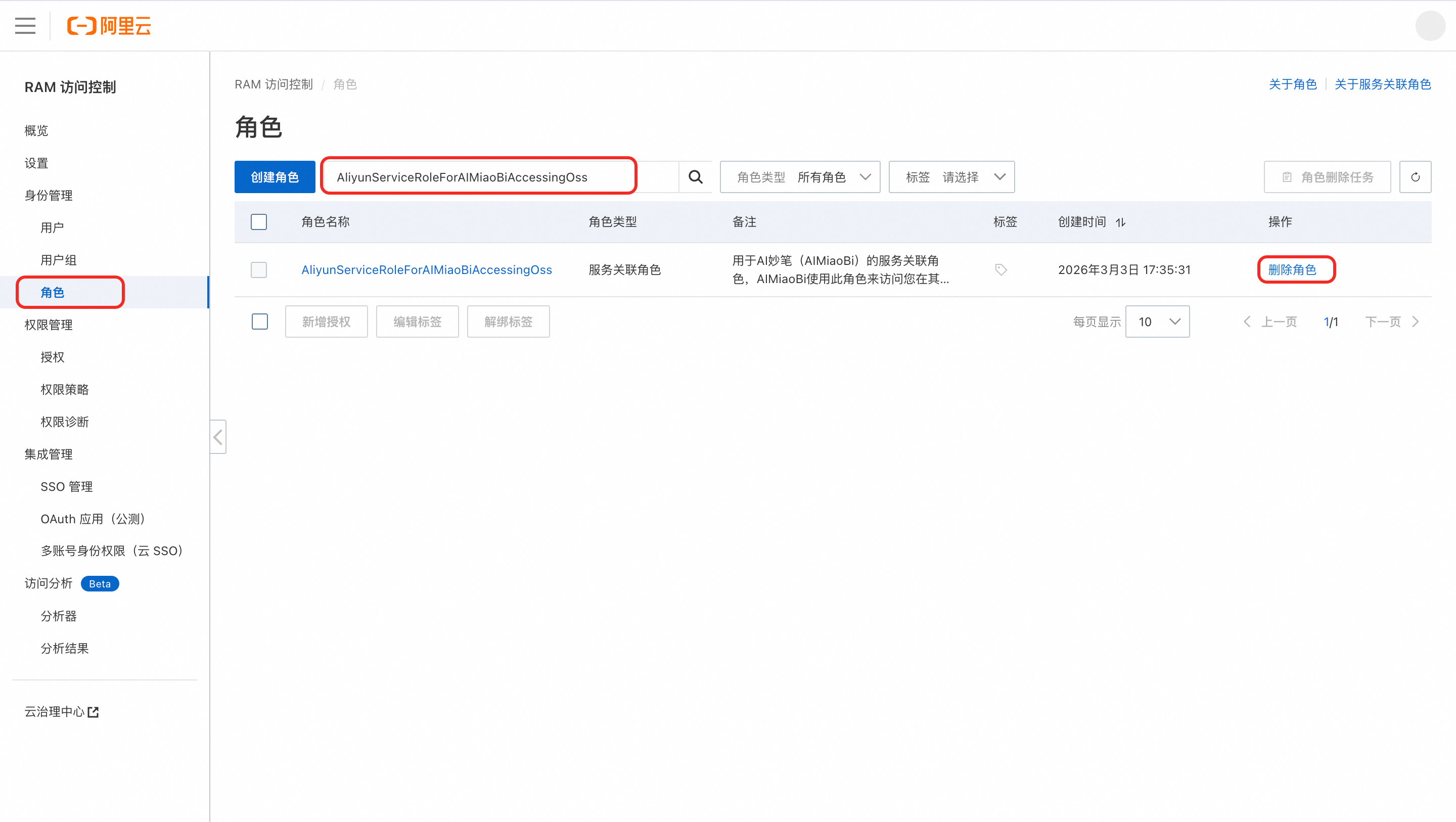
No active orders
In the Alibaba Cloud RAM console, delete the RAM role associated with Quanmiao: RAM Access Management > Roles > Search for AliyunServiceRoleForAIMiaoBiAccessingOss > Delete role.
Active orders exist
Do not delete the RAM role yourself. Doing so may affect historical data.
Contact Quanmiao product and R&D support:
- DingTalk group ID: 166725003249 (include the following: [OSS unbind] + aliUid + reason).
- The R&D team marks the role as deletable. After that, you can delete it using the method above.
Key limits and behaviors
Feature | Behavior Logic | Notes |
|---|---|---|
File upload | New files upload directly to | This does not consume Quanmiao’s storage quota. |
File deletion | Strongly consistent synchronous deletion: When you delete a document or dataset in the console, the corresponding file in OSS is deleted at the same time. | Deletion is irreversible. |
File download or preview | Quanmiao either proxies requests through its backend or generates a temporary OSS STS signed URL, depending on your security policy. | |
Directory isolation | Quanmiao can access only | This follows the principle of least privilege. |