Use encryption to access model inference features
If a request contains sensitive information or is sent over the public network, encrypt the input field in the request body. This prevents data from being intercepted or tampered with during transmission.
Encryption and decryption process
This process uses a hybrid encryption mechanism. Data is encrypted with the AES symmetric algorithm. The AES key is securely transmitted using RSA asymmetric encryption.
-
Prepare the request data.
-
Generate an AES symmetric key. AES is an efficient symmetric encryption algorithm used to encrypt the content of the
inputfield.Note:
inputfield is the core object in a request to a Large Language Model (LLM) application. It includes required parameters such as the prompt (prompt) and optional parameters such as the conversation history (messages). -
Use a key pair to encrypt the
input. -
Encrypt the AES key with an RSA public key. Use the hosted RSA public key from the Alibaba Cloud Model Studio platform to encrypt the AES key. This ensures the secure transmission of the AES key.
Note: RSA is an asymmetric encryption algorithm that includes a public key and a private key. The public key is used to encrypt data, and the private key is used to decrypt data.
-
-
Send the request. When you call the Alibaba Cloud Model Studio platform, pass the encrypted
inputcontent and the key information. The key information is encapsulated in theX-DashScope-EncryptionKeyrequest header. -
Alibaba Cloud Model Studio processes the request.
- The data is encrypted throughout the Alibaba Cloud Model Studio inference pipeline.
- The Alibaba Cloud Model Studio platform decrypts the data during vector recall and model inference.
- The generated answer is encrypted with the same AES key, and the encrypted inference result is returned.
-
Process the response. The client receives the response, decrypts the inference result with the AES key, and obtains the plaintext answer.
Prerequisites
Activate the Alibaba Cloud Model Studio service and obtain an API key. For more information, see Obtain an API Key.
Important: Configure the API key as an environment variable to reduce the risk of leakage. For more information, see Set the API key as an environment variable. You can also configure the API key in your code, but this increases the risk of leakage.
DashScope SDK call (automatic encryption, out-of-the-box)
The DashScope SDK handles encryption and decryption. To make encrypted calls, simply enable the encryption feature. You do not need to write your own encryption and decryption code.
Constraints and limits
- Custom keys are not supported. To use a custom key, see HTTP call (manual key management).
- Only Java and Python are supported. For other programming languages, see HTTP call (manual key management).
Procedure
-
Enable the encryption feature.
Java SDK
Set
enableEncrypttotrueto enable the encryption feature.GenerationParam param = GenerationParam.builder() // ...omitted for brevity // Enable encryption. .enableEncrypt(true) .build();Python SDK
Set
enable_encryptiontoTrueto enable the encryption feature.# ...omitted for brevity response = dashscope.Generation.call( # ...omitted for brevity # Enable encryption enable_encryption=True ) -
Call the model. Send the request in the same way as a normal call. The SDK automatically handles encryption and decryption.
Complete SDK code examples
Important: The sample code is for reference only. Do not use it directly in a production environment.
Note: For more information about request parameters, see Qwen API documentation.
Java SDK
Request exampleimport java.util.Arrays;
import java.lang.System;
import com.alibaba.dashscope.aigc.generation.Generation;
import com.alibaba.dashscope.aigc.generation.GenerationParam;
import com.alibaba.dashscope.aigc.generation.GenerationResult;
import com.alibaba.dashscope.common.Message;
import com.alibaba.dashscope.common.Role;
import com.alibaba.dashscope.exception.ApiException;
import com.alibaba.dashscope.exception.InputRequiredException;
import com.alibaba.dashscope.exception.NoApiKeyException;
import com.alibaba.dashscope.utils.JsonUtils;
public class Main {
public static GenerationResult callWithMessage() throws ApiException, NoApiKeyException, InputRequiredException {
Generation gen = new Generation();
Message systemMsg = Message.builder()
.role(Role.SYSTEM.getValue())
.content("You are a helpful assistant.")
.build();
Message userMsg = Message.builder()
.role(Role.USER.getValue())
.content("Who are you?")
.build();
GenerationParam param = GenerationParam.builder()
// If you have not configured the environment variable, replace the following line with: .apiKey("sk-xxx")
.apiKey(System.getenv("DASHSCOPE_API_KEY"))
// This example uses qwen-plus. You can replace it with another model as needed. For a list of models, see https://help.aliyun.com/en/model-studio/models
.model("qwen-plus")
.messages(Arrays.asList(systemMsg, userMsg))
.resultFormat(GenerationParam.ResultFormat.MESSAGE)
// Enable encryption.
.enableEncrypt(true)
.build();
return gen.call(param);
}
public static void main(String[] args) {
try {
GenerationResult result = callWithMessage();
System.out.println(JsonUtils.toJson(result));
} catch (ApiException | NoApiKeyException | InputRequiredException e) {
// Use a logging framework to record the exception.
System.err.println("An error occurred while calling the generation service: " + e.getMessage());
}
System.exit(0);
}
}
The DashScope SDK automatically decrypts the response. The returned content is plaintext and does not require manual decryption.
{
    "finish_reason": "stop",
    "text": "I am Qwen, a large-scale language model developed by Alibaba Cloud. My goal is to help users obtain information more efficiently, solve various problems, and inspire creativity. I will do my best to provide support, whether it's answering questions, providing information, or engaging in creative discussions. Is there anything I can help you with?"
}
Python SDK
Request exampleimport os
import dashscope
messages = [
{'role': 'system', 'content': 'You are a helpful assistant.'},
{'role': 'user', 'content': 'Who are you?'}
]
response = dashscope.Generation.call(
# If you have not configured the environment variable, replace the following line with: api_key="sk-xxx",
api_key=os.getenv('DASHSCOPE_API_KEY'),
model="qwen-plus", # This example uses qwen-plus. You can replace it with another model as needed. For a list of models, see https://help.aliyun.com/en/model-studio/models
messages=messages,
result_format='message',
# Enable encryption
enable_encryption=True
)
print(response)
The DashScope SDK automatically decrypts the response. The returned content is plaintext and does not require manual decryption.
{
    "finish_reason": "stop",
    "text": "I am Qwen, a large-scale language model developed by Alibaba Cloud. My goal is to help users obtain information more efficiently, solve various problems, and inspire creativity. I will do my best to provide support, whether it's answering questions, providing information, or engaging in creative discussions. Is there anything I can help you with?"
}
HTTP calls (manual key management)
Note: This encrypted call method is a security feature provided by Alibaba Cloud Model Studio. This encryption process applies only to DashScope Endpoints. OpenAI-compatible Endpoints, such as the Chat Completions API and Responses API, do not support this encryption mechanism.
Differences from normal calls
Encrypted calls require three extra steps compared to normal calls. For more information, see Integration process.
-
Add the
X-DashScope-EncryptionKeyrequest header.The value of the
X-DashScope-EncryptionKeyrequest header is a JSON string. The following table describes the parameters.public_key_id: The public key ID.encrypt_key: The AES key encrypted with an RSA public key.iv: The initialization vector (IV).
For more information about how to generate these parameters, see the Integration process section.
-
Encrypt the content of the
inputrequest parameter.The following table shows the difference between the request data for a normal call and an encrypted call.
{ ... "input": { "messages": [ { "role": "system", "content": "You are a helpful assistant." }, { "role": "user", "content": "Who are you?" } ] } ... }{ ... "input": "+J2aT8GNBUD......" ... } -
Decrypt the response data.
Integration process
The integration process consists of three stages: prepare the request data, build and send the encrypted request, and decrypt the response data.
1. Prepare the request data
-
Generate an AES key
-
Algorithm: AES
-
Key specifications:
-
Length: 128 bits (16 bytes), 192 bits (24 bytes), or 256 bits (32 bytes)
Note: Longer keys provide higher security but also increase computational overhead. A 256 bit key offers the highest security and is suitable for protecting highly sensitive data, such as core financial data.
-
Randomness: Generate the key using a cryptographically secure random source.
-
Uniqueness: The key must be unique for each request and must not be reused.
-
-
Example code:
-
private static SecretKey generateAesSecretKey() throws Exception {
        KeyGenerator keyGen = KeyGenerator.getInstance("AES");
        SecureRandom secureRandom = new SecureRandom();
        keyGen.init(256, secureRandom);
        return keyGen.generateKey();
}
def generate_aes_secret_key():
    """Generate a 256-bit AES key"""
    return os.urandom(32)  # 32 bytes = 256 bits
-
Generate an initialization vector (IV)
Generate a random initialization vector for Galois/Counter Mode (GCM) encryption. Use a secure random number generator to create a 12 byte random byte sequence. Then, Base64-encode this byte sequence to obtain the IV.
Example code:
private static final int GCM_IV_LENGTH = 12; // 12-byte IV

private static byte[] generateIv() {
    byte[] iv = new byte[GCM_IV_LENGTH];
    SecureRandom secureRandom = new SecureRandom(); // Random generation ensures uniqueness.
    secureRandom.nextBytes(iv);
    return iv;
}
# Constant definition
GCM_IV_LENGTH = 12       # 12-byte IV

def generate_iv():
    """Generate a 12-byte random IV"""
    return os.urandom(GCM_IV_LENGTH)
-
Encrypt the input data
-
Algorithm: AES-GCM (authentication tag length: 128 bits)
-
Parameters:
-
Processing flow:
-
Serialize the input value into a JSON string. This is the
{"messages":[......]}part shown in the figure.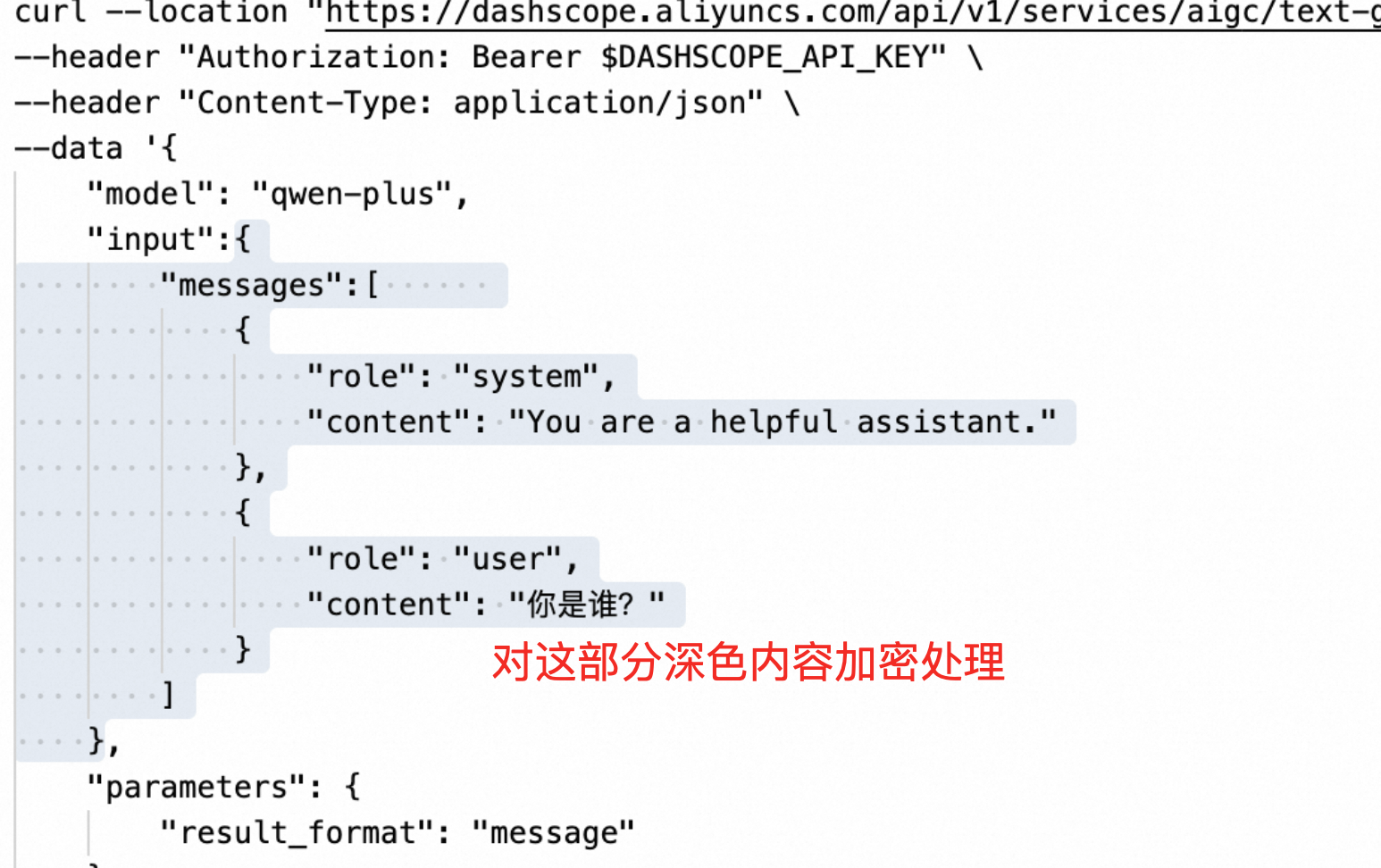
-
Perform AES-GCM encryption on the serialized
input. -
Convert the encryption result to a string. This string will be used as the value for the
inputfield when you build and send the request.
-
-
Example code:
-
private static final int GCM_TAG_LENGTH = 128; // 128-bit Tag (16 bytes)

private static String encryptInputWithAes(SecretKey aesSecretKey,byte[] iv, String input) throws Exception {
        byte[] content = input.getBytes(StandardCharsets.UTF_8);

        Cipher aesCipher = Cipher.getInstance("AES/GCM/NoPadding");
        GCMParameterSpec gcmParameterSpec = new GCMParameterSpec(GCM_TAG_LENGTH, iv);
        aesCipher.init(Cipher.ENCRYPT_MODE, new SecretKeySpec(aesSecretKey.getEncoded(), "AES"), gcmParameterSpec);

        byte[] encryptedBytes = aesCipher.doFinal(content);
        return Base64.encodeBase64String(encryptedBytes);
}
def encrypt_input_with_aes(aes_key, iv, plaintext):
    """Encrypt data using AES-GCM"""
    # Create an AES-GCM encryptor.
    aesgcm = Cipher(
        algorithms.AES(aes_key),
        modes.GCM(iv, tag=None),
        backend=default_backend()
    ).encryptor()

    # Set associated data to empty. You can adjust this as needed.
    aesgcm.authenticate_additional_data(b'')

    # Encrypt the data.
    ciphertext = aesgcm.update(plaintext.encode('utf-8')) + aesgcm.finalize()

    # Get the authentication tag.
    tag = aesgcm.tag

    # Combine the ciphertext and the tag.
    encrypted_data = ciphertext + tag

    # Return the Base64-encoded result.
    return base64.b64encode(encrypted_data).decode('utf-8')
-
Encrypt the AES key with an RSA public key
-
Algorithm: RSA
-
Processing flow:
-
Base64-encode the original AES key generated in step 1.
-
Encrypt the encoded AES key using the RSA public key. For more information about how to obtain the
public_keyandpublic_key_idfrom Alibaba Cloud Model Studio, see Obtain an RSA public key.NoteYou do not need to fetch the RSA public key for every request. You can cache the public key on the client side to reduce the number of API calls in high queries-per-second (QPS) scenarios. A cache duration of 1 minute is recommended.
The public key does not change under normal circumstances. It is rotated only in case of a security incident. Therefore, manage the public key cache using the following policy:
- Normal scenario: Use the cached public key. After the cache expires, automatically fetch the latest public key.
- Error scenario: If the error code
BadRequest.IllegalInputis returned with the error messageThe input parameter can not be decoded., the public key is invalid. In this case, you must immediately fetch the latest public key to minimize service disruption.
With this policy, even if an emergency public key rotation occurs, the service disruption is theoretically limited to a few minutes.
-
Base64-encode the encryption result.
-
-
Example code:
-
private static String encryptAesKeyWithRsaPublicKey(SecretKey aesSecretKey, String publicKey) throws Exception {
        byte[] aesKeyBytes = aesSecretKey.getEncoded();
        String base64AesKey = Base64.encodeBase64String(aesKeyBytes);

        byte[] publicKeyBytes = Base64.decodeBase64(publicKey);
        X509EncodedKeySpec spec = new X509EncodedKeySpec(publicKeyBytes);
        KeyFactory kf = KeyFactory.getInstance("RSA");
        PublicKey pubKey = kf.generatePublic(spec);

        Cipher rsaCipher = Cipher.getInstance("RSA");
        rsaCipher.init(Cipher.ENCRYPT_MODE, pubKey);
        byte[] encryptedBytes = rsaCipher.doFinal(base64AesKey.getBytes());

        return Base64.encodeBase64String(encryptedBytes);
}
def encrypt_aes_key_with_rsa(aes_key, public_key_str):
    """Encrypt the AES key with an RSA public key"""
    # Decode the Base64-formatted public key.
    public_key_bytes = base64.b64decode(public_key_str)

    # Load the public key.
    public_key = serialization.load_der_public_key(
        public_key_bytes,
        backend=default_backend()
    )

    # First, Base64-encode the AES key.
    base64_aes_key = base64.b64encode(aes_key).decode('utf-8')

    # Encrypt using RSA.
    encrypted_bytes = public_key.encrypt(
        base64_aes_key.encode('utf-8'),
        padding.PKCS1v15()
    )

    # Return the Base64-encoded encryption result.
    return base64.b64encode(encrypted_bytes).decode('utf-8')
2. Build and send the request
Add the X-DashScope-EncryptionKey request header and replace the original input value with the encrypted input. Then, send the request in the same way as a normal call.
The following list describes the parameters for the X-DashScope-EncryptionKey request header. The values for these parameters are generated during the data preparation stage.
public_key_id: The public key ID.encrypt_key: The AES key encrypted with an RSA public key.iv: The initialization vector (IV).
The final HTTP request sent to the Large Language Model (LLM) has the following format:
 Example code:
private static String sendEncryptedRequest(String apiKey, String publicKeyId, String encryptedAesKey, byte[] iv, String encryptedInput) throws Exception {
        OkHttpClient okHttpClient = new OkHttpClient().newBuilder().build();

        JSONObject requestBodyJson = new JSONObject();
        requestBodyJson.put("model", "qwen-max");
        requestBodyJson.put("input", encryptedInput);

        RequestBody requestBody = RequestBody.create(MediaType.parse("application/json"), requestBodyJson.toJSONString());

        JSONObject headerJson = new JSONObject();
        headerJson.put("Content-Type", "application/json");
        headerJson.put("Accept", "application/json");
        headerJson.put("Authorization","Bearer " + apiKey);

        String encryptionHeader = String.format("{\"public_key_id\": \"%s\", \"encrypt_key\": \"%s\", \"iv\": \"%s\"}", publicKeyId, encryptedAesKey, Base64.encodeBase64String(iv));
        headerJson.put("X-DashScope-EncryptionKey", encryptionHeader);

        Headers headers = Headers.of(JSONObject.parseObject(headerJson.toString(), Map.class));

        String url = "https://dashscope.aliyuncs.com/api/v1/services/aigc/text-generation/generation";
        Request request = new Request.Builder()
                .url(url)
                .post(requestBody)
                .headers(headers)
                .build();

        return okHttpClient.newCall(request).execute().body().string();
}
def send_encrypted_request(api_key, public_key_id, encrypted_aes_key, iv, encrypted_input):
    """Send an encrypted request to the API destination"""
    url = "https://dashscope.aliyuncs.com/api/v1/services/aigc/text-generation/generation"

    # Build the request header.
    headers = {
        "Content-Type": "application/json",
        "Accept": "application/json",
        "Authorization": f"Bearer {api_key}",
        "X-DashScope-EncryptionKey": json.dumps({
            "public_key_id": public_key_id,
            "encrypt_key": encrypted_aes_key,
            "iv": base64.b64encode(iv).decode('utf-8')
        })
    }

    # Build the request body.
    payload = {
        "model": "qwen-max",
        "input": encrypted_input
    }

    # Send a POST request.
    response = requests.post(
        url,
        headers=headers,
        json=payload
    )

    # Check the response status.
    response.raise_for_status()
    return response.json()
3. Decrypt the response data
-
Algorithm: AES-GCM
-
Parameters:
-
Processing flow:
- Use AES-GCM to decrypt the content of the
outputfield. - Return the plaintext result.
- Use AES-GCM to decrypt the content of the
-
Example code:
private static String decryptResponseWithAes(SecretKey aesSecretKey, byte[] iv, String response) throws Exception {
        JSONObject responseJson = JSONObject.parseObject(response, JSONObject.class);
        String encryptedOutput = responseJson.getString("output");

        Cipher aesCipher = Cipher.getInstance("AES/GCM/NoPadding");
        GCMParameterSpec gcmParameterSpec = new GCMParameterSpec(GCM_TAG_LENGTH, iv);
        aesCipher.init(Cipher.DECRYPT_MODE, new SecretKeySpec(aesSecretKey.getEncoded(), "AES"), gcmParameterSpec);

        byte[] decryptedBytes = aesCipher.doFinal(Base64.decodeBase64(encryptedOutput));
        return new String(decryptedBytes);
}
def decrypt_response_with_aes(aes_key, iv, response_data):
    """Decrypt the response using AES-GCM"""
    # Extract the encrypted output.
    encrypted_output = response_data.get("output")
    if not encrypted_output:
        raise ValueError("Response missing 'output' field")

    # Decode the Base64 data.
    encrypted_data = base64.b64decode(encrypted_output)

    # Separate the ciphertext and the tag (tag length is 16 bytes).
    ciphertext = encrypted_data[:-16]
    tag = encrypted_data[-16:]

    # Create an AES-GCM decryptor.
    aesgcm = Cipher(
        algorithms.AES(aes_key),
        modes.GCM(iv, tag),
        backend=default_backend()
    ).decryptor()

    # Authenticate the associated data. It must be the same as during encryption.
    aesgcm.authenticate_additional_data(b'')

    # Decrypt the data.
    decrypted_bytes = aesgcm.update(ciphertext) + aesgcm.finalize()

    return decrypted_bytes.decode('utf-8')
Complete HTTP example code
This section provides complete Java and Python code examples. These examples combine all the steps from the integration process into a runnable program. If you use another programming language, you can follow the integration process to implement the logic.
Tip: If you need an implementation in another programming language, you can use an LLM to convert the following code to your target language.
Important: The example code is for reference only. Do not use it directly in a production environment.
Request exampleNote: For more information about request parameters, see the Qwen API documentation.
import java.nio.charset.StandardCharsets;
import java.security.KeyFactory;
import java.security.PublicKey;
import java.security.SecureRandom;
import java.security.spec.X509EncodedKeySpec;
import java.util.Map;
import javax.crypto.Cipher;
import javax.crypto.KeyGenerator;
import javax.crypto.SecretKey;
import javax.crypto.spec.GCMParameterSpec;
import javax.crypto.spec.SecretKeySpec;
import org.apache.commons.codec.binary.Base64;
import com.alibaba.fastjson.JSONObject;
import okhttp3.Headers;
import okhttp3.MediaType;
import okhttp3.OkHttpClient;
import okhttp3.Request;
import okhttp3.RequestBody;

public class Main {
    // Use AES-GCM encryption mode to enhance data security and integrity protection. Specify the IV and Tag lengths here.
    private static final int GCM_TAG_LENGTH = 128; // 128-bit Tag (16 bytes)
    private static final int GCM_IV_LENGTH = 12; // 12-byte IV

    public static void main(String[] args) throws Exception {
        String publicKeyId = "xxx"; // Replace with the actual public_key_id value of the obtained RSA public key.
        String publicKey = "xxx"; // Replace with the actual public_key value of the obtained RSA public key.

        // If the environment variable is not configured, replace the next line with: String apiKey = "sk-xxx". Use your Model Studio API key.
        // However, do not hard code the API key in your code in a production environment to reduce the threat of API key leakage.
        String apiKey = System.getenv("DASHSCOPE_API_KEY");

        // Generate an AES key.
        SecretKey aesSecretKey = generateAesSecretKey();

        // Generate a unique IV.
        byte[] iv = generateIv();

        // Encrypt the input data.
        String input = "{\"messages\": [{\"role\":\"user\",\"content\":\"Who are you?\"}]}";
        String encryptedInput = encryptInputWithAes(aesSecretKey, iv, input);

        // Encrypt the AES key with the RSA public key.
        String encryptedAesKey = encryptAesKeyWithRsaPublicKey(aesSecretKey, publicKey);

        // Build and send the request.
        String response = sendEncryptedRequest(apiKey, publicKeyId, encryptedAesKey, iv, encryptedInput);

        // Decrypt the response content.
        String decryptOutput = decryptResponseWithAes(aesSecretKey, iv, response);
        System.out.println("The output content is: " + decryptOutput);
    }

    private static SecretKey generateAesSecretKey() throws Exception {
        KeyGenerator keyGen = KeyGenerator.getInstance("AES");
        SecureRandom secureRandom = new SecureRandom();
        keyGen.init(256, secureRandom); // AES key lengths of 128, 192, and 256 bits are supported.
        return keyGen.generateKey();
    }

    private static byte[] generateIv() {
        byte[] iv = new byte[GCM_IV_LENGTH];
        SecureRandom secureRandom = new SecureRandom(); // Random generation ensures uniqueness.
        secureRandom.nextBytes(iv);
        return iv;
    }

    private static String encryptAesKeyWithRsaPublicKey(SecretKey aesSecretKey, String publicKey) throws Exception {
        byte[] aesKeyBytes = aesSecretKey.getEncoded();
        String base64AesKey = Base64.encodeBase64String(aesKeyBytes);

        byte[] publicKeyBytes = Base64.decodeBase64(publicKey);
        X509EncodedKeySpec spec = new X509EncodedKeySpec(publicKeyBytes);
        KeyFactory kf = KeyFactory.getInstance("RSA");
        PublicKey pubKey = kf.generatePublic(spec);

        Cipher rsaCipher = Cipher.getInstance("RSA");
        rsaCipher.init(Cipher.ENCRYPT_MODE, pubKey);
        byte[] encryptedBytes = rsaCipher.doFinal(base64AesKey.getBytes());

        return Base64.encodeBase64String(encryptedBytes);
    }

    private static String encryptInputWithAes(SecretKey aesSecretKey, byte[] iv, String input) throws Exception {
        byte[] content = input.getBytes(StandardCharsets.UTF_8);

        Cipher aesCipher = Cipher.getInstance("AES/GCM/NoPadding");
        GCMParameterSpec gcmParameterSpec = new GCMParameterSpec(GCM_TAG_LENGTH, iv);
        aesCipher.init(Cipher.ENCRYPT_MODE, new SecretKeySpec(aesSecretKey.getEncoded(), "AES"), gcmParameterSpec);

        byte[] encryptedBytes = aesCipher.doFinal(content);
        return Base64.encodeBase64String(encryptedBytes);
    }

    private static String sendEncryptedRequest(String apiKey, String publicKeyId, String encryptedAesKey, byte[] iv, String encryptedInput) throws Exception {
        OkHttpClient okHttpClient = new OkHttpClient().newBuilder().build();
        JSONObject requestBodyJson = new JSONObject();
        requestBodyJson.put("model", "qwen-max");
        requestBodyJson.put("input", encryptedInput);

        RequestBody requestBody = RequestBody.create(MediaType.parse("application/json"), requestBodyJson.toJSONString());

        JSONObject headerJson = new JSONObject();
        headerJson.put("Content-Type", "application/json");
        headerJson.put("Accept", "application/json");
        headerJson.put("Authorization","Bearer " + apiKey);

        String encryptionHeader = String.format("{\"public_key_id\": \"%s\", \"encrypt_key\": \"%s\", \"iv\": \"%s\"}", publicKeyId, encryptedAesKey, Base64.encodeBase64String(iv));
        headerJson.put("X-DashScope-EncryptionKey", encryptionHeader);

        Headers headers = Headers.of(JSONObject.parseObject(headerJson.toString(), Map.class));

        String url = "https://dashscope.aliyuncs.com/api/v1/services/aigc/text-generation/generation";
        Request request = new Request.Builder()
                .url(url)
                .post(requestBody)
                .headers(headers)
                .build();

        return okHttpClient.newCall(request).execute().body().string();
    }

    private static String decryptResponseWithAes(SecretKey aesSecretKey, byte[] iv,String response) throws Exception {
        JSONObject responseJson = JSONObject.parseObject(response, JSONObject.class);
        String encryptedOutput = responseJson.getString("output");

        Cipher aesCipher = Cipher.getInstance("AES/GCM/NoPadding");
        GCMParameterSpec gcmParameterSpec = new GCMParameterSpec(GCM_TAG_LENGTH, iv);
        aesCipher.init(Cipher.DECRYPT_MODE, new SecretKeySpec(aesSecretKey.getEncoded(), "AES"), gcmParameterSpec);

        byte[] decryptedBytes = aesCipher.doFinal(Base64.decodeBase64(encryptedOutput));
        return new String(decryptedBytes);
    }
}
import os
import base64
import json
from cryptography.hazmat.primitives.ciphers import Cipher, algorithms, modes
from cryptography.hazmat.primitives import serialization, hashes
from cryptography.hazmat.primitives.asymmetric import padding
from cryptography.hazmat.backends import default_backend
import requests

# Constant definition
GCM_IV_LENGTH = 12       # 12-byte IV

def main():
    public_key_id = "xxx"  # Replace with the actual public_key_id value of the obtained RSA public key.
    public_key = "xxx"     # Replace with the actual public_key value of the obtained RSA public key.

    # Get the API key from the environment variable.
    api_key = os.getenv("DASHSCOPE_API_KEY")
    if not api_key:
        # If the environment variable is not configured, uncomment the following line and replace "sk-xxx" with your actual Model Studio API key.
        # Do not hard code the API key in your code in a production environment to reduce the threat of API key leakage.
        # api_key = "sk-xxx"
        raise ValueError("DASHSCOPE_API_KEY environment variable not set")

    # Generate an AES key.
    aes_secret_key = generate_aes_secret_key()

    # Generate an IV.
    iv = generate_iv()

    # Encrypt the input data.
    input_data = '{"messages": [{"role":"user","content":"Who are you?"}]}'
    encrypted_input = encrypt_input_with_aes(aes_secret_key, iv, input_data)

    # Encrypt the AES key with the RSA public key.
    encrypted_aes_key = encrypt_aes_key_with_rsa(aes_secret_key, public_key)

    # Send the encrypted request.
    response = send_encrypted_request(api_key, public_key_id, encrypted_aes_key, iv, encrypted_input)

    # Decrypt the response.
    decrypted_output = decrypt_response_with_aes(aes_secret_key, iv, response)
    print("The output content is:", decrypted_output)

def generate_aes_secret_key():
    """Generate a 256-bit AES key"""
    return os.urandom(32)  # 32 bytes = 256 bits

def generate_iv():
    """Generate a 12-byte random IV"""
    return os.urandom(GCM_IV_LENGTH)

def encrypt_aes_key_with_rsa(aes_key, public_key_str):
    """Encrypt the AES key with an RSA public key"""
    # Decode the Base64-formatted public key.
    public_key_bytes = base64.b64decode(public_key_str)

    # Load the public key.
    public_key = serialization.load_der_public_key(
        public_key_bytes,
        backend=default_backend()
    )

    # First, Base64-encode the AES key.
    base64_aes_key = base64.b64encode(aes_key).decode('utf-8')

    # Encrypt using RSA.
    encrypted_bytes = public_key.encrypt(
        base64_aes_key.encode('utf-8'),
        padding.PKCS1v15()
    )

    # Return the Base64-encoded encryption result.
    return base64.b64encode(encrypted_bytes).decode('utf-8')

def encrypt_input_with_aes(aes_key, iv, plaintext):
    """Encrypt data using AES-GCM"""
    # Create an AES-GCM encryptor.
    aesgcm = Cipher(
        algorithms.AES(aes_key),
        modes.GCM(iv, tag=None),
        backend=default_backend()
    ).encryptor()

    # Set associated data to empty. You can adjust this as needed.
    aesgcm.authenticate_additional_data(b'')

    # Encrypt the data.
    ciphertext = aesgcm.update(plaintext.encode('utf-8')) + aesgcm.finalize()

    # Get the authentication tag.
    tag = aesgcm.tag

    # Combine the ciphertext and the tag.
    encrypted_data = ciphertext + tag

    # Return the Base64-encoded result.
    return base64.b64encode(encrypted_data).decode('utf-8')

def send_encrypted_request(api_key, public_key_id, encrypted_aes_key, iv, encrypted_input):
    """Send an encrypted request to the API destination"""
    url = "https://dashscope.aliyuncs.com/api/v1/services/aigc/text-generation/generation"

    # Build the request header.
    headers = {
        "Content-Type": "application/json",
        "Accept": "application/json",
        "Authorization": f"Bearer {api_key}",
        "X-DashScope-EncryptionKey": json.dumps({
            "public_key_id": public_key_id,
            "encrypt_key": encrypted_aes_key,
            "iv": base64.b64encode(iv).decode('utf-8')
        })
    }

    # Build the request body.
    payload = {
        "model": "qwen-max",
        "input": encrypted_input
    }

    # Send a POST request.
    response = requests.post(
        url,
        headers=headers,
        json=payload
    )

    # Check the response status.
    response.raise_for_status()
    return response.json()

def decrypt_response_with_aes(aes_key, iv, response_data):
    """Decrypt the response using AES-GCM"""
    # Extract the encrypted output.
    encrypted_output = response_data.get("output")
    if not encrypted_output:
        raise ValueError("Response missing 'output' field")

    # Decode the Base64 data.
    encrypted_data = base64.b64decode(encrypted_output)

    # Separate the ciphertext and the tag (tag length is 16 bytes).
    ciphertext = encrypted_data[:-16]
    tag = encrypted_data[-16:]

    # Create an AES-GCM decryptor.
    aesgcm = Cipher(
        algorithms.AES(aes_key),
        modes.GCM(iv, tag),
        backend=default_backend()
    ).decryptor()

    # Authenticate the associated data. It must be the same as during encryption.
    aesgcm.authenticate_additional_data(b'')

    # Decrypt the data.
    decrypted_bytes = aesgcm.update(ciphertext) + aesgcm.finalize()

    return decrypted_bytes.decode('utf-8')

if __name__ == "__main__":
    main()
The DashScope SDK automatically decrypts the response. The returned content is plaintext and does not require manual decryption.
{
    "finish_reason": "stop",
    "text": "I am Qwen, a large-scale language model developed by Alibaba Cloud. My goal is to help users obtain information more efficiently, solve various problems, and inspire creativity. I will do my best to provide support, whether it's answering questions, providing information, or engaging in creative discussions. Is there anything I can help you with?"
}
FAQ
Q: Why do I receive the error "Invalid AES key Length: 294 bytes" during code execution?A: AES keys must be 128 bits (16 bytes), 192 bits (24 bytes), or 256 bits (32 bytes) long. Check your key length setting.
Q: Do the OpenAI-compatible Endpoints for the Chat Completions API and Responses API support encrypted inference?A: No, they do not. The encryption flow described in this topic applies only to the DashScope SDK and HTTP Endpoints.
Q: Do I need to fetch the RSA public key for each request?A: No, you do not. You should cache the RSA public key on the client for a recommended duration of 1 minute. The public key does not change under normal circumstances. It is only rotated in an emergency, such as a security incident. If a request returns the error code BadRequest.IllegalInput (The input parameter can not be decoded.), the public key is invalid. Immediately fetch the latest public key.
Error codes
If a call fails, an error message is returned. For troubleshooting information, see Error messages.