Alibaba Cloud Model Studio supports building retrieval-augmented generation (RAG) applications with the LlamaIndex API for scenarios such as internal knowledge Q&A and customer support. This topic demonstrates how to build a sample RAG application using the LlamaIndex API.
In this solution, LlamaIndex provides the tools and framework to build RAG applications. Alibaba Cloud Model Studio provides data management capabilities and large model services. If you are familiar with the LlamaIndex API, you can follow this solution to build a RAG application that combines the capabilities of both platforms.
This solution deploys the knowledge base in the cloud and uses the default settings for smart document chunking and vector models. Custom document chunking methods and custom embedding models are not supported.
If you want to deploy the knowledge base locally for more flexibility in document chunking and embedding model selection, see Build a RAG application based on a local knowledge base.
If you want to deploy the knowledge base in the cloud and create a RAG application with zero code, see Build a RAG application with zero code.
Demo
You can use this solution to achieve the following:
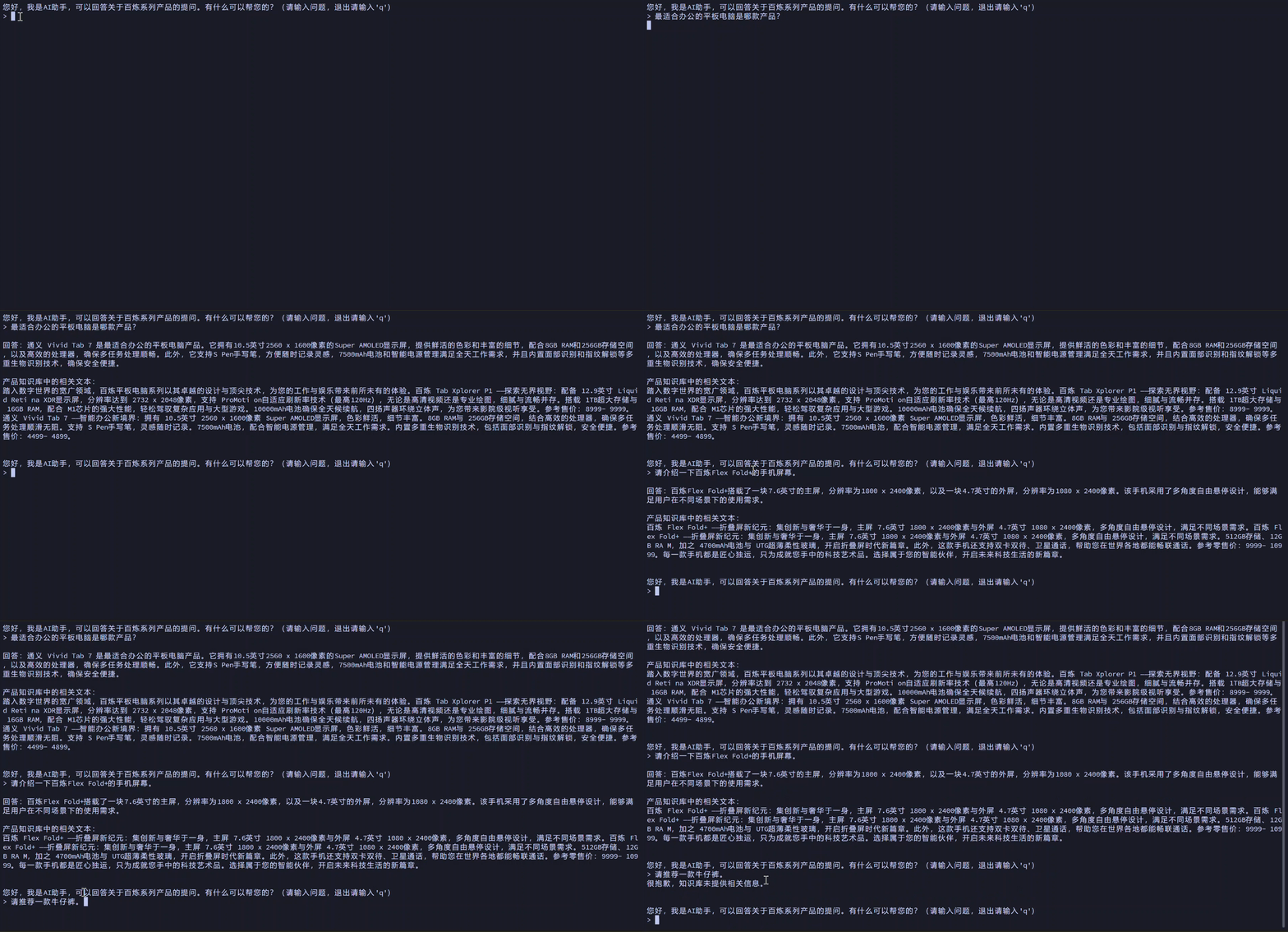
Solution overview
-
Read local files and build a cloud knowledge base: Read and parse unstructured data files, such as .txt, .docx, and .pdf. Then, upload the files to the cloud to build a knowledge base.
-
Build a retrieval engine and a RAG application: Build a retrieval engine based on the cloud knowledge base. The engine accepts questions from end users and retrieves relevant text segments from the knowledge base. It then merges the questions and retrieval results, sends them to a large model, and generates an answer. The RAG application provides an interactive interface for end users. If the engine cannot retrieve relevant text segments or generate an answer from the retrieved segments, it returns an appropriate error message.
Download the sample files and code
Download and decompress llamaindex_cloud_rag.zip. The folder structure is as follows:
llamaindex_cloud_rag
├── docs
│ ├── bailian_tablet_introduction.pdf
│ ├── bailian_phone_introduction.docx
│ └── bailian_smart_speaker_introduction.txt
├── create_cloud_index.py
├── rag.py
└── requirements.txt
The docs/ folder contains sample files. You can replace them with your own files. The create_cloud_index.py script reads the files in the docs/ folder to build a cloud knowledge base. The rag.py script builds the retrieval engine and the RAG application. The requirements.txt file lists the required dependencies.
Install dependencies
Navigate to the directory that contains the requirements.txt file and run the following command:
pip install -r requirements.txt
Read local files and build a cloud knowledge base
Navigate to the directory that contains the create_cloud_index.py file and run the following command: python create_cloud_index.py. This command uploads the files from the docs/ folder to Application Data in Alibaba Cloud Model Studio and builds a cloud knowledge base.
Note: Ensure that your local machine has Internet access. The file upload may take some time to complete.
After the code finishes running, navigate to the Files page in Application Data to view the uploaded files.

Navigate to the Knowledge Base page to view the created cloud knowledge base.
Code explanation
create_cloud_index.py
from llama_index.core import SimpleDirectoryReader
from llama_index.readers.dashscope.base import DashScopeParse
from llama_index.readers.dashscope.utils import ResultType
from llama_index.indices.managed.dashscope import DashScopeCloudIndex


def read_parse_upload_local_documents(dir, num_workers=1):
    """Read, parse, and upload local files to Alibaba Cloud Model Studio Application Data.

    Args:
        dir (str): The path where local files are stored.
        num_workers (int, optional): The number of concurrent workers.

    Returns:
        A list of files uploaded to the cloud.
    """
    parse = DashScopeParse(result_type=ResultType.DASHSCOPE_DOCMIND)
    file_extractor = {'.txt': parse, '.docx': parse, ".pdf": parse}  # Set the file formats to read and parse. Adjust as needed.
    documents = SimpleDirectoryReader(input_dir=dir, file_extractor=file_extractor).load_data(num_workers=num_workers)
    return documents


if __name__ == '__main__':
    dir = "./docs/"  # In this example, business-related files are stored in the docs folder in the current path. Adjust the path as needed.
    documents = read_parse_upload_local_documents(dir)
    cloud_index_name = "my_first_index"  # Set the name of the cloud knowledge base.
    index = DashScopeCloudIndex.from_documents(documents, cloud_index_name, verbose=True)  # Create the cloud knowledge base.
Build the retrieval engine and RAG application
Navigate to the directory that contains the rag.py file and run the following command: python rag.py. This command reads the created cloud knowledge base, builds a retrieval engine, and starts the RAG application on your local machine.
Follow the prompts to interact with the RAG application. Enter a question and press Enter to obtain a result. To exit the application, enter q and press Enter.
Note: Ensure that your local machine has Internet access. Generating an answer may take some time.
Code explanation
rag.py
Settings.llm = DashScope(model_name="qwen-max"), you can set the `model_name` parameter to a model name, such as "qwen-max", to specify the large model that the retrieval engine uses to generate answers. For a complete list of model names, see Text Generation - Qwen and Text Generation - Qwen (Open Source).
from llama_index.core import Settings
from llama_index.llms.dashscope import DashScope
from llama_index.indices.managed.dashscope import DashScopeCloudIndex
from llama_index.core.postprocessor import SimilarityPostprocessor
from llama_index.postprocessor.dashscope_rerank import DashScopeRerank

'''
In this example, manually set the following parameters when building the retrieval engine. Adjust them as needed based on the results.
'''
Settings.llm = DashScope(model_name="qwen-max")  # Set the large model that the retrieval engine calls to generate answers.
similarity_top_k = 5  # The number of top similar results found by the retrieval engine.
similarity_cutoff = 0.4  # The minimum similarity threshold used to filter retrieval results.
top_n = 1  # The number of top semantically relevant results to return after reranking.

'''
In this example, the following Q&A template is used for the RAG application. Adjust it as needed.
'''
init_chat = "\nHello, I am an AI assistant. I can answer questions about Alibaba Cloud Model Studio series products. How can I help you? (Enter a question, or enter 'q' to quit)\n> "
resp_with_no_answer = "Sorry, the knowledge base does not provide relevant information." + "\n"
prompt_template = "Answer the following question: {0}\nIf the provided information is not enough to answer the question, return: {1}"


def prettify_rag(resp):  # Format the output
    output = ""
    output += "\nAnswer: {0}\n".format(resp.response)
    for j in range(len(resp.source_nodes)):
        output += "\nRelevant text from the product knowledge base:\n{0}\n".format(resp.source_nodes[j].text)
    return output


'''
Build a retrieval engine based on the cloud knowledge base. The engine can accept questions from end users, retrieve relevant text segments from the cloud knowledge base, merge the questions and retrieval results, and then input them into the large model to generate an answer.
The RAG application provides an interactive interface for end users. If no relevant text segments can be retrieved, or if the question cannot be answered based on the retrieved text segments, an appropriate error message is returned.
'''
if __name__ == '__main__':
    index = DashScopeCloudIndex("my_first_index")  # Read the knowledge base already created on the Alibaba Cloud Model Studio platform.
    query_engine = index.as_query_engine(  # Build the retrieval engine
        similarity_top_k=similarity_top_k,
        node_postprocessors=[  # The default retrieval results may not meet your needs. In this example, node_postprocessors are added to post-process the retrieval results.
            SimilarityPostprocessor(similarity_cutoff=similarity_cutoff),  # Filter out retrieval results that do not meet the minimum similarity threshold.
            DashScopeRerank(top_n=top_n, model="gte-rerank")  # Rerank the retrieval results and return the most semantically relevant results.
        ],
        response_mode="tree_summarize"
    )
    while True:
        user_prompt = input(init_chat)
        if user_prompt in ['q', 'Q']:  # When the end user enters 'q' or 'Q', exit the RAG application.
            break
        resp = query_engine.query(prompt_template.format(user_prompt, resp_with_no_answer))
        if len(resp.source_nodes) == 0:
            output = resp_with_no_answer  # If no relevant context is found, return an appropriate error message.
        else:
            output = prettify_rag(resp)
        print(output)
References
For more information about the LlamaIndex APIs related to Alibaba Cloud Model Studio, see the related topics.