Machine translation (Qwen-MT)
Qwen-MT is a machine translation model fine-tuned from Qwen3. It supports 92 languages -- including Chinese, English, Japanese, Korean, French, Spanish, German, Thai, Indonesian, Vietnamese, and Arabic -- and offers term intervention, domain prompting, and translation memory to control translation quality.
How it works
-
Provide the text to translate: The
messagesarray must contain exactly one message withroleset touser, and itscontentis the text to translate. -
Set languages: Refer to Supported languages and set the source language (
source_lang) and target language (target_lang) intranslation_options. To automatically detect the source language, setsource_langtoauto.Specifying the source language helps improve translation accuracy.
Qwen-MT also supports setting languages through custom prompts.
The following examples use the OpenAI-compatible and DashScope Python SDKs to demonstrate the basic way to call Qwen-MT. All translation options are passed in through the translation_options parameter.
# 导入依赖与创建客户端...
completion = client.chat.completions.create(
    model="qwen-mt-flash",    # 选择模型
    # messages 有且仅有一个 role 为 user 的消息,其 content 为待翻译文本
    messages=[{"role": "user", "content": "我看到这个视频后没有笑"}],
    # 由于 translation_options 非 OpenAI 标准参数,需要通过 extra_body 传入
    extra_body={"translation_options": {"source_lang": "Chinese", "target_lang": "English"}},
)
# 导入依赖与创建客户端...
response = client.chat.completions.create(
    model="qwen-mt-flash",  # 选择模型
    # messages 有且仅有一个 role 为 user 的消息,其 content 为待翻译文本
    messages=[{"role": "user", "content": "我看到这个视频后没有笑"}],
    # 配置翻译选项(translation_options 非 SDK 签名参数,统一通过 parameters 传入)
    parameters={"translation_options": {"source_lang": "Chinese", "target_lang": "English"}},
)
import os
from openai import OpenAI
client = OpenAI(
    # 若没有配置环境变量,请用阿里云百炼API Key将下行替换为:api_key="sk-xxx",
    api_key=os.getenv("DASHSCOPE_API_KEY"),
    # 以下为新加坡地域URL,调用时请将WorkspaceId替换为真实的业务空间ID,各地域的URL不同。
    base_url="https://{WorkspaceId}.ap-southeast-1.maas.aliyuncs.com/compatible-mode/v1",
)
completion = client.chat.completions.create(
    model="qwen-mt-flash",
    # messages 有且仅有一个 role 为 user 的消息,其 content 为待翻译文本
    messages=[
        {
            "role": "user",
            "content": "我看到这个视频后没有笑"
        }
    ],
    # 由于 translation_options 非 OpenAI 标准参数,需要通过 extra_body 传入
    extra_body={
        # 配置翻译选项
        "translation_options": {
            "source_lang": "Chinese",
            "target_lang": "English"
        }
    },
)
import os
import dashscope

# 以下为新加坡地域的配置,调用时请将{WorkspaceId}替换为真实的业务空间ID,各地域的region取值不同。
client = dashscope.Client(
    # 若没有配置环境变量,请用阿里云百炼API Key将下行替换为:api_key="sk-xxx"
    # 各地域的API Key不同。获取API Key:https://help.aliyun.com/zh/model-studio/get-api-key
    api_key=os.getenv("DASHSCOPE_API_KEY"),
    workspace="{WorkspaceId}",
    region="ap-southeast-1",
)

response = client.chat.completions.create(
    model="qwen-mt-flash",
    # messages 有且仅有一个 role 为 user 的消息,其 content 为待翻译文本
    messages=[
        {
            "role": "user",
            "content": "我看到这个视频后没有笑"
        }
    ],
    # 配置翻译选项(translation_options 非 SDK 签名参数,统一通过 parameters 传入)
    parameters={
        "translation_options": {
            "source_lang": "auto",
            "target_lang": "English",
        }
    },
)
print(response.choices[0].message.content)
Through translation_options, you can also implement translation customization features such as term intervention, translation memory, and domain prompting.
- Single-turn translation only: The model is designed for translation tasks and does not support multi-turn conversations.
- System messages are not supported: You cannot use a
systemmessage to define global behavior. Translation options are defined intranslation_options.
Model selection
- For general scenarios,
qwen-mt-flashis the first choice. It strikes the best balance between translation quality, speed, and cost, and supports incremental streaming output. - For the highest translation quality (professional literature, formal documents), choose
qwen-mt-plus. - For the lowest latency (simple scenarios such as real-time chat), choose
qwen-mt-lite.
For a detailed comparison of the models, see the following table:
| Model | Recommended scenarios | Quality | Speed | Cost | Supported languages | Incremental streaming output |
|---|---|---|---|---|---|---|
qwen-mt-plus | Scenarios with high translation quality requirements, such as professional fields, formal documents, papers, and technical reports | Best | Standard | Relatively high | 92 | Not supported |
qwen-mt-flash | General-purpose first choice, suitable for scenarios such as website/App content, product descriptions, daily communication, and blog posts | Good | Fast | Relatively low | 92 | Supported |
qwen-mt-lite | Simple, latency-sensitive scenarios such as real-time chat and live comment translation | Basic | Fastest | Lowest | 31 | Supported |
For information such as the context length and pricing of each model, see the Bailian console. For throttling conditions, see Rate limits. For translation model billing details, see Model calling prices.
Getting started
The following example translates “我看到这个视频后没有笑” into English.
You must first obtain and configure an API key and configure the API key in environment variables. If you call the API through the OpenAI SDK or DashScope SDK, you must also install the SDK.
OpenAI compatible
Request exampleimport os
from openai import OpenAI
client = OpenAI(
# 若没有配置环境变量,请用阿里云百炼API Key将下行替换为:api_key="sk-xxx",
# 各地域的API Key不同。获取API Key:https://help.aliyun.com/zh/model-studio/get-api-key
api_key=os.getenv("DASHSCOPE_API_KEY"),
# 以下为华北2(北京)地域的URL,调用时请将WorkspaceId替换为真实的业务空间ID,各地域的URL不同。
base_url="https://{WorkspaceId}.cn-beijing.maas.aliyuncs.com/compatible-mode/v1",
)
messages = [
{
"role": "user",
"content": "我看到这个视频后没有笑"
}
]
translation_options = {
"source_lang": "auto",
"target_lang": "English"
}
completion = client.chat.completions.create(
model="qwen-mt-flash",
messages=messages,
extra_body={
"translation_options": translation_options
}
)
print(completion.choices[0].message.content)
# ======= 重要提示 =======
# 各地域的API Key不同。获取API Key:https://help.aliyun.com/zh/model-studio/get-api-key
# 以下为华北2(北京)地域的URL,调用时请将WorkspaceId替换为真实的业务空间ID,各地域的URL不同。
# === 执行时请删除该注释 ===
curl -X POST https://{WorkspaceId}.cn-beijing.maas.aliyuncs.com/compatible-mode/v1/chat/completions \
-H "Authorization: Bearer $DASHSCOPE_API_KEY" \
-H "Content-Type: application/json" \
-d '{
    "model": "qwen-mt-flash",
    "messages": [{"role": "user", "content": "我看到这个视频后没有笑"}],
    "translation_options": {
      "source_lang": "auto",
      "target_lang": "English"
      }
}'
I didn't laugh after watching this video.
DashScope
Request exampleImportantThe DashScope Java SDK must be version 2.20.6 or later.
import os
import dashscope

# 以下为华北2(北京)地域的配置,调用时请将{WorkspaceId}替换为真实的业务空间ID,各地域的region取值不同。
client = dashscope.Client(
    # 若没有配置环境变量,请用阿里云百炼API Key将下行替换为:api_key="sk-xxx",
    # 各地域的API Key不同。获取API Key:https://help.aliyun.com/zh/model-studio/get-api-key
    api_key=os.getenv('DASHSCOPE_API_KEY'),
    workspace="{WorkspaceId}",
    region="cn-beijing",
)
messages = [
    {
        "role": "user",
        "content": "我看到这个视频后没有笑"
    }
]
translation_options = {
    "source_lang": "auto",
    "target_lang": "English",
}
response = client.chat.completions.create(
    model="qwen-mt-flash",
    messages=messages,
    parameters={"translation_options": translation_options}
)
print(response.choices[0].message.content)
// DashScope SDK 版本需要不低于 2.20.6
import java.lang.System;
import java.util.Collections;
import com.alibaba.dashscope.aigc.generation.Generation;
import com.alibaba.dashscope.aigc.generation.GenerationParam;
import com.alibaba.dashscope.aigc.generation.GenerationResult;
import com.alibaba.dashscope.aigc.generation.TranslationOptions;
import com.alibaba.dashscope.common.Message;
import com.alibaba.dashscope.common.Role;
import com.alibaba.dashscope.exception.ApiException;
import com.alibaba.dashscope.exception.InputRequiredException;
import com.alibaba.dashscope.exception.NoApiKeyException;
import com.alibaba.dashscope.utils.Constants;

public class Main {
    // 以下为华北2(北京)地域的URL,调用时请将WorkspaceId替换为真实的业务空间ID,各地域的URL不同。
    static {Constants.baseHttpApiUrl="https://{WorkspaceId}.cn-beijing.maas.aliyuncs.com/api/v1";}
    public static GenerationResult callWithMessage() throws ApiException, NoApiKeyException, InputRequiredException {
        Generation gen = new Generation();
        Message userMsg = Message.builder()
                .role(Role.USER.getValue())
                .content("我看到这个视频后没有笑")
                .build();
        TranslationOptions options = TranslationOptions.builder()
                .sourceLang("auto")
                .targetLang("English")
                .build();
        GenerationParam param = GenerationParam.builder()
                // 若没有配置环境变量,请用阿里云百炼API Key将下行替换为:.apiKey("sk-xxx")
                .apiKey(System.getenv("DASHSCOPE_API_KEY"))
                .model("qwen-mt-flash")
                .messages(Collections.singletonList(userMsg))
                .resultFormat(GenerationParam.ResultFormat.MESSAGE)
                .translationOptions(options)
                .build();
        return gen.call(param);
    }
    public static void main(String[] args) {
        try {
            GenerationResult result = callWithMessage();
            System.out.println(result.getOutput().getChoices().get(0).getMessage().getContent());
        } catch (ApiException | NoApiKeyException | InputRequiredException e) {
            System.err.println("错误信息:"+e.getMessage());
            e.printStackTrace();
        } finally {
            System.exit(0);
        }
    }
}
# ======= 重要提示 =======
# 各地域的API Key不同。获取API Key:https://help.aliyun.com/zh/model-studio/get-api-key
# 以下为华北2(北京)地域的URL,调用时请将WorkspaceId替换为真实的业务空间ID,各地域的URL不同。
# === 执行时请删除该注释 ===
curl -X POST https://{WorkspaceId}.cn-beijing.maas.aliyuncs.com/api/v1/services/aigc/text-generation/generation \
-H "Authorization: Bearer $DASHSCOPE_API_KEY" \
-H "Content-Type: application/json" \
-d '{
  "model": "qwen-mt-flash",
  "input": {
    "messages": [
      {
        "content": "我看到这个视频后没有笑",
        "role": "user"
      }
    ]
  },
  "parameters": {
    "translation_options": {
      "source_lang": "auto",
      "target_lang": "English"
    }
  }
}'
I didn't laugh after watching this video.
Streaming output
Streaming output returns translated content in real time and reduces user waiting time. qwen-mt-flash and qwen-mt-lite support incremental streaming output, which is enabled with the incremental_output parameter and returns only newly generated content each time. qwen-mt-plus supports only non-incremental streaming output and returns the complete sequence generated so far each time. For more information, see Streaming output.
OpenAI compatible
Request exampleimport os
from openai import OpenAI
client = OpenAI(
# 各地域的API Key不同。获取API Key:https://help.aliyun.com/zh/model-studio/get-api-key
# 若没有配置环境变量,请用阿里云百炼API Key将下行替换为:api_key="sk-xxx",
api_key=os.getenv("DASHSCOPE_API_KEY"),
# 以下为华北2(北京)地域的URL,调用时请将WorkspaceId替换为真实的业务空间ID,各地域的URL不同。
base_url="https://{WorkspaceId}.cn-beijing.maas.aliyuncs.com/compatible-mode/v1",
)
messages = [{"role": "user", "content": "我看到这个视频后没有笑"}]
translation_options = {"source_lang": "Chinese", "target_lang": "English"}
completion = client.chat.completions.create(
model="qwen-mt-flash",
messages=messages,
stream=True,
stream_options={"include_usage": True},
extra_body={"translation_options": translation_options},
)
for chunk in completion:
if chunk.choices:
content = chunk.choices[0].delta.content or ""
print(content, end="", flush=True)
else:
print("\n"+"="*20+"usage 消耗"+"="*20)
print(chunk.usage)
# ======= 重要提示 =======
# 各地域的API Key不同。获取API Key:https://help.aliyun.com/zh/model-studio/get-api-key
# 以下为华北2(北京)地域的URL,调用时请将WorkspaceId替换为真实的业务空间ID,各地域的URL不同。
# === 执行时请删除该注释 ===
curl -X POST https://{WorkspaceId}.cn-beijing.maas.aliyuncs.com/compatible-mode/v1/chat/completions \
-H "Authorization: Bearer $DASHSCOPE_API_KEY" \
-H "Content-Type: application/json" \
-d '{
    "model": "qwen-mt-flash",
    "messages": [{"role": "user", "content": "我看到这个视频后没有笑"}],
    "stream": true,
    "translation_options": {
      "source_lang": "Chinese",
      "target_lang": "English"
      }
}'
I didn’t laugh after watching this video.
====================usage 消耗====================
CompletionUsage(completion_tokens=9, prompt_tokens=56, total_tokens=65, completion_tokens_details=None, prompt_tokens_details=None)
DashScope
Request exampleimport os
import dashscope
# 以下为华北2(北京)地域的配置,调用时请将{WorkspaceId}替换为真实的业务空间ID,各地域的region取值不同。
client = dashscope.Client(
# 若没有配置环境变量,请用阿里云百炼API Key将下行替换为:api_key="sk-xxx",
# 各地域的API Key不同。获取API Key:https://help.aliyun.com/zh/model-studio/get-api-key
api_key=os.getenv('DASHSCOPE_API_KEY'),
workspace="{WorkspaceId}",
region="cn-beijing",
)
messages = [
{
"role": "user",
"content": "我看到这个视频后没有笑"
}
]
translation_options = {
"source_lang": "Chinese",
"target_lang": "English",
}
response = client.chat.completions.create(
model="qwen-mt-flash",
messages=messages,
stream=True,
# 流式输出默认为增量模式:每个数据块仅包含新生成的内容(当前仅qwen-mt-flash和qwen-mt-lite支持流式)。
parameters={"translation_options": translation_options}
)
for chunk in response:
print(chunk.choices[0].delta.content, end="", flush=True)
// DashScope SDK 版本需要不低于 2.20.6
import java.lang.System;
import com.alibaba.dashscope.aigc.generation.Generation;
import com.alibaba.dashscope.aigc.generation.GenerationParam;
import com.alibaba.dashscope.aigc.generation.GenerationResult;
import com.alibaba.dashscope.aigc.generation.TranslationOptions;
import com.alibaba.dashscope.common.Message;
import com.alibaba.dashscope.common.Role;
import com.alibaba.dashscope.exception.ApiException;
import com.alibaba.dashscope.exception.InputRequiredException;
import com.alibaba.dashscope.exception.NoApiKeyException;
import com.alibaba.dashscope.utils.Constants;
import java.util.Arrays;
import org.slf4j.Logger;
import org.slf4j.LoggerFactory;
import io.reactivex.Flowable;

public class Main {
    // 以下为华北2(北京)地域的URL,调用时请将WorkspaceId替换为真实的业务空间ID,各地域的URL不同。
    static {Constants.baseHttpApiUrl="https://{WorkspaceId}.cn-beijing.maas.aliyuncs.com/api/v1";}
    private static final Logger logger = LoggerFactory.getLogger(Main.class);
    private static void handleGenerationResult(GenerationResult message) {
        String content = message.getOutput().getChoices().get(0).getMessage().getContent();
        System.out.print(content);
    }
    public static void streamCallWithMessage(Generation gen, Message userMsg)
            throws NoApiKeyException, ApiException, InputRequiredException {
        GenerationParam param = buildGenerationParam(userMsg);
        Flowable<GenerationResult> result = gen.streamCall(param);
        result.blockingForEach(message -> handleGenerationResult(message));
    }
    private static GenerationParam buildGenerationParam(Message userMsg) {
        TranslationOptions options = TranslationOptions.builder()
                .sourceLang("auto")
                .targetLang("English")
                .build();
        return GenerationParam.builder()
                // 若没有配置环境变量,请用阿里云百炼API Key将下行替换为:.apiKey("sk-xxx")
                .apiKey(System.getenv("DASHSCOPE_API_KEY"))
                .model("qwen-mt-flash")
                .resultFormat(GenerationParam.ResultFormat.MESSAGE)
                .translationOptions(options)
                // 开启增量输出,当前仅qwen-mt-flash和qwen-mt-lite支持
                .incrementalOutput(true)
                .messages(Arrays.asList(userMsg))
                .build();
    }
    public static void main(String[] args) {
        try {
            Generation gen = new Generation();
            Message userMsg = Message.builder().role(Role.USER.getValue()).content("我看到这个视频后没有笑").build();
            streamCallWithMessage(gen, userMsg);
        } catch (ApiException | NoApiKeyException | InputRequiredException  e) {
            logger.error("An exception occurred: {}", e.getMessage());
        }
        System.exit(0);
    }
}
# ======= 重要提示 =======
# 各地域的API Key不同。获取API Key:https://help.aliyun.com/zh/model-studio/get-api-key
# 以下为华北2(北京)地域的URL,调用时请将WorkspaceId替换为真实的业务空间ID,各地域的URL不同。
# === 执行时请删除该注释 ===
curl -X POST https://{WorkspaceId}.cn-beijing.maas.aliyuncs.com/api/v1/services/aigc/text-generation/generation \
-H "Authorization: Bearer $DASHSCOPE_API_KEY" \
-H "Content-Type: application/json" \
-H "X-DashScope-SSE: enable" \
-d '{
  "model": "qwen-mt-flash",
  "input": {
    "messages": [
      {
        "content": "我看到这个视频后没有笑",
        "role": "user"
      }
    ]
  },
  "parameters": {
    "translation_options": {
      "source_lang": "Chinese",
      "target_lang": "English"
    },
    "incremental_output": true
  }
}'
I didn't laugh after watching this video.
The qwen-mt-plus model does not support incremental streaming output.
Improve translation quality
Standard translation meets daily communication needs, but the following issues may occur in professional scenarios:
- Inconsistent terminology: Product names or industry terms are translated incorrectly.
- Style mismatch: The translation style does not conform to the conventions of specific fields such as legal or marketing content.
The following three methods address these issues:
Term intervention
When the text contains brand names, product names, or technical terms, you can provide a glossary through the terms field to guide the model to translate with accuracy and consistency.
Usage steps:
-
Define terms
Create a JSON array and assign it to the
termsfield. Each object represents one term:
{
    "source": "术语",
    "target": "提前翻译好的术语"
}
-
Pass in terms
Pass the
termsarray through thetranslation_optionsparameter.
OpenAI compatible
Request exampleimport os
from openai import OpenAI
client = OpenAI(
# 若没有配置环境变量,请用阿里云百炼API Key将下行替换为:api_key="sk-xxx",
# 各地域的API Key不同。获取API Key:https://help.aliyun.com/zh/model-studio/get-api-key
api_key=os.getenv("DASHSCOPE_API_KEY"),
# 以下为华北2(北京)地域的URL,调用时请将WorkspaceId替换为真实的业务空间ID,各地域的URL不同。
base_url="https://{WorkspaceId}.cn-beijing.maas.aliyuncs.com/compatible-mode/v1",
)
messages = [
{
"role": "user",
"content": "而这套生物传感器运用了石墨烯这种新型材料,它的目标物是化学元素,敏锐的“嗅觉”让它能更深度、准确地体现身体健康状况。"
}
]
# --- 第一次请求:不使用 terms 参数 ---
print("--- [不使用 terms] 的翻译结果 ---")
translation_options_without_terms = {
"source_lang": "auto",
"target_lang": "English"
}
completion_without_terms = client.chat.completions.create(
model="qwen-mt-plus",
messages=messages,
extra_body={
"translation_options": translation_options_without_terms
}
)
print(completion_without_terms.choices[0].message.content)
print("\n" + "="*50 + "\n") # 用于分割,方便对比
# --- 第二次请求:使用 terms 参数 ---
print("--- [使用 terms] 的翻译结果 ---")
translation_options_with_terms = {
"source_lang": "Chinese",
"target_lang": "English",
"terms": [
{
"source": "生物传感器",
"target": "biological sensor"
},
{
"source": "身体健康状况",
"target": "health status of the body"
}
]
}
completion_with_terms = client.chat.completions.create(
model="qwen-mt-plus",
messages=messages,
extra_body={
"translation_options": translation_options_with_terms
}
)
print(completion_with_terms.choices[0].message.content)
# ======= 重要提示 =======
# 各地域的API Key不同。获取API Key:https://help.aliyun.com/zh/model-studio/get-api-key
# 以下为华北2(北京)地域的URL,调用时请将WorkspaceId替换为真实的业务空间ID,各地域的URL不同。
# === 执行时请删除该注释 ===
curl -X POST https://{WorkspaceId}.cn-beijing.maas.aliyuncs.com/compatible-mode/v1/chat/completions \
-H "Authorization: Bearer $DASHSCOPE_API_KEY" \
-H "Content-Type: application/json" \
-d '{
  "model": "qwen-mt-plus",
  "messages": [
    {
      "role": "user",
      "content": "而这套生物传感器运用了石墨烯这种新型材料,它的目标物是化学元素,敏锐的“嗅觉”让它能更深度、准确地体现身体健康状况。"
    }
  ],
  "translation_options": {
    "source_lang": "Chinese",
    "target_lang": "English",
    "terms": [
      {
        "source": "生物传感器",
        "target": "biological sensor"
      },
      {
        "source": "身体健康状况",
        "target": "health status of the body"
      }
    ]
  }
}'
After the terms are added, the translation is consistent with the specified terms: “生物传感器” (biological sensor) and “身体健康状况” (the health status of the body).
--- [不使用 terms] 的翻译结果 ---
This set of biosensors uses graphene, a new material, whose target substance is chemical elements. Its sensitive "sense of smell" allows it to more deeply and accurately reflect one's health condition.

==================================================

--- [使用 terms] 的翻译结果 ---
This biological sensor uses a new material called graphene. Its target is chemical elements, and its sensitive "sense of smell" enables it to reflect the health status of the body more deeply and accurately.
DashScope
Request exampleimport os
import dashscope
# 以下为华北2(北京)地域的配置,调用时请将{WorkspaceId}替换为真实的业务空间ID,各地域的region取值不同。
client = dashscope.Client(
# 若没有配置环境变量,请用阿里云百炼API Key将下行替换为:api_key="sk-xxx",
# 各地域的API Key不同。获取API Key:https://help.aliyun.com/zh/model-studio/get-api-key
api_key=os.getenv('DASHSCOPE_API_KEY'),
workspace="{WorkspaceId}",
region="cn-beijing",
)
messages = [
{
"role": "user",
"content": "而这套生物传感器运用了石墨烯这种新型材料,它的目标物是化学元素,敏锐的“嗅觉”让它能更深度、准确地体现身体健康状况。"
}
]
translation_options = {
"source_lang": "Chinese",
"target_lang": "English",
"terms": [
{
"source": "生物传感器",
"target": "biological sensor"
},
{
"source": "身体健康状况",
"target": "health status of the body"
}
]
}
response = client.chat.completions.create(
model="qwen-mt-plus",
messages=messages,
parameters={"translation_options": translation_options}
)
print(response.choices[0].message.content)
// DashScope SDK 版本需要不低于 2.20.6
import java.lang.System;
import java.util.Collections;
import java.util.Arrays;
import com.alibaba.dashscope.aigc.generation.Generation;
import com.alibaba.dashscope.aigc.generation.GenerationParam;
import com.alibaba.dashscope.aigc.generation.GenerationResult;
import com.alibaba.dashscope.aigc.generation.TranslationOptions;
import com.alibaba.dashscope.aigc.generation.TranslationOptions.Term;
import com.alibaba.dashscope.common.Message;
import com.alibaba.dashscope.common.Role;
import com.alibaba.dashscope.exception.ApiException;
import com.alibaba.dashscope.exception.InputRequiredException;
import com.alibaba.dashscope.exception.NoApiKeyException;
import com.alibaba.dashscope.utils.Constants;

public class Main {
    // 以下为华北2(北京)地域的URL,调用时请将WorkspaceId替换为真实的业务空间ID,各地域的URL不同。
    static {Constants.baseHttpApiUrl="https://{WorkspaceId}.cn-beijing.maas.aliyuncs.com/api/v1";}
    public static GenerationResult callWithMessage() throws ApiException, NoApiKeyException, InputRequiredException {
        Generation gen = new Generation();
        Message userMsg = Message.builder()
                .role(Role.USER.getValue())
                .content("而这套生物传感器运用了石墨烯这种新型材料,它的目标物是化学元素,敏锐的“嗅觉”让它能更深度、准确地体现身体健康状况。")
                .build();
        Term term1 = Term.builder()
                .source("生物传感器")
                .target("biological sensor")
                .build();
        Term term2 = Term.builder()
                .source("身体健康状况")
                .target("health status of the body")
                .build();
        TranslationOptions options = TranslationOptions.builder()
                .sourceLang("auto")
                .targetLang("English")
                .terms(Arrays.asList(term1, term2))
                .build();
        GenerationParam param = GenerationParam.builder()
                // 若没有配置环境变量,请用阿里云百炼API Key将下行替换为:.apiKey("sk-xxx")
                .apiKey(System.getenv("DASHSCOPE_API_KEY"))
                .model("qwen-mt-flash")
                .messages(Collections.singletonList(userMsg))
                .resultFormat(GenerationParam.ResultFormat.MESSAGE)
                .translationOptions(options)
                .build();
        return gen.call(param);
    }
    public static void main(String[] args) {
        try {
            GenerationResult result = callWithMessage();
            System.out.println(result.getOutput().getChoices().get(0).getMessage().getContent());
        } catch (ApiException | NoApiKeyException | InputRequiredException e) {
            System.err.println("错误信息:"+e.getMessage());
        }
        System.exit(0);
    }
}
# ======= 重要提示 =======
# 各地域的API Key不同。获取API Key:https://help.aliyun.com/zh/model-studio/get-api-key
# 以下为华北2(北京)地域的URL,调用时请将WorkspaceId替换为真实的业务空间ID,各地域的URL不同。
# === 执行时请删除该注释 ===
curl -X POST https://{WorkspaceId}.cn-beijing.maas.aliyuncs.com/api/v1/services/aigc/text-generation/generation \
-H "Authorization: Bearer $DASHSCOPE_API_KEY" \
-H 'Content-Type: application/json' \
-d '{
  "model": "qwen-mt-plus",
  "input": {
    "messages": [
      {
        "content": "而这套生物传感器运用了石墨烯这种新型材料,它的目标物是化学元素,敏锐的“嗅觉”让它能更深度、准确地体现身体健康状况。",
        "role": "user"
      }
    ]
  },
  "parameters": {
    "translation_options": {
      "source_lang": "Chinese",
      "target_lang": "English",
      "terms": [
        {
          "source": "生物传感器",
          "target": "biological sensor"
        },
        {
          "source": "身体健康状况",
          "target": "health status of the body"
        }
      ]
    }
  }
}'
This biological sensor uses graphene, a new material, and its target is chemical elements. Its sensitive "nose" can more deeply and accurately reflect the health status of the human body.
Translation memory
When you need the model to follow a specific translation style or sentence pattern, provide source-target sentence pairs through the tm_list field as references. The model imitates the style of these examples in the current translation task. This is suitable for maintaining terminology consistency across large document sets or following existing enterprise writing conventions.
-
Define translation memory
Create a JSON array and assign it to
tm_list. Each object contains a source sentence and its translation:
{
    "source": "源语句",
    "target": "已翻译的语句"
}
-
Pass in translation memory
Pass the translation memory array through the
translation_optionsparameter.
You can implement the translation memory feature with the following code.
OpenAI compatible
Request exampleimport os
from openai import OpenAI
client = OpenAI(
# 若没有配置环境变量,请用阿里云百炼API Key将下行替换为:api_key="sk-xxx",
# 各地域的API Key不同。获取API Key:https://help.aliyun.com/zh/model-studio/get-api-key
api_key=os.getenv("DASHSCOPE_API_KEY"),
# 以下为华北2(北京)地域的URL,调用时请将WorkspaceId替换为真实的业务空间ID,各地域的URL不同。
base_url="https://{WorkspaceId}.cn-beijing.maas.aliyuncs.com/compatible-mode/v1",
)
messages = [
{
"role": "user",
"content": "通过如下命令可以看出安装thrift的版本信息;"
}
]
translation_options = {
"source_lang": "Chinese",
"target_lang": "English",
"tm_list": [
{
"source": "您可以通过如下方式查看集群的内核版本信息:",
"target": "You can use one of the following methods to query the engine version of a cluster:"
},
{
"source": "我们云HBase的thrift环境是0.9.0,所以建议客户端的版本也为 0.9.0,可以从这里下载thrift的0.9.0 版本,下载的源码包我们后面会用到,这里需要先安装thrift编译环境,对于源码安装可以参考thrift官网;",
"target": "The version of Thrift used by ApsaraDB for HBase is 0.9.0. Therefore, we recommend that you use Thrift 0.9.0 to create a client. Click here to download Thrift 0.9.0. The downloaded source code package will be used later. You must install the Thrift compiling environment first. For more information, see Thrift official website."
},
{
"source": "您可以通过PyPI来安装SDK,安装命令如下:",
"target": "You can run the following command in Python Package Index (PyPI) to install Elastic Container Instance SDK for Python:"
}
]
}
completion = client.chat.completions.create(
model="qwen-mt-plus",
messages=messages,
extra_body={
"translation_options": translation_options
}
)
print(completion.choices[0].message.content)
# ======= 重要提示 =======
# 各地域的API Key不同。获取API Key:https://help.aliyun.com/zh/model-studio/get-api-key
# 以下为华北2(北京)地域的URL,调用时请将WorkspaceId替换为真实的业务空间ID,各地域的URL不同。
# === 执行时请删除该注释 ===
curl -X POST https://{WorkspaceId}.cn-beijing.maas.aliyuncs.com/compatible-mode/v1/chat/completions \
-H "Authorization: Bearer $DASHSCOPE_API_KEY" \
-H "Content-Type: application/json" \
-d '{
  "model": "qwen-mt-plus",
  "messages": [
    {
      "role": "user",
      "content": "通过如下命令可以看出安装thrift的版本信息;"
    }
  ],
  "translation_options": {
    "source_lang": "Chinese",
    "target_lang": "English",
    "tm_list":[
          {"source": "您可以通过如下方式查看集群的内核版本信息:", "target": "You can use one of the following methods to query the engine version of a cluster:"},
          {"source": "我们云HBase的thrift环境是0.9.0,所以建议客户端的版本也为 0.9.0,可以从这里下载thrift的0.9.0 版本,下载的源码包我们后面会用到,这里需要先安装thrift编译环境,对于源码安装可以参考thrift官网;", "target": "The version of Thrift used by ApsaraDB for HBase is 0.9.0. Therefore, we recommend that you use Thrift 0.9.0 to create a client. Click here to download Thrift 0.9.0. The downloaded source code package will be used later. You must install the Thrift compiling environment first. For more information, see Thrift official website."},
          {"source": "您可以通过PyPI来安装SDK,安装命令如下:", "target": "You can run the following command in Python Package Index (PyPI) to install Elastic Container Instance SDK for Python:"}
    ]
  }
}'
You can run the following command to view the version of Thrift that is installed:
DashScope
Request exampleimport os
import dashscope
# 以下为华北2(北京)地域的配置,调用时请将{WorkspaceId}替换为真实的业务空间ID,各地域的region取值不同。
client = dashscope.Client(
# 若没有配置环境变量,请用阿里云百炼API Key将下行替换为:api_key="sk-xxx",
# 各地域的API Key不同。获取API Key:https://help.aliyun.com/zh/model-studio/get-api-key
api_key=os.getenv('DASHSCOPE_API_KEY'),
workspace="{WorkspaceId}",
region="cn-beijing",
)
messages = [
{
"role": "user",
"content": "通过如下命令可以看出安装thrift的版本信息;"
}
]
translation_options = {
"source_lang": "Chinese",
"target_lang": "English",
"tm_list": [
{
"source": "您可以通过如下方式查看集群的内核版本信息:",
"target": "You can use one of the following methods to query the engine version of a cluster:"
},
{
"source": "我们云HBase的thrift环境是0.9.0,所以建议客户端的版本也为 0.9.0,可以从这里下载thrift的0.9.0 版本,下载的源码包我们后面会用到,这里需要先安装thrift编译环境,对于源码安装可以参考thrift官网;",
"target": "The version of Thrift used by ApsaraDB for HBase is 0.9.0. Therefore, we recommend that you use Thrift 0.9.0 to create a client. Click here to download Thrift 0.9.0. The downloaded source code package will be used later. You must install the Thrift compiling environment first. For more information, see Thrift official website."
},
{
"source": "您可以通过PyPI来安装SDK,安装命令如下:",
"target": "You can run the following command in Python Package Index (PyPI) to install Elastic Container Instance SDK for Python:"
}
]}
response = client.chat.completions.create(
model="qwen-mt-plus",
messages=messages,
parameters={"translation_options": translation_options}
)
print(response.choices[0].message.content)
// DashScope SDK 版本需要不低于 2.20.6
import java.lang.System;
import java.util.Collections;
import java.util.Arrays;
import com.alibaba.dashscope.aigc.generation.Generation;
import com.alibaba.dashscope.aigc.generation.GenerationParam;
import com.alibaba.dashscope.aigc.generation.GenerationResult;
import com.alibaba.dashscope.aigc.generation.TranslationOptions;
import com.alibaba.dashscope.aigc.generation.TranslationOptions.Tm;
import com.alibaba.dashscope.common.Message;
import com.alibaba.dashscope.common.Role;
import com.alibaba.dashscope.exception.ApiException;
import com.alibaba.dashscope.exception.InputRequiredException;
import com.alibaba.dashscope.exception.NoApiKeyException;
import com.alibaba.dashscope.utils.Constants;

public class Main {
    // 以下为华北2(北京)地域的URL,调用时请将WorkspaceId替换为真实的业务空间ID,各地域的URL不同。
    static {Constants.baseHttpApiUrl="https://{WorkspaceId}.cn-beijing.maas.aliyuncs.com/api/v1";}
    public static GenerationResult callWithMessage() throws ApiException, NoApiKeyException, InputRequiredException {
        Generation gen = new Generation();
        Message userMsg = Message.builder()
                .role(Role.USER.getValue())
                .content("通过如下命令可以看出安装thrift的版本信息;")
                .build();
        Tm tm1 = Tm.builder()
                .source("您可以通过如下方式查看集群的内核版本信息:")
                .target("You can use one of the following methods to query the engine version of a cluster:")
                .build();
        Tm tm2 = Tm.builder()
                .source("我们云HBase的thrift环境是0.9.0,所以建议客户端的版本也为 0.9.0,可以从这里下载thrift的0.9.0 版本,下载的源码包我们后面会用到,这里需要先安装thrift编译环境,对于源码安装可以参考thrift官网;")
                .target("The version of Thrift used by ApsaraDB for HBase is 0.9.0. Therefore, we recommend that you use Thrift 0.9.0 to create a client. Click here to download Thrift 0.9.0. The downloaded source code package will be used later. You must install the Thrift compiling environment first. For more information, see Thrift official website.")
                .build();
        Tm tm3 = Tm.builder()
                .source("您可以通过PyPI来安装SDK,安装命令如下:")
                .target("You can run the following command in Python Package Index (PyPI) to install Elastic Container Instance SDK for Python:")
                .build();
        TranslationOptions options = TranslationOptions.builder()
                .sourceLang("auto")
                .targetLang("English")
                .tmList(Arrays.asList(tm1, tm2, tm3))
                .build();
        GenerationParam param = GenerationParam.builder()
                // 若没有配置环境变量,请用阿里云百炼API Key将下行替换为:.apiKey("sk-xxx")
                .apiKey(System.getenv("DASHSCOPE_API_KEY"))
                .model("qwen-mt-plus")
                .messages(Collections.singletonList(userMsg))
                .resultFormat(GenerationParam.ResultFormat.MESSAGE)
                .translationOptions(options)
                .build();
        return gen.call(param);
    }
    public static void main(String[] args) {
        try {
            GenerationResult result = callWithMessage();
            System.out.println(result.getOutput().getChoices().get(0).getMessage().getContent());
        } catch (ApiException | NoApiKeyException | InputRequiredException e) {
            System.err.println("错误信息:"+e.getMessage());
        }
        System.exit(0);
    }
}
# ======= 重要提示 =======
# 各地域的API Key不同。获取API Key:https://help.aliyun.com/zh/model-studio/get-api-key
# 以下为华北2(北京)地域的URL,调用时请将WorkspaceId替换为真实的业务空间ID,各地域的URL不同。
# === 执行时请删除该注释 ===
curl -X POST https://{WorkspaceId}.cn-beijing.maas.aliyuncs.com/api/v1/services/aigc/text-generation/generation \
-H "Authorization: Bearer $DASHSCOPE_API_KEY" \
-H 'Content-Type: application/json' \
-d '{
  "model": "qwen-mt-plus",
  "input": {
    "messages": [
      {
        "content": "通过如下命令可以看出安装thrift的版本信息;",
        "role": "user"
      }
    ]
  },
  "parameters": {
    "translation_options": {
      "source_lang": "Chinese",
      "target_lang": "English",
      "tm_list":[
          {"source": "您可以通过如下方式查看集群的内核版本信息:", "target": "You can use one of the following methods to query the engine version of a cluster:"},
          {"source": "我们云HBase的thrift环境是0.9.0,所以建议客户端的版本也为 0.9.0,可以从这里下载thrift的0.9.0 版本,下载的源码包我们后面会用到,这里需要先安装thrift编译环境,对于源码安装可以参考thrift官网;", "target": "The version of Thrift used by ApsaraDB for HBase is 0.9.0. Therefore, we recommend that you use Thrift 0.9.0 to create a client. Click here to download Thrift 0.9.0. The downloaded source code package will be used later. You must install the Thrift compiling environment first. For more information, see Thrift official website."},
          {"source": "您可以通过PyPI来安装SDK,安装命令如下:", "target": "You can run the following command in Python Package Index (PyPI) to install Elastic Container Instance SDK for Python:"}
      ]
    }
  }
}'
You can use the following commands to check the version information of thrift installed;
Domain prompting
If the translation style must conform to a specific domain (for example, legal documents require a serious and formal style, while social media content requires a colloquial style), pass a domain prompt through the translation_options parameter.
ImportantDomain prompts currently support English only.
OpenAI compatible
Request exampleimport os
from openai import OpenAI
client = OpenAI(
# 若没有配置环境变量,请用阿里云百炼API Key将下行替换为:api_key="sk-xxx",
# 各地域的API Key不同。获取API Key:https://help.aliyun.com/zh/model-studio/get-api-key
api_key=os.getenv("DASHSCOPE_API_KEY"),
# 以下为华北2(北京)地域的URL,调用时请将WorkspaceId替换为真实的业务空间ID,各地域的URL不同。
base_url="https://{WorkspaceId}.cn-beijing.maas.aliyuncs.com/compatible-mode/v1",
)
messages = [
{
"role": "user",
"content": "第二个SELECT语句返回一个数字,表示在没有LIMIT子句的情况下,第一个SELECT语句返回了多少行。"
}
]
# --- 第一次请求:不使用 domains 参数 ---
print("--- [不使用 domains] 的翻译结果 ---")
translation_options_without_domains = {
"source_lang": "Chinese",
"target_lang": "English",
}
completion_without_domains = client.chat.completions.create(
model="qwen-mt-plus",
messages=messages,
extra_body={
"translation_options": translation_options_without_domains
}
)
print(completion_without_domains.choices[0].message.content)
print("\n" + "="*50 + "\n") # 用于分割,方便对比
# --- 第二次请求:使用 domains 参数 (您的原始代码) ---
print("--- [使用 domains] 的翻译结果 ---")
translation_options_with_domains = {
"source_lang": "Chinese",
"target_lang": "English",
"domains": "The sentence is from Ali Cloud IT domain. It mainly involves computer-related software development and usage methods, including many terms related to computer software and hardware. Pay attention to professional troubleshooting terminologies and sentence patterns when translating. Translate into this IT domain style."
}
completion_with_domains = client.chat.completions.create(
model="qwen-mt-plus",
messages=messages,
extra_body={
"translation_options": translation_options_with_domains
}
)
print(completion_with_domains.choices[0].message.content)
# ======= 重要提示 =======
# 各地域的API Key不同。获取API Key:https://help.aliyun.com/zh/model-studio/get-api-key
# 以下为华北2(北京)地域的URL,调用时请将WorkspaceId替换为真实的业务空间ID,各地域的URL不同。
# === 执行时请删除该注释 ===
curl -X POST https://{WorkspaceId}.cn-beijing.maas.aliyuncs.com/compatible-mode/v1/chat/completions \
-H "Authorization: Bearer $DASHSCOPE_API_KEY" \
-H "Content-Type: application/json" \
-d '{
  "model": "qwen-mt-plus",
  "messages": [
    {
      "role": "user",
      "content": "第二个SELECT语句返回一个数字,表示在没有LIMIT子句的情况下,第一个SELECT语句返回了多少行。"
    }
  ],
  "translation_options": {
    "source_lang": "Chinese",
    "target_lang": "English",
    "domains": "The sentence is from Ali Cloud IT domain. It mainly involves computer-related software development and usage methods, including many terms related to computer software and hardware. Pay attention to professional troubleshooting terminologies and sentence patterns when translating. Translate into this IT domain style."
  }
}'
--- [不使用 domains] 的翻译结果 ---
The second SELECT statement returns a number indicating how many rows the first SELECT statement would return without the LIMIT clause.

==================================================

--- [使用 domains] 的翻译结果 ---
The second SELECT statement returns a number that indicates how many rows the first SELECT statement would have returned if it had not included a LIMIT clause.
DashScope
Request exampleimport os
import dashscope
# 以下为华北2(北京)地域的配置,调用时请将{WorkspaceId}替换为真实的业务空间ID,各地域的region取值不同。
client = dashscope.Client(
# 若没有配置环境变量,请用阿里云百炼API Key将下行替换为:api_key="sk-xxx",
# 各地域的API Key不同。获取API Key:https://help.aliyun.com/zh/model-studio/get-api-key
api_key=os.getenv('DASHSCOPE_API_KEY'),
workspace="{WorkspaceId}",
region="cn-beijing",
)
messages = [
{
"role": "user",
"content": "第二个SELECT语句返回一个数字,表示在没有LIMIT子句的情况下,第一个SELECT语句返回了多少行。"
}
]
translation_options = {
"source_lang": "Chinese",
"target_lang": "English",
"domains": "The sentence is from Ali Cloud IT domain. It mainly involves computer-related software development and usage methods, including many terms related to computer software and hardware. Pay attention to professional troubleshooting terminologies and sentence patterns when translating. Translate into this IT domain style."
}
response = client.chat.completions.create(
model="qwen-mt-plus",
messages=messages,
parameters={"translation_options": translation_options}
)
print(response.choices[0].message.content)
// DashScope SDK 版本需要不低于 2.20.6
import java.lang.System;
import java.util.Collections;
import com.alibaba.dashscope.aigc.generation.Generation;
import com.alibaba.dashscope.aigc.generation.GenerationParam;
import com.alibaba.dashscope.aigc.generation.GenerationResult;
import com.alibaba.dashscope.aigc.generation.TranslationOptions;
import com.alibaba.dashscope.common.Message;
import com.alibaba.dashscope.common.Role;
import com.alibaba.dashscope.exception.ApiException;
import com.alibaba.dashscope.exception.InputRequiredException;
import com.alibaba.dashscope.exception.NoApiKeyException;
import com.alibaba.dashscope.utils.Constants;

public class Main {
    // 以下为华北2(北京)地域的URL,调用时请将WorkspaceId替换为真实的业务空间ID,各地域的URL不同。
    static {Constants.baseHttpApiUrl="https://{WorkspaceId}.cn-beijing.maas.aliyuncs.com/api/v1";}
    public static GenerationResult callWithMessage() throws ApiException, NoApiKeyException, InputRequiredException {
        Generation gen = new Generation();
        Message userMsg = Message.builder()
                .role(Role.USER.getValue())
                .content("第二个SELECT语句返回一个数字,表示在没有LIMIT子句的情况下,第一个SELECT语句返回了多少行。")
                .build();
        TranslationOptions options = TranslationOptions.builder()
                .sourceLang("auto")
                .targetLang("English")
                .domains("The sentence is from Ali Cloud IT domain. It mainly involves computer-related software development and usage methods, including many terms related to computer software and hardware. Pay attention to professional troubleshooting terminologies and sentence patterns when translating. Translate into this IT domain style.")
                .build();
        GenerationParam param = GenerationParam.builder()
                // 若没有配置环境变量,请用阿里云百炼API Key将下行替换为:.apiKey("sk-xxx")
                .apiKey(System.getenv("DASHSCOPE_API_KEY"))
                .model("qwen-mt-plus")
                .messages(Collections.singletonList(userMsg))
                .resultFormat(GenerationParam.ResultFormat.MESSAGE)
                .translationOptions(options)
                .build();
        return gen.call(param);
    }
    public static void main(String[] args) {
        try {
            GenerationResult result = callWithMessage();
            System.out.println(result.getOutput().getChoices().get(0).getMessage().getContent());
        } catch (ApiException | NoApiKeyException | InputRequiredException e) {
            System.err.println("错误信息:"+e.getMessage());
        }
        System.exit(0);
    }
}
# ======= 重要提示 =======
# 各地域的API Key不同。获取API Key:https://help.aliyun.com/zh/model-studio/get-api-key
# 以下为华北2(北京)地域的URL,调用时请将WorkspaceId替换为真实的业务空间ID,各地域的URL不同。
# === 执行时请删除该注释 ===
curl -X POST https://{WorkspaceId}.cn-beijing.maas.aliyuncs.com/api/v1/services/aigc/text-generation/generation \
-H "Authorization: Bearer $DASHSCOPE_API_KEY" \
-H 'Content-Type: application/json' \
-d '{
  "model": "qwen-mt-plus",
  "input": {
    "messages": [
      {
        "content": "第二个SELECT语句返回一个数字,表示在没有LIMIT子句的情况下,第一个SELECT语句返回了多少行。",
        "role": "user"
      }
    ]
  },
  "parameters": {
    "translation_options": {
      "source_lang": "Chinese",
      "target_lang": "English",
      "domains": "The sentence is from Ali Cloud IT domain. It mainly involves computer-related software development and usage methods, including many terms related to computer software and hardware. Pay attention to professional troubleshooting terminologies and sentence patterns when translating. Translate into this IT domain style."
    }
  }
}'
The second SELECT statement returns a number that indicates how many rows were returned by the first SELECT statement without a LIMIT clause.
Custom prompts
Qwen-MT supports guiding translation with custom prompts (such as specifying languages and styles). The translation_options parameter and custom prompts can be passed at the same time. However, when both are set, the settings in translation_options (such as target_lang and source_lang) take precedence over the corresponding settings in the custom prompt and override the language or style specified in the prompt.
We recommend using the
translation_optionsparameter to configure translation options first for the best translation results.
The following example translates Chinese legal text into English:
OpenAI compatible
import os
from openai import OpenAI

client = OpenAI(
    # 若没有配置环境变量,请用阿里云百炼API Key将下行替换为:api_key="sk-xxx",
    # 各地域的API Key不同。获取API Key:https://help.aliyun.com/zh/model-studio/get-api-key
    api_key=os.getenv("DASHSCOPE_API_KEY"),
    # 以下为华北2(北京)地域的URL,调用时请将WorkspaceId替换为真实的业务空间ID,各地域的URL不同。
    base_url="https://{WorkspaceId}.cn-beijing.maas.aliyuncs.com/compatible-mode/v1",
)

prompt_template = """
# 角色
你是一名专业的法律翻译专家,精通中文和英文,尤其擅长处理商业合同和法律文件。

# 任务
我需要你将以下中文法律文本翻译成专业、精准、正式的英文。

# 翻译要求
1.  **忠实原文**:严格按照原文的含义和法律意图进行翻译,不得添加或删减信息。
2.  **术语精准**:使用英美法系(Common law)通用的标准法律术语。例如,“甲方”应翻译为 "Party A",“乙方”应翻译为 "Party B",“不可抗力”应翻译为 "Force Majeure"。
3.  **语气正式**:保持法律文件固有的严谨、客观和正式的语体。
4.  **语句清晰**:译文必须清晰、无歧义,符合英文法律文书的表达习惯。
5.  **格式保留**:保持原文的段落、编号和基本格式。

# 待翻译文本
{text_to_translate}
"""

# --- 2. 准备待翻译的法律文本 ---
chinese_legal_text = "本合同自双方签字盖章之日起生效,有效期为一年。"
final_prompt = prompt_template.format(text_to_translate=chinese_legal_text)

# --- 3. 构建messages ---
messages = [{"role": "user", "content": final_prompt}]

# --- 4. 发起API请求 ---
completion = client.chat.completions.create(model="qwen-mt-plus", messages=messages)

# --- 5. 打印模型的翻译结果 ---
translation_result = completion.choices[0].message.content
print(translation_result)
import OpenAI from 'openai';

const client = new OpenAI({
    // 若没有配置环境变量,请用阿里云百炼API Key将下行替换为:apiKey: "sk-xxx",
    // 各地域的API Key不同。获取API Key:https://help.aliyun.com/zh/model-studio/get-api-key
    apiKey: process.env.DASHSCOPE_API_KEY,
    // 以下为华北2(北京)地域的URL,调用时请将WorkspaceId替换为真实的业务空间ID,各地域的URL不同。
    baseURL: "https://{WorkspaceId}.cn-beijing.maas.aliyuncs.com/compatible-mode/v1",
});

const promptTemplate = `
# 角色
你是一名专业的法律翻译专家,精通中文和英文,尤其擅长处理商业合同和法律文件。

# 任务
我需要你将以下中文法律文本翻译成专业、精准、正式的英文。

# 翻译要求
1.  **忠实原文**:严格按照原文的含义和法律意图进行翻译,不得添加或删减信息。
2.  **术语精准**:使用英美法系(Common law)通用的标准法律术语。例如,“甲方”应翻译为 "Party A",“乙方”应翻译为 "Party B",“不可抗力”应翻译为 "Force Majeure"。
3.  **语气正式**:保持法律文件固有的严谨、客观和正式的语体。
4.  **语句清晰**:译文必须清晰、无歧义,符合英文法律文书的表达习惯。
5.  **格式保留**:保持原文的段落、编号和基本格式。

# 待翻译文本
{text_to_translate}
`;

const chineseLegalText = "本合同自双方签字盖章之日起生效,有效期为一年。";
const finalPrompt = promptTemplate.replace('{text_to_translate}', chineseLegalText);

const messages = [{"role": "user", "content": finalPrompt}];

async function main() {
    const completion = await client.chat.completions.create({
        model: "qwen-mt-plus",
        messages: messages
    });

    const translationResult = completion.choices[0].message.content;
    console.log(translationResult);
}

main();
This Contract shall become effective from the date on which both parties sign and affix their seals, and its term of validity shall be one year.
DashScope
Request exampleimport os
import dashscope
# 以下为华北2(北京)地域的配置,调用时请将{WorkspaceId}替换为真实的业务空间ID,各地域的region取值不同。
client = dashscope.Client(
# 若没有配置环境变量,请用阿里云百炼API Key将下行替换为:api_key="sk-xxx",
# 各地域的API Key不同。获取API Key:https://help.aliyun.com/zh/model-studio/get-api-key
api_key=os.getenv('DASHSCOPE_API_KEY'),
workspace="{WorkspaceId}",
region="cn-beijing",
)
prompt_template = """
# 角色
你是一名专业的法律翻译专家,精通中文和英文,尤其擅长处理商业合同和法律文件。
# 任务
我需要你将以下中文法律文本翻译成专业、精准、正式的英文。
# 翻译要求
1. **忠实原文**:严格按照原文的含义和法律意图进行翻译,不得添加或删减信息。
2. **术语精准**:使用英美法系(Common law)通用的标准法律术语。例如,“甲方”应翻译为 "Party A",“乙方”应翻译为 "Party B",“不可抗力”应翻译为 "Force Majeure"。
3. **语气正式**:保持法律文件固有的严谨、客观和正式的语体。
4. **语句清晰**:译文必须清晰、无歧义,符合英文法律文书的表达习惯。
5. **格式保留**:保持原文的段落、编号和基本格式。
# 待翻译文本
{text_to_translate}
"""
# --- 2. 准备待翻译的法律文本 ---
chinese_legal_text = "本合同自双方签字盖章之日起生效,有效期为一年。"
final_prompt = prompt_template.format(text_to_translate=chinese_legal_text)
# --- 3. 构建messages ---
messages = [
{
"role": "user",
"content": final_prompt
}
]
response = client.chat.completions.create(
model="qwen-mt-plus",
messages=messages,
)
print(response.choices[0].message.content)
// DashScope SDK 版本需要不低于 2.20.6
import java.lang.System;
import java.util.Collections;
import com.alibaba.dashscope.aigc.generation.Generation;
import com.alibaba.dashscope.aigc.generation.GenerationParam;
import com.alibaba.dashscope.aigc.generation.GenerationResult;
import com.alibaba.dashscope.common.Message;
import com.alibaba.dashscope.common.Role;
import com.alibaba.dashscope.exception.ApiException;
import com.alibaba.dashscope.exception.InputRequiredException;
import com.alibaba.dashscope.exception.NoApiKeyException;
import com.alibaba.dashscope.utils.Constants;

public class Main {
    // 以下为华北2(北京)地域的URL,调用时请将WorkspaceId替换为真实的业务空间ID,各地域的URL不同。
    static {Constants.baseHttpApiUrl="https://{WorkspaceId}.cn-beijing.maas.aliyuncs.com/api/v1";}
    public static GenerationResult callWithMessage() throws ApiException, NoApiKeyException, InputRequiredException {
        Generation gen = new Generation();
        String promptTemplate = "# 角色\n" +
                "你是一名专业的法律翻译专家,精通中文和英文,尤其擅长处理商业合同和法律文件。\n\n" +
                "# 任务\n" +
                "我需要你将以下中文法律文本翻译成专业、精准、正式的英文。\n\n" +
                "# 翻译要求\n" +
                "1.  **忠实原文**:严格按照原文的含义和法律意图进行翻译,不得添加或删减信息。\n" +
                "2.  **术语精准**:使用英美法系(Common law)通用的标准法律术语。例如,“甲方”应翻译为 \"Party A\",“乙方”应翻译为 \"Party B\",“不可抗力”应翻译为 \"Force Majeure\"。\n" +
                "3.  **语气正式**:保持法律文件固有的严谨、客观和正式的语体。\n" +
                "4.  **语句清晰**:译文必须清晰、无歧义,符合英文法律文书的表达习惯。\n" +
                "5.  **格式保留**:保持原文的段落、编号和基本格式。\n\n" +
                "# 待翻译文本\n" +
                "{text_to_translate}";

        String chineseLegalText = "本合同自双方签字盖章之日起生效,有效期为一年。";
        String finalPrompt = promptTemplate.replace("{text_to_translate}", chineseLegalText);

        Message userMsg = Message.builder()
                .role(Role.USER.getValue())
                .content(finalPrompt)
                .build();

        GenerationParam param = GenerationParam.builder()
                // 若没有配置环境变量,请用阿里云百炼API Key将下行替换为:.apiKey("sk-xxx")
                .apiKey(System.getenv("DASHSCOPE_API_KEY"))
                .model("qwen-mt-plus")
                .messages(Collections.singletonList(userMsg))
                .resultFormat(GenerationParam.ResultFormat.MESSAGE)
                .build();
        return gen.call(param);
    }
    public static void main(String[] args) {
        try {
            GenerationResult result = callWithMessage();
            System.out.println(result.getOutput().getChoices().get(0).getMessage().getContent());
        } catch (ApiException | NoApiKeyException | InputRequiredException e) {
            System.err.println("错误信息:"+e.getMessage());
            e.printStackTrace();
        }
        }
    }
This Contract shall become effective from the date on which both parties sign and affix their seals, and its term of validity shall be one year.
Use in production
-
Control the number of input tokens
The input token limit of Qwen-MT models is 8,192. When the input is long, consider the following strategies:
- Translate in segments: Split long text at semantic boundaries (paragraphs or complete sentences) instead of truncating by character count, to preserve context integrity and improve translation quality.
- Pass in only the most relevant references: Terms, translation memory, and domain prompts are all appended to the prompt as input tokens. Pass in only content directly relevant to the current translation task, and avoid large and generic reference lists.
-
Set
source_langbased on the scenario- When the source language is uncertain (for example, multilingual social chat), set
source_langtoautoand the model detects the language automatically. - For scenarios with a fixed language and high accuracy requirements (such as technical documentation and operation manuals), always specify
source_langexplicitly, which effectively improves translation accuracy.
- When the source language is uncertain (for example, multilingual social chat), set
FAQ
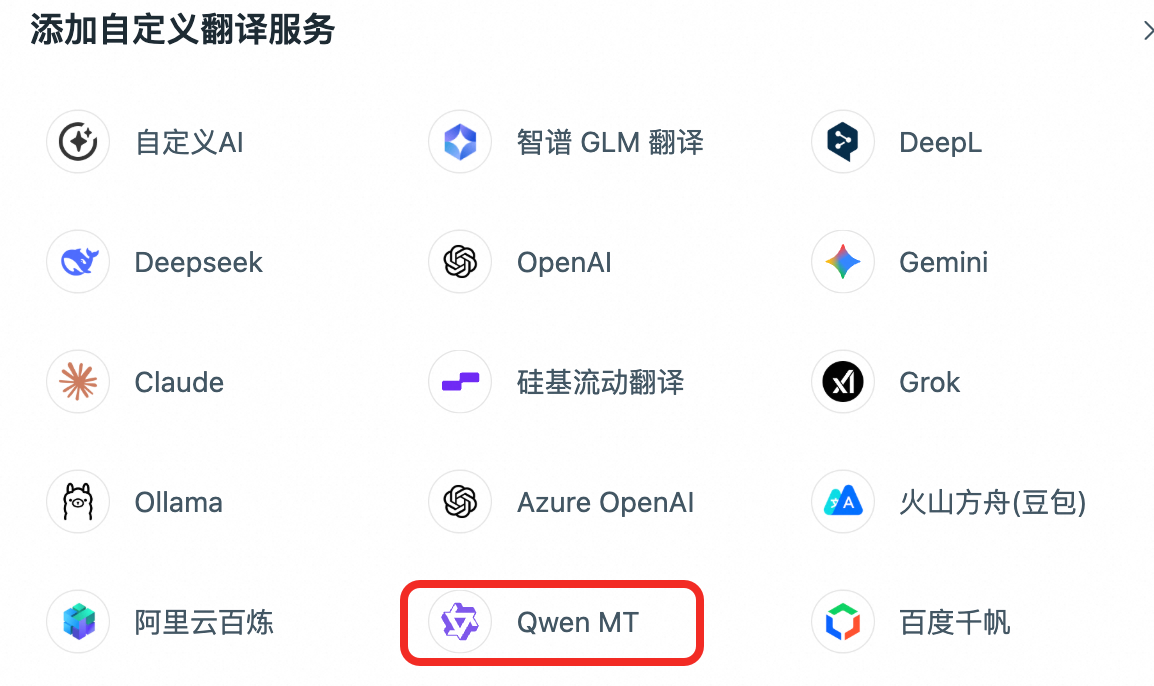
Q: How do I integrate Qwen-MT with Immersive Translate?
A: In the latest version of the plugin, add a custom translation service and select Qwen MT.
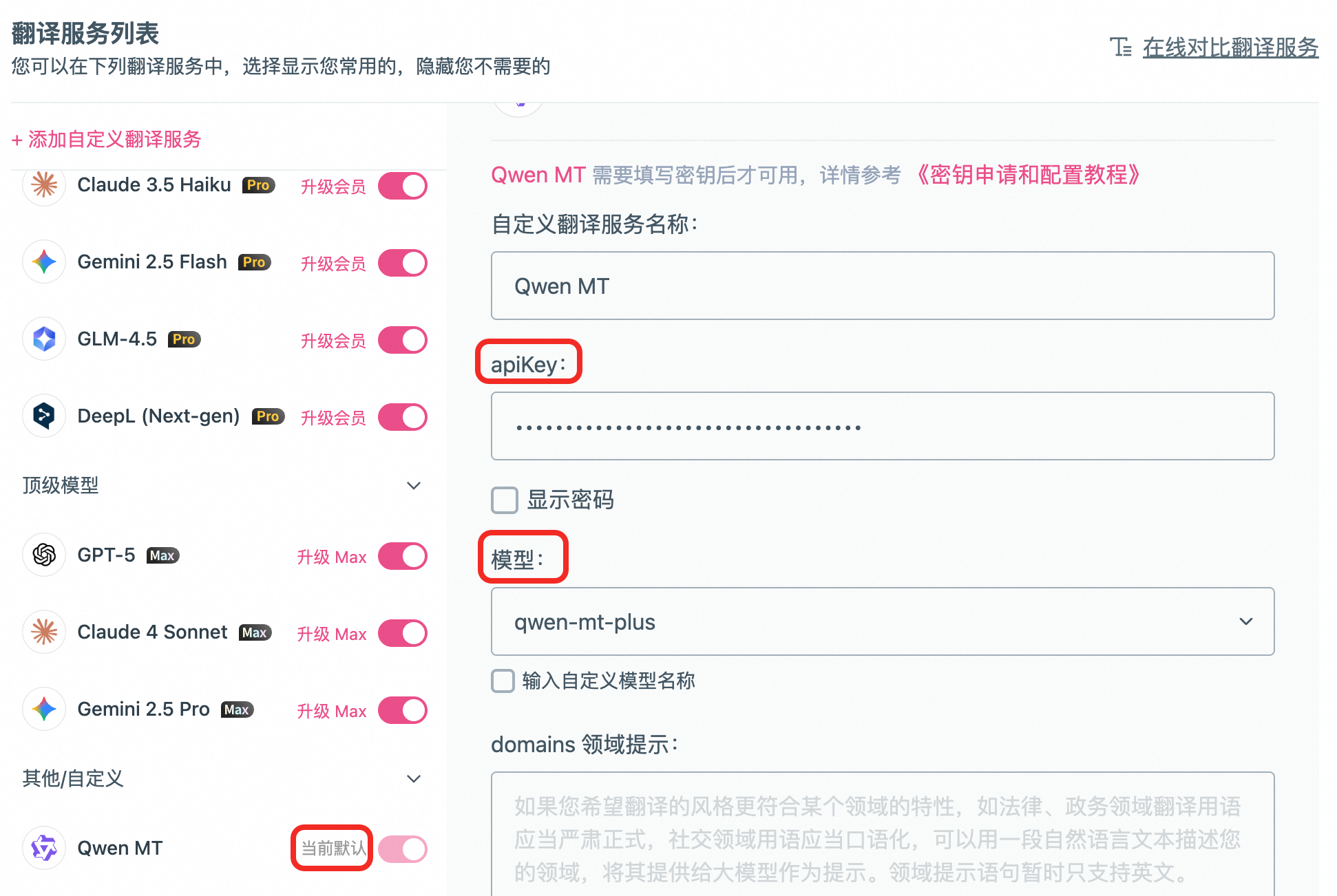
Enter the API key, select qwen-mt-plus or qwen-mt-flash from the model drop-down list, and set Qwen MT as the default in the left sidebar.
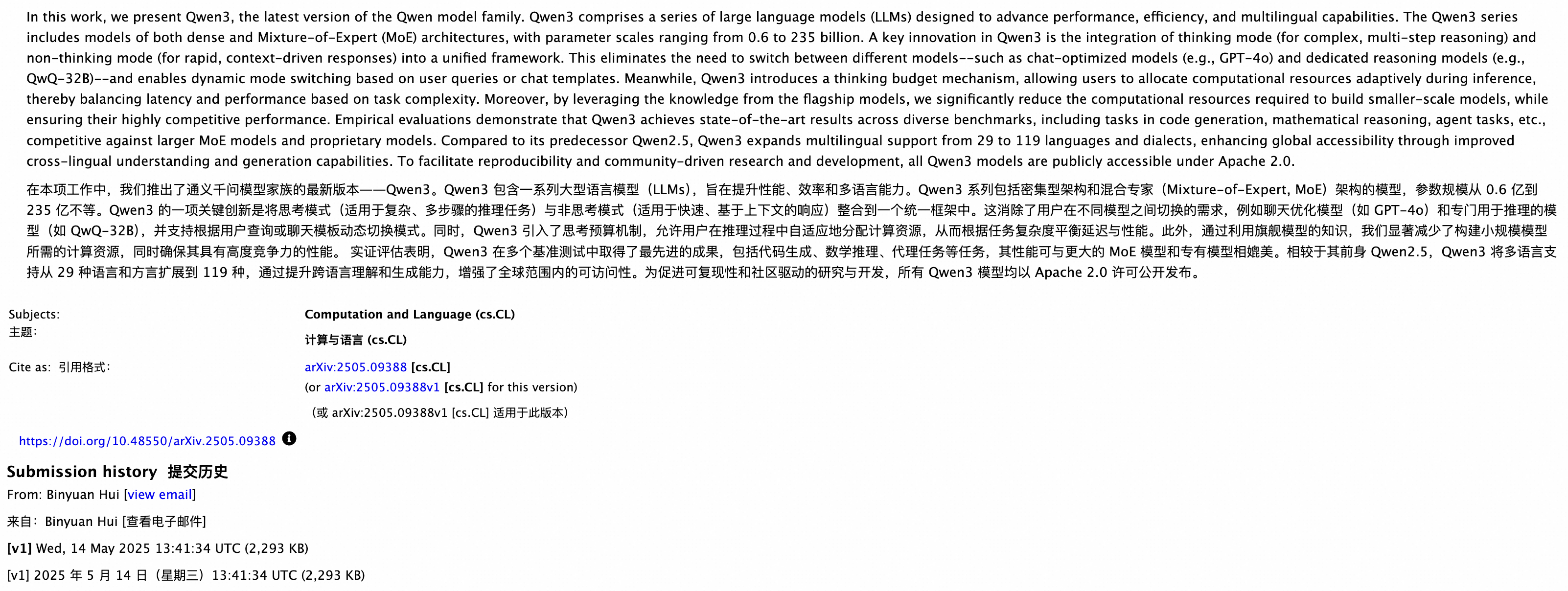
After the configuration is complete, open any webpage to use it. Take the Qwen3 Technical Report as an example. Click the plugin ball on the right of the page to start translating.
Q: How do I integrate Qwen-MT with other third-party tools?
A: The latest Tongyi Qianwen (Qwen) plugin of Dify supports Qwen-MT models.
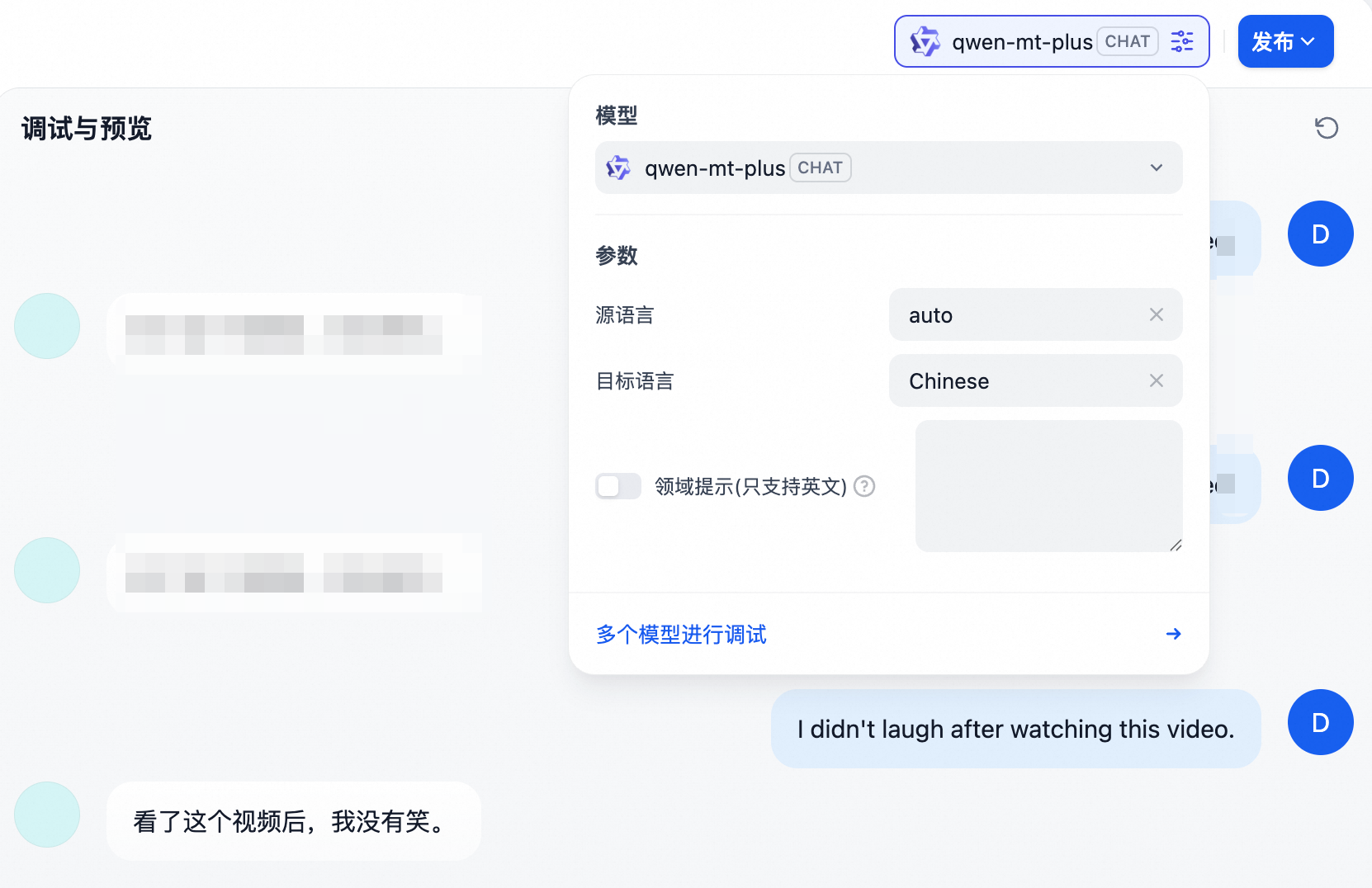
Whether other third-party tools support Qwen-MT depends on their actual status.
Supported languages
When sending a request, use the English name or code in the following table to specify languages.
When the source language is uncertain, set the
source_langparameter toautofor automatic detection.
Languages supported by qwen-mt-plus/flash/turbo (92)
Language | English name | Code |
|---|---|---|
English | English | en |
Simplified Chinese | Chinese | zh |
Traditional Chinese | Traditional Chinese | zh_tw |
Russian | Russian | ru |
Japanese | Japanese | ja |
Korean | Korean | ko |
Spanish | Spanish | es |
French | French | fr |
Portuguese | Portuguese | pt |
German | German | de |
Italian | Italian | it |
Thai | Thai | th |
Vietnamese | Vietnamese | vi |
Indonesian | Indonesian | id |
Malay | Malay | ms |
Arabic | Arabic | ar |
Hindi | Hindi | hi |
Hebrew | Hebrew | he |
Burmese | Burmese | my |
Tamil | Tamil | ta |
Urdu | Urdu | ur |
Bengali | Bengali | bn |
Polish | Polish | pl |
Dutch | Dutch | nl |
Romanian | Romanian | ro |
Turkish | Turkish | tr |
Khmer | Khmer | km |
Lao | Lao | lo |
Cantonese | Cantonese | yue |
Czech | Czech | cs |
Greek | Greek | el |
Swedish | Swedish | sv |
Hungarian | Hungarian | hu |
Danish | Danish | da |
Finnish | Finnish | fi |
Ukrainian | Ukrainian | uk |
Bulgarian | Bulgarian | bg |
Serbian | Serbian | sr |
Telugu | Telugu | te |
Afrikaans | Afrikaans | af |
Armenian | Armenian | hy |
Assamese | Assamese | as |
Asturian | Asturian | ast |
Basque | Basque | eu |
Belarusian | Belarusian | be |
Bosnian | Bosnian | bs |
Catalan | Catalan | ca |
Cebuano | Cebuano | ceb |
Croatian | Croatian | hr |
Egyptian Arabic | Egyptian Arabic | arz |
Estonian | Estonian | et |
Galician | Galician | gl |
Georgian | Georgian | ka |
Gujarati | Gujarati | gu |
Icelandic | Icelandic | is |
Javanese | Javanese | jv |
Kannada | Kannada | kn |
Kazakh | Kazakh | kk |
Latvian | Latvian | lv |
Lithuanian | Lithuanian | lt |
Luxembourgish | Luxembourgish | lb |
Macedonian | Macedonian | mk |
Maithili | Maithili | mai |
Maltese | Maltese | mt |
Marathi | Marathi | mr |
Mesopotamian Arabic | Mesopotamian Arabic | acm |
Moroccan Arabic | Moroccan Arabic | ary |
Najdi Arabic | Najdi Arabic | ars |
Nepali | Nepali | ne |
North Azerbaijani | North Azerbaijani | az |
North Levantine Arabic | North Levantine Arabic | apc |
Northern Uzbek | Northern Uzbek | uz |
Norwegian Bokmål | Norwegian Bokmål | nb |
Norwegian Nynorsk | Norwegian Nynorsk | nn |
Occitan | Occitan | oc |
Odia | Odia | or |
Pangasinan | Pangasinan | pag |
Sicilian | Sicilian | scn |
Sindhi | Sindhi | sd |
Sinhala | Sinhala | si |
Slovak | Slovak | sk |
Slovenian | Slovenian | sl |
South Levantine Arabic | South Levantine Arabic | ajp |
Swahili | Swahili | sw |
Tagalog | Tagalog | tl |
Ta’izzi-Adeni Arabic | Ta’izzi-Adeni Arabic | acq |
Tosk Albanian | Tosk Albanian | sq |
Tunisian Arabic | Tunisian Arabic | aeb |
Venetian | Venetian | vec |
Waray | Waray | war |
Welsh | Welsh | cy |
Western Persian | Western Persian | fa |
Languages supported by qwen-mt-lite (31)
Language | English name | Code |
|---|---|---|
English | English | en |
Simplified Chinese | Chinese | zh |
Traditional Chinese | Traditional Chinese | zh_tw |
Russian | Russian | ru |
Japanese | Japanese | ja |
Korean | Korean | ko |
Spanish | Spanish | es |
French | French | fr |
Portuguese | Portuguese | pt |
German | German | de |
Italian | Italian | it |
Thai | Thai | th |
Vietnamese | Vietnamese | vi |
Indonesian | Indonesian | id |
Malay | Malay | ms |
Arabic | Arabic | ar |
Hindi | Hindi | hi |
Hebrew | Hebrew | he |
Urdu | Urdu | ur |
Bengali | Bengali | bn |
Polish | Polish | pl |
Dutch | Dutch | nl |
Turkish | Turkish | tr |
Khmer | Khmer | km |
Czech | Czech | cs |
Swedish | Swedish | sv |
Hungarian | Hungarian | hu |
Danish | Danish | da |
Finnish | Finnish | fi |
Tagalog | Tagalog | tl |
Persian | Persian | fa |
API reference
For the input and output parameters of Qwen-MT models, see Qwen-MT translation model.