This document describes the features of the music radio agent and how to integrate it using the software development kit (SDK).
Features
When enabled, it shuffles recommended music.
Current music library: Instrumental music (no vocals)
Music samples:
|
Track name |
Sample |
Description |
|
Hold on a Sec |
Chill, relaxing, pleasant, jazz |
|
|
One Step Closer |
Fantasy, imaginative, mysterious |
|
|
The Celebrated Minuet |
Classical, elegant |
|
|
Shining Stars |
Emotional, healing, gentle |
|
|
Village Tarantella |
Exotic, unique rhythm |
|
|
Quick Metal Riff 1 |
Rock, exciting, powerful |
|
|
Patron Saint of Heists |
Playful, rhythmic |
|
|
Painful Disorientation |
Classical, delicate, elegant, playful |
|
|
Jethro on the Run |
Country, cheerful, rhythmic |
|
|
Joey's Song |
Healing, gentle, nostalgic |
Integrate the music radio agent using the SDK
1. Enter the music radio using voice or text
Voice command: "Enter music radio" or "Open music radio"
Text command: requestToRespond("prompt", "Enter music radio", null)
2. Get music
After you enter the music radio, the service returns music track information, which includes a downloadable MP3 link. The data format of the response is different for voice and multimodal applications, so you must parse the response based on your application type.
2.1 Integrate the music radio using a voice application
You can parse the payload.output.extra_info.tool_calls from the RespondingContent result that is returned by the service.
|
Parameter |
Type |
Other |
Description |
|||
|
tool_calls[] |
type |
String |
The field name is typically fixed to "FUNCTION". It represents a function call. |
|||
|
id |
String |
The default value for the music radio is music_radio. |
||||
|
function |
||||||
|
name |
String |
The field is the name of a custom utility function, similar to the domain in multimodal applications. |
||||
|
arguments[] |
list |
A list of parameters sent by the plugin or skill. |
||||
|
music_info |
jsonString |
Music resource information. |
||||
|
music_keyword |
String |
The music genre, such as "Jazz Blues". |
{
    "tool_calls": [
        {
            "id": "music_radio",
            "function": {
                "name": "play_music",
                "arguments": [
                    {
                        "music_info": "{\"songName\":\"Hold on a Sec\",\"song_transition\":\"\",\"_q_score\":0.8128400446231343,\"source\":\"freePD\",\"_score\":0.0,\"tags\":\"[\\\"Miscellaneous_Jazz\\\",\\\"Hold on a Sec\\\"]\",\"_rc_score\":4.835166,\"_scores\":{\"gte-rerank-v2\":0.0},\"audios\":\"https://dashscope.oss-cn-beijing.aliyuncs.com/samples/audio/FreePD_mp3s/Miscellaneaous_Jazz_mp3/Hold%20on%20a%20Sec.mp3\",\"_id\":\"2102\",\"id\":\"2102\",\"category\":\"Miscellaneaous_Jazz\",\"songId\":7877949454}"
                    },
                    {
                        "music_keyword": "Jazz Blues"
                    }
                ]
            },
            "type": "FUNCTION"
        }
    ]
}
2.2 Integrate the music radio using a multimodal application
You can parse the payload.output.extra_info.commands from the RespondingContent result that is returned by the service.
|
Parameter |
Type |
Description |
||
|
commands[] |
intent_info |
String |
Multimodal intent. |
|
|
|
domain |
String |
The default value for the music radio is music_radio. |
|
|
intent |
String |
The intent, such as open_music_radio to open the music radio. |
||
|
name |
String |
play_music |
||
|
params[] |
||||
|
object.music_info |
jsonString |
Music resource information, including the audio link address. |
||
|
object.music_keyword |
The music genre, such as "Jazz Blues". |
[
    {
        "intent_info": {
            "domain": "music_radio",
            "intent": "open_music_radio"
        },
        "name": "play_music",
        "params": [
            {
                "name": "music_info",
                "normValue": "{\"songName\":\"Lukewarm Banjo\",\"song_transition\":\"\",\"_q_score\":0.9366762545655505,\"source\":\"freePD\",\"_score\":0.0,\"tags\":\"[\\\"Miscellaneous_Country\\\",\\\"Lukewarm Banjo\\\"]\",\"_rc_score\":28.435673,\"_scores\":{\"gte-rerank-v2\":0.0},\"audios\":\"https://dashscope.oss-cn-beijing.aliyuncs.com/samples/audio/FreePD_mp3s/Miscellaneaous_Country_mp3/Lukewarm%20Banjo.mp3\",\"_id\":\"2003\",\"id\":\"2003\",\"category\":\"Miscellaneaous_Country\",\"songId\":1046525568}"
            },
            {
                "name": "music_keyword",
                "normValue": "Country"
            }
        ]
    }
]
3. Music playback
The service provides a URL that links to an MP3 file. After you retrieve the URL, you can download the file or use a network player for playback.
-
For example, the SDK provides sample code for a URL MP3 player for Android that you can integrate into your project.
package com.tongyi.multimodal_dialog.utils;

import android.media.MediaPlayer;
import android.util.Log;

import java.io.IOException;

/**
 * A utility class for playing network MP3 files.
 * It supports playing MP3 files from a URL and provides playback, stop, and completion callback features.
 */
public class NetworkMp3Player {
    private static final String TAG = "NetworkMp3Player";

    private MediaPlayer mediaPlayer;
    private OnPlayCallback playCallback;
    private boolean isPlaying = false;
    private String currentUrl = null;

    /**
     * Playback callback interface.
     */
    public interface OnPlayCallback {
        /**
         * Callback for when playback starts.
         */
        void onPlayStart();

        /**
         * Callback for when playback is complete.
         */
        void onPlayComplete();

        /**
         * Callback for a playback error.
         * @param error The error message.
         */
        void onPlayError(String error);
    }

    public NetworkMp3Player() {
        initMediaPlayer();
    }

    /**
     * Initializes the MediaPlayer.
     */
    private void initMediaPlayer() {
        if (mediaPlayer == null) {
            mediaPlayer = new MediaPlayer();
            mediaPlayer.setOnCompletionListener(new MediaPlayer.OnCompletionListener() {
                @Override
                public void onCompletion(MediaPlayer mp) {
                    isPlaying = false;
                    if (playCallback != null) {
                        playCallback.onPlayComplete();
                    }
                }
            });

            mediaPlayer.setOnErrorListener(new MediaPlayer.OnErrorListener() {
                @Override
                public boolean onError(MediaPlayer mp, int what, int extra) {
                    isPlaying = false;
                    String errorMsg = "Playback error: what=" + what + ", extra=" + extra;
                    Log.e(TAG, errorMsg);
                    if (playCallback != null) {
                        playCallback.onPlayError(errorMsg);
                    }
                    return true;
                }
            });

            mediaPlayer.setOnPreparedListener(new MediaPlayer.OnPreparedListener() {
                @Override
                public void onPrepared(MediaPlayer mp) {
                    if (playCallback != null) {
                        playCallback.onPlayStart();
                    }
                    mediaPlayer.start();
                    isPlaying = true;
                }
            });
        }
    }

    /**
     * Plays a network MP3.
     * @param url The URL of the MP3 file.
     * @param callback The playback callback.
     */
    public void play(String url, OnPlayCallback callback) {
        if (url == null || url.isEmpty()) {
            if (callback != null) {
                callback.onPlayError("URL cannot be empty");
            }
            return;
        }

        this.playCallback = callback;
        this.currentUrl = url; // Save the current playback URL.

        try {
            stop(); // Stop the current playback.
            initMediaPlayer(); // Re-initialize.

            mediaPlayer.setDataSource(url);
            mediaPlayer.prepareAsync(); // Prepare for playback asynchronously.
        } catch (IOException e) {
            Log.e(TAG, "Playback failed: " + e.getMessage());
            if (playCallback != null) {
                playCallback.onPlayError("Playback failed: " + e.getMessage());
            }
        } catch (Exception e) {
            Log.e(TAG, "Playback exception: " + e.getMessage());
            if (playCallback != null) {
                playCallback.onPlayError("Playback exception: " + e.getMessage());
            }
        }
    }

    /**
     * Stops playback.
     */
    public void stop() {
        if (mediaPlayer != null && isPlaying) {
            try {
                mediaPlayer.stop();
                mediaPlayer.reset();
                isPlaying = false;
                currentUrl = null; // Clear the current playback URL.
            } catch (Exception e) {
                Log.e(TAG, "Failed to stop playback: " + e.getMessage());
            }
        }
    }

    /**
     * Pauses playback.
     */
    public void pause() {
        if (mediaPlayer != null && isPlaying) {
            mediaPlayer.pause();
            isPlaying = false;
        }
    }

    /**
     * Resumes playback.
     */
    public void resume() {
        if (mediaPlayer != null && !isPlaying) {
            mediaPlayer.start();
            isPlaying = true;
        }
    }

    /**
     * Checks if playback is in progress.
     * @return true if playing, false otherwise.
     */
    public boolean isPlaying() {
        return isPlaying;
    }

    /**
     * Releases resources.
     */
    public void release() {
        stop();
        if (mediaPlayer != null) {
            mediaPlayer.release();
            mediaPlayer = null;
        }
        isPlaying = false;
    }

    /**
     * Gets the current playback URL.
     * @return The current playback URL, or null if nothing is playing.
     */
    public String getCurrentUrl() {
        return currentUrl;
    }
}-
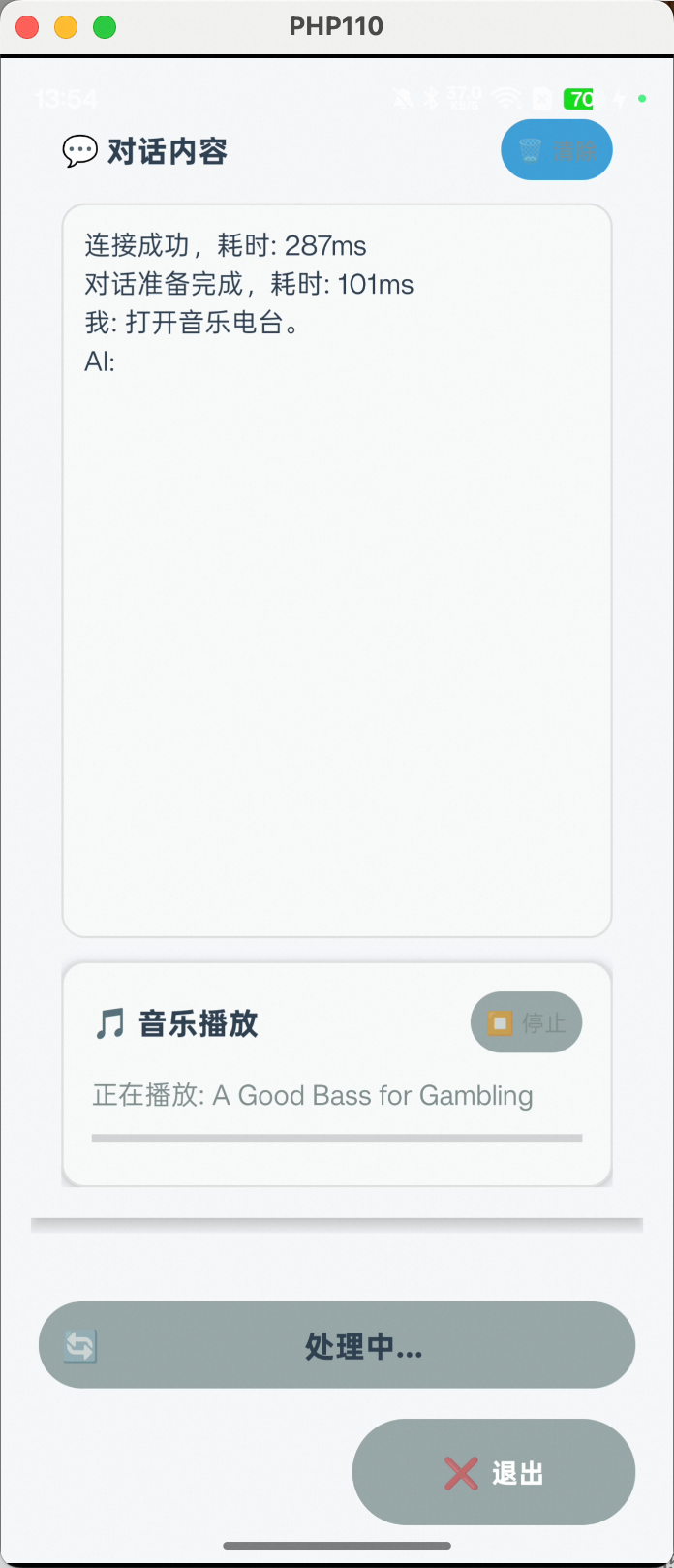
You can parse the `audios` field from the result to obtain the music URL. Then, use an MP3 player for playback. The demo includes a simple UI that displays the music playback status.
-
For the complete code, see the Android SDK demo. For other languages, you can implement the same feature using similar parsing and playback methods.
4. Continuous playback
To enable continuous playback, the client can send a command to play the next track after the current one finishes. You can implement this by listening for the onPlayComplete method of NetworkMp3Player.OnPlayCallback(). When this method is called, send a request to the service to play the next track:
multiModalDialog.requestToRespond("prompt","next track", null);You do not need to maintain a persistent connection during playback. When you start the next session, you can send a request with the same dialog_id to inherit the conversation.