Integrate with third-party RTC for video calls
This topic describes how to use a third-party Real-Time Communication (RTC) channel to integrate with the Alibaba Cloud Model Studio multimodal interactive suite and enable video calls.
Your project might already use a third-party RTC service to forward and process audio and video. To simplify integration with the Alibaba Cloud Model Studio multimodal interactive suite, you can enable the video call (LiveAI) feature by submitting a sequence of images. This process requires minimal changes to your existing setup.
Call flow
In a typical scenario, your client, such as a webpage or an app, connects to your server-side through RTC to transmit video and audio. The server-side then collects video frames and sends them to the multimodal interactive SDK at a rate of one frame every 500 ms, while also maintaining a real-time audio input.
Note: LiveAI supports only Base64 encoded images. Each image must be smaller than 180 KB.
- LiveAI call timing
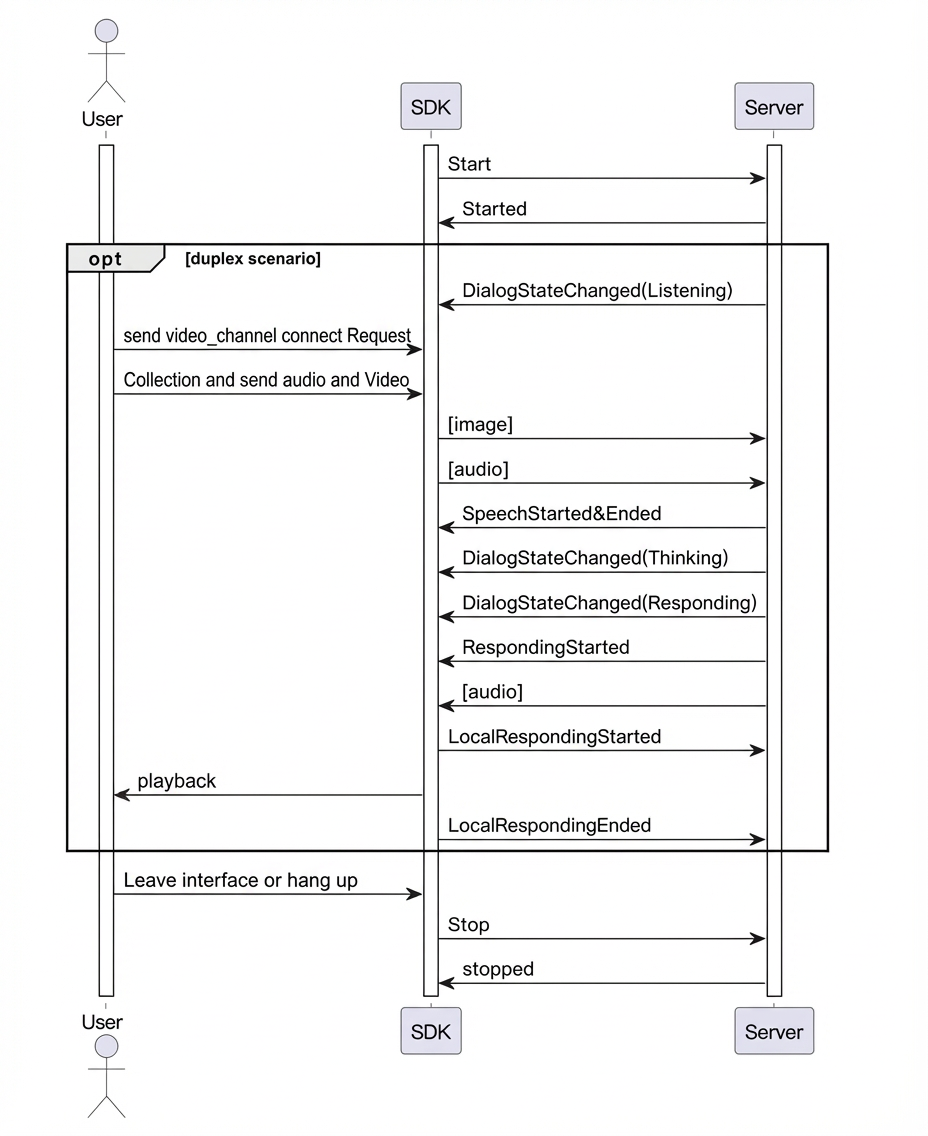
Call examples
The SDK documentation for each language provides examples of how to access LiveAI through a WebSocket channel. The following examples show how to access the LiveAI feature from the server-side. For more information, see Install the SDK.
public void testMultimodalLiveAI() {
    log.info("############ Starting LiveAI Test ############");

    try {
        // Build request parameters for duplex mode
        MultiModalRequestParam params = buildBaseRequestParams("duplex");
        log.info("Request parameters: {}", JsonUtils.toJson(params));

        // Initialize conversation
        conversation = new MultiModalDialog(params, getCallback());
        conversation.start();

        // Start send video frame loop
        startVideoFrameStreaming();
        // Wait for listening state
        waitForListeningState();
        conversation.sendHeartBeat();
        // Send video channel connect request, will response command : switch_video_call_success
        conversation.requestToRespond("prompt", "", connectVideoChannelRequest());

        // Send audio data directly (no manual start needed for duplex)
                       sendAudioFromFile("./src/main/resources/what_in_picture.wav");

        // Wait for listening state twice
        waitForListeningState();

        sendAudioFromFile("./src/main/resources/what_color.wav");

        // Wait for conversation completion
        waitForConversationCompletion(3);

        // Clean up
        stopConversation();

        isVideoStreamingActive = false;
        if (videoStreamingThread != null && videoStreamingThread.isAlive()) {
            videoStreamingThread.interrupt();
        }

    } catch (Exception e) {
        log.error("Error in LiveAI test: ", e);
    } finally {
        log.info("############ LiveAI Test Completed ############");
    }
}

/**
 * Build video channel connection request for LiveAI
 *
 * @return UpdateParams containing video channel connection configuration
 */
private MultiModalRequestParam.UpdateParams connectVideoChannelRequest(){

    Map<String, String> video = new HashMap<>();
    video.put("action", "connect");
    video.put("type", "voicechat_video_channel");
    ArrayList<Map<String, String>> videos = new ArrayList<>();
    videos.add(video);
    MultiModalRequestParam.BizParams bizParams = MultiModalRequestParam.BizParams.builder().videos(videos).build();

    return MultiModalRequestParam.UpdateParams.builder().bizParams(bizParams).build();
}

/**
 * Start continuous video frame streaming for LiveAI
 */
private void startVideoFrameStreaming() {
    log.info("Starting continuous video frame streaming for LiveAI...");

    vqaUseUrl = false;
    isVideoStreamingActive = true;

    videoStreamingThread = new Thread(() -> {
        try {
            while (isVideoStreamingActive && !Thread.currentThread().isInterrupted()) {
                Thread.sleep(VIDEO_FRAME_INTERVAL_MS);

                MultiModalRequestParam.UpdateParams videoUpdate =
                        MultiModalRequestParam.UpdateParams.builder()
                                .images(getMockImageRequest())
                                .build();

                if (conversation != null && isVideoStreamingActive) {
                    conversation.updateInfo(videoUpdate);
                    log.debug("Video frame sent to LiveAI");
                }
            }
        } catch (InterruptedException e) {
            log.info("Video streaming thread interrupted - stopping video stream");
            Thread.currentThread().interrupt();
        } catch (Exception e) {
            log.error("Error in video streaming thread: ", e);
        } finally {
            log.info("Video streaming thread terminated");
        }
    });

    videoStreamingThread.setDaemon(true);
    videoStreamingThread.setName("LiveAI-VideoStreaming");
    videoStreamingThread.start();

    log.info("Video streaming thread started successfully");
}
# 1. Set the request mode to AudioAndVideo.
up_stream = Upstream(type="AudioAndVideo", mode="duplex", audio_format="pcm")
...

# 2. Send a request to connect to the video chat agent.
# {"action":"connect", "type":"voicechat_video_channel"}
def send_connect_video_command(self):
    """Sends an instruction to switch to video mode."""
    logger.info("Sending connect video command")
    try:
        video_connect_command = [{"action":"connect", "type":"voicechat_video_channel"}]

        self.conversation.request_to_respond("prompt","", RequestToRespondParameters(biz_params=BizParams(videos=video_connect_command)))
        # Mark that video mode is active.
        self.video_mode_active = True
        logger.info("Video mode activated")

    except Exception as e:
        logger.error(f"Failed to send connect video command: {e}")

 # 3. Send a video frame image smaller than 180 KB every 500 ms.
 def send_video_frame_data_loop(self):
    """Sends video frame data in a loop."""
    logger.info("Starting video frame data loop")
    self.video_thread_running = True

    # Get sample image data.
    image_data = self._get_sample_images()

    try:
        while self.video_thread_running and self.video_mode_active:
            # Send image data.
            self._send_video_frame(image_data)
            logger.debug(f"Sent video frame, sleeping for {VIDEO_FRAME_INTERVAL}s")

            # Wait for 500 ms.
            time.sleep(VIDEO_FRAME_INTERVAL)
...
# Other call procedures are omitted. For more information, see the complete example.
// Example of sending Base64-encoded image data.
// You can use the helper interface of the SDK for Base64 encoding or implement it yourself.
ConversationUtils utils;
std::string base64_content = utils.Base64EncodeFromFilePath(path/*image path*/);
if (!base64_content.empty()) {
  Json::Value root;
  root["type"] = "update_info";
  Json::Value parameters;
  parameters["biz_params"] = Json::objectValue;

  Json::Value client_info;
  Json::Value status;
  Json::Value bluetooth_announcement;
  bluetooth_announcement["status"] = "stopped";
  status["bluetooth_announcement"] = bluetooth_announcement;
  client_info["status"] = status;
  parameters["client_info"] = client_info;

  Json::Value image;
  image["type"] = "base64";
  image["value"] = base64_content;
  image["width"] = 480;
  image["height"] = 720;
  Json::Value images(Json::arrayValue);
  images.append(image);
  parameters["images"] = images;
  root["parameters"] = parameters;

  Json::StreamWriterBuilder writer;
  writer["indentation"] = "";
  conversation->UpdateMessage(Json::writeString(writer, root).c_str());
}