Reference-to-video
Wan-R2V accepts multimodal input (text, image, video, and audio) to generate performance videos. Use prompts to cast people or objects as the main characters.
Quick links: API reference | Prompt guide
Getting started
Input prompt: Video 1 holds Image 3 and plays a soothing country folk song on the chair from Image 4, saying: "The weather is so nice today." Image 1, holding Image 2, walks past Video 1, places Image 2 on the table next to Video 1, and says: "That sounds beautiful. Can you play it again?" | |||||
Input image (Image 1)
| Input video (Video 1)
| Input image (Image 2)
| Input image (Image 3)
| Input image (Image 4)
| Output video (multi-shot, with audio) |
 Input reference voice: | Input reference voice: |  | 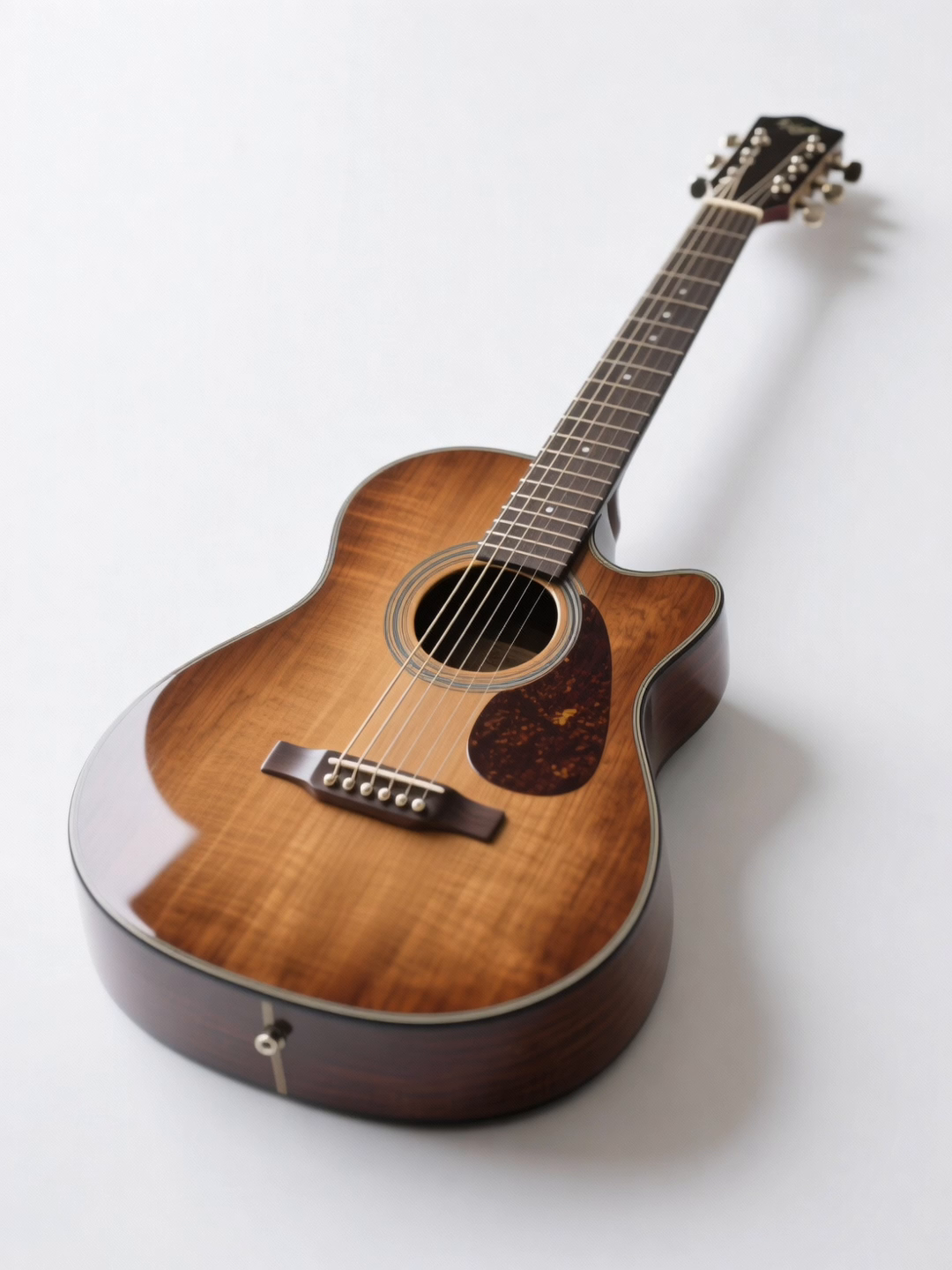 |  | |
Before you start, get an API key and set it as an environment variable. To use an SDK, install the DashScope SDK.
Python SDK
ImportantEnsure that the DashScope Python SDK version is at least1.25.16 before you run the following code.
Older versions might trigger errors such as "url error, please check url!". See Install the SDK.
# -*- coding: utf-8 -*-
from http import HTTPStatus
from dashscope import VideoSynthesis
import dashscope
import os

# The following is the URL for the China (Beijing) region. Replace {WorkspaceId} with your Bailian workspace ID. URLs vary by region. For more information, see https://help.aliyun.com/en/model-studio/wan-video-to-video-api-reference
dashscope.base_http_api_url = 'https://{WorkspaceId}.cn-beijing.maas.aliyuncs.com/api/v1'

# If you have not set the environment variable, replace the following line with your Model Studio API key: api_key="sk-xxx"
# API keys vary by region. For more information, see https://help.aliyun.com/en/model-studio/get-api-key
api_key = os.getenv("DASHSCOPE_API_KEY")

media = [
    {
        "type": "reference_image",
        "url": "https://help-static-aliyun-doc.aliyuncs.com/file-manage-files/zh-CN/20260408/sjuytr/wan-r2v-object-girl.jpg",
        "reference_voice": "https://help-static-aliyun-doc.aliyuncs.com/file-manage-files/zh-CN/20260408/gbqewz/wan-r2v-girl-voice.mp3"
    },
    {
        "type": "reference_video",
        "url": "https://help-static-aliyun-doc.aliyuncs.com/file-manage-files/zh-CN/20260129/qigswt/wan-r2v-role2.mp4",
        "reference_voice": "https://help-static-aliyun-doc.aliyuncs.com/file-manage-files/zh-CN/20260408/isllrq/wan-r2v-boy-voice.mp3"
    },
    {
        "type": "reference_image",
        "url": "https://help-static-aliyun-doc.aliyuncs.com/file-manage-files/zh-CN/20260129/rtjeqf/wan-r2v-object3.png"
    },
    {
        "type": "reference_image",
        "url": "https://help-static-aliyun-doc.aliyuncs.com/file-manage-files/zh-CN/20260129/qpzxps/wan-r2v-object4.png"
    },
    {
        "type": "reference_image",
        "url": "https://help-static-aliyun-doc.aliyuncs.com/file-manage-files/zh-CN/20260129/wfjikw/wan-r2v-backgroud5.png"
    }
]

print('please wait...')
rsp = VideoSynthesis.call(
    api_key=api_key,
    model="wan2.7-r2v-2026-06-12",
    media=media,
    resolution="720P",
    ratio="16:9",
    duration=10,
    prompt_extend=False,
    watermark=True,
    prompt="Video 1 holds Image 3 and plays a soothing country folk song on the chair from Image 4, saying: 'The weather is so nice today.' Image 1, holding Image 2, walks past Video 1, places Image 2 on the table next to Video 1, and says: 'That sounds beautiful. Can you play it again?'",
)
print(rsp)
if rsp.status_code == HTTPStatus.OK:
    print("video_url:", rsp.output.video_url)
else:
    print('Failed, status_code: %s, code: %s, message: %s' % (rsp.status_code, rsp.code, rsp.message))
Java SDK
ImportantEnsure that your DashScope Java SDK version is at least2.22.14, and then run the following code.
Older versions might trigger errors such as "url error, please check url!". See Install the SDK.
// Copyright (c) Alibaba, Inc. and its affiliates.

import com.alibaba.dashscope.aigc.videosynthesis.VideoSynthesis;
import com.alibaba.dashscope.aigc.videosynthesis.VideoSynthesisParam;
import com.alibaba.dashscope.aigc.videosynthesis.VideoSynthesisResult;
import com.alibaba.dashscope.exception.ApiException;
import com.alibaba.dashscope.exception.InputRequiredException;
import com.alibaba.dashscope.exception.NoApiKeyException;
import com.alibaba.dashscope.utils.Constants;
import com.alibaba.dashscope.utils.JsonUtils;

import java.util.ArrayList;
import java.util.List;

public class Ref2Video {

    static {
        // The following is the URL for the China (Beijing) region. Replace {WorkspaceId} with your Bailian workspace ID. URLs vary by region. For more information, see https://help.aliyun.com/en/model-studio/wan-video-to-video-api-reference
        Constants.baseHttpApiUrl = "https://{WorkspaceId}.cn-beijing.maas.aliyuncs.com/api/v1";
    }

    // If you have not set the environment variable, replace the following line with your Model Studio API key: apiKey="sk-xxx"
    // API keys vary by region. For more information, see https://help.aliyun.com/en/model-studio/get-api-key
    static String apiKey = System.getenv("DASHSCOPE_API_KEY");

    public static void ref2video() throws ApiException, NoApiKeyException, InputRequiredException {
        VideoSynthesis vs = new VideoSynthesis();
        final String prompt = "Video 1 holds Image 3 and plays a soothing country folk song on the chair from Image 4, saying: 'The weather is so nice today.' Image 1, holding Image 2, walks past Video 1, places Image 2 on the table next to Video 1, and says: 'That sounds beautiful. Can you play it again?'";
        List<VideoSynthesisParam.Media> media = new ArrayList<VideoSynthesisParam.Media>(){{
            add(VideoSynthesisParam.Media.builder()
                    .url("https://help-static-aliyun-doc.aliyuncs.com/file-manage-files/zh-CN/20260408/sjuytr/wan-r2v-object-girl.jpg")
                    .type("reference_image")
                    .referenceVoice("https://help-static-aliyun-doc.aliyuncs.com/file-manage-files/zh-CN/20260408/gbqewz/wan-r2v-girl-voice.mp3")
                    .build());
            add(VideoSynthesisParam.Media.builder()
                    .url("https://help-static-aliyun-doc.aliyuncs.com/file-manage-files/zh-CN/20260129/qigswt/wan-r2v-role2.mp4")
                    .type("reference_video")
                    .referenceVoice("https://help-static-aliyun-doc.aliyuncs.com/file-manage-files/zh-CN/20260408/isllrq/wan-r2v-boy-voice.mp3")
                    .build());
            add(VideoSynthesisParam.Media.builder()
                    .url("https://help-static-aliyun-doc.aliyuncs.com/file-manage-files/zh-CN/20260129/rtjeqf/wan-r2v-object3.png")
                    .type("reference_image")
                    .build());
            add(VideoSynthesisParam.Media.builder()
                    .url("https://help-static-aliyun-doc.aliyuncs.com/file-manage-files/zh-CN/20260129/qpzxps/wan-r2v-object4.png")
                    .type("reference_image")
                    .build());
            add(VideoSynthesisParam.Media.builder()
                    .url("https://help-static-aliyun-doc.aliyuncs.com/file-manage-files/zh-CN/20260129/wfjikw/wan-r2v-backgroud5.png")
                    .type("reference_image")
                    .build());
        }};
        VideoSynthesisParam param =
                VideoSynthesisParam.builder()
                        .apiKey(apiKey)
                        .model("wan2.7-r2v-2026-06-12")
                        .prompt(prompt)
                        .media(media)
                        .watermark(true)
                        .duration(10)
                        .resolution("720P")
                        .ratio("16:9")
                        .promptExtend(false)
                        .build();
        System.out.println("please wait...");
        VideoSynthesisResult result = vs.call(param);
        System.out.println(JsonUtils.toJson(result));
    }

    public static void main(String[] args) {
        try {
            ref2video();
        } catch (ApiException | NoApiKeyException | InputRequiredException e) {
            System.out.println(e.getMessage());
        }
        System.exit(0);
    }
}
curl
Step 1: Create a task and get the task IDcurl --location 'https://{WorkspaceId}.cn-beijing.maas.aliyuncs.com/api/v1/services/aigc/video-generation/video-synthesis' \
-H 'X-DashScope-Async: enable' \
-H "Authorization: Bearer $DASHSCOPE_API_KEY" \
-H 'Content-Type: application/json' \
-d '{
"model": "wan2.7-r2v-2026-06-12",
"input": {
"prompt": "Video 1 holds Image 3 and plays a soothing country folk song on the chair from Image 4, saying: ''The weather is so nice today.'' Image 1, holding Image 2, walks past Video 1, places Image 2 on the table next to Video 1, and says: ''That sounds beautiful. Can you play it again?'' ",
"media": [
{
"type": "reference_image",
"url": "https://help-static-aliyun-doc.aliyuncs.com/file-manage-files/zh-CN/20260408/sjuytr/wan-r2v-object-girl.jpg",
"reference_voice": "https://help-static-aliyun-doc.aliyuncs.com/file-manage-files/zh-CN/20260408/gbqewz/wan-r2v-girl-voice.mp3"
},
{
"type": "reference_video",
"url": "https://help-static-aliyun-doc.aliyuncs.com/file-manage-files/zh-CN/20260129/qigswt/wan-r2v-role2.mp4",
"reference_voice": "https://help-static-aliyun-doc.aliyuncs.com/file-manage-files/zh-CN/20260408/isllrq/wan-r2v-boy-voice.mp3"
},
{
"type": "reference_image",
"url": "https://help-static-aliyun-doc.aliyuncs.com/file-manage-files/zh-CN/20260129/rtjeqf/wan-r2v-object3.png"
},
{
"type": "reference_image",
"url": "https://help-static-aliyun-doc.aliyuncs.com/file-manage-files/zh-CN/20260129/qpzxps/wan-r2v-object4.png"
},
{
"type": "reference_image",
"url": "https://help-static-aliyun-doc.aliyuncs.com/file-manage-files/zh-CN/20260129/wfjikw/wan-r2v-backgroud5.png"
}
]
},
"parameters": {
"resolution": "720P",
"ratio": "16:9",
"duration": 10,
"prompt_extend": false,
"watermark": true
}
}'
Replace {task_id} with the task_id value returned by the previous API call. The task_id is valid for queries for 24 hours, Replace {WorkspaceId} with your actual workspace ID.
curl -X GET https://{WorkspaceId}.cn-beijing.maas.aliyuncs.com/api/v1/tasks/{task_id} \
--header "Authorization: Bearer $DASHSCOPE_API_KEY"
Availability
- Supported models vary by region. Resources are isolated between regions. For supported models in each region, see the Model Studio console.
- When making a call, make sure your model, endpoint URL, and API key all belong to the same region. Cross-region calls fail.
NoteThe sample code in this topic applies to the China (Beijing) region. If you use other regions, see the API Reference.
Core capabilities (wan2.7)
Single-image reference (multi-panel image)
Supported models: wan2.7 series.
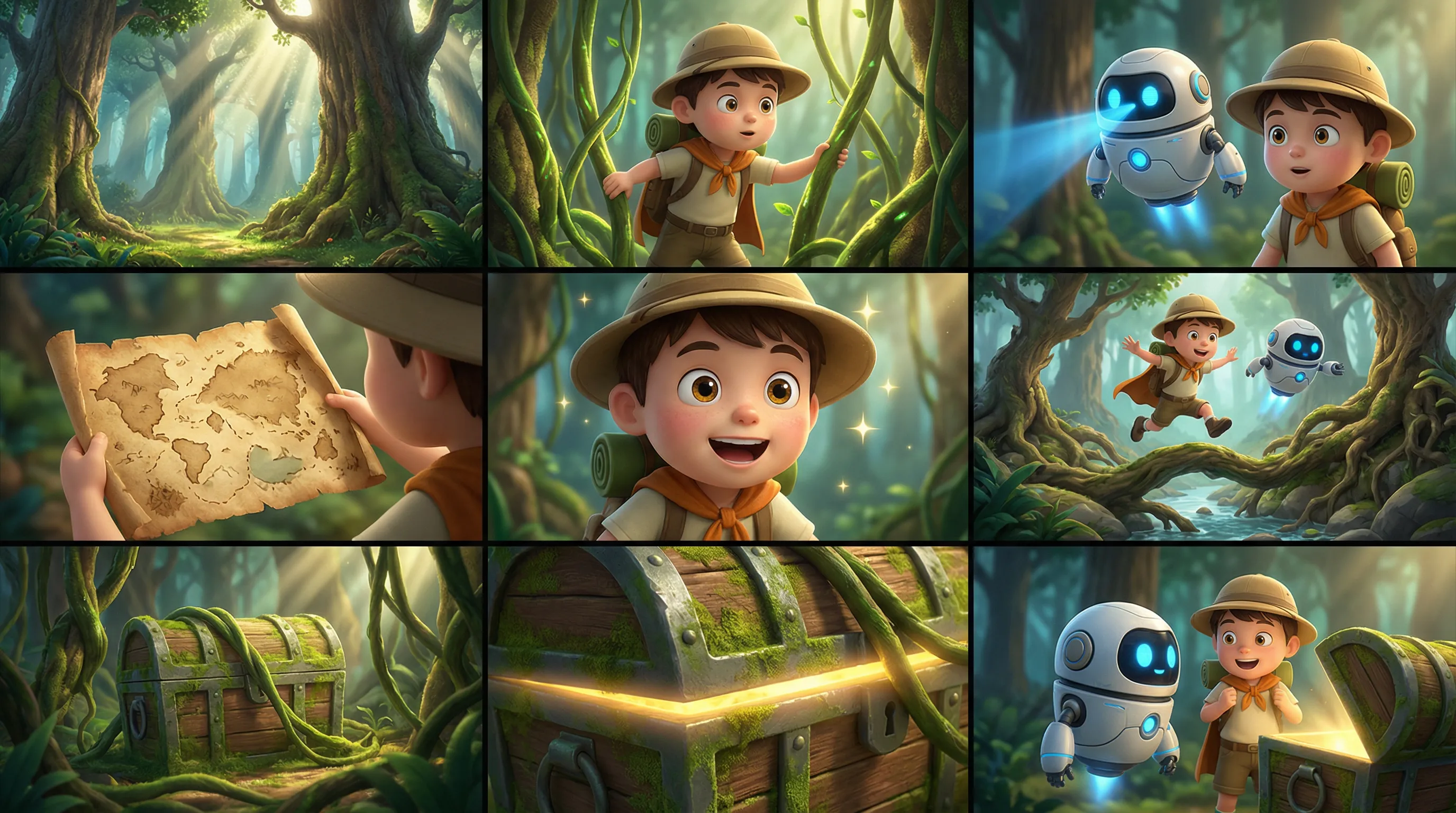
Description: You can input a multi-panel image (storyboard). The model automatically detects the multi-panel layout and generates a video with consistent characters, scenes, and shots. You can input only one multi-panel image at a time.
Parameters:
media.type: Set toreference_image.media.url: The URL or base64-encoded string of the multi-panel image.prompt: If you provide only one reference image or video, use "reference image" or "reference video".
Input prompt: Reference image, 3D cartoon adventure movie style, chibi characters with detailed textures, smooth actions, and vibrant colors. Keep the characters and forest scene consistent. Do not add text. Atmosphere: Adventurous, lighthearted, mysterious, whimsical. Characters: Boy explorer: round hat, backpack, short cloak. Sidekick: a flying small robot with a round body and blue glowing eyes. Scene: Fantasy forest with giant tree roots, mushrooms, vines, a treasure cave entrance, and sunbeams. Storyboard: 1. Wide shot: Tall trees and interlaced light beams in a mysterious and bright fantasy forest. 2. Medium shot: The boy pushes aside vines to explore. 3. Medium shot: The small robot flies beside him, scanning ahead with a blue light. 4. Close-up: An old treasure map unfolds in the boy's hands. 5. Close-up: He shows an excited expression, his eyes lighting up. 6. Action shot: The two jump over tree roots and a stream, continuing deeper into the forest. 7. Medium shot: A moss-covered treasure chest is revealed behind the vines. 8. Close-up: A golden glow shines from the edge of the treasure chest. 9. Final shot: The boy and the small robot stand before the treasure chest, looking at each other in surprise, full of adventure. | |
| Input multi-panel image | Output video |
 | |
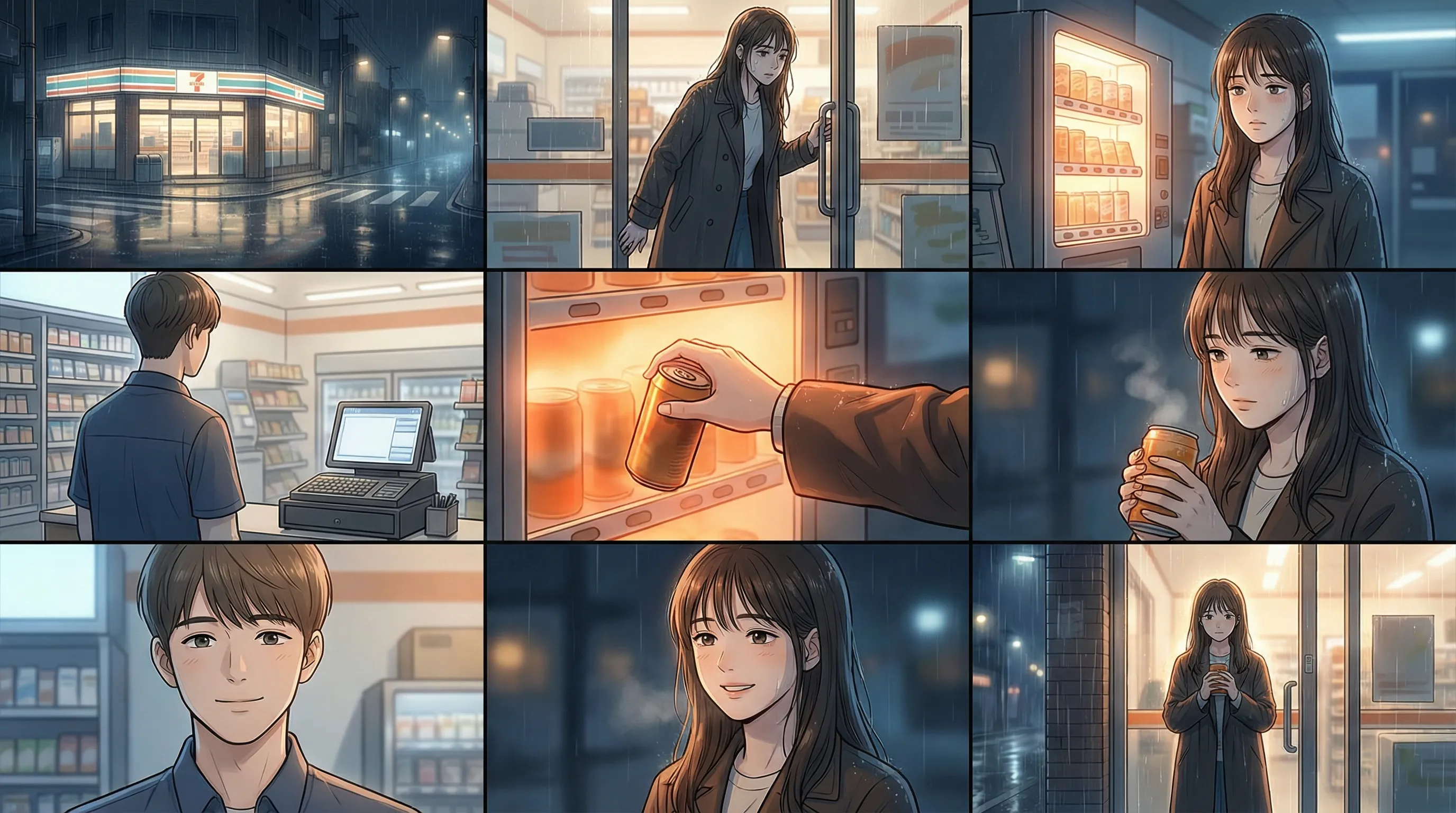
Input prompt: Reference image, Korean webtoon style, soft night lighting, detailed character expressions, consistent scenes. Do not include text in the image. Atmosphere: Healing, quiet, slightly lonely, gentle. Characters: Female lead: a young woman after work, wearing a long coat, tired but gentle. Young clerk: a convenience store night shift clerk with neat short hair. Scene: A late-night convenience store with warm white lights, neat shelves, and fine rain and streetlights visible outside the glass door. Storyboard: 1. Wide shot: A late-night convenience store on a street corner glows with warm white light on a rainy night. 2. Medium shot: The female lead pushes the door open and enters, her shoulders damp from the night rain. 3. Close-up: She stands tiredly in front of the hot drink cabinet, lost in thought. 4. Medium shot: The young clerk looks up from the cash register and sees her. 5. Close-up: The orange light from the hot drink cabinet reflects on her hand. 6. Close-up: The female lead picks up a can of hot drink, her expression relaxing slightly. 7. Close-up: The clerk gives her a gentle, restrained smile and says, "You worked hard today, too." 8. Medium shot: The female lead returns a faint smile, her fatigue fading. 9. Final shot: She stands at the store entrance holding the hot drink, looking out at the rainy night. The convenience store light casts a gentle silhouette of her back. | |
| Input multi-panel image | Output video |
 | |
Python SDK
Make sure that your DashScope Python SDK is version
1.25.16or later. See Install the SDK.
# -*- coding: utf-8 -*-
from http import HTTPStatus
from dashscope import VideoSynthesis
import dashscope
import os

# This is the URL for the China (Beijing) region. Replace {WorkspaceId} with your Bailian workspace ID. URLs vary by region. To get the URL, see https://help.aliyun.com/en/model-studio/wan-video-to-video-api-reference
dashscope.base_http_api_url = 'https://{WorkspaceId}.cn-beijing.maas.aliyuncs.com/api/v1'

# If you have not configured the environment variable, replace the following line with your Model Studio API key: api_key="sk-xxx"
# API keys vary by region. To get an API key, see https://help.aliyun.com/en/model-studio/get-api-key
api_key = os.getenv("DASHSCOPE_API_KEY")

media = [
    {
        "type": "reference_image",
        "url": "https://help-static-aliyun-doc.aliyuncs.com/file-manage-files/zh-CN/20260403/wgjaxy/banana_storyboard_00000020.png"
    }
]

def sample_sync_call():
    print('----sync call, please wait a moment----')
    rsp = VideoSynthesis.call(
        api_key=api_key,
        model="wan2.7-r2v-2026-06-12",
        media=media,
        resolution="720P",
        ratio="16:9",
        duration=10,
        prompt_extend=False,
        watermark=True,
        prompt="Reference image, 3D cartoon adventure movie style, chibi characters with detailed textures, smooth actions, and vibrant colors. Keep the characters and forest scene consistent. Do not add text. Atmosphere: Adventurous, lighthearted, mysterious, whimsical. Characters: Boy explorer: round hat, backpack, short cloak. Sidekick: a flying small robot with a round body and blue glowing eyes. Scene: Fantasy forest with giant tree roots, mushrooms, vines, a treasure cave entrance, and sunbeams. Storyboard: 1. Wide shot: Tall trees and interlaced light beams in a mysterious and bright fantasy forest. 2. Medium shot: The boy pushes aside vines to explore. 3. Medium shot: The small robot flies beside him, scanning ahead with a blue light. 4. Close-up: An old treasure map unfolds in the boy's hands. 5. Close-up: He shows an excited expression, his eyes lighting up. 6. Action shot: The two jump over tree roots and a stream, continuing deeper into the forest. 7. Medium shot: A moss-covered treasure chest is revealed behind the vines. 8. Close-up: A golden glow shines from the edge of the treasure chest. 9. Final shot: The boy and the small robot stand before the treasure chest, looking at each other in surprise, full of adventure.",
    )
    if rsp.status_code == HTTPStatus.OK:
        print(rsp.output.video_url)
    else:
        print('Failed, status_code: %s, code: %s, message: %s' %
              (rsp.status_code, rsp.code, rsp.message))

if __name__ == '__main__':
    sample_sync_call()
Java SDK
Make sure that your DashScope Java SDK is version
2.22.14or later. See Install the SDK.
// Copyright (c) Alibaba, Inc. and its affiliates.

import com.alibaba.dashscope.aigc.videosynthesis.VideoSynthesis;
import com.alibaba.dashscope.aigc.videosynthesis.VideoSynthesisParam;
import com.alibaba.dashscope.aigc.videosynthesis.VideoSynthesisResult;
import com.alibaba.dashscope.exception.ApiException;
import com.alibaba.dashscope.exception.InputRequiredException;
import com.alibaba.dashscope.exception.NoApiKeyException;
import com.alibaba.dashscope.utils.Constants;
import com.alibaba.dashscope.utils.JsonUtils;

import java.util.ArrayList;
import java.util.List;

public class Ref2Video {

    static {
        // The following is the URL for the China (Beijing) region. Replace {WorkspaceId} with your Bailian workspace ID. URLs vary by region. For more information, see https://help.aliyun.com/en/model-studio/wan-video-to-video-api-reference
        Constants.baseHttpApiUrl = "https://{WorkspaceId}.cn-beijing.maas.aliyuncs.com/api/v1";
    }

    // If you have not configured the environment variable, replace the following line with your Model Studio API key: apiKey="sk-xxx"
    // API keys vary by region. To get an API key, see https://help.aliyun.com/en/model-studio/get-api-key
    static String apiKey = System.getenv("DASHSCOPE_API_KEY");

    public static void syncCall() {
        VideoSynthesis videoSynthesis = new VideoSynthesis();
        final String prompt = "Reference image, 3D cartoon adventure movie style, chibi characters with detailed textures, smooth actions, and vibrant colors. Keep the characters and forest scene consistent. Do not add text. Atmosphere: Adventurous, lighthearted, mysterious, whimsical. Characters: Boy explorer: round hat, backpack, short cloak. Sidekick: a flying small robot with a round body and blue glowing eyes. Scene: Fantasy forest with giant tree roots, mushrooms, vines, a treasure cave entrance, and sunbeams. Storyboard: 1. Wide shot: Tall trees and interlaced light beams in a mysterious and bright fantasy forest. 2. Medium shot: The boy pushes aside vines to explore. 3. Medium shot: The small robot flies beside him, scanning ahead with a blue light. 4. Close-up: An old treasure map unfolds in the boy's hands. 5. Close-up: He shows an excited expression, his eyes lighting up. 6. Action shot: The two jump over tree roots and a stream, continuing deeper into the forest. 7. Medium shot: A moss-covered treasure chest is revealed behind the vines. 8. Close-up: A golden glow shines from the edge of the treasure chest. 9. Final shot: The boy and the small robot stand before the treasure chest, looking at each other in surprise, full of adventure.";
        List<VideoSynthesisParam.Media> media = new ArrayList<VideoSynthesisParam.Media>(){{
            add(VideoSynthesisParam.Media.builder()
                    .url("https://help-static-aliyun-doc.aliyuncs.com/file-manage-files/zh-CN/20260403/wgjaxy/banana_storyboard_00000020.png")
                    .type("reference_image")
                    .build());
        }};
        VideoSynthesisParam param =
                VideoSynthesisParam.builder()
                        .apiKey(apiKey)
                        .model("wan2.7-r2v-2026-06-12")
                        .prompt(prompt)
                        .media(media)
                        .watermark(true)
                        .duration(10)
                        .resolution("720P")
                        .ratio("16:9")
                        .promptExtend(false)
                        .build();
        VideoSynthesisResult result = null;
        try {
            System.out.println("---sync call, please wait a moment----");
            result = videoSynthesis.call(param);
        } catch (ApiException | NoApiKeyException e){
            throw new RuntimeException(e.getMessage());
        } catch (InputRequiredException e) {
            throw new RuntimeException(e);
        }
        System.out.println(JsonUtils.toJson(result));
    }

    public static void main(String[] args) {
        syncCall();
    }
}
curl
Step 1: Create a task and get the task IDcurl --location 'https://{WorkspaceId}.cn-beijing.maas.aliyuncs.com/api/v1/services/aigc/video-generation/video-synthesis' \
-H 'X-DashScope-Async: enable' \
-H "Authorization: Bearer $DASHSCOPE_API_KEY" \
-H 'Content-Type: application/json' \
-d '{
"model": "wan2.7-r2v-2026-06-12",
"input": {
"prompt": "Reference image, 3D cartoon adventure movie style, chibi characters with detailed textures, smooth actions, and vibrant colors. Keep the characters and forest scene consistent. Do not add text. Atmosphere: Adventurous, lighthearted, mysterious, whimsical. Characters: Boy explorer: round hat, backpack, short cloak. Sidekick: a flying small robot with a round body and blue glowing eyes. Scene: Fantasy forest with giant tree roots, mushrooms, vines, a treasure cave entrance, and sunbeams. Storyboard: 1. Wide shot: Tall trees and interlaced light beams in a mysterious and bright fantasy forest. 2. Medium shot: The boy pushes aside vines to explore. 3. Medium shot: The small robot flies beside him, scanning ahead with a blue light. 4. Close-up: An old treasure map unfolds in the boy's hands. 5. Close-up: He shows an excited expression, his eyes lighting up. 6. Action shot: The two jump over tree roots and a stream, continuing deeper into the forest. 7. Medium shot: A moss-covered treasure chest is revealed behind the vines. 8. Close-up: A golden glow shines from the edge of the treasure chest. 9. Final shot: The boy and the small robot stand before the treasure chest, looking at each other in surprise, full of adventure.",
"media": [
{
"type": "reference_image",
"url": "https://help-static-aliyun-doc.aliyuncs.com/file-manage-files/zh-CN/20260403/wgjaxy/banana_storyboard_00000020.png"
}
]
},
"parameters": {
"resolution": "720P",
"ratio": "16:9",
"duration": 10,
"prompt_extend": false,
"watermark": true
}
}'
Replace {task_id} with the task_id value returned by the previous API call. The task_id is valid for queries for 24 hours, Replace {WorkspaceId} with your actual workspace ID.
curl -X GET https://{WorkspaceId}.cn-beijing.maas.aliyuncs.com/api/v1/tasks/{task_id} \
--header "Authorization: Bearer $DASHSCOPE_API_KEY"
Multi-entity reference and voice customization
Supported models: wan2.7 series.
Description: You can input multiple reference images and videos as entity materials. You can also specify a unique voice for each entity to enable multi-character interaction and voice differentiation.
Parameters:
-
media: An array of reference materials.-
media.type: Supportsreference_imageandreference_video. The total number of reference images and videos cannot exceed 5. -
media.url: The URL of the material. Images also support base64-encoded strings. -
media.reference_voice(optional): The audio URL to specify the voice for the entity. Use this withreference_imageorreference_video.Audio logic: If a
reference_videocontains audio andreference_voiceis not specified, the original video audio is used by default. If both are provided,reference_voiceoverwrites the original video audio.
-
-
prompt: Refer to the reference materials in the prompt according to the following rules:- Use identifiers such as Image 1, Image 2 for
reference_imageassets and Video 1, Video 2 forreference_videoassets. - The reference order of the materials is defined by the
mediaarray. Images and videos are counted separately.
- Use identifiers such as Image 1, Image 2 for
Input prompt: Video 1 holds Image 3 and plays a soothing country ballad on the chair from Image 4, saying, "The sunshine is so nice today." Image 1, holding Image 2, walks past Video 1, places Image 2 on the table next to Video 1, and says, "That sounds beautiful. Can you sing it again?". | |||||
Input image (Image 1)
| Input video (Video 1)
| Input image (Image 2)
| Input image (Image 3)
| Input image (Image 4)
| Output video (multi-shot, with audio) |
Input reference voice: | Input reference voice: | | | | |
Input prompt: Image 2 walks in from the deep left side of the frame. The shot then cuts to a close-up of Image 2. Image 1 is leaning against the rusty wall from Image 3 on the right, lost in thought. She notices the footsteps and slowly turns her head. After seeing Image 2, Image 1 says, "Why did you still come?" Image 2 replies, "Let's talk." | |||
Input image (Image 1)
| Input image (Image 2)
| Input image (Image 3)
| Output video (multi-shot, with audio) |
 Input reference voice: |  Input reference voice: Input reference voice: | 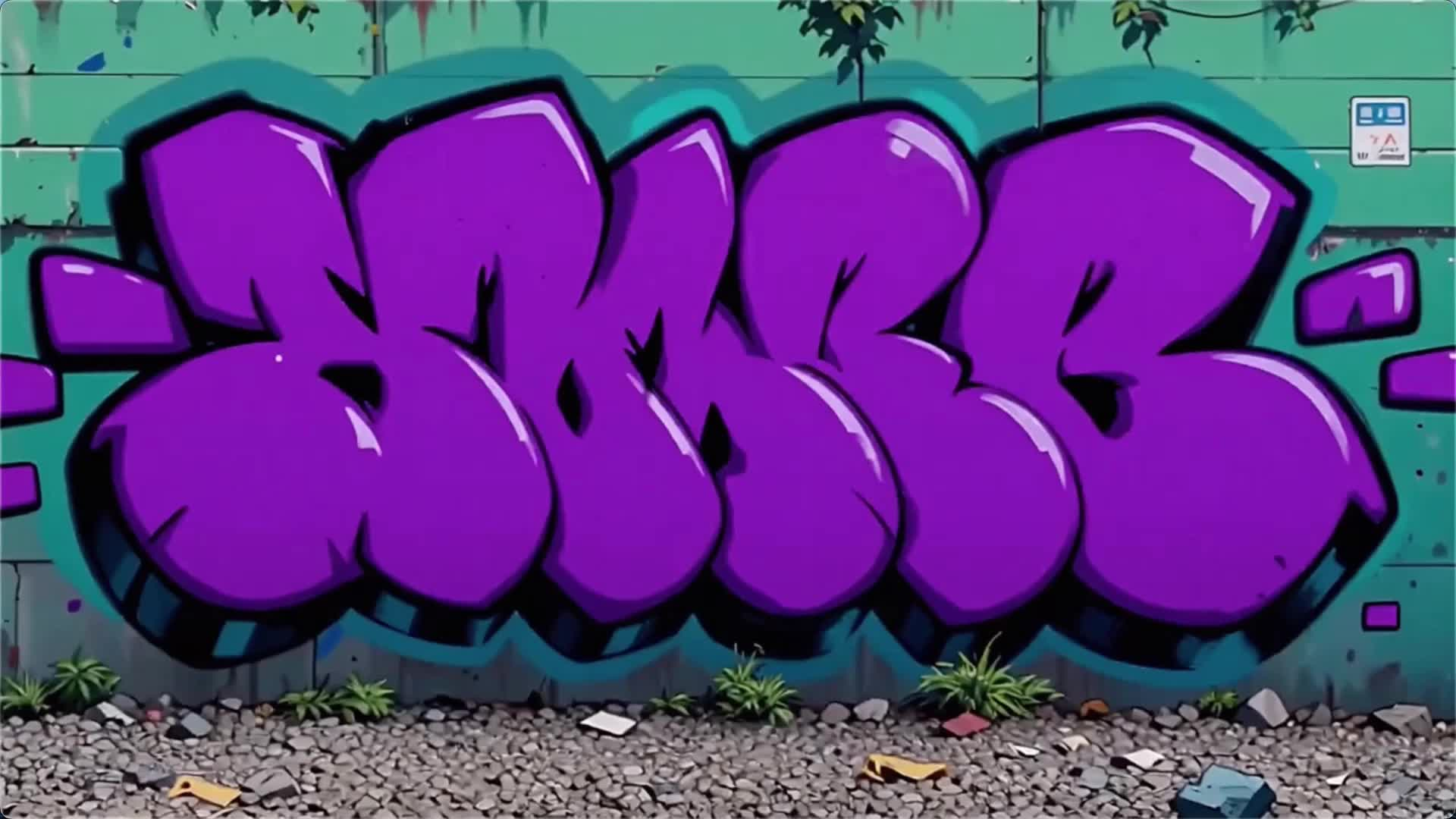 | |
Python SDK
Make sure that your DashScope Python SDK is version
1.25.16or later. See Install the SDK.
# -*- coding: utf-8 -*-
from http import HTTPStatus
from dashscope import VideoSynthesis
import dashscope
import os

# This is the URL for the China (Beijing) region. Replace {WorkspaceId} with your Bailian workspace ID. URLs vary by region. To get the URL, see https://help.aliyun.com/en/model-studio/wan-video-to-video-api-reference
dashscope.base_http_api_url = 'https://{WorkspaceId}.cn-beijing.maas.aliyuncs.com/api/v1'

# If you have not configured the environment variable, replace the following line with your Model Studio API key: api_key="sk-xxx"
# API keys vary by region. To get an API key, see https://help.aliyun.com/en/model-studio/get-api-key
api_key = os.getenv("DASHSCOPE_API_KEY")

media = [
    {
        "type": "reference_image",
        "url": "https://help-static-aliyun-doc.aliyuncs.com/file-manage-files/zh-CN/20260408/sjuytr/wan-r2v-object-girl.jpg",
        "reference_voice": "https://help-static-aliyun-doc.aliyuncs.com/file-manage-files/zh-CN/20260408/gbqewz/wan-r2v-girl-voice.mp3"
    },
    {
        "type": "reference_video",
        "url": "https://help-static-aliyun-doc.aliyuncs.com/file-manage-files/zh-CN/20260129/qigswt/wan-r2v-role2.mp4",
        "reference_voice": "https://help-static-aliyun-doc.aliyuncs.com/file-manage-files/zh-CN/20260408/isllrq/wan-r2v-boy-voice.mp3"
    },
    {
        "type": "reference_image",
        "url": "https://help-static-aliyun-doc.aliyuncs.com/file-manage-files/zh-CN/20260129/rtjeqf/wan-r2v-object3.png"
    },
    {
        "type": "reference_image",
        "url": "https://help-static-aliyun-doc.aliyuncs.com/file-manage-files/zh-CN/20260129/qpzxps/wan-r2v-object4.png"
    },
    {
        "type": "reference_image",
        "url": "https://help-static-aliyun-doc.aliyuncs.com/file-manage-files/zh-CN/20260129/wfjikw/wan-r2v-backgroud5.png"
    }
]

def sample_sync_call():
    print('----sync call, please wait a moment----')
    rsp = VideoSynthesis.call(
        api_key=api_key,
        model="wan2.7-r2v-2026-06-12",
        media=media,
        resolution="720P",
        ratio="16:9",
        duration=10,
        prompt_extend=False,
        watermark=True,
        prompt="Video 1 holds Image 3 and plays a soothing country ballad on the chair from Image 4, saying, 'The sunshine is so nice today.' Image 1, holding Image 2, walks past Video 1, places Image 2 on the table next to Video 1, and says, 'That sounds beautiful. Can you sing it again?'.",
    )
    if rsp.status_code == HTTPStatus.OK:
        print(rsp.output.video_url)
    else:
        print('Failed, status_code: %s, code: %s, message: %s' %
              (rsp.status_code, rsp.code, rsp.message))

if __name__ == '__main__':
    sample_sync_call()
Java SDK
Make sure that your DashScope Java SDK is version
2.22.14or later. See Install the SDK.
// Copyright (c) Alibaba, Inc. and its affiliates.

import com.alibaba.dashscope.aigc.videosynthesis.VideoSynthesis;
import com.alibaba.dashscope.aigc.videosynthesis.VideoSynthesisParam;
import com.alibaba.dashscope.aigc.videosynthesis.VideoSynthesisResult;
import com.alibaba.dashscope.exception.ApiException;
import com.alibaba.dashscope.exception.InputRequiredException;
import com.alibaba.dashscope.exception.NoApiKeyException;
import com.alibaba.dashscope.utils.Constants;
import com.alibaba.dashscope.utils.JsonUtils;

import java.util.ArrayList;
import java.util.List;

public class Ref2Video {

    static {
        // The following is the URL for the China (Beijing) region. Replace {WorkspaceId} with your Bailian workspace ID. URLs vary by region. For more information, see https://help.aliyun.com/en/model-studio/wan-video-to-video-api-reference
        Constants.baseHttpApiUrl = "https://{WorkspaceId}.cn-beijing.maas.aliyuncs.com/api/v1";
    }

    // If you have not configured the environment variable, replace the following line with your Model Studio API key: apiKey="sk-xxx"
    // API keys vary by region. To get an API key, see https://help.aliyun.com/en/model-studio/get-api-key
    static String apiKey = System.getenv("DASHSCOPE_API_KEY");

    public static void syncCall() {
        VideoSynthesis videoSynthesis = new VideoSynthesis();
        final String prompt = "Video 1 holds Image 3 and plays a soothing country ballad on the chair from Image 4, saying, 'The sunshine is so nice today.' Image 1, holding Image 2, walks past Video 1, places Image 2 on the table next to Video 1, and says, 'That sounds beautiful. Can you sing it again?'.";
        List<VideoSynthesisParam.Media> media = new ArrayList<VideoSynthesisParam.Media>(){{
            add(VideoSynthesisParam.Media.builder()
                    .url("https://help-static-aliyun-doc.aliyuncs.com/file-manage-files/zh-CN/20260408/sjuytr/wan-r2v-object-girl.jpg")
                    .type("reference_image")
                    .referenceVoice("https://help-static-aliyun-doc.aliyuncs.com/file-manage-files/zh-CN/20260408/gbqewz/wan-r2v-girl-voice.mp3")
                    .build());
            add(VideoSynthesisParam.Media.builder()
                    .url("https://help-static-aliyun-doc.aliyuncs.com/file-manage-files/zh-CN/20260129/qigswt/wan-r2v-role2.mp4")
                    .type("reference_video")
                    .referenceVoice("https://help-static-aliyun-doc.aliyuncs.com/file-manage-files/zh-CN/20260408/isllrq/wan-r2v-boy-voice.mp3")
                    .build());
            add(VideoSynthesisParam.Media.builder()
                    .url("https://help-static-aliyun-doc.aliyuncs.com/file-manage-files/zh-CN/20260129/rtjeqf/wan-r2v-object3.png")
                    .type("reference_image")
                    .build());
            add(VideoSynthesisParam.Media.builder()
                    .url("https://help-static-aliyun-doc.aliyuncs.com/file-manage-files/zh-CN/20260129/qpzxps/wan-r2v-object4.png")
                    .type("reference_image")
                    .build());
            add(VideoSynthesisParam.Media.builder()
                    .url("https://help-static-aliyun-doc.aliyuncs.com/file-manage-files/zh-CN/20260129/wfjikw/wan-r2v-backgroud5.png")
                    .type("reference_image")
                    .build());
        }};
        VideoSynthesisParam param =
                VideoSynthesisParam.builder()
                        .apiKey(apiKey)
                        .model("wan2.7-r2v-2026-06-12")
                        .prompt(prompt)
                        .media(media)
                        .watermark(true)
                        .duration(10)
                        .resolution("720P")
                        .ratio("16:9")
                        .promptExtend(false)
                        .build();
        VideoSynthesisResult result = null;
        try {
            System.out.println("---sync call, please wait a moment----");
            result = videoSynthesis.call(param);
        } catch (ApiException | NoApiKeyException e){
            throw new RuntimeException(e.getMessage());
        } catch (InputRequiredException e) {
            throw new RuntimeException(e);
        }
        System.out.println(JsonUtils.toJson(result));
    }

    public static void main(String[] args) {
        syncCall();
    }
}
curl
Step 1: Create a task and get the task IDcurl --location 'https://{WorkspaceId}.cn-beijing.maas.aliyuncs.com/api/v1/services/aigc/video-generation/video-synthesis' \
-H 'X-DashScope-Async: enable' \
-H "Authorization: Bearer $DASHSCOPE_API_KEY" \
-H 'Content-Type: application/json' \
-d '{
"model": "wan2.7-r2v-2026-06-12",
"input": {
"prompt": "Video 1 holds Image 3 and plays a soothing country ballad on the chair from Image 4, saying, 'The sunshine is so nice today.' Image 1, holding Image 2, walks past Video 1, places Image 2 on the table next to Video 1, and says, 'That sounds beautiful. Can you sing it again?'. ",
"media": [
{
"type": "reference_image",
"url": "https://help-static-aliyun-doc.aliyuncs.com/file-manage-files/zh-CN/20260408/sjuytr/wan-r2v-object-girl.jpg",
"reference_voice": "https://help-static-aliyun-doc.aliyuncs.com/file-manage-files/zh-CN/20260408/gbqewz/wan-r2v-girl-voice.mp3"
},
{
"type": "reference_video",
"url": "https://help-static-aliyun-doc.aliyuncs.com/file-manage-files/zh-CN/20260129/qigswt/wan-r2v-role2.mp4",
"reference_voice": "https://help-static-aliyun-doc.aliyuncs.com/file-manage-files/zh-CN/20260408/isllrq/wan-r2v-boy-voice.mp3"
},
{
"type": "reference_image",
"url": "https://help-static-aliyun-doc.aliyuncs.com/file-manage-files/zh-CN/20260129/rtjeqf/wan-r2v-object3.png"
},
{
"type": "reference_image",
"url": "https://help-static-aliyun-doc.aliyuncs.com/file-manage-files/zh-CN/20260129/qpzxps/wan-r2v-object4.png"
},
{
"type": "reference_image",
"url": "https://help-static-aliyun-doc.aliyuncs.com/file-manage-files/zh-CN/20260129/wfjikw/wan-r2v-backgroud5.png"
}
]
},
"parameters": {
"resolution": "720P",
"ratio": "16:9",
"duration": 10,
"prompt_extend": false,
"watermark": true
}
}'
Replace {task_id} with the task_id value returned by the previous API call. The task_id is valid for queries for 24 hours, Replace {WorkspaceId} with your actual workspace ID.
curl -X GET https://{WorkspaceId}.cn-beijing.maas.aliyuncs.com/api/v1/tasks/{task_id} \
--header "Authorization: Bearer $DASHSCOPE_API_KEY"
Multi-entity reference and first-frame control
Supported models: wan2.7 series.
Description: This feature adds first-frame control to the entity reference feature, which gives you more control over the composition and content flow of the video.
Parameters:
-
media: An array of reference materials.-
media.type: Supportsfirst_frame,reference_image, andreference_video.You can provide a maximum of one first-frame image. You must provide at least one reference image or video. The total number of reference images and videos cannot exceed 5.
-
media.url: The URL of the material. Images also support base64-encoded strings.
-
-
prompt: Refer to the reference materials in the prompt according to the following rules:- Use "Image 1, Image 2" to refer to
reference_imageassets and "Video 1, Video 2" to refer toreference_videoassets. - The reference order of the materials is defined by the
mediaarray. Images and videos are counted separately. - You do not need to reference the first frame in the prompt.
- Use "Image 1, Image 2" to refer to
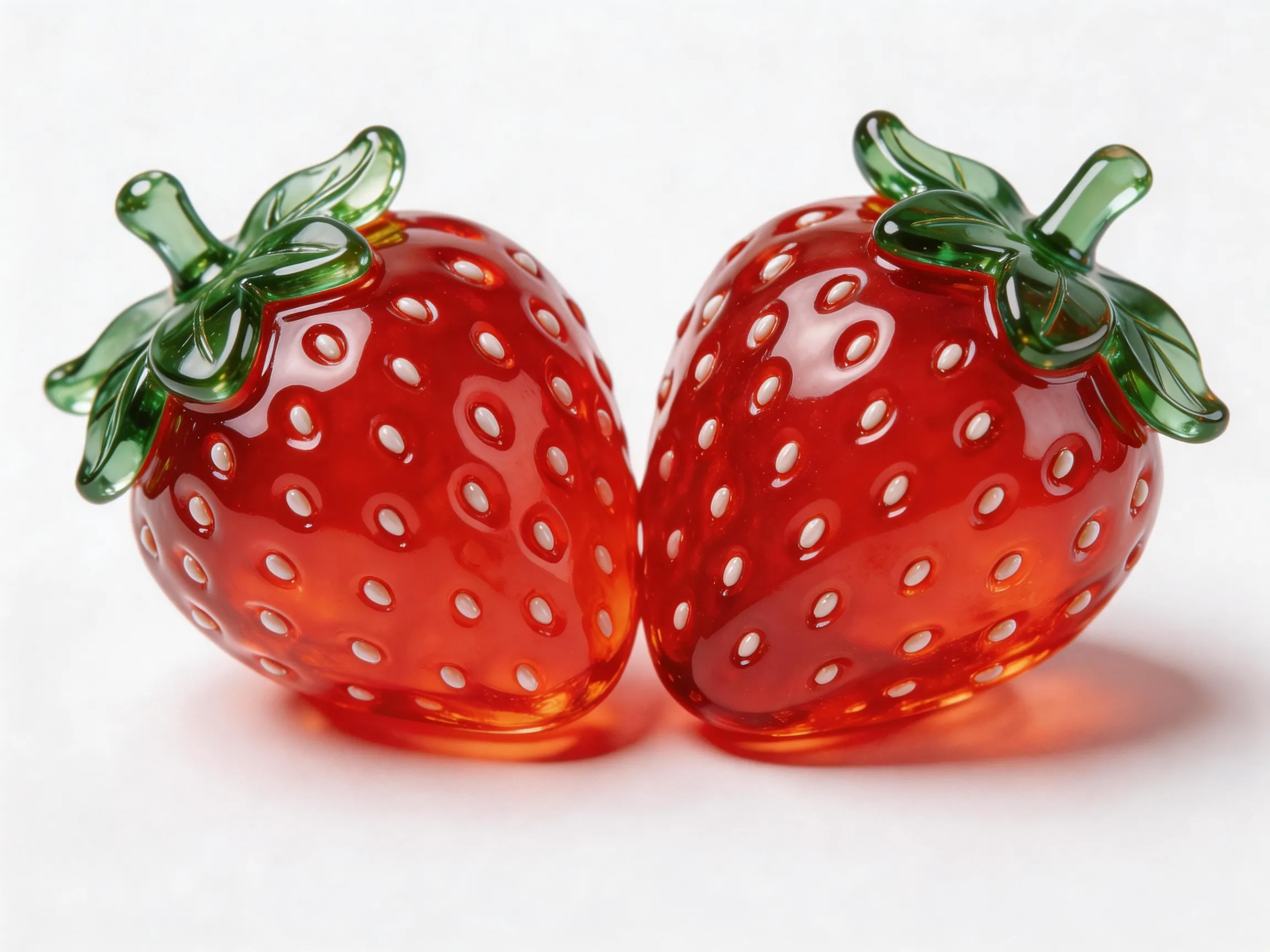
Input prompt: An overhead shot of a blue planet. The camera gradually zooms in to a close-up of Image 1 on the planet. He is holding Image 2 and eating it, while saying, "Why is no one coming to play with me?" | |||
Input first frame
| Input image (Image 1)
| Input image (Image 2)
| Output video
|
 |  |  | |
Python SDK
Make sure that your DashScope Python SDK is version
1.25.16or later. See Install the SDK.
# -*- coding: utf-8 -*-
from http import HTTPStatus
from dashscope import VideoSynthesis
import dashscope
import os

# This is the URL for the China (Beijing) region. Replace {WorkspaceId} with your Bailian workspace ID. URLs vary by region. To get the URL, see https://help.aliyun.com/en/model-studio/wan-video-to-video-api-reference
dashscope.base_http_api_url = 'https://{WorkspaceId}.cn-beijing.maas.aliyuncs.com/api/v1'

# If you have not configured the environment variable, replace the following line with your Model Studio API key: api_key="sk-xxx"
# API keys vary by region. To get an API key, see https://help.aliyun.com/en/model-studio/get-api-key
api_key = os.getenv("DASHSCOPE_API_KEY")

media = [
    {
        "type": "first_frame",
        "url": "https://help-static-aliyun-doc.aliyuncs.com/file-manage-files/zh-CN/20260414/ixwovg/wan2.7-r2v-first-frame.webp"
    },
    {
        "type": "reference_image",
        "url": "https://help-static-aliyun-doc.aliyuncs.com/file-manage-files/zh-CN/20260414/fkltfw/wan2.7-r2v-image-qq.webp"
    },
    {
        "type": "reference_image",
        "url": "https://help-static-aliyun-doc.aliyuncs.com/file-manage-files/zh-CN/20260414/kxkbsv/wan2.7-r2v-image-ob.webp"
    }
]

def sample_sync_call():
    print('----sync call, please wait a moment----')
    rsp = VideoSynthesis.call(
        api_key=api_key,
        model="wan2.7-r2v-2026-06-12",
        media=media,
        resolution="720P",
        duration=10,
        prompt_extend=False,
        watermark=True,
        prompt="An overhead shot of a blue planet. The camera gradually zooms in to a close-up of Image 1 on the planet. He is holding Image 2 and eating it, while saying, 'Why is no one coming to play with me?'",
    )
    if rsp.status_code == HTTPStatus.OK:
        print(rsp.output.video_url)
    else:
        print('Failed, status_code: %s, code: %s, message: %s' %
              (rsp.status_code, rsp.code, rsp.message))

if __name__ == '__main__':
    sample_sync_call()
Java SDK
Make sure that your DashScope Java SDK is version
2.22.14or later. See Install the SDK.
// Copyright (c) Alibaba, Inc. and its affiliates.

import com.alibaba.dashscope.aigc.videosynthesis.VideoSynthesis;
import com.alibaba.dashscope.aigc.videosynthesis.VideoSynthesisParam;
import com.alibaba.dashscope.aigc.videosynthesis.VideoSynthesisResult;
import com.alibaba.dashscope.exception.ApiException;
import com.alibaba.dashscope.exception.InputRequiredException;
import com.alibaba.dashscope.exception.NoApiKeyException;
import com.alibaba.dashscope.utils.Constants;
import com.alibaba.dashscope.utils.JsonUtils;

import java.util.ArrayList;
import java.util.List;

public class Ref2Video {

    static {
        // The following is the URL for the China (Beijing) region. Replace {WorkspaceId} with your Bailian workspace ID. URLs vary by region. For more information, see https://help.aliyun.com/en/model-studio/wan-video-to-video-api-reference
        Constants.baseHttpApiUrl = "https://{WorkspaceId}.cn-beijing.maas.aliyuncs.com/api/v1";
    }

    // If you have not configured the environment variable, replace the following line with your Model Studio API key: apiKey="sk-xxx"
    // API keys vary by region. To get an API key, see https://help.aliyun.com/en/model-studio/get-api-key
    static String apiKey = System.getenv("DASHSCOPE_API_KEY");

    public static void syncCall() {
        VideoSynthesis videoSynthesis = new VideoSynthesis();
        final String prompt = "An overhead shot of a blue planet. The camera gradually zooms in to a close-up of Image 1 on the planet. He is holding Image 2 and eating it, while saying, 'Why is no one coming to play with me?'";
        List<VideoSynthesisParam.Media> media = new ArrayList<VideoSynthesisParam.Media>(){{
            add(VideoSynthesisParam.Media.builder()
                    .url("https://help-static-aliyun-doc.aliyuncs.com/file-manage-files/zh-CN/20260414/ixwovg/wan2.7-r2v-first-frame.webp")
                    .type("first_frame")
                    .build());
            add(VideoSynthesisParam.Media.builder()
                    .url("https://help-static-aliyun-doc.aliyuncs.com/file-manage-files/zh-CN/20260414/fkltfw/wan2.7-r2v-image-qq.webp")
                    .type("reference_image")
                    .build());
            add(VideoSynthesisParam.Media.builder()
                    .url("https://help-static-aliyun-doc.aliyuncs.com/file-manage-files/zh-CN/20260414/kxkbsv/wan2.7-r2v-image-ob.webp")
                    .type("reference_image")
                    .build());
        }};
        VideoSynthesisParam param =
                VideoSynthesisParam.builder()
                        .apiKey(apiKey)
                        .model("wan2.7-r2v-2026-06-12")
                        .prompt(prompt)
                        .media(media)
                        .watermark(true)
                        .duration(10)
                        .resolution("720P")
                        .promptExtend(false)
                        .build();
        VideoSynthesisResult result = null;
        try {
            System.out.println("---sync call, please wait a moment----");
            result = videoSynthesis.call(param);
        } catch (ApiException | NoApiKeyException e){
            throw new RuntimeException(e.getMessage());
        } catch (InputRequiredException e) {
            throw new RuntimeException(e);
        }
        System.out.println(JsonUtils.toJson(result));
    }

    public static void main(String[] args) {
        syncCall();
    }
}
curl
Step 1: Create a task and get the task IDcurl --location 'https://{WorkspaceId}.cn-beijing.maas.aliyuncs.com/api/v1/services/aigc/video-generation/video-synthesis' \
-H 'X-DashScope-Async: enable' \
-H "Authorization: Bearer $DASHSCOPE_API_KEY" \
-H 'Content-Type: application/json' \
-d '{
"model": "wan2.7-r2v-2026-06-12",
"input": {
"prompt": "An overhead shot of a blue planet. The camera gradually zooms in to a close-up of Image 1 on the planet. He is holding Image 2 and eating it, while saying, 'Why is no one coming to play with me?' ",
"media": [
{
"type": "first_frame",
"url": "https://help-static-aliyun-doc.aliyuncs.com/file-manage-files/zh-CN/20260414/ixwovg/wan2.7-r2v-first-frame.webp"
},
{
"type": "reference_image",
"url": "https://help-static-aliyun-doc.aliyuncs.com/file-manage-files/zh-CN/20260414/fkltfw/wan2.7-r2v-image-qq.webp"
},
{
"type": "reference_image",
"url": "https://help-static-aliyun-doc.aliyuncs.com/file-manage-files/zh-CN/20260414/kxkbsv/wan2.7-r2v-image-ob.webp"
}
]
},
"parameters": {
"resolution": "720P",
"duration": 10,
"prompt_extend": false,
"watermark": true
}
}'
Replace {task_id} with the task_id value returned by the previous API call. The task_id is valid for queries for 24 hours, Replace {WorkspaceId} with your actual workspace ID.
curl -X GET https://{WorkspaceId}.cn-beijing.maas.aliyuncs.com/api/v1/tasks/{task_id} \
--header "Authorization: Bearer $DASHSCOPE_API_KEY"
Provide references
wan2.7 series
Pass reference images, videos, and audio to the media array.
Input images
-
Number of first frames: A maximum of one first frame (
media.type=first_frame) is allowed. -
Number of reference images: A maximum of five reference images (
media.type=reference_image) are allowed. The total number of reference images and reference videos cannot exceed 5. -
Input methods:
-
Public URL: Supports HTTP or HTTPS protocols. Example: https://xxxx/xxx.png.
-
Temporary URL: Supports the OSS protocol. You must upload a file to get a temporary URL. Example: oss://dashscope-instant/xxx/xxx.png.
-
Base64-encoded string: Use the
data:{MIME_type};base64,{base64_data}format, where:-
{base64_data}: The Base64-encoded string of the image file.
-
{MIME_type}: The Multipurpose Internet Mail Extensions (MIME) type of the image. The type must match the file format.
Image format
MIME type
JPEG
image/jpeg
JPG
image/jpeg
PNG
image/png
BMP
image/bmp
WEBP
image/webp
-
-

Input videos
-
Number of reference videos: A maximum of five reference videos (
media.type=reference_video) are allowed. The total number of reference images and reference videos cannot exceed 5. -
Input methods:
- Public URL: Supports HTTP or HTTPS protocols. Example: https://xxxx/xxx.mp4.
- Temporary URL: Supports the OSS protocol. You must upload a file to get a temporary URL. Example: oss://dashscope-instant/xxx/xxx.mp4.
Input audio
-
Limits: The reference voice (
media.reference_voice) can be used only withreference_imageorreference_videoto specify the voice for the corresponding entity role. -
Input methods:
- Public URL: Supports HTTP or HTTPS protocols. Example: https://xxxx/xxx.mp3.
- Temporary URL: Supports the OSS protocol. You must upload a file to get a temporary URL. Example: oss://dashscope-instant/xxx/xxx.mp3.
Output video
-
Number of videos: 1.
-
Video specifications: The format is MP4. For detailed specifications, see Supported models.
-
Video URL validity period: 24 hours.
-
Video dimensions:
-
wan2.7 series: The
resolutionparameter controls the resolution level (720p or 1080p), and theratioparameter controls the aspect ratio (16:9, 9:16, 1:1, 4:3, or 3:4).- If a first frame image is provided, the
ratioparameter is ignored. The aspect ratio of the output video approximates that of the first frame image. - If a first frame image is not provided, the aspect ratio is specified by the
ratioparameter. The default is 16:9.
- If a first frame image is provided, the
-
Billing and rate limiting
-
For free quota and unit price, see Wan reference-to-video.
-
For model rate limiting, see Wan.
-
Billing details:
- Input images are free of charge. Input and output videos are billed based on their duration in seconds.
- Failed model calls or processing faults do not incur charges or consume the new user free quota.
-
Billing formula:
Total billable duration (seconds) = Billable duration of input video (seconds) + Duration of output video (seconds).Wan 2.7 Series Models
Billable duration of input video: The maximum is 5 seconds.
Truncation limit per video = 5 seconds ÷ Number of input reference videos (reference images and the first frame image are excluded). Each video is billed based onmin(actual duration, truncation limit). The billable durations for multiple videos are added together.- 1 reference video: Truncation limit per video is 5 seconds.
- 2 reference videos: Truncation limit per video is 2.5 seconds.
- 3 reference videos: Truncation limit per video is 1.65 seconds.
- 4 reference videos: Truncation limit per video is 1.25 seconds.
- 5 reference videos: Truncation limit per video is 1 second.
- Example: If the input is 2 reference videos + 1 image, the image is excluded from the count. The truncation limit is calculated based on 2 reference videos, resulting in 2.5 seconds per video.
Billable input duration = min(video 1 duration, 2.5 seconds) + min(video 2 duration, 2.5 seconds).
Billable duration of output video: The duration in seconds of the video successfully generated by the model.
Wan 2.6 Series Models
Billable duration of input video: The maximum is 5 seconds.
Truncation limit per video = 5 seconds ÷ Total number of reference materials (reference images + reference videos, excluding the first frame image). Each video is billed based onmin(actual duration, truncation limit). The billable durations for multiple videos are added together.- 1 reference material: Truncation limit per video is 5 seconds.
- 2 reference materials: Truncation limit per video is 2.5 seconds.
- 3 reference materials: Truncation limit per video is 1.65 seconds.
- 4 reference materials: Truncation limit per video is 1.25 seconds.
- 5 reference materials: Truncation limit per video is 1 second.
More examples: Calculating the billable duration of input video
-
Input: 1 reference material (truncation limit per video: 5 seconds)
- If the input is a video:
Billable input duration = min(video duration, 5 seconds). - If the input is an image: Free of charge.
- If the input is a video:
-
Input: 2 reference materials (truncation limit per video: 2.5 seconds)
- If the input is 1 video + 1 image:
Billable input duration = min(video 1 duration, 2.5 seconds). - If the input is 2 videos:
Billable input duration = min(video 1 duration, 2.5 seconds) + min(video 2 duration, 2.5 seconds).
- If the input is 1 video + 1 image:
-
Input: 3 reference materials (truncation limit per video: 1.65 seconds)
- If the input is 1 video + 2 images:
Billable input duration = min(video 1 duration, 1.65 seconds). - If the input is 3 videos:
Billable input duration = min(video 1 duration, 1.65 seconds) + min(video 2 duration, 1.65 seconds) + min(video 3 duration, 1.65 seconds).
- If the input is 1 video + 2 images:
-
Input: 4 reference materials (truncation limit per video: 1.25 seconds)
- If the input is 2 videos + 2 images:
Billable input duration = min(video 1 duration, 1.25 seconds) + min(video 2 duration, 1.25 seconds). - If the input is 3 videos + 1 image:
Billable input duration = min(video 1 duration, 1.25 seconds) + min(video 2 duration, 1.25 seconds) + min(video 3 duration, 1.25 seconds).
- If the input is 2 videos + 2 images:
-
Input: 5 reference materials (truncation limit per video: 1 second)
- If the input is 1 video + 4 images:
Billable input duration = min(video 1 duration, 1 second). - If the input is 3 videos + 2 images:
Billable input duration = min(video 1 duration, 1 second) + min(video 2 duration, 1 second) + min(video 3 duration, 1 second).
- If the input is 1 video + 4 images:
Billable duration of output video: The duration in seconds of the video successfully generated by the model.
API reference
Reference-to-video API reference
FAQ
Q: How do I reference materials in a prompt?
A: The reference method depends on the model and feature used:
wan2.7 series
- Reference images are identified as Figure 1, Figure 2, and so on. Reference videos are identified similarly. For English prompts, use identifiers such as Image 1 and Video 1.
- Images and videos are counted separately. The order matches the order of the same type of material in the
mediaarray. - If you have only one reference image or video, you can simplify the identifier to "reference image" or "reference video".
- Usually, you do not need to reference the first frame image in the prompt.
{
    "input": {
        "prompt": "Video 1 is playing the guitar, and Image 1 is holding a bouquet of flowers and walks past Video 1.",
        "media": [
            {
                "type": "first_frame",
                "url":  "https://example.com/scene.jpg"
            },
            {
                "type": "reference_video",
                "url":  "https://example.com/girl.mp4"           // Video 1
            },
            {
                "type": "reference_image",
                "url": "https://example.com/boy.png"             // Image 1
            }
        ]
    }
}
Q: Can reference_voice be used with a first frame image?
A: This is not recommended. Use media.reference_voice with reference_image or reference_video to specify the timbre for the corresponding entity.