Z-Image API reference
A lightweight text-to-image model for fast generation, with Chinese and English text rendering, and flexible resolutions.
Try it online: (Beijing | Singapore) | Technical blog
Examples
Input prompt | Output image |
|---|---|
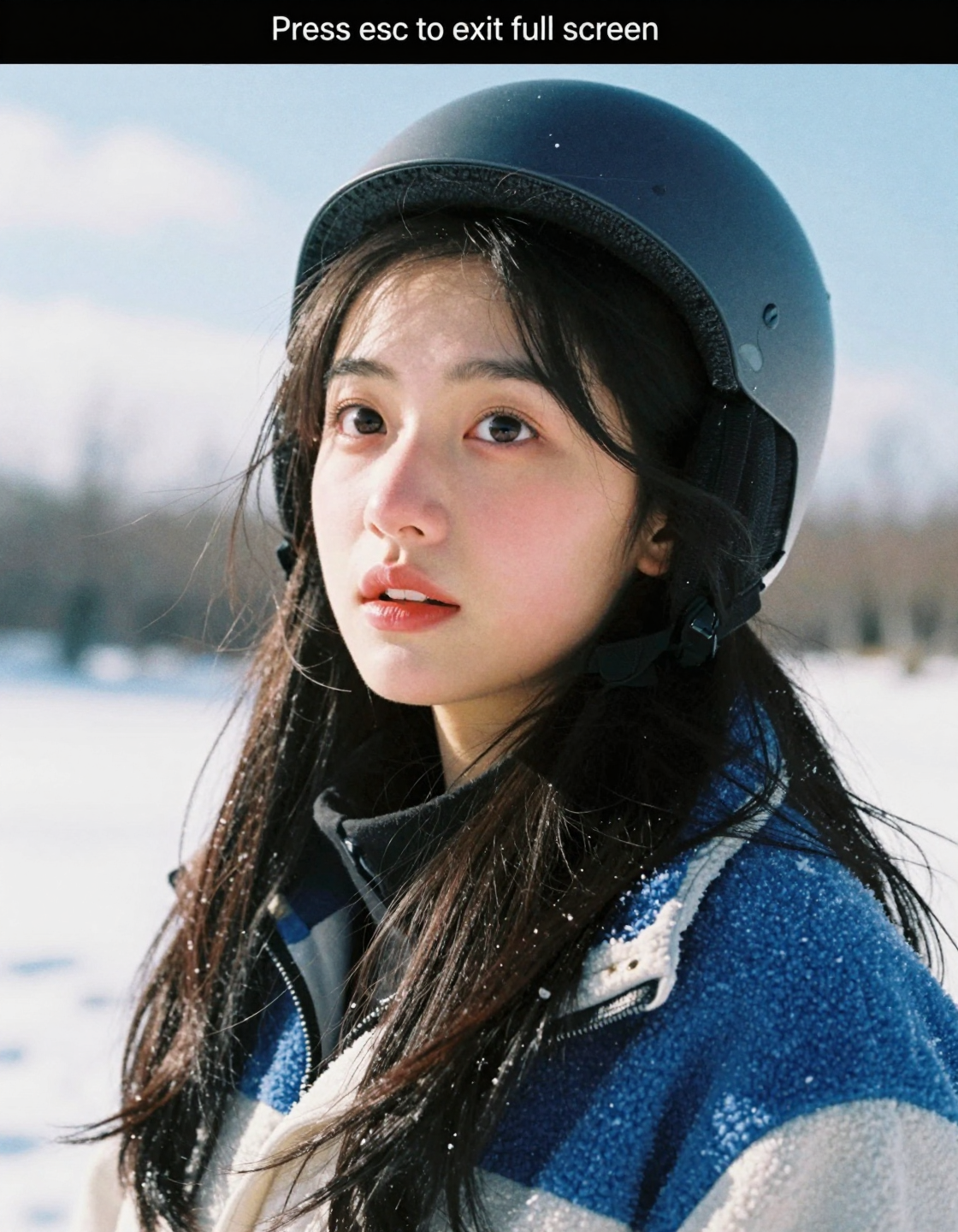
film grain, analog film texture, soft film lighting, Kodak Portra 400 style, cinematic grainy texture, photorealistic details, subtle noise, (film grain:1.2). A close-up shot of a young East Asian woman in an outdoor snow scene. She has a slender build and is standing with her body slightly tilted to the right, head raised to look upwards, in a natural and relaxed pose. Her face has typical East Asian features, with fair skin and a natural blush on her cheeks. Her features are delicate: her eyes are dark brown and round, looking up with a slightly surprised expression, with the whites of her eyes visible; her eyebrows are dark black, naturally long and curved; her nose is small and straight, and her lips are painted with red lipstick, slightly parted, with an expression of mild surprise or curiosity. She has long, straight, dark black hair, slightly tousled by the wind, with some strands falling on the sides of her face. She is wearing a dark gray helmet on her head, with a few strands of hair showing at the edge. Her clothing is a heavy blue and white spliced jacket, which appears to be a combination of fleece and fabric, looking warm and thick, suitable for a snowy environment. The background is an outdoor scene covered in white snow, with blurry describes of trees in the distance. The sky is a bright light blue with a few white clouds. The lighting is strong natural daylight, illuminating her face and hair, creating clear light and shadow. The color palette is dominated by blue, white, and black, with an overall fresh and natural style. At the top of the frame is a black notification box with the white text "Press esc to exit full screen". The close-up perspective of the lens magnifies the character's expression and details, creating a realistic atmosphere of an outdoor snow scene. |
|
Model overview
Model Name | Description | Output image specifications |
|---|---|---|
z-image-turbo | A fast lightweight image generation model | Image resolution: 512×512 to 2048×2048 pixels. See recommended resolutions in size parameter settings. Image format: png Number of images: Fixed at 1. |
NoteCheck Model List for region support before calling.
Prerequisites
Create an API key and set the API key as an environment variable.
ImportantAlibaba Cloud Model Studio has released workspace-specific domains for the China (Beijing) and Singapore regions. The new dedicated domains deliver superior performance and higher stability for inference requests. We recommend migrating to the new domains:
- China (Beijing): from
https://dashscope.aliyuncs.comtohttps://{WorkspaceId}.cn-beijing.maas.aliyuncs.com - Singapore: from
https://dashscope-intl.aliyuncs.comtohttps://{WorkspaceId}.ap-southeast-1.maas.aliyuncs.com
{WorkspaceId} is your workspace ID, which can be found on the Workspace Details page in the Alibaba Cloud Model Studio console. The existing domain remains fully functional.
Synchronous HTTP call
Beijing:POST https://{WorkspaceId}.cn-beijing.maas.aliyuncs.com/api/v1/services/aigc/multimodal-generation/generation
Singapore:POST https://{WorkspaceId}.ap-southeast-1.maas.aliyuncs.com/api/v1/services/aigc/multimodal-generation/generation
Replace {WorkspaceId} with your actual workspace ID.
Request parametersRequest headersContent-Type The content type of the request. Must be Authorization Authenticates the request with a Model Studio API key. Example: Bearer sk-xxxx. Request bodymodel Model name: z-image-turbo. input Input content. parameters Image generation parameters. | Text-to-imageThis example returns an image directly for a faster response. To enable intelligent rewriting, set |
Response parametersoutput Model output. usage This includes usage statistics for successful generations only. request_id Unique request identifier for tracing and troubleshooting. code Error code. Returned only for failed requests. See Error codes. message Detailed error message. Returned only for failed requests. See Error codes. | Successful task executionTask data (task status and image URLs) is retained for only 24 hours and then automatically purged. Save generated images promptly. Abnormal task executionOn failure, the system returns error details in |
Limits
- Image URLs are valid for 24 hours. Download promptly.
- Content moderation: Both the input
promptand output image undergo content moderation. Non-compliant content returns anIPInfringementSuspectorDataInspectionFailederror. See Error codes.
Billing and rate limiting
- For pricing and free quota, see Model pricing.
- For rate limits, see Z-Image.
- Billing is based on successful image count and prompt_extend status. Failed calls do not incur fees or consume free quota.
Error codes
See Error codes for troubleshooting failed calls.
FAQ
Q: How do I view model invocation metrics?
A: One hour after a model invocation completes, go to the Monitoring (China (Beijing)) or Monitoring (Singapore) page to view metrics such as invocation count and success rate. For more information, see Billing and cost management.
Q: How do I get the domain name whitelist for image storage?
A: Images generated by models are stored in OSS. The API returns a temporary public URL. To configure a firewall whitelist for this download URL, note the following: The underlying storage may change dynamically. This topic does not provide a fixed OSS domain name whitelist to prevent access issues caused by outdated information. If you have security control requirements, contact your account manager to obtain the latest OSS domain name list.