Lifecycle management
Lifecycle management in Alibaba Cloud File Storage NAS transitions cold files that you rarely access from the Standard storage class of a General-purpose NAS file system to the Infrequent Access (IA) or Archive storage class. Transitioned data is billed at IA or Archive rates, which reduces the storage cost of your file system.
Benefits
Simple configuration — You only set a lifecycle policy, and the file system automatically transitions the data that matches the policy to the IA or Archive storage class. No scripts or complex, high-risk data migration operations are required.
File-level transition of cold data — The file system identifies your cold data based on the lifecycle policy and promptly transitions every file that matches the policy. Compared with coarse-grained, folder-based archiving, this file-level precision minimizes your storage cost.
Cold data remains accessible — After cold data is transitioned, the content and structure of the file system remain unchanged. Your applications access the cold data as usual, so you do not need to migrate the data back, modify the applications, or suspend your business.
Applicability
Check the following requirements before you configure a lifecycle policy:
Supported file systems — General-purpose NAS file systems support lifecycle management. Extreme NAS file systems do not support lifecycle management.
Encrypted file systems — General-purpose NAS file systems that have data encryption enabled do not support lifecycle management.
Access to the IA and Archive storage classes — You cannot purchase the IA or Archive storage class directly or write data to it directly. Purchase a General-purpose NAS file system and use the lifecycle management feature instead. For more information, see Create a General-purpose NAS file system in the console and Create a lifecycle policy.
Workflow
The following figure shows how cold data in a General-purpose NAS file system is transitioned, accessed, and retrieved.
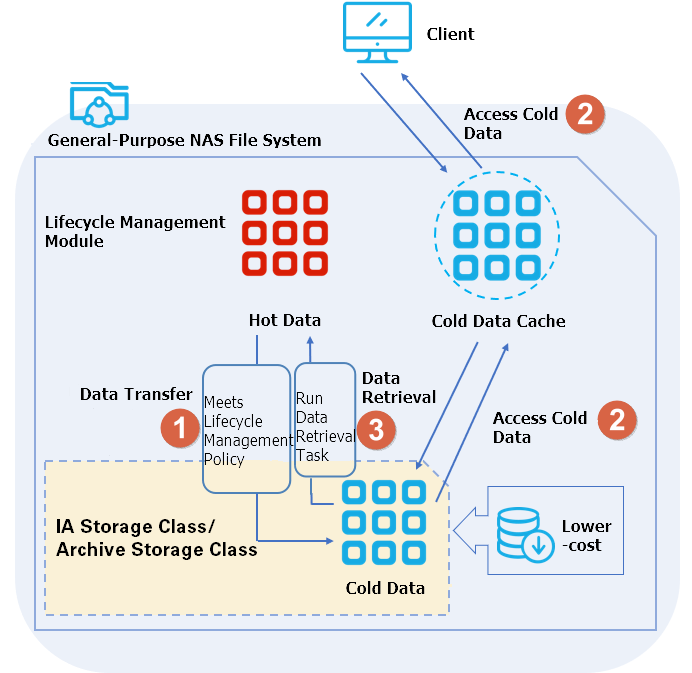
You create a lifecycle policy based on how the data in the file system is used. For more information, see Set a lifecycle policy.
Based on the lifecycle policy, the lifecycle management module periodically checks the specified folder for cold data. It then transitions cold data from the Standard storage class to the IA or Archive storage class, or from the IA storage class to the Archive storage class (① in the figure).
When you access cold data in the IA or Archive storage class, the file system caches the data from the IA or Archive storage class to the Standard storage class of the General-purpose NAS file system to enable the access (② in the figure). The first access to cold data takes longer than access to data in the Standard storage class. Subsequent access performance is the same as accessing data in the Standard storage class of a General-purpose NAS file system. Accessing cold data in the IA or Archive storage class generates read and write traffic fees. For more information, see Billing for General-purpose NAS.
When you need to frequently access data in the IA or Archive storage class, you create a data retrieval task to retrieve the data in the specified files or folders to the Standard storage class of the General-purpose NAS file system (③ in the figure). Retrieval avoids the read and write fees caused by frequently accessing data that stays in the IA or Archive storage class. A data retrieval task reads the target data and generates read traffic fees, and retrieving a file that has been stored in the Archive storage class for less than the minimum storage duration also incurs a storage fee for the remaining duration. For more information, see Create a data retrieval task and Billing for General-purpose NAS.
The time required for a transition depends on the size of the file system and the amount of data to transition. After you enable lifecycle management, the first transition of the files that match the lifecycle policy takes at least 2 hours and usually finishes within 24 hours. Subsequent periodic transitions finish within one week.
To check the result of a transition, query the storage usage of the IA or Archive storage class on the file system details page. You can also view the files that have been transitioned to the IA or Archive storage class in the NAS console. For more information, see View files in the IA or Archive storage class.
Lifecycle policies
A lifecycle policy is a rule that periodically transitions cold data from the Standard storage class of a General-purpose NAS file system to the IA or Archive storage class. Lifecycle policies identify cold data based on the last access time of a file or folder. Accessing data that is already stored in the IA or Archive storage class does not change its cold data attribute.
The following table compares the two storage classes that a lifecycle policy can transition data to. For more information about the IA and Archive storage classes, see Storage classes.
| Comparison item | IA storage class | Archive storage class |
| Recommended for | Data that is accessed infrequently, such as one to three times per month. | Long-term data retention, such as data that is accessed once or twice per quarter. Common scenarios include data auditing and data archiving. |
| Supported transition thresholds | Data that has not been accessed for more than 14, 30, 60, or 90 days. | Data that has not been accessed for more than 14, 30, 60, 90, or 180 days. |
| Read and write traffic rate | Lower than the rate of the Archive storage class. | Higher than the rate of the IA storage class. |
| Typical savings compared with the Standard storage class | Approximately 89% to 92%, depending on the data access ratio. | Approximately 93% to 97%, depending on the data access ratio. |
Choose the storage class based on how frequently you access the data: use the IA storage class for data with a monthly access pattern, and use the Archive storage class for data with a quarterly access pattern and long-term retention requirements. Before you transition data to the Archive storage class, review the minimum storage duration in Limits. For a detailed fee comparison, see Cost savings example.
When more than one rule applies to the same file or folder, the following rules take effect:
If multiple lifecycle policies are scheduled for the same time and a file or folder matches the transition operation of more than one policy, NAS runs the policy that results in the lowest cost for you.
You can configure an IA storage rule and an Archive storage rule for the same file or folder at the same time. If you configure both, the number of days in the IA storage rule must be less than the number of days in the Archive storage rule.
Limits
File size — Lifecycle policies transition only files that are between 64 KiB and 4.88 TiB in size. Data outside this range is not transitioned to the IA or Archive storage class.
Minimum storage duration — The minimum storage duration for the Archive storage class is 60 days. If a file is stored in the Archive storage class for less than 60 days, you are charged a storage fee for the remaining duration. For more information, see Billing for General-purpose NAS.
Cost savings plan
Transitioned files are billed at the IA or Archive unit price instead of the Standard unit price. For the unit prices of File Storage NAS, see File Storage NAS Pricing.
After you enable the IA storage class for a Performance NAS file system, you can save up to 92% of the storage cost of the original Performance NAS file system.
The unit price of a Performance NAS file system is 1.85 CNY/GiB/month, the unit price of the IA storage class is 0.15 CNY/GiB/month, and the unit price of the Archive storage class is 0.05 CNY/GiB/month.
If cold data accounts for 80% of the data in a file system, the effective storage cost after you use the IA storage class drops to 0.49 CNY/GiB/month for an original Performance NAS file system, 0.29 CNY/GiB/month for an original Premium NAS file system, and 0.19 CNY/GiB/month for an original Capacity NAS file system.
Deciding whether to enable lifecycle management
Before you enable lifecycle management, estimate the following two amounts for your own scenario, and then compare them. This helps you decide whether to enable lifecycle management and transition files to the IA or Archive storage class.
Cost A: the storage fees saved by storing all data in the IA or Archive storage class
Cost A = (Unit price of General-purpose NAS - Unit price of the IA or Archive storage class) × Estimated storage capacity
For the unit prices of File Storage NAS, see File Storage NAS Pricing.
Estimated storage capacity: view the file system usage on the file system details page and estimate the storage capacity that your business scenario requires. For more information, see Query the resource usage of a file system.
Cost B: the data transfer fees generated by reading and writing data in the IA or Archive storage class
Cost B = Unit price of data transfer × Estimated read and write volume
For the unit price of read and write traffic of the IA or Archive storage class, see File Storage NAS Pricing.
Estimated read and write volume: estimate this value based on the data that your business scenario reads and writes.
For information about the billing of read and write traffic of the IA or Archive storage class, see Billable items for General-purpose NAS.
Compare the two results:
If A ≥ B, enable lifecycle management.
If A < B, do not enable lifecycle management.
Example
A user creates a Capacity NAS file system in the China (Hangzhou) region. The estimated monthly data volume in the IA storage class is 1 PiB, and the estimated monthly read and write volume in the IA storage class is 5,000 GiB. The two amounts are calculated as follows:
Cost A = (Unit price of General-purpose NAS - Unit price of the IA storage class) × Estimated storage capacity = (0.35 - 0.15) (CNY/GiB/month) × 1 (PiB) × 1024 × 1024 = 209,715.2 (CNY)
Cost B = Unit price of data transfer × Estimated read and write volume = 0.06 (CNY/GiB/month) × 5,000 (GiB) = 300 (CNY)
In this example, A > B. Enable lifecycle management to further reduce storage costs.
Cost savings example
Assume that a user creates a Performance NAS file system in the China (Hangzhou) region and stores 1 PiB of data per month. The following conditions apply to this example:
The unit prices come from the detailed NAS pricing published on the Alibaba Cloud website on April 17, 2024. Unit prices of individual billable items may differ because the prices were collected on different dates. The data published on the File Storage NAS Pricing page always applies.
The example covers only data transition and data read scenarios. If you use other NAS features, other billable items may apply. For more information, see Billing for General-purpose NAS.
The following table lists the monthly fees when all data remains in the Standard storage class.
| Storage class | Total data volume | Storage fee (1.85 CNY/GiB/month) | Read traffic fee | Total fee |
| Standard storage class | 1 PiB | 1,939,865.6 | Not applicable | 1,939,865.6 |
The following table lists the monthly fees when a lifecycle policy transitions all 1 PiB of data to the IA storage class and the data is then accessed at the following ratios.
| Data access ratio | Storage fee (0.15 CNY/GiB/month) | Read traffic fee (0.06 CNY/GiB/month) | Total fee |
| 10% | 157,286.4 | 6,291.456 | 163,577.856 |
| 50% | 157,286.4 | 31,457.28 | 188,743.68 |
| 80% | 157,286.4 | 50,331.648 | 207,618.048 |
The following table lists the monthly fees when a lifecycle policy transitions all 1 PiB of data to the Archive storage class and the data is then accessed at the following ratios.
| Data access ratio | Storage fee (0.05 CNY/GiB/month) | Read traffic fee (0.1 CNY/GiB/month) | Total fee |
| 10% | 52,428.8 | 10,485.76 | 62,914.56 |
| 50% | 52,428.8 | 52,428.8 | 104,857.6 |
| 80% | 52,428.8 | 83,886.08 | 136,314.88 |
The preceding tables show the following results:
The IA storage class saves approximately 89% to 92% of the cost of the Standard storage class.
The Archive storage class saves approximately 93% to 97% of the cost of the Standard storage class.
Billing description
After you use a lifecycle policy to transition cold data from the Standard storage class of a General-purpose NAS file system to the IA or Archive storage class, NAS charges storage fees based on the storage class, size, and storage duration of your files, and traffic fees for the data that you read and write. For more information, see Billing for General-purpose NAS.
Fees for the IA storage class
IA storage capacity fee: you are charged based on the size and storage duration of the files that you transition to the IA storage class.
IA storage read and write traffic fee: you are charged based on the cumulative read and write traffic per hour for the data that you access in the IA storage class.
Fees for the Archive storage class
Archive storage capacity fee: you are charged for the Storage Usage of Archive Storage Class item based on the size and storage duration of the files that you transition to the Archive storage class.
Fee for an Archive storage duration shorter than the minimum storage duration: if a file is deleted, retrieved, or reduced in size after it is stored for less than 60 days (1,440 hours), you are charged a storage fee for the remaining time (1,440 hours minus the hours already stored) based on the original size of the archived file. This fee is charged only once within 24 hours. The minimum storage duration is calculated from the modification time (mtime) of the file, and modifying an archived file resets the 60-day timer.
Archive storage read and write traffic fee: you are charged based on the cumulative read and write traffic per hour for the data that you access in the Archive storage class.
For both the IA and Archive storage classes, internal network traffic and Internet traffic are billed at the same rate.