EventHandle
Overview
The misuse of event listeners in Node.js is a common problem. Leaking event listeners can be a time bomb in your code. This article uses a real customer use case to explain this type of leak in detail and help you avoid similar problems.
Discovering the problem
After an application was connected to the Node.js Performance Platform, global alerts frequently showed that its heap memory usage exceeded 80% of the heap limit. This situation strongly indicates a memory leak. With the customer's authorization, we examined the memory status of the problematic process. The following figure shows the results.
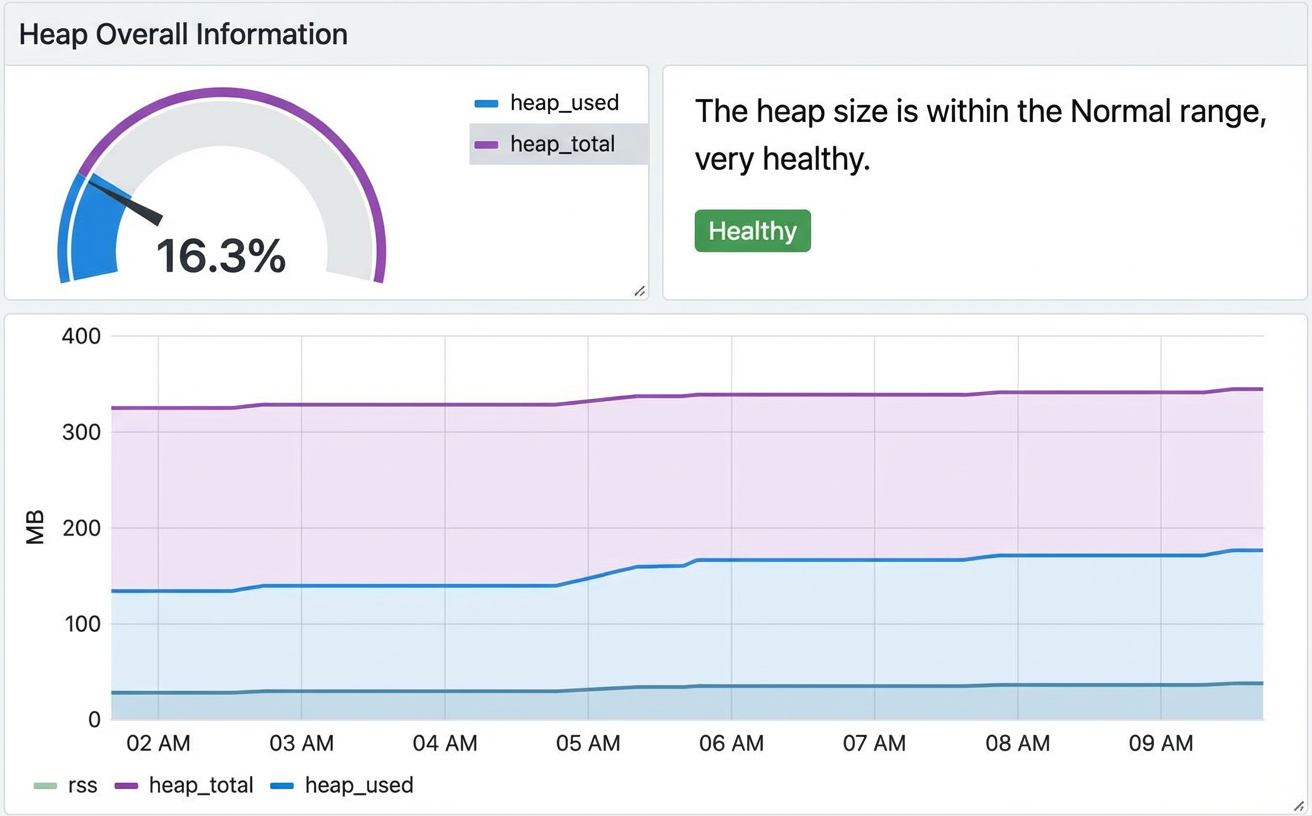
Although the figure shows a healthy state, the trend shows that the heap memory is steadily increasing. In more severe cases, some business processes reached the heap limit and caused an out-of-memory (OOM) error.
Locating the problem
Heap snapshot analysis
To troubleshoot a memory leak, the first step is to capture a heap snapshot. The selected process had a heap memory size of about 225 MB, so a heap snapshot was successfully generated using the Node.js Performance Platform. This snapshot revealed several memory issues. The online analysis provided by the platform returned the following information.
The first piece of information is an overview of the current heap structure:

The second is the memory leak report:

Expanding the retainer graph shows the reference chain for the suspected leak point, as shown in the following figure:
Based on the details from the retainer graph, the reference chain that caused the memory accumulation is as follows:
(context) of function /home/xxxx/app/controller/home.js() / home.js @345463 -> _events property of Client @46073 -> error property of EventHandlers @46075 -> Array @46089
Developers familiar with the Node.js Event class can see that improper handling of the `error` event listener during socket creation caused the memory leak. In simpler terms, the leak was caused by continuously listening for the `error` event on the same socket.
The third piece of information is the object cluster view:
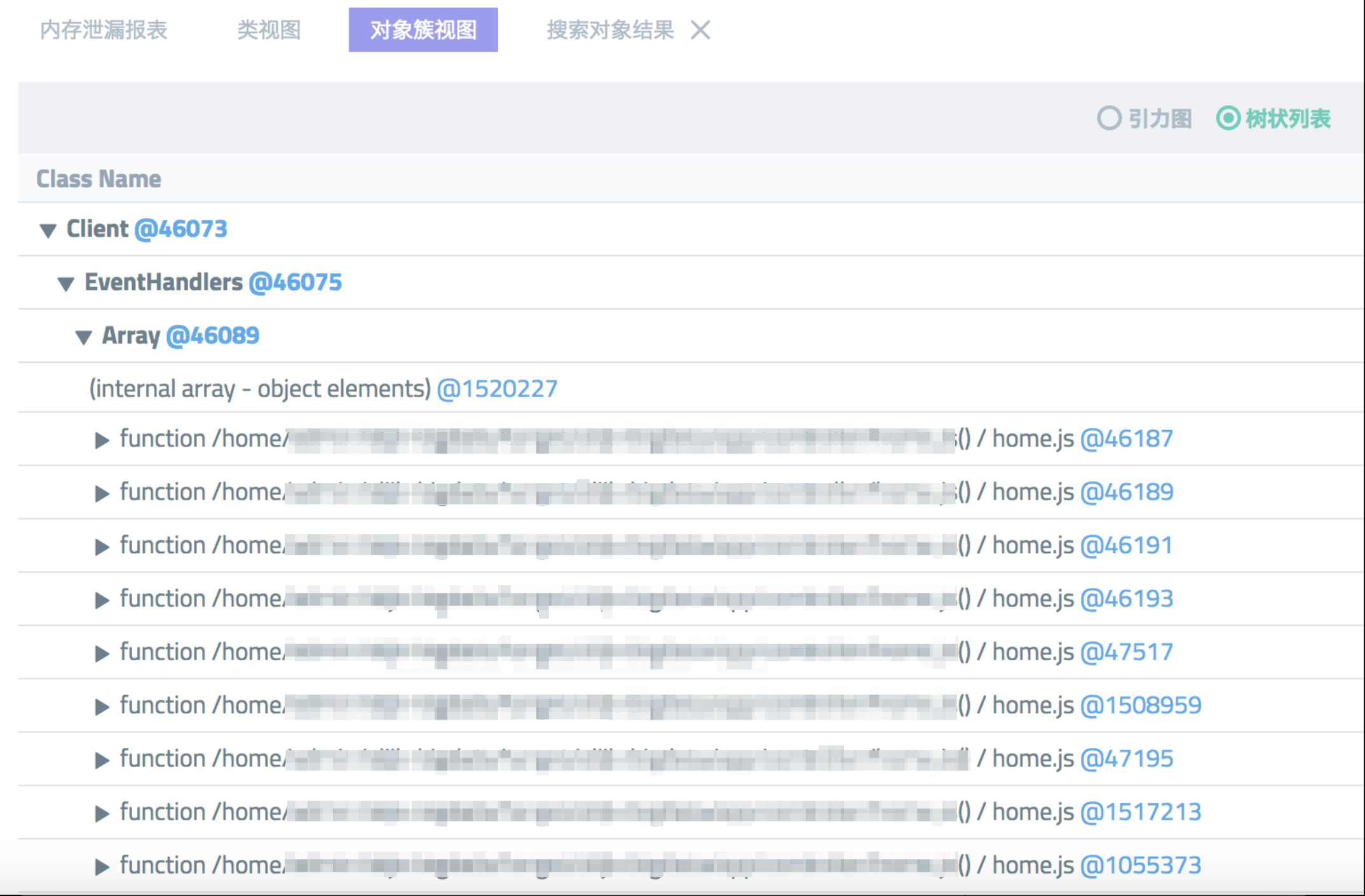
This confirms the suspicion. The number of `error` event listener callback functions for a socket object in `app/controller/home.js` was continuously increasing.
Code analysis
Now, the problematic code can be located. After communicating with the application owner, we received permission to view the project's code repository. In the `app/controller/home.js` file, searching for `error` immediately revealed the problem. The following code is a minimal representation of the issue:
module.exports = app => {
  class HomeController extends app.Controller {
    * demo() {
          if (ENV === DEVELOPMENT) {
           // Operations in the development environment...
       } else {
          if (!client) {
              client = Client.create({
                  refreshInterval: 30000,
                  requestTimeout: 5000,
                  urllib: urllib
              })
          }
          client.on('error', err => {
              // Error handling...
          })

          // Other logic...
      }
    }
  }
  return HomeController;
};
The corresponding route for this controller defined in `router.js` is as follows:
app.get(/.*/, 'home.demo');Because `client` is a global variable, an `error` handler function is added to the `client._events.error` array every time a user accesses the home page. Although each `error` handler function is only about 26 KB, they accumulate quickly under high traffic and can easily trigger an OOM error.
Solving the problem
Once the cause of the memory leak is understood, solving the problem is straightforward. A common solution is to place the `error` event listener inside the client initialization:
module.exports = app => {
  class HomeController extends app.Controller {
    * demo() {
          if (ENV === DEVELOPMENT) {
           // Operations in the development environment...
       } else {
          if (!client) {
              client = Client.create({
                  refreshInterval: 30000,
                  requestTimeout: 5000,
                  urllib: urllib
              })

              client.on('error', err => {
                  // Error handling...
              })
          }

          // Other logic...
      }
    }
  }
  return HomeController;
};
This ensures that there is only one global `error` event listener, which also improves performance. Another approach is to remove the listener after each controller process is complete:
module.exports = app => {
  class HomeController extends app.Controller {
    * demo() {
          if (ENV === DEVELOPMENT) {
           // Operations in the development environment...
       } else {
          if (!client) {
              client = Client.create({
                  refreshInterval: 30000,
                  requestTimeout: 5000,
                  urllib: urllib
              })
          }
          // Define the error handle
          const errorHandle = err => {
                  // Error handling...
           }
          client.on('error', errorHandle);

          // Other logic...

          // Remove the error listener
          client.removeListener('error', errorHandle);
      }
    }
  }
  return HomeController;
};
However, this method has a higher performance overhead than the first one. It is included here as another option for solving event listener memory leaks.
The final method is the one recommended by the Egg framework and is the best solution for this problem. Connections that are only needed once per process lifecycle can be placed in `app/extend/application.js`. The framework then ensures that it is a global singleton:
// app/extend/application.js
const CLIENT = Symbol('Application#xxClient');
module.exports = {
  get xxClient() {
    if (!this[CLIENT]) {
      this[CLIENT] = Client.create({});
      // this[CLIENT].on('error', fn);
    }
    return this[CLIENT];
  }
}

// app/controller/home.js
module.exports = app => {
  class HomeController extends app.Controller {
    * demo() {
      this.app.xxClient.xx();
    }
  }
  return HomeController;
};