OpenSearch provides the subdocument feature to support fine-grained retrievals of products based on stock keeping units (SKUs). You can use the subdocument feature to retrieve products and the SKUs to which the products belong. The subdocument feature is suitable for common scenarios in which the main product belongs to SKUs. Multiple SKUs are multiple subdocuments of the main product.
1. Configure an index schema with a subdocument
To create an index table, choose Configuration Center > Index Schema in the left-side navigation pane on the details page of an instance.
Note: Each index table must correspond to a data source. For more information, see Data sources.
On the Index Schema page, set the Mode parameter to Administrator Mode, specify the Index Table, Data Source, and Data Shards parameters, and configure the field and index settings.
In Developer Mode, enter the subdocument code based on the following sample code:
"sub_schema":{
	"table_name": "sub_simple_table",
	"fields": [
            {"field_name":"sub_id", "field_type":"INTEGER"},
            {"field_name":"sub_body", "field_type":"TEXT", "analyzer":"simple_analyzer"},
            {"field_name":"sub_title", "field_type":"TEXT", "analyzer":"simple_analyzer"},
            {"field_name":"sub_multi", "field_type":"INTEGER", "multi_value":true }
    	],
 	"indexs":
 	[
    {
      "index_name": "sub_index",
      "index_type" : "EXPACK",
      "index_fields":
       	[
          {
            "field_name":"sub_body",
            "boost":100
          },
          {
            "field_name":"sub_title",
            "boost":100
          }
        ]
    },
    {
      "index_name": "sub_pk",
      "index_type" : "PRIMARYKEY64",
      "index_fields": "sub_id",
      "has_primary_key_attribute": true
    }
  ],
  "attributes": [
    "sub_id", "sub_multi", "sub_int"
  ]
}Note:
table_name indicates the name of the subtable.
The subtable includes fields, indexes, and attributes and does not support summary.
Click Publish.
In the left-side navigation pane, choose Configuration Center > Advanced Configurations. On the page that appears, click the Data Processing Configuration tab. On the Data Processing Configuration tab, find the data_tables directory and click View in the Actions column.
Click Modify.
Modify the xxx_table.json file.
In the sub_document_processor_chain panel, configure the subdocument based on the following sample code:
"processor_chain_config": [
        {
            "sub_document_processor_chain": [
                {
                    "class_name": "OneBuildProcessor",
                    "module_name": "BuildModule",
                    "parameters": {
                        "BuildStep": "BeforeTokenizer",
                        "DocType": "add,update,delete",
                        "config_path": "pluginsConf/subdoc_one_build.json"
                    }
                },
                {
                    "class_name": "TokenizeDocumentProcessor",
                    "module_name": "",
                    "parameters": {}
                },
                {
                    "class_name": "OneBuildProcessor",
                    "module_name": "BuildModule",
                    "parameters": {
                        "BuildStep": "AfterTokenizer",
                        "DocType": "add,update,delete",
                        "config_path": "pluginsConf/subdoc_one_build.json"
                    }
                }
            ],
            "document_processor_chain": [
                {
                    "module_name": "BuildModule",
                    "class_name": "OneBuildProcessor",
                    "parameters": {
                        "BuildStep": "BeforeModifyField",
                        "config_path": "pluginsConf/one_build.json"
                    }
                },
                {
                    "module_name": "",
                    "class_name": "ModifiedFieldsDocumentProcessor",
                    "parameters": {
                        "derivative_relationship": ""
                    }
                },
                {
                    "module_name": "BuildModule",
                    "class_name": "OneBuildProcessor",
                    "parameters": {
                        "BuildStep": "BeforeTokenizer",
                        "config_path": "pluginsConf/one_build.json"
                    }
                },
                {
                    "class_name": "TokenizeDocumentProcessor"
                },
                {
                    "module_name": "BuildModule",
                    "class_name": "OneBuildProcessor",
                    "parameters": {
                        "BuildStep": "AfterTokenizer",
                        "config_path": "pluginsConf/one_build.json"
                    }
                }
            ],
            "table_name": "${table_name}",
            "clusters": [
                "${clusters}"
            ],
            "modules": [
                {
                    "module_name": "BuildModule",
                    "parameters": {},
                    "module_path": "libPluginOffline.so"
                }
            ]
        }
You must add the index name to the value of ${table_name} and ${clusters} parameters. You can view the index name on the Index Schema page.
The pluginsConf/one_build.json in the config_path parameter indicates that pluginsConf and xxx_table.json are in the same-level directory. You must upload the one_build.json and subdoc_one_build.json files to the directory based on the following sample code:
one_build.json:
{
	"chains": {
		"BeforeTokenizer": [
			"Duplicator",
			"SplitProcessor"
		],
		"BeforeModifyField": [],
		"AfterTokenizer": []
	},
	"processors": [
		{
			"name": "Duplicator",
			"class": "Duplicator",
			"parameters": {
				"dup_fields": "",
				"hidden_flag": "true"
			}
		},
		{
			"name": "SplitProcessor",
			"class": "SplitProcessor",
			"parameters": {
				"HiddenFlag": "true",
				"FieldsAndSeparators": ""
			}
		}
	]
}subdoc_one_build.json:
{
	"chains": {
		"BeforeTokenizer": [
			"Duplicator",
			"SplitProcessor"
		],
		"BeforeModifyField": [],
		"AfterTokenizer": []
	},
	"processors": [
		{
			"name": "Duplicator",
			"class": "Duplicator",
			"parameters": {
				"dup_fields": "",
				"hidden_flag": "true"
			}
		},
		{
			"name": "SplitProcessor",
			"class": "SplitProcessor",
			"parameters": {
				"HiddenFlag": "true",
				"FieldsAndSeparators": ""
			}
		}
	]
}
After the configuration is complete, click Publish on the Data Processing Configuration tab.
A new data processing configuration version is generated.
Push the offline configurations and trigger reindexing.
After the relevant configurations are complete, choose O&M Center > O&M Management in the left-side navigation pane. On the page that appears, click the Update Configurations tab. In the Instance Configuration Update panel, select the data processing configuration version generated in the previous step, set the Trigger Reindexing parameter to Push Configurations and Trigger Reindexing, and then click OK.
View the reindexing progress on the Data Source Change Tab of the Change History page.
After the finite-state machine (FSM) process is complete, you can access the index for which you configured the subdocument.
2. Configure a version of query configuration
If you want to use the subdocument for queries, you must modify the qrs.json file. To modify the qrs.json file, choose Configuration Center > Advanced Configurations in the left-side navigation pane. On the page that appears, click the Query Configurations tab.
Find the qrs.json file and click Modify in the Actions column.
Add the subdocument configurations to the value of the extend_processors parameter based on the following sample code:
  {
            "processor_name": "xxx",
            "module_name": "QrsModule",
            "parameters": {
                "SubDocIdName": "sub_doc_id",
                "searcher_schema_path": "schemas/xxx_schema.json",
                "SubDocHitField": "xxx",
                "SubDocIdCompress": "C",
                "primary_key": "xxx"
            }
        },
Click Publish on the Query Configurations tab.
A new version of query configuration is generated.
In the left-side navigation pane, choose O&M Center > O&M Management. On the page that appears, click Update Configurations.
In the Instance Configuration Update panel, set the Configuration Type parameter to Online Configurations, select the query configuration version generated in the previous step from the Query Configuration Version drop-down list, and click OK.
View the update progress on the Cluster Changes tab of the Change History page.
After the preceding FSM process is complete, you can use the subdocument to query online business.
3. Perform subdocument-based queries
Subdocument-based query logic
After the subdocument configuration is complete and the subdocument index is created, you can perform subdocument-based queries. You can configure the sub_doc parameter in the config clause to enable or disable the subdocument-based query feature. By default, the sub_doc parameter is set to no. In this case, you perform queries in regular mode. If you set the sub_doc parameter to group or flat, you can perform subdocument-based queries in group or flat mode.
Queries in regular mode
All queries in this mode are the same as regular queries. Terms of the subdocument index can be included in the query clause, but documents are queried and returned. The following section describes the subdocument-based queries in group and flat modes.
Queries in group mode
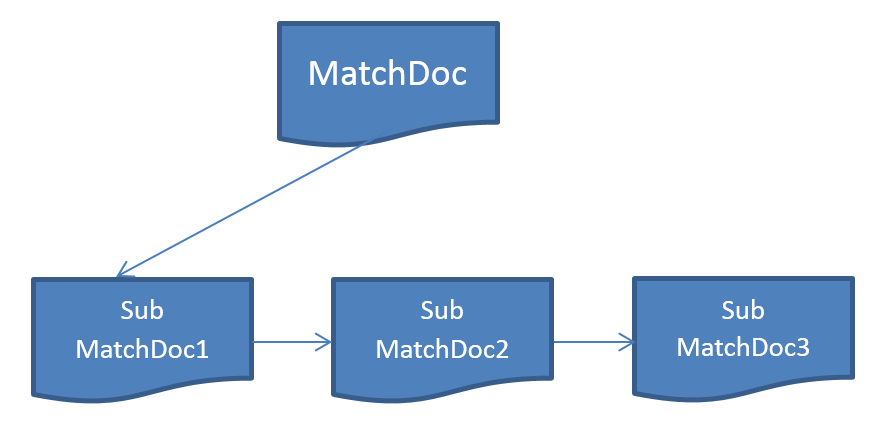
If terms of the subdocument index are included in the query clause, subdocuments are queried. The returned results include the hit documents and the hit subdocuments that are associated with the documents. The user plug-ins can access the attributes of the subdocuments based on the for-each interface of the SubSlabAcceesor operation, use ProcessorWrapper to encapsulate the accumulation operations, or use the virtual attribute clause and sub_* function to process and return the attributes of the subdocuments in the results. The associated subdocuments are not serialized into the final results.
Queries in flat mode
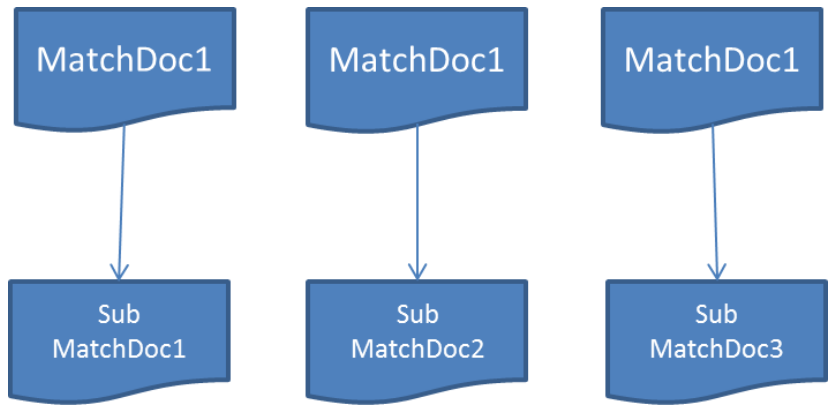
This mode is similar to sub_doc:group. In this mode, subdocuments are queried. In the returned results, the hit documents are merged into each subdocument with which they are associated. All subdocuments contain their document attributes and are displayed in the results. In this case, only the hit subdocuments are displayed in the plug-ins and results, and the hit documents are not separately displayed in the results. The performance in this mode is low.
Query interpretation
virtual attribute clause
An expression that contains only the attributes or variables of documents is the primary expression. If an expression contains subdocument attributes or variables that are involved in the operation, the expression is a subexpression, and subdocuments are displayed in the corresponding returned results such as the attribute clause. Subexpressions are disallowed in the virtual_attribute, filter, and cache_filter clauses in group mode, but are allowed in flat mode.
cache clause
The cache_filter clause does not support subdocument attributes in group mode.
The cache hit ratio depends on documents instead of subdocuments. If a subdocument is deleted, the same query hits the cache and the deleted subdocument is filtered out.
The calculation results on the documents in specific caches involve the attributes of subdocuments. If subdocuments are deleted or created during the incremental indexing, the values of the documents are not recalculated.
Query clauses in different modes
Clause |
regular mode |
group mode |
flat mode |
Remarks |
query |
A query clause can contain the terms of the subdocument index, but only the hit documents are returned. |
A query clause can query the terms of documents and subdocuments. Subdocuments are associated with documents and can be accessed by the plug-ins. Subdocuments are not displayed in the final serialized results. |
A query clause can query the terms of documents and subdocuments. The hit documents are merged into each subdocument to with which they are associated. The plug-ins can access the hit subdocuments and only the hit subdocuments are displayed in the returned results. |
To simplify queries, the ANDNOT operation on subdocument terms is not fully implemented. For example, if you perform ANDNOT on A and B and B is a subdocument term, the documents and subdocuments whose names contain B are filtered out. |
pkfilter |
Same as the original query |
Not supported |
Not supported |
|
filter |
Subdocument attributes are disallowed. |
You can specify the subdocument attributes to filter subdocuments. |
Same as the queries in group mode |
If no subdocument meets the conditions in a document, the document is filtered out. |
aggregate |
Subdocument attributes are disallowed. |
Supported |
Supported |
|
attribute |
Subdocument attributes are disallowed. |
Not supported |
Supported |
|
distinct |
Subdocument attributes are disallowed. |
Not supported |
Supported |
|
sort and rank_sort |
Subdocument attributes are disallowed. |
Not supported |
Supported |
|
layer |
Same as the original query |
Not supported |
Not supported |
|
fetch_summary |
Same as the original query |
Not supported |
Not supported |
The next version may support a subdocument summary. |
Usage notes
You cannot configure a summary for subdocuments. Subdocument secondary tables are not supported.