OSS data source
Before you begin
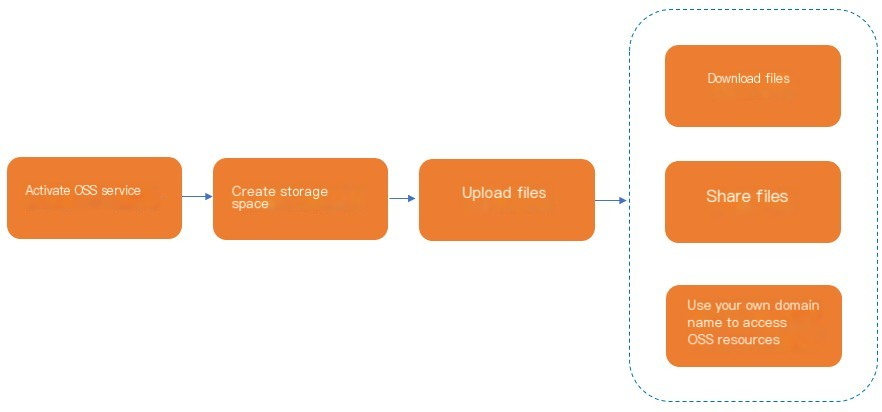
Add an OSS data source
-
Log in to the OpenSearch console, select OpenSearch Retrieval Engine Edition from the upper-left corner, find your instance on the Instances page, and then click Manage in the Actions column.
-
Configure the data source.
From the left-side navigation pane, go to Configuration Center > Data Sources and click Add Data Source. In the displayed panel, select OSS, provide a Data Source Name, an OSS Path, and a Bucket, then click Verify.
Parameters:
-
Data Source Name: A custom name for the data source. The name must start with a letter and can contain letters, digits, and underscores (_).
-
OSS Path: The path used to access objects in OSS.
-
Bucket: The name of the OSS bucket.
-
The directory name must contain opensearch and cannot contain special characters such as equal signs (=), ampersands (&), or question marks (?). Otherwise, data cannot be read.
-
To get the OSS path, go to the bucket you created, click Create Directory, and copy the new directory's path. This topic uses /opensearch_index_data/ as an example.
-
To find the bucket name, go to the OSS console and locate the bucket you created.
-
Create an index table:
-
After you create the OSS data source, choose Configuration Center > Index Schema and click Create Index Table.
-
On the configuration page, enter a custom Index Table Name and select the OSS data source that you created.
-
In the field settings, add two fields. First, add a pk field of the STRING type, set it as the primary key, and set its analysis method to uniq. Second, add an embeddings field of the FLOAT type, enable multi-value, use ^] as the delimiter, and set its analysis method to uniq. In the index settings, add two indexes: a pk index of the PRIMARYKEY64 type that includes the pk field, and a vector index of the CUSTOMIZED type that includes the pk,embeddings fields.
In this example, the pk and embeddings fields are configured. For sample data, see oss_test.txt.
CMD=add
pk=999000
embeddings=0.00.0039257140.0098142860.0039257140.00
pk=999000
embeddings=0.00.0039257140
For details about the data format required by the index schema, see the Data file format section.
-
Start reindexing: In the left-side navigation pane, choose O&M Center > O&M Management and click Reindexing.
In the Reindexing panel, select the Data Source Name of the OSS data source that you created. Confirm the Data Source Type and Associated Index Table. Set a Timestamp and click OK. After reindexing completes, a new full index version is generated. Switch to the new version to activate it.
After reindexing is complete, you can run a query test.
HA file format
Data files must be UTF-8 encoded and adhere to a specific structure. This section outlines the standard input format.
-
The following example shows the content of a data file named standard_sample.data:
CMD=add^_
PK=12345321^_
url=http://www.aliyun.com/index.html^_
title=Alibaba Cloud Computing Co., Ltd.^_
body=xxxxxx xxx^_
time=3123423421^_
multi_value_field=1234^]324^]342^_
bidwords=mp3^\price=35.8^Ptime=13867236221^]mp4^\price=32.8^Ptime=13867236221^_
^^
CMD=delete^_
PK=12345321^_CMD=add^_
PK=12345321^_
url=http://www.aliyun.com/index.html^_
title=Alibaba Cloud Computing Co., Ltd.^_
body=xxxxxx xxx^_
time=3123423421^_
multi_value_field=1234^]324^]342^_
bidwords=mp3^\price=35.8^Ptime=13867236221^]mp4^\price=32.8^Ptime=13867236221^_
^^
CMD=delete^_
PK=12345321^_
A data file consists of commands, such as add and delete. Each command is a set of key-value pairs. Use ^^\n to separate commands, ^_\n to separate key-value pairs within a command, and ^] to separate values in a multi-value field.
-
File delimiters
|
C++ encoding |
ASCII (Hex) |
Description |
Display in Emacs/vi |
Input method in Emacs |
Input method in vi |
|
"\x1F\n" |
1F0A |
Key-value pair delimiter |
^_ (followed by a line break) |
C-q C-7 |
C-v C-7 |
|
"\x1E\n" |
1E0A |
Command delimiter |
^^ (followed by a line break) |
C-q C-6 |
C-v C-6 |
|
"\x1D" |
1D |
Multi-value delimiter |
^] |
C-q C-5 |
C-v C-5 |
|
"\x1C" |
1C |
Section weight identifier |
^\ |
C-q C-4 |
C-v C-4 |
|
"\x1D" |
1D |
Multi-value item delimiter |
^] |
C-q C-5 |
C-v C-5 |
|
"\x03" |
03 |
Sub-document field delimiter |
^C |
C-q C-c |
C-v C-c |
-
Command formats
-
Add command format
The add command adds new content to the index.
The first line of an add command must be CMD=add. This line is followed by the document's fields. The order of fields in the command does not need to match their order in the index schema. However, all fields used must be defined in the index schema.
-
CMD=add^_
PK=12345321^_
url=http://www.aliyun.com/index.html^_
title=Alibaba Cloud Computing Co., Ltd.^_
body=xxxxxx xxx^_
time=3123423421^_
multi_value_field=1234^]324^]342^_
bidwords=mp3^\price=35.8^Ptime=13867236221^]mp4^\price=32.8^Ptime=13867236221^_
^^CMD=add^_
PK=12345321^_
url=http://www.aliyun.com/index.html^_
title=Alibaba Cloud Computing Co., Ltd.^_
body=xxxxxx xxx^_
time=3123423421^_
multi_value_field=1234^]324^]342^_
bidwords=mp3^\price=35.8^Ptime=13867236221^]mp4^\price=32.8^Ptime=13867236221^_
^^-
Delete command format
The delete command removes a specified document from the index.
The first line must be CMD=delete, followed by the line that specifies the field defined as the primary key in the index schema.
If a separate field is used for partition hashing, that field must also be included. If the primary key field is also used for partition hashing, you only need to specify it once.
CMD=delete^_
PK=12345321^_
^^CMD=delete^_
PK=12345321^_
^^
Delete an OSS data source
On the Data Sources page, find the data source that you want to delete and click Delete in the Actions column.
Important:
-
This action cannot be undone. Proceed with caution.
A confirmation dialog box appears. Click Confirm to proceed.
-
You cannot delete a data source while it is associated with an index table. You must delete the index table before you can delete the data source.
Usage notes
-
The OSS service must be in the same region as your OpenSearch Retrieval Engine Edition instance.
-
OpenSearch Retrieval Engine Edition does not support Anywhere OSS buckets.
-
When you add an OSS data source, a service-linked role named AliyunServiceRoleForSearchEngine is automatically created. If this role already exists, it is not created again. OpenSearch uses this role to access your resources in other Alibaba Cloud services.