AI content awareness
When you store large amounts of unstructured data, such as images and videos, in Object Storage Service (OSS), traditional search methods based on filenames or manual tags are inefficient. These methods cannot understand the semantics of the file content. OSS uses multi-modal AI models to automatically extract semantic descriptions and concise summaries for files in a bucket. This information is then used to build a searchable index. This lets you search file content directly using natural language. You can use advanced search features, such as text-to-image and text-to-video search. This greatly improves the accuracy and efficiency of data retrieval. It also provides a solid foundation for building high-level applications, such as retrieval-augmented generation (RAG).
Scenarios
Intelligent search for IP Camera (IPC) scenarios: In smart security scenarios, this feature supports semantic search for video playback, monitoring event pushes, and app trending keyword recommendations. For example, when an end user views a playback, the system can automatically generate "Today's Trending Keywords".
Retrieval-augmented generation (RAG) knowledge base: You can build an external RAG knowledge base using the large volume of data and content awareness capabilities in OSS. When a user asks a question, the content awareness feature enhances the RAG retrieval process. This provides large models with more accurate and relevant context to generate higher-quality answers.
Knowledge storage and management platform: You can build knowledge management platforms, media asset management platforms, and enterprise smart office platforms based on the knowledge content from OSS data indexing and content awareness. The data indexing and content awareness features can obtain nearly 70 metadata items for multimedia files. You can use this metadata to build cloud-based knowledge management platforms.
How it works
The core of AI Content Awareness is semantic search. It understands natural language to match queries with the multimedia content of files, instead of relying on traditional keyword matching. The process is as follows:
Enable the feature and perform initial indexing: When you enable this feature for a bucket, the system triggers a one-time scan of existing files and processes all supported files in the bucket asynchronously.
Extract features and generate descriptions: The system uses a large model to extract core semantic features for each file. It generates two types of content-aware descriptive text: a detailed description (about 100 words) and a concise summary (under 20 words).
Vectorize and build an index: The system vectorizes the semantic features and content-aware descriptions of the files. It then builds a vector index library to support large-scale, high-performance search.
Perform semantic search and reranking: When a user starts a query, the system vectorizes the search statement and retrieves the most similar files from the vector index. It then combines the vector representations and content-aware descriptions to rerank the results. This improves accuracy and recall rate, precisely identifies key information in large datasets, and enables enhanced semantic search.
Return results for applications: The search results include the detailed descriptions and concise summaries generated by the content awareness feature. You can directly obtain key information and use it to build high-level applications, such as "Search Trends" or "Daily Summary".
Initial indexing runs asynchronously. It may take several minutes to several hours, depending on the number and size of files in the bucket. During this time, existing files cannot be searched. For new or updated files, the system automatically triggers an incremental index update.
Limits
Before you start, make sure your bucket is in one of the following regions that support AI Content Awareness: China (Beijing), China (Zhangjiakou), China (Hangzhou), China (Shanghai), China (Shenzhen), and China (Chengdu).
1. Create a bucket and upload files
Log on to the OSS console.
On the Buckets page, click Create Bucket.
On the Create Bucket page, enter a bucket name that is relevant to your business, such as
videos-oss-metaquery. Keep the default settings for the other parameters.Click Create. On the success page, click View Bucket.
On the Objects page, click . Select the video files to upload, such as VideoA.mp4, VideoB.mp4, and VideoC.mp4. Keep the default settings for the other parameters and click Upload.
2. Enable AI Content Awareness
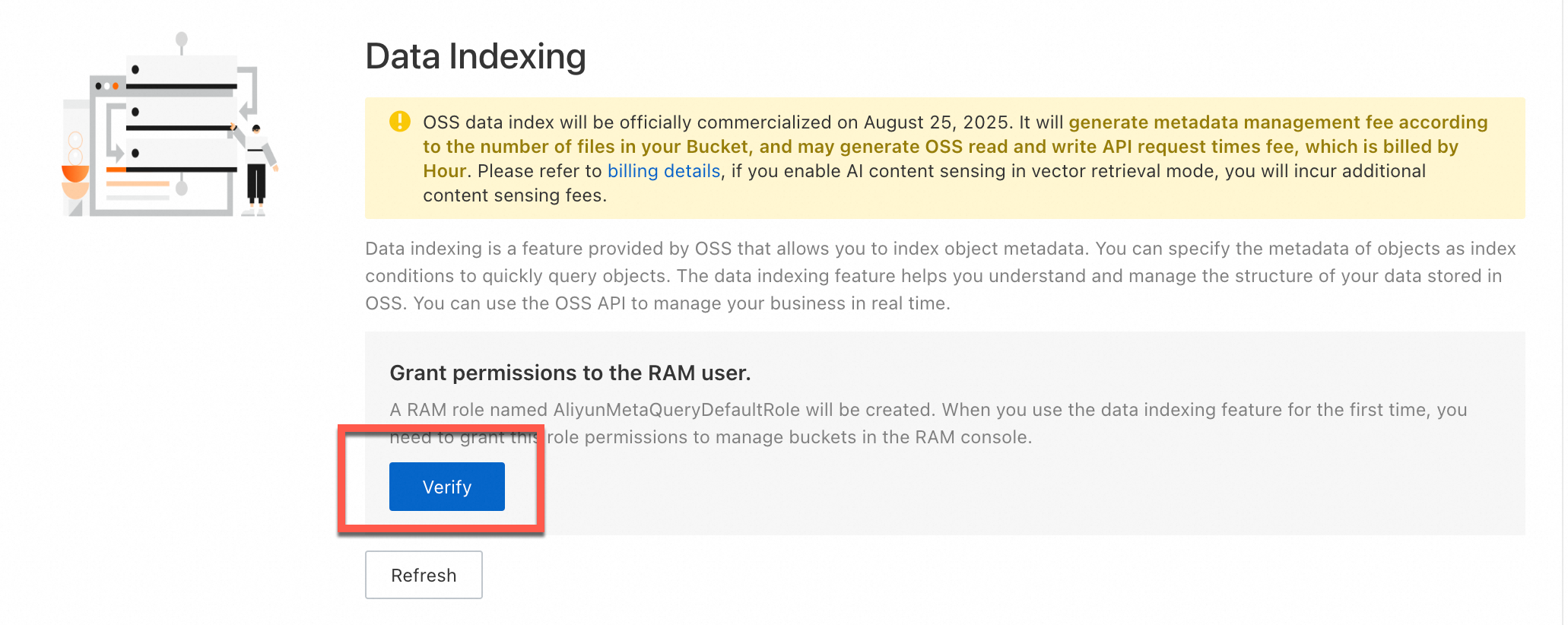
You must enable OSS AI Content Awareness for your bucket in the Data Index - AISearch feature. After you enable the feature, you can use the query API of Data Index to perform semantic searches and queries.
Note Building the metadata index takes some time. The duration depends on the number of objects in the bucket. If it takes too long, you can refresh the page to check the enabling status. |
|

3. Run a query
After the index is built, you can run semantic searches using the console, an SDK, or a command line interface. Simply enter a descriptive text, such as a yard with a parked car, and the system returns the matching key files and their content summaries. You can develop applications directly based on this API or SDK. You do not need to manage the elasticity of underlying resources, the vectorization process, or index building and storage because the service is completely serverless.
Console
On the Buckets page, click your bucket name.
On the Objects page, confirm that the videos are uploaded.
In the navigation pane on the left, choose .
On the Data Index page, enter
a yard with a parked carin the search box. In the Media Type section, selectVideo. Click Query Now. The search returns videos that match the description, along with their content summaries.
SDK
Java
The vector search feature is available only in Java SDK 3.18.2 and later. For more information, see Vector Search (Java SDK V1).
import com.aliyun.oss.*;
import com.aliyun.oss.common.auth.CredentialsProviderFactory;
import com.aliyun.oss.common.auth.EnvironmentVariableCredentialsProvider;
import com.aliyun.oss.common.comm.SignVersion;
import com.aliyun.oss.model.*;
import java.util.ArrayList;
import java.util.List;

public class DoMetaQuery {
    public static void main(String[] args) throws Exception {
        // The endpoint is set to China (Hangzhou) in this example. Replace it with the actual endpoint.
        String endpoint = "https://oss-cn-hangzhou.aliyuncs.com";
        // Specify the bucket name, for example, examplebucket.
        String bucketName = "examplebucket";
        // Obtain access credentials from environment variables. Before you run this sample code, make sure that the OSS_ACCESS_KEY_ID and OSS_ACCESS_KEY_SECRET environment variables are set.
        EnvironmentVariableCredentialsProvider credentialsProvider = CredentialsProviderFactory.newEnvironmentVariableCredentialsProvider();
        // Specify the region where the bucket is located. This example uses cn-hangzhou, which indicates the China (Hangzhou) region.
        String region = "cn-hangzhou";

        // Create an OSSClient instance.
        // When the OSSClient instance is no longer needed, call the shutdown method to release its resources.
        ClientBuilderConfiguration clientBuilderConfiguration = new ClientBuilderConfiguration();
        clientBuilderConfiguration.setSignatureVersion(SignVersion.V4);
        OSS ossClient = OSSClientBuilder.create()
                .endpoint(endpoint)
                .credentialsProvider(credentialsProvider)
                .clientConfiguration(clientBuilderConfiguration)
                .region(region)
                .build();

        try {
            int maxResults = 20;
            List<String> mediaTypes = new ArrayList<String>();
            mediaTypes.add("image");
            String query = "Snow";
            String simpleQuery = "{\"Operation\":\"gt\", \"Field\": \"Size\", \"Value\": \"30\"}";
            String sort = "Size";
            DoMetaQueryRequest doMetaQueryRequest = new DoMetaQueryRequest(bucketName, maxResults, query, sort, MetaQueryMode.SEMANTIC, mediaTypes, simpleQuery);
            DoMetaQueryResult doMetaQueryResult = ossClient.doMetaQuery(doMetaQueryRequest);
        } catch (OSSException oe) {
            System.out.println("Error Message: " + oe.getErrorMessage());
            System.out.println("Error Code:       " + oe.getErrorCode());
            System.out.println("Request ID:      " + oe.getRequestId());
            System.out.println("Host ID:           " + oe.getHostId());
        } catch (ClientException ce) {
            System.out.println("Error Message: " + ce.getMessage());
        } finally {
            if(ossClient != null){
                ossClient.shutdown();
            }
        }
    }
}
Python
For more information, see AISearch.
import argparse
import alibabacloud_oss_v2 as oss

# Create a command-line argument parser to process command-line input.
parser = argparse.ArgumentParser(description="do meta query semantic sample")
# Add the necessary command-line arguments.
parser.add_argument('--region', help='The region in which the bucket is located.', required=True)  # The region where the bucket is located.
parser.add_argument('--bucket', help='The name of the bucket.', required=True)  # The name of the bucket.
parser.add_argument('--endpoint', help='The domain names that other services can use to access OSS')  # The OSS domain name, which is optional.

def main():
    # Parse command-line arguments.
    args = parser.parse_args()

    # Load access credentials from environment variables.
    # Before running, you need to set the environment variables: OSS_ACCESS_KEY_ID and OSS_ACCESS_KEY_SECRET.
    credentials_provider = oss.credentials.EnvironmentVariableCredentialsProvider()

    # Load the default SDK configurations.
    cfg = oss.config.load_default()
    # Set the credential provider.
    cfg.credentials_provider = credentials_provider
    # Set the region.
    cfg.region = args.region
    # If an endpoint is provided, update the endpoint in the configuration.
    if args.endpoint is not None:
        cfg.endpoint = args.endpoint

    # Create an OSS client instance.
    client = oss.Client(cfg)

    # Initiate a metadata query request in AISearch mode.
    result = client.do_meta_query(oss.DoMetaQueryRequest(
            bucket=args.bucket,
            mode='semantic',
            meta_query=oss.MetaQuery(
                max_results=1000,
                query='An aerial view of a snow-covered forest',
                order='desc',
                media_types=oss.MetaQueryMediaTypes(
                    media_type=['image']
                ),
                simple_query='{"Operation":"gt", "Field": "Size", "Value": "30"}',
            ),
    ))

    # Print the retrieval results.
    print(vars(result))

if __name__ == "__main__":
    main()
Go
For more information, see AISearch (Go SDK V2).
package main
import (
"context"
"flag"
"log"
"github.com/aliyun/alibabacloud-oss-go-sdk-v2/oss"
"github.com/aliyun/alibabacloud-oss-go-sdk-v2/oss/credentials"
)
var (
region string
bucketName string
)
func init() {
// Set a command-line flag to specify the region.
flag.StringVar(®ion, "region", "", "The region in which the bucket is located.")
// Set a command-line flag to specify the bucket name.
flag.StringVar(&bucketName, "bucket", "", "The name of the bucket.")
}
func main() {
flag.Parse()
// Check if the bucket name is provided.
if len(bucketName) == 0 {
flag.PrintDefaults()
log.Fatalf("invalid parameters, bucket name required")
}
// Check if the region is provided.
if len(region) == 0 {
flag.PrintDefaults()
log.Fatalf("invalid parameters, region required")
}
// Create a client configuration and use credentials from environment variables and the specified region.
cfg := oss.LoadDefaultConfig().
WithCredentialsProvider(credentials.NewEnvironmentVariableCredentialsProvider()).
WithRegion(region)
client := oss.NewClient(cfg) // Create an OSS client.
// Perform an AISearch operation.
request := &oss.DoMetaQueryRequest{
Bucket: oss.Ptr(bucketName),
Mode: oss.Ptr("semantic"),
MetaQuery: &oss.MetaQuery{
MaxResults: oss.Ptr(int64(99)),
Query: oss.Ptr("Overlook the snow-covered forest"), // Provide the semantic query string. This is an example.
MediaTypes: &oss.MetaQueryMediaTypes{
MediaTypes: []string{"image"}, // Specify the media types to search. In this example, "image".
},
SimpleQuery: oss.Ptr(`{"Operation":"gt", "Field": "Size", "Value": "30"}`),
},
}
result, err := client.DoMetaQuery(context.TODO(), request)
if err != nil {
log.Fatalf("failed to do meta query %v", err)
}
log.Printf("do meta query result:%#v\n", result)
}
PHP
For more information, see AISearch (PHP SDK V2).
<?php

// Import the autoloader file to ensure that dependency libraries are correctly loaded.
require_once __DIR__ . '/../vendor/autoload.php';

use AlibabaCloud\Oss\V2 as Oss;

// Define the description of command line arguments.
$optsdesc = [
    "region" => ['help' => 'The region in which the bucket is located.', 'required' => True], // The region where the bucket is located. This parameter is required.
    "endpoint" => ['help' => 'The domain names that other services can use to access OSS.', 'required' => False], // The endpoint that other services can use to access OSS. This parameter is optional.
    "bucket" => ['help' => 'The name of the bucket', 'required' => True], // The name of the bucket. This parameter is required.
];

// Convert the argument description to the long option format required by getopt.
// A colon (:) after each argument indicates that the argument requires a value.
$longopts = \array_map(function ($key) {
    return "$key:";
}, array_keys($optsdesc));

// Parse the command line arguments.
$options = getopt("", $longopts);

// Check whether required arguments are specified.
foreach ($optsdesc as $key => $value) {
    if ($value['required'] === True && empty($options[$key])) {
        $help = $value['help']; // Obtain the help information of the argument.
        echo "Error: the following arguments are required: --$key, $help" . PHP_EOL;
        exit(1); // If a required argument is not specified, exit the program.
    }
}

// Extract values from the parsed arguments.
$region = $options["region"]; // The region where the bucket is located.
$bucket = $options["bucket"]; // The name of the bucket.

// Load the credential information from environment variables.
// Use EnvironmentVariableCredentialsProvider to read the Access Key ID and Access Key Secret from environment variables.
$credentialsProvider = new Oss\Credentials\EnvironmentVariableCredentialsProvider();

// Use the default configurations of the SDK.
$cfg = Oss\Config::loadDefault();
$cfg->setCredentialsProvider($credentialsProvider); // Set the credential provider.
$cfg->setRegion($region); // Set the region where the bucket is located.
if (isset($options["endpoint"])) {
    $cfg->setEndpoint($options["endpoint"]); // If an endpoint is provided, set the endpoint.
}

// Create an OSS client instance.
$client = new Oss\Client($cfg);

// Perform an AISearch query for objects that meet the specified conditions.
$request = new Oss\Models\DoMetaQueryRequest($bucket, new Oss\Models\MetaQuery(
    maxResults: 99,
    query: "Overlook the snow-covered forest",
    mediaTypes: new Oss\Models\MetaQueryMediaTypes('image'),
    simpleQuery: '{"Operation":"gt", "Field": "Size", "Value": "30"}',
), 'semantic');

$result = $client->doMetaQuery($request);
printf(
    'status code:' . $result->statusCode . PHP_EOL .
    'request id:' . $result->requestId . PHP_EOL .
    'result:' . var_export($result, true)
);
ossutil
The following example shows how to query for files that meet specified conditions in the examplebucket bucket.
ossutil api do-meta-query --bucket examplebucket --meta-query "{\"Query\":\"Overlooking the snow covered forest\",\"MediaTypes\":{\"MediaType\":\"video\"},\"SimpleQuery\":\"{\\\"Operation\\\":\\\"gt\\\", \\\"Field\\\": \\\"Size\\\", \\\"Value\\\": \\\"1\\\"}\"}" --meta-query-mode semanticFor more information about this command, see do-meta-query.
Billing
Using the AI Content Awareness feature incurs the following fees:
Data indexing fees: You must enable AI Content Awareness in Data Index - AISearch mode. This incurs fees related to Data Index - AISearch.
AI Content Awareness fees: These fees include charges for image and video content awareness, which are billed based on the type and usage of processed files. After you enable AI Content Awareness, OSS automatically scans the existing image and video files in the bucket. When new image or video files are uploaded, OSS automatically triggers AI Content Awareness. These newly uploaded files also incur AI Content Awareness fees. We recommend that you monitor your bills closely.
API request fees: API request fees are incurred during the indexing of existing files and the updating of indexes for incremental files. These fees are charged based on the number of API calls. The relevant API operations are as follows:
Operation
API
Scan files in a bucket
ListObjects
Build an index for files in a bucket
HeadObject and GetObject
The file in the bucket has a tag
GetObjectTag
The file in the bucket has custom metadata
GetObjectMeta
The bucket contains a symbolic link file
GetSymlink
To stop incurring related charges, you must disable AISearch promptly.
Related APIs
The AI Content Awareness feature is implemented based on the following RESTful APIs. If your application has high customization requirements, you can call these APIs directly for development. However, you must manually implement signature calculation.
For more information about enabling the metadata management feature, see OpenMetaQuery.
For more information about querying the current status of metadata management, see GetMetaQueryStatus.
For more information about querying for files that meet specified conditions, see DoMetaQuery.
For more information about disabling the metadata management feature, see CloseMetaQuery.