Dynamic dataset loading service
The PAI dynamic dataset loading service loads and evicts data on demand during DSW or DLC training. You no longer need to keep the full dataset in high-performance storage, which reduces storage costs and keeps training efficient.
This feature is in invitational preview. To use it, contact your account manager (PDSA).
Background
As large models such as large language models (LLMs) scale up, AI training data has grown from terabytes to petabytes and even tens of petabytes. This growth drives up storage costs and creates performance bottlenecks. The dynamic dataset loading service keeps the full dataset in low-cost Object Storage Service (OSS) and pulls only the required data subsets into a high-performance Cloud Paralleled File System (CPFS) cache when training needs them. This approach reduces the capacity that you must provision in high-performance storage without sacrificing performance.
Common scenarios
The dynamic dataset loading service is a good fit for the following scenarios:
Extremely large datasets — The total dataset size exceeds your CPFS storage capacity. For example, you can train on a 100 PB dataset with only a 10 PB CPFS cache.
Clear access locality — The workload reads large files such as video, image, and audio data whose access patterns show clear spatial and temporal locality.
Preserve your existing data read logic — The service is compatible with native file APIs, so you keep your existing data read logic and integrate the service with few code changes.
Technical architecture
System components
The architecture includes the following components:
Object Storage Service (OSS) — Stores the original full dataset and provides a low-cost, highly reliable base storage layer.
Cloud Paralleled File System (CPFS) — Serves as the high-performance cache medium and holds the data subsets that the training task needs in real time.
CPFS data flow component — Pulls data from OSS into the CPFS cache on demand, based on scheduling instructions.
Main workflow
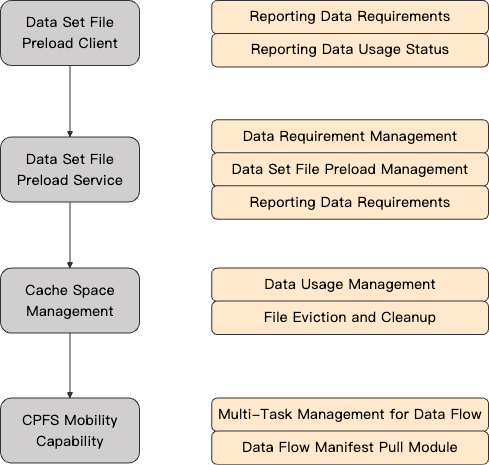
Integrate the service into your training job
This example shows how to add the preload workflow to a DLC training task. Before you start, use Dataset Mount to mount CPFS to /mnt/data/.
Step 1: Initialize the dataset file preload client
When the training process starts, create a DatasetFileLoaderClient instance to initialize the client:
import os
from dataset_file_loader import DatasetFileLoaderClient
from dataset_file_loader.model import DatasetFile

worker_id = int(os.environ.get('LOCAL_RANK', 0))  # Get the current worker ID

client = DatasetFileLoaderClient(
    worker_id=worker_id,
    cpfs_mount_path="/mnt/data/",                   # CPFS mount path that matches the training task
    persistence_file_path=".dataset_file_persistence/task_1/",  # Path of the persisted metadata
    preload_request_buffer_size=20                  # Preload buffer size (10-50 recommended)
)worker_idmust match the local rank in your distributed training framework, such asLOCAL_RANKin PyTorch.cpfs_mount_pathandpersistence_file_pathmust exactly match the preload service configuration.
Step 2: Submit preload requests before you use the data
During the data sampling phase, report the file paths that you plan to use in advance to trigger preloading:
# Query the preload quota currently available to avoid overload
quota = client.get_preload_dataset_files_quota(index)

for _ in range(quota):
    client.preload_dataset_file(
        DatasetFile(
            dataset_file_path=file_path, # Relative path of the OSS folder or file to preload
            sampler_index=index # Sampler index
        )
    )
Step 3: Mark the data usage status when reading starts
When your code reads a dataset file, notify the system that the file is in use. This notification prevents the cache from being cleared too early:
client.active_dataset_file(
    DatasetFile(
        dataset_file_path=file_path, # Relative path of the OSS folder or file to preload
        sampler_index=index # Sampler index
    )
)
Step 4: Release the data resources after reading completes
After the read completes, release the resources so that the system can clear the cache and free up space:
client.release_dataset_file(
    DatasetFile(
        dataset_file_path=file_path, # Relative path of the OSS folder or file to preload
        sampler_index=index # Sampler index
    )
)
Billing
The PAI dynamic dataset loading service is currently free of charge and incurs no additional fees.