Trains image metric learning models using raw data with mainstream backbone architectures such as ResNet and Vision Transformers.
Prerequisites
Before you begin, ensure that you have:
Activated OSS. See Activate OSS
Authorized Machine Learning Studio to access OSS. See Grant permissions
Limitations
Requires the Deep Learning Containers (DLC) computing engine.
Supported backbones
| Group | Backbones | When to use |
|---|---|---|
| Lightweight ResNet | resnet18, resnet34 | Smaller datasets, faster training, lower GPU memory |
| Standard ResNet | resnet50, resnet101 | General-purpose; resnet50 is the default |
| Swin Transformer | swint_tiny, swint_small, swint_base | Hierarchical feature extraction with window-based attention |
| Vision Transformer (ViT) | vit_tiny, vit_small, vit_base | Global attention; works well with large datasets |
| XCiT | xcit_tiny, xcit_small, xcit_base | Cross-covariance attention; memory-efficient alternative to ViT |
For larger backbones (vit_base, xcit_base, swint_base), use a smaller batch size to avoid GPU memory issues.
Training mode: scratch vs. transfer learning
Before configuring parameters, decide whether to train from scratch or use a pre-trained model:
From scratch: The model initializes with random weights and trains entirely on your data. Requires a large, well-labeled dataset.
Transfer learning: The model starts from a pre-trained checkpoint and fine-tunes on your data. Effective with smaller datasets and converges faster.
To use transfer learning, set the OSS path of the pre-trained model parameter to your checkpoint path. If left blank, PAI uses its default pre-trained weights.
Configuration
Input ports
| Port (left to right) | Data type | Recommended upstream component | Required |
|---|---|---|---|
| Training annotation file | OSS | Read OSS Data | No |
| Evaluation annotation file | OSS | Read OSS Data | No |
Annotation file format
Each line in the annotation file maps an image path to a label ID:
/data/imagenet/images/class_a/img001.jpg 0
/data/imagenet/images/class_a/img002.jpg 0
/data/imagenet/images/class_b/img003.jpg 1
/data/imagenet/images/class_b/img004.jpg 1
Separate the image path and label ID with a single space.
Parameters
Field Settings tab
| Parameter | Required | Default | Description |
|---|---|---|---|
| Metric learning model type | Yes | Data-parallel metric learning | Algorithm parallelism strategy. Select Data-parallel metric learning for standard training, or Model-parallel metric learning to distribute the model across multiple GPUs. |
| OSS directory for training output | Yes | — | OSS directory where trained models are saved. Example: oss://examplebucket/yun****/designer_test |
| Training annotation file path | No | — | Required only if no training annotation file is connected to the input port. If configured in both places, the input port takes precedence. Example: oss://examplebucket/yourfolder****/data/imagenet/meta/train_labeled.txt |
| Validation annotation file path | No | — | Required only if no evaluation annotation file is connected to the input port. If configured in both places, the input port takes precedence. Example: oss://examplebucket/yourfolder****/data/imagenet/meta/val_labeled.txt |
| File of class name list | No | — | Enter class names directly or specify an OSS path to a file containing class names. |
| Data source format | Yes | ClsSourceImageList | Input data format. ClsSourceImageList expects annotation files in the format above. ClsSourceItag expects data annotated with the PAI iTAG module. |
| OSS path of the pre-trained model | No | — | OSS path to a custom pre-trained model. If not set, PAI uses its default pre-trained weights. |
Parameter Settings tab
| Parameter | Required | Default | Description |
|---|---|---|---|
| Metric learning backbone | Yes | resnet_50 | Backbone model for feature extraction. See Supported backbones for selection guidance. |
| Image resize size | Yes | 224 | Image width and height in pixels after resizing. |
| Backbone output feature dimension | Yes | 2048 | Output feature dimension of the backbone. Must be an integer. |
| Feature output dimension | Yes | 1536 | Output feature dimension of the Neck. Must be an integer. |
| Number of training classes | Yes | — | Total number of classes in your dataset. Set this to match your label count. |
| Loss function | Yes | AMSoftmax (margin 0.4, scale 30) | Loss function for training. Use the recommended parameters in parentheses as a starting point. Valid values: AMSoftmax (margin 0.4, scale 30), ArcFaceLoss (margin 28.6, scale 64), CosFaceLoss (margin 0.35, scale 64), LargeMarginSoftmaxLoss (margin 4, scale 1), SphereFaceLoss (margin 4, scale 1), Model-parallel AMSoftmax (classification limit scales with GPU count), Model-parallel Softmax (classification limit scales with GPU count) |
| Loss function scale parameter | Yes | 30 | Scale parameter for the selected loss function. |
| Loss function margin parameter | Yes | 0.4 | Margin parameter for the selected loss function. |
| Loss function weight | No | 1.0 | Balances optimization between metric and classification objectives. |
| Optimizer | Yes | SGD | Optimizer for training. SGD suits most cases. AdamW converges faster and is a good alternative when SGD is slow to converge. |
| Initial learning rate | Yes | 0.03 | Initial learning rate. Must be a floating-point number. |
| Training batch_size | Yes | — | Number of samples per training iteration. Use a smaller batch size for larger backbones. |
| Total training epochs | Yes | 200 | Total number of passes through the training dataset. |
| Checkpoint saving frequency | No | 10 | Number of epochs between checkpoint saves. Set to 1 to save after every epoch. |
Execution Tuning tab
| Parameter | Required | Default | Description |
|---|---|---|---|
| Training data read threads | No | 4 | Number of parallel processes for reading training data. |
| Enable half-precision | No | — | Enables half-precision (float16) training to reduce GPU memory usage. |
| Computing mode | Yes | Standalone DLC | Computing engine mode. Standalone DLC runs on a single machine. Distributed DLC distributes training across multiple worker processes. |
| Workers | No | 1 | Number of concurrent worker processes. Configure when using Distributed DLC. |
| GPU model | Yes | 8vCPU+60GB Mem+1xp100-ecs.gn5-c8g1.2xlarge | GPU specification for training. Select a larger instance for bigger backbones or larger batch sizes. |
Example
The following example shows a workflow that uses the Image Metric Learning Training (raw) component.
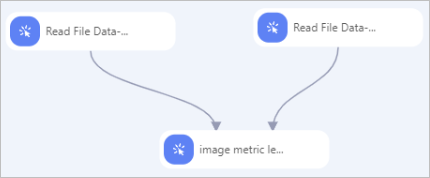
Prepare and annotate data using the PAI iTAG module. See .
Use Read OSS Data-4 and Read OSS Data-5 to read the training and validation annotation files. Set OSS Data Path for each component to the corresponding annotation file path.
Connect both Read OSS Data components to Image Metric Learning Training (raw) and configure parameters. See Configuration.