The pose detection component trains top-down pose estimation models using HRNet or Lite-HRNet backbones. Use it in Machine Learning Designer pipelines to detect human body keypoints from images.
Prerequisites
Before you begin, make sure you have:
An activated Object Storage Service (OSS) bucket
Machine Learning Studio authorized to access OSS — see Activate OSS and Grant the permissions that are required to use Machine Learning Designer
Limitations
The component is available only in Machine Learning Designer of Machine Learning Platform for AI (PAI).
It requires Deep Learning Containers (DLC) compute resources.
Only the TopDown algorithm type is supported. TopDown first detects persons with an object detector, then estimates keypoints for each detected person. This approach is more accurate but slows down as the number of people in the image increases — it is best suited for scenes with a small, fixed number of people. Because human body detection must precede pose detection, connect the object detection component upstream or configure the detection model path manually in the image prediction component.
How it works
Find the component in the component library under Video Algorithm > Offline Training.
The component accepts training data, annotation files, evaluation data, and a dataset info file through five input ports. It trains a top-down pose model and outputs the trained model to an OSS directory, which the downstream image prediction component uses for offline inference.
Configure the component
Input ports
Connect Read File Data components to each port. All ports are optional — if you leave a port unconnected, set the corresponding OSS path parameter instead.
| Port (left to right) | Data type | Required |
|---|---|---|
| data for training | OSS | No |
| data annotation path for training | OSS | No |
| data for evaluation | OSS | No |
| data annotation path for evaluation | OSS | No |
| data keypoints info path | OSS | No |
When both an input port and its corresponding parameter are set, the input port value takes precedence.
Fields setting
| Parameter | Required | Default | Description |
|---|---|---|---|
| model type | Yes | TopDown | Algorithm type. Only TopDown is supported. |
| oss dir to save model | No | None | OSS directory for saving the trained model. Example: oss://examplebucket/output_dir/ckpt/ |
| oss data path to training | No | None | OSS path to training images. Required if the training input port is not connected. Example: oss://examplebucket/data/train_images/ |
| oss annotation path for training data | No | None | OSS path to the training annotation file. Required if the training annotation port is not connected. Example: oss://examplebucket/data/annotations/train.json |
| oss data path to evaluation | No | None | OSS path to evaluation images. Required if the evaluation input port is not connected. Example: oss://examplebucket/data/val_images/ |
| oss annotation path for evaluation data | No | None | OSS path to the evaluation annotation file. Required if the evaluation annotation port is not connected. Example: oss://examplebucket/data/annotations/val.json |
| oss path to dataset info file | No | None | OSS path to the dataset info file. Required if the dataset info port is not connected. Example: oss://examplebucket/data/annotations/dataset_info.py |
| Data Source Type | Yes | DetSourceCOCO | Input data format. Only DetSourceCOCO is supported. |
| oss path to pretrained model | No | None | OSS path to a custom pre-trained model. If blank, PAI uses its default pre-trained model. |
Parameters setting
| Parameter | Required | Default | Description |
|---|---|---|---|
| backbone | Yes | hrnet | Backbone model. Valid values: hrnet, lite_hrnet. |
| num keypoints | Yes | None | Number of keypoint categories in the dataset. |
| image size after resizing | Yes | 192,256 | Fixed input image size (width,height). Separate values with a comma. |
| initial learning rate | Yes | 0.01 | Starting learning rate for training. |
| learning rate policy | Yes | step | Learning rate schedule. Only step is supported: the rate decays at the epochs specified in lr step. |
| lr step | Yes | 170,200 | Epochs at which the learning rate decays by 90%. Separate multiple values with commas. For example, with an initial rate of 0.1 and lr step set to 5,10: epochs 1–5 use 0.1, epoch 6 onward uses 0.01, epoch 11 onward uses 0.001. |
| train batch size | Yes | 32 | Number of samples per training iteration. |
| eval batch size | Yes | 32 | Number of samples per evaluation iteration. |
| total train epochs | Yes | 200 | Total number of passes over the training data. |
| save checkpoint epoch | No | 1 | Checkpoint save frequency. 1 saves a checkpoint after every epoch. |
Tuning
| Parameter | Required | Default | Description |
|---|---|---|---|
| optimizer | Yes | SGD | Optimizer for model training. Valid values: SGD, Adam. |
| number process of reading data per gpu | No | 2 | Number of data-loading threads per GPU. |
| evtorch model with fp16 | No | None | Enable FP16 mixed precision to reduce GPU memory usage. |
| single worker or distributed on DLC | Yes | single_on_dlc | Compute mode. Valid values: single_on_dlc, distribute_on_dlc. |
| number of worker | No | 1 | Number of worker nodes. Required when distribute_on_dlc is selected. |
| cpu machine type | No | 16vCPU+64GB Mem-ecs.g6.4xlarge | CPU instance type. Required when distribute_on_dlc is selected. |
| gpu machine type | Yes | 8vCPU+60GB Mem+1xp100-ecs.gn5-c8g1.2xlarge | GPU instance type. |
Output ports
| Port | Data type | Downstream component |
|---|---|---|
| output model | OSS directory (same as oss dir to save model) | image prediction |
Build a pose detection pipeline
The following steps describe a complete training and inference pipeline. 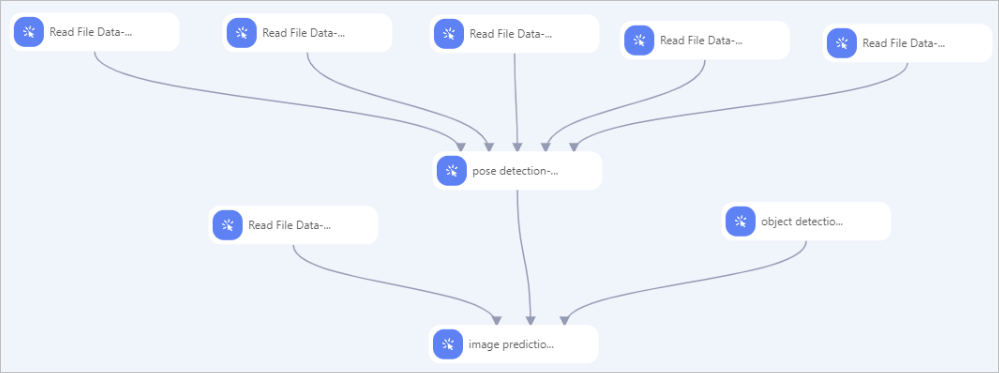
Label your data. Use iTAG to annotate images. See iTAG.
Load data. Add five Read File Data components (Read File Data-1 through Read File Data-5). Set the OSS Data Path parameter for each to the following paths in order: training images, training annotations, evaluation images, evaluation annotations, and dataset info file.
Connect and configure. Draw connections from all five Read File Data components to the pose detection component. Configure the parameters described in the Configure the component section.
Add inference. Connect the output of the pose detection component to the image prediction component. Set the following parameters on image prediction:
Parameter Value model type pose_predictoross path for model The same path set in oss dir to save model on the pose detection component oss path of detection model for pose OSS path to the object detection model. Required unless the object detection component is already connected upstream — in that case the detection model is inherited automatically. detection model type for pose yolox_predictor(required)