Machine reading comprehension solution
This machine reading comprehension (MRC) solution provides document-based intelligent question answering capabilities. It helps you quickly build an end-to-end pipeline that includes offline model training, offline prediction, and online service deployment. The solution is designed to extract answers from large volumes of text based on given questions. This reduces manual costs and improves information retrieval effectiveness. This topic describes the workflow and how to use the solution.
Prerequisites
Before you begin, complete the following preparations.
-
You have activated PAI (Designer, DSW, and EAS) with the pay-as-you-go billing method and created a default workspace. For more information, see Activate PAI and create a default workspace.
-
You have created an OSS bucket to store datasets, trained model files, and configuration files. For more information about how to create a bucket, see Create a bucket.
-
You have created a dedicated resource group for EAS to deploy the trained model. For more information, see Use a dedicated resource group.
-
You have associated your workspace with MaxCompute and DLC computing resources. For more information, see Manage workspaces.
Background information
Alibaba Cloud PAI provides diverse, end-to-end, and white-box (fully transparent) solutions for machine reading comprehension that support question answering based on long passages of text. You can build custom machine reading comprehension models for your business scenarios, or use the default models provided by PAI for model fine-tuning and online deployment to extract relevant answers from given text passages. The solution includes the following parts:
-
Fine-tune models on the Designer platform by using the machine reading comprehension models and algorithms provided by PAI. This allows you to build natural language processing (NLP) models tailored for your specific machine reading comprehension scenarios.
-
Perform batch offline prediction on the Designer platform by using either the default models provided by PAI or your own fine-tuned machine reading comprehension models.
-
Deploy the model as an EAS online service to perform automatic machine reading comprehension on given text passages and questions.
Workflow
Deploy the model as an EAS online service to perform automatic reading comprehension on given text passages and questions.

-
Upload the training and validation datasets to an OSS bucket for subsequent model training and prediction.
-
Step 2: Build a machine reading comprehension model
On the Designer platform, use the machine reading comprehension training component to build a machine reading comprehension model based on an NLP pretrained model trained on a massive corpus.
-
Step 3: Perform batch offline prediction
On the Designer platform, use the machine reading comprehension prediction component to perform batch offline answer extraction from large volumes of text passages and questions. You can use either a fine-tuned model or a default model provided by PAI.
-
Step 4: Deploy and call the model service
Deploy your trained machine reading comprehension model as an EAS online service for inference in a production environment.
Step 1: Prepare data
-
Prepare the training and validation datasets.
This topic uses a Chinese machine reading comprehension dataset for model training and prediction. The format requirements for the training and prediction datasets are as follows.
Dataset
Format
Columns
Sample dataset file
Training dataset
TSV or TXT
-
ID column
-
Context column
-
Question column
-
Answer column
-
Start position column
-
Title column (optional)
Validation dataset
TSV or TXT
-
ID column
-
Context column
-
Question column
-
Answer column (optional)
-
Start position column (optional)
-
Title column (optional)
-
-
Upload the datasets to your OSS bucket. For detailed instructions, see Upload files.
NoteIf you want to fine-tune the model on your own dataset, you must first upload the dataset to an OSS bucket.
Step 2: Build an MRC model
-
Go to the PAI-Designer page and create a blank workflow. For more information, see Create a blank pipeline.
-
In the workflow list, select the blank workflow that you created and click Enter Workflow.
-
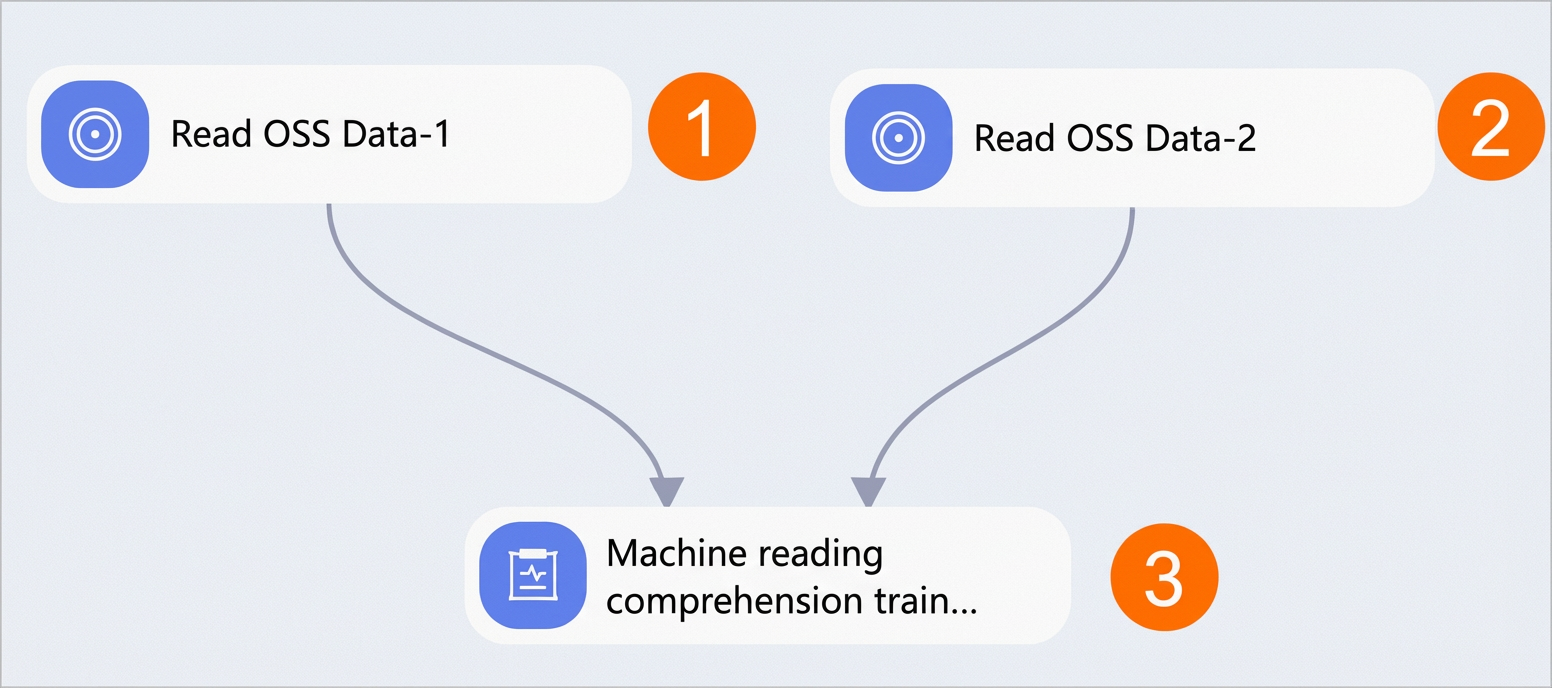
On the workflow canvas, drag the following components and configure their parameters as described below.
Area
Description
①
Configure the training dataset for the experiment. Set the OSS Path parameter of the Read OSS Data-1 component to the storage path of the training dataset in your OSS bucket.
②
Configure the validation dataset for the experiment. Set the OSS Path parameter of the Read OSS Data-2 component to the storage path of the validation dataset in your OSS bucket.
③
Configure the parameters for model training. For details on how to configure the Machine Reading Comprehension-Train component, see Configure the Machine Reading Comprehension-Train component below.
Table 1. Machine Reading Comprehension-Train parameters
Tab
Parameter
Description
Example value
Fields
Language
The language of the input file. The following languages are supported for machine reading comprehension:
-
zh
-
en
zh
Input Data Format
The data format for each column in the input file. Use commas (,) to separate columns.
qas_id:str:1,context_text:str:1,question_text:str:1,answer_text:str:1,start_position_character:str:1,title:str:1
Question column
The name of the question column in the input file.
question_text
Context column
The name of the context column in the input file.
context_text
Answer column
The name of the answer column in the input file.
answer_text
ID column
The name of the ID column in the input file.
qas_id
Start position column
The name of the column that specifies the starting position of the answer within the context text.
start_position_character
Model Path
The OSS directory where the model files generated during training or fine-tuning are stored.
oss://exampleBucket.oss-cn-shanghai-internal.aliyuncs.com/exampledir
NoteReplace this with your actual OSS path.
Parameters
Batch size
The batch size during training. If you use multiple machines with multiple GPUs, this value represents the batch size on each GPU.
4
NoteDue to the sliding window mechanism, do not set the batch size too large to avoid out-of-memory errors.
Max Context Length
The maximum length of the context that the system can process.
384
Max Question Length
The maximum length of the question that the system can process.
64
Doc Stride
The size of the sliding window used to split the context.
128
Number of Epochs
The number of training epochs.
3
Learning rate
The learning rate used during model training.
3.5e-5
Save Checkpoint Steps
The number of training steps after which the model is evaluated and the best-performing model is saved.
600
pretrainModelNameOrPath
The name or path of the pretrained model provided by the system. Valid values:
-
Custom
-
hfl/macbert-base-zh (Default)
-
hfl/macbert-large-zh
-
bert-base-uncased
-
bert-large-uncased
hfl/macbert-base-zh
User-defined Parameters
Custom parameters that you can use to adjust the model based on your data.
If you want to use a custom pretrained or fine-tuned model, you can declare it here.
Not required for this example.
Tuning
GPU Instance Type
The GPU instance type for computing resources. The default value is
gn5-c8g1.2xlarge, which provides 8 vCPUs, 80 GB of memory, and a single P100 GPU.gn5-c8g1.2xlarge
Number of GPUs per Worker
The number of GPUs allocated to each worker.
1
-
Step 3: Perform batch offline prediction
-
Configure the offline prediction workflow.
The Machine Reading Comprehension-Predict component works in one of the following two ways:
-
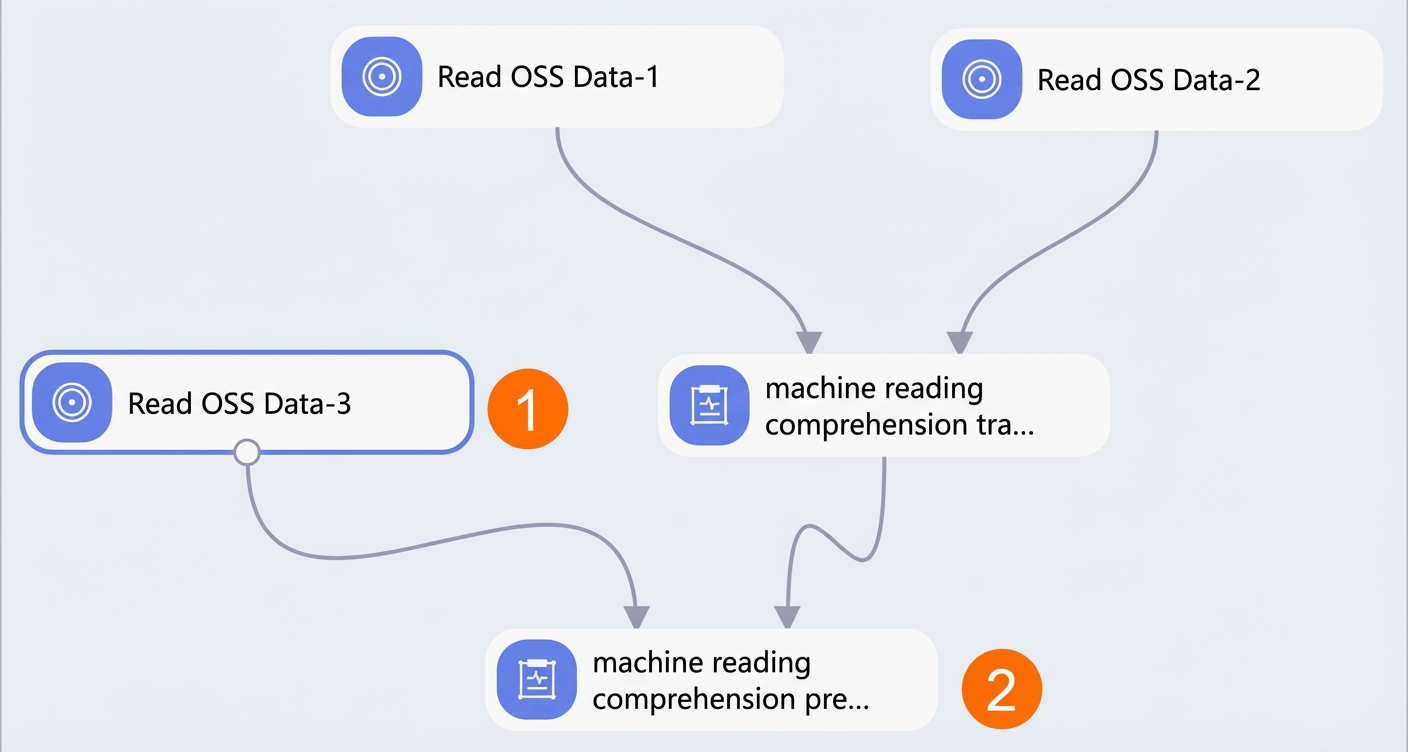
Method 1: Use the model generated by the Machine Reading Comprehension-Train component to perform prediction and extract answers.
On the workflow canvas from Step 2, add and configure the components as shown in the following figure.
-
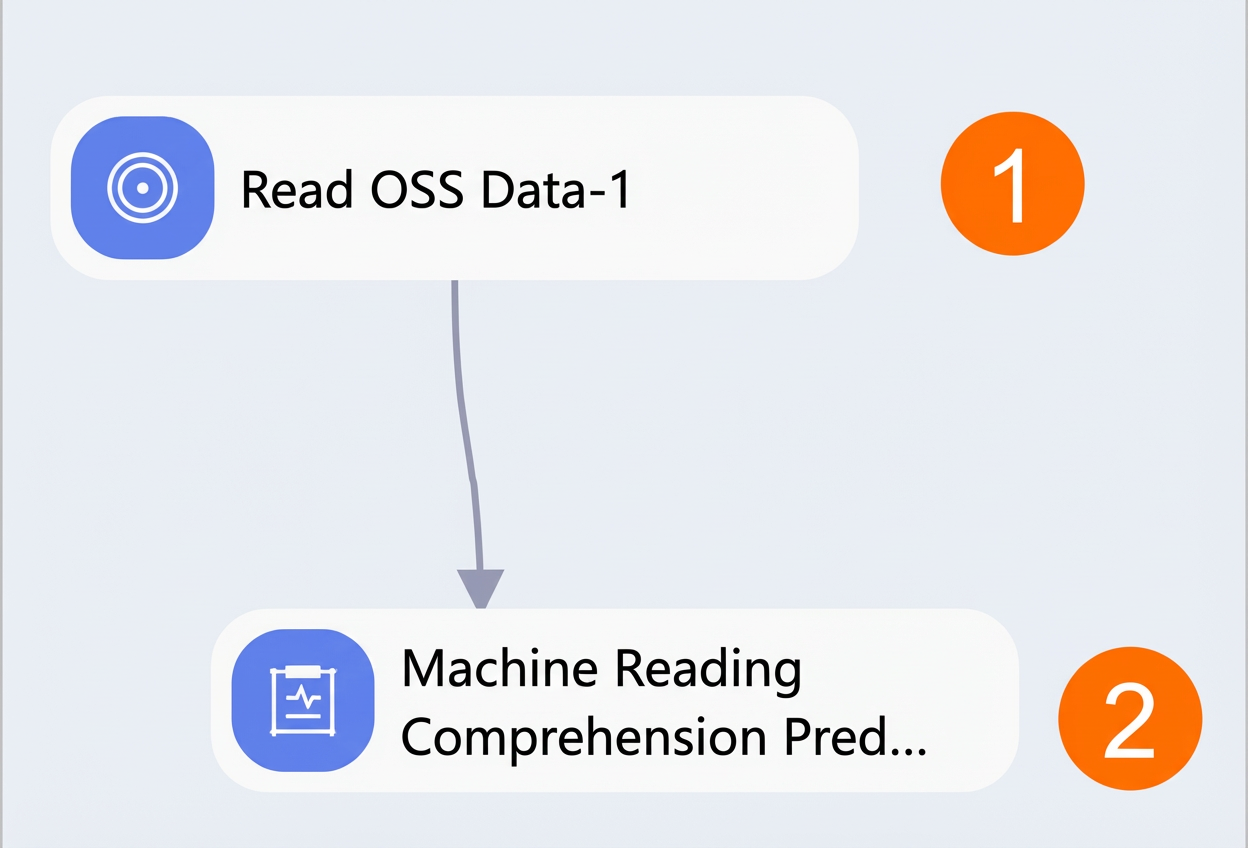
Method 2: Upload a default PAI model to an OSS bucket and connect it to the Machine Reading Comprehension-Predict component to perform prediction and extract answers.
Create a new blank workflow as described in Step 2, drag and configure the components as shown in the following figure.
Area
Description
①
Configure the prediction dataset for the experiment by using the validation dataset from Step 1. Set the OSS Path parameter of the Read OSS Data-3 component to the storage path of the validation dataset in your OSS bucket.
②
Configure the parameters for model prediction. For details on how to configure the Machine Reading Comprehension-Predict component, see Configure the Machine Reading Comprehension-Predict component.
Table 2. Machine Reading Comprehension-Predict parameters
Tab
Parameter
Description
Example value
Fields
Language
The language of the input file. The following languages are supported for machine reading comprehension:
-
zh
-
en
zh
Input Data Format
The data format for each column in the input file. Use commas (,) to separate columns.
qas_id:str:1,context_text:str:1,question_text:str:1,answer_text:str:1,start_position_character:str:1,title:str:1
Question column
The name of the question column in the input file.
question_text
Context column
The name of the context column in the input file.
context_text
Answer column
The name of the answer column in the input file.
answer_text
ID column
The name of the ID column in the input file.
qas_id
Start position column
The name of the column that specifies the starting position of the answer within the context text.
start_position_character
Prediction Output Path
The OSS directory where the prediction results are stored.
oss://exampleBucket.oss-cn-shanghai-internal.aliyuncs.com/exampledir1
NoteReplace this with your actual OSS path.
Use Custom Model
Specifies whether to use a custom model. Valid values:
-
No: Corresponds to Method 1 above.
-
Yes: This corresponds to Method 2.
false
Model Path
This parameter must be configured when Use Custom Model is set to Yes.
Specifies the OSS directory where the custom model files are stored.
oss://exampleBucket.oss-cn-shanghai-internal.aliyuncs.com/exampledir2
NoteReplace with yourOSSpath。
Parameters
Batch size
The batch size for prediction. If you use multiple machines with multiple GPUs, this is the batch size for each GPU.
256
Max Context Length
The maximum length of the context that the system can process.
384
Max Question Length
The maximum length of the question that the system can process.
64
Max Answer Length
The maximum length of the answer that the system can extract.
30
Doc Stride
The size of the sliding window used to split the context.
128
pretrainModelNameOrPath
The name or path of the pretrained model provided by the system. Valid values:
-
Custom
-
hfl/macbert-base-zh
-
hfl/macbert-large-zh
-
bert-base-uncased
-
bert-large-uncased
hfl/macbert-base-zh
User-defined Parameters
Custom parameters that you can use to adjust the model based on your data.
Not required for this example.
Tuning
GPU Instance Type
The GPU instance type for computing resources. The default value is
gn5-c8g1.2xlarge, which provides 8 vCPUs, 80 GB of memory, and a single P100 GPU.gn5-c8g1.2xlarge
Number of GPUs per Worker
The number of GPUs allocated to each worker.
1
-
-
Click Run at the top of the canvas.
-
After the experiment succeeds, you can download the prediction results from the OSS directory specified in the Prediction Output Path parameter of the Machine Reading Comprehension-Predict component. You can also download the generated model and configuration files from the OSS directory specified in the Model Path parameter of the Machine Reading Comprehension-Train component.
Step 4: Deploy and call the model service
Use PAI EAS to deploy your trained machine reading comprehension model as an online service for inference in your production environment.
Go to the Elastic Algorithm Service (EAS) page.
Log on to the PAI console.
In the left-side navigation pane, click Workspaces. On the Workspaces page, click the name of the workspace that you want to manage.
In the left-side navigation pane, choose .
-
Deploy the model service.
-
On the Inference Services tab of the Model Service - EAS page, click Deploy Service.
-
On the Deploy Service page, click Custom Deployment and configure the following parameters. This section describes only the key parameters for this example. For information about other parameters, see Custom Deployment. Then, click Deploy.
Parameter
Description
Service Name
Use a name that reflects your business to distinguish it from other services.
Deployment Method
Select Deploy by Using Processor.
Model Configurations
In this example, the trained models are stored in OSS. Therefore, select Object Storage Service (OSS) as the configuration type.
For the OSS path, select the model folder located in the directory specified for the Model Path parameter of the machine reading comprehension training component. This folder should contain
config.json,pytorch_model.bin,pytorch_model.meta.bin,train_config.json,vocab.txt, andlabel_mapping.json. For example, given the model directory structure shown in the figure, you must select this directory as the OSS path.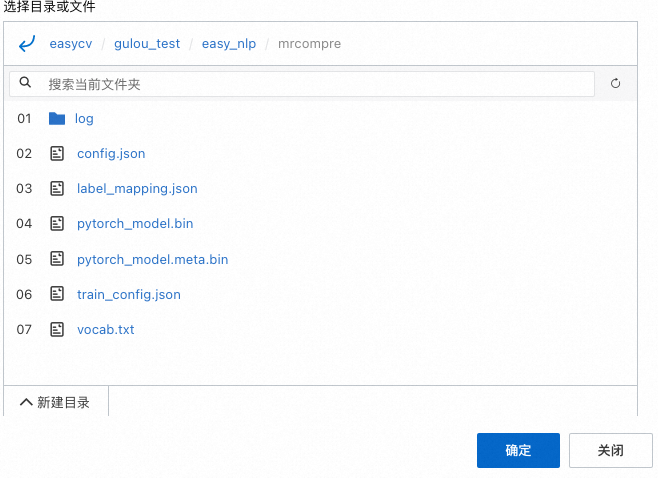
Processor
Select EasyNLP.
Model Type
Select either Machine Reading Comprehension (Chinese) or Machine Reading Comprehension (English) based on your needs.
Resources
Select your purchased resources. We recommend prioritizing GPU resources.
-
-
Debug the model service.
-
On the Model Service - EAS page, find the target service and click Debug Online in the Actions column.
-
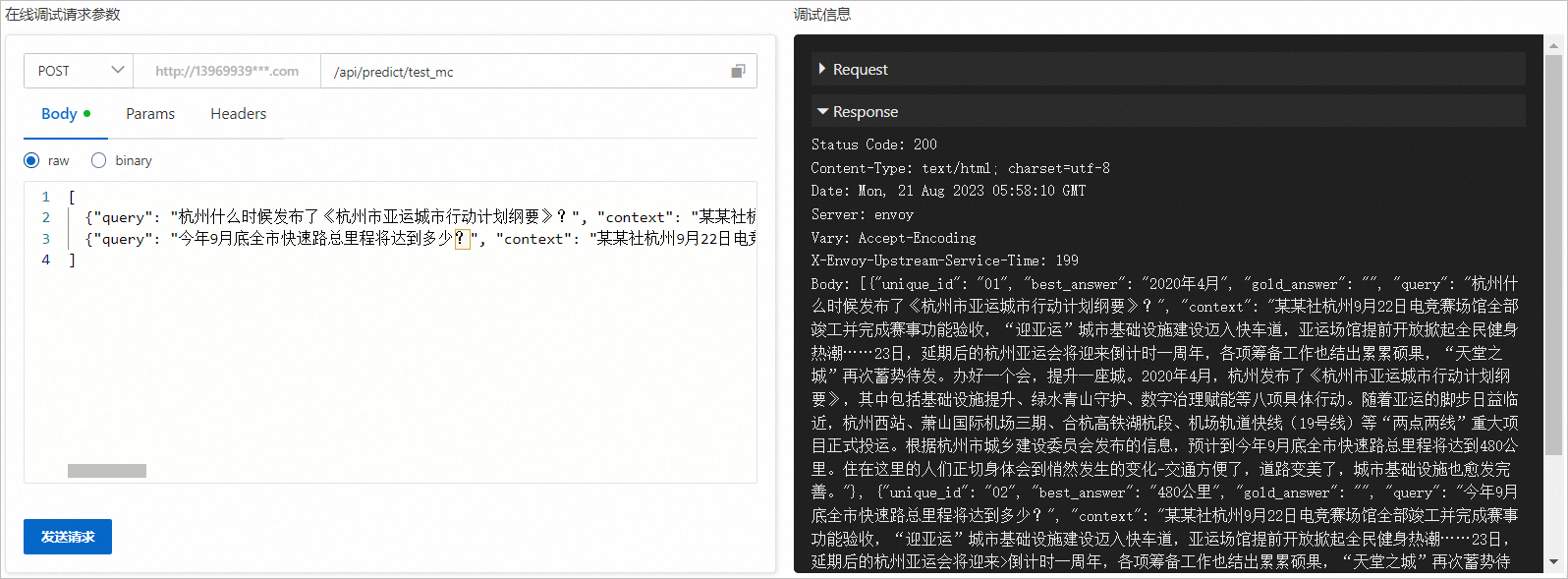
On the debugging page, enter the following content in the Body field of the Online Debugging Request Parameters section.
[ {"query": "When did Hangzhou release the 'Hangzhou Asian Games City Action Plan Outline'?", "context": "News Agency, Hangzhou, Sept. 22 – The competition venues have been fully completed and passed event function acceptance tests. The urban infrastructure construction for the 'Welcome Asian Games' initiative is on a fast track, and the early opening of Asian Games venues has sparked a public fitness boom. On the 23rd, the postponed Hangzhou Asian Games will enter its one-year countdown, with preparations yielding fruitful results. The 'City of Heaven' is poised for action once again. Hosting a major event elevates a city. In April 2020, Hangzhou released the 'Hangzhou Asian Games City Action Plan Outline,' which includes eight specific actions such as infrastructure improvement, green environment protection, and digital governance empowerment. As the Asian Games approach, major projects such as Hangzhou West Railway Station, Phase III of Xiaoshan International Airport, the Huzhou-Hangzhou section of the Hefei-Hangzhou high-speed railway, and the Airport Rail Express (Line 19) have been officially put into operation. According to the Hangzhou Municipal Commission of Urban-Rural Development, the total length of the city's expressways is expected to reach 480 kilometers by the end of this September. Residents are experiencing these quiet changes firsthand—transportation is more convenient, roads are more scenic, and the urban infrastructure is increasingly complete.", "id": "01"}, {"query": "What will be the total mileage of the city's expressways by the end of this September?", "context": "News Agency, Hangzhou, Sept. 22 – The competition venues have been fully completed and passed event function acceptance tests. The urban infrastructure construction for the 'Welcome Asian Games' initiative is on a fast track, and the early opening of Asian Games venues has sparked a public fitness boom. On the 23rd, the postponed Hangzhou Asian Games will enter its one-year countdown, with preparations yielding fruitful results. The 'City of Heaven' is poised for action once again. Hosting a major event elevates a city. In April 2020, Hangzhou released the 'Hangzhou Asian Games City Action Plan Outline,' which includes eight specific actions such as infrastructure improvement, green environment protection, and digital governance empowerment. As the Asian Games approach, major projects such as Hangzhou West Railway Station, Phase III of Xiaoshan International Airport, the Huzhou-Hangzhou section of the Hefei-Hangzhou high-speed railway, and the Airport Rail Express (Line 19) have been officially put into operation. According to the Hangzhou Municipal Commission of Urban-Rural Development, the total length of the city's expressways is expected to reach 480 kilometers by the end of this September. Residents are experiencing these quiet changes firsthand—transportation is more convenient, roads are more scenic, and the urban infrastructure is increasingly complete.", "id": "02"} ] -
Click Send Request. The prediction result is displayed in the Debugging Information area, as shown in the following figure.
 In the prediction result, best_answer is the answer text provided by the model. For your convenience, the input id, query, and context information is also returned. If you specify a reference answer in the input, the reference answer text is also returned in the gold_answer parameter. The following is an example of the returned result.
[ {"unique_id": "01", "best_answer": "In April 2020", "gold_answer": "", "query": "When did Hangzhou release the 'Hangzhou Asian Games City Action Plan Outline'?", "context": "News Agency, Hangzhou, Sept. 22 – The competition venues have been fully completed and passed event function acceptance tests. The urban infrastructure construction for the 'Welcome Asian Games' initiative is on a fast track, and the early opening of Asian Games venues has sparked a public fitness boom. On the 23rd, the postponed Hangzhou Asian Games will enter its one-year countdown, with preparations yielding fruitful results. The 'City of Heaven' is poised for action once again. Hosting a major event elevates a city. In April 2020, Hangzhou released the 'Hangzhou Asian Games City Action Plan Outline,' which includes eight specific actions such as infrastructure improvement, green environment protection, and digital governance empowerment. As the Asian Games approach, major projects such as Hangzhou West Railway Station, Phase III of Xiaoshan International Airport, the Huzhou-Hangzhou section of the Hefei-Hangzhou high-speed railway, and the Airport Rail Express (Line 19) have been officially put into operation. According to the Hangzhou Municipal Commission of Urban-Rural Development, the total length of the city's expressways is expected to reach 480 kilometers by the end of this September. Residents are experiencing these quiet changes firsthand—transportation is more convenient, roads are more scenic, and the urban infrastructure is increasingly complete."}, {"unique_id": "02", "best_answer": "480 kilometers", "gold_answer": "", "query": "What will be the total mileage of the city's expressways by the end of this September?", "context": "News Agency, Hangzhou, Sept. 22 – The competition venues have been fully completed and passed event function acceptance tests. The urban infrastructure construction for the 'Welcome Asian Games' initiative is on a fast track, and the early opening of Asian Games venues has sparked a public fitness boom. On the 23rd, the postponed Hangzhou Asian Games will enter its one-year countdown, with preparations yielding fruitful results. The 'City of Heaven' is poised for action once again. Hosting a major event elevates a city. In April 2020, Hangzhou released the 'Hangzhou Asian Games City Action Plan Outline,' which includes eight specific actions such as infrastructure improvement, green environment protection, and digital governance empowerment. As the Asian Games approach, major projects such as Hangzhou West Railway Station, Phase III of Xiaoshan International Airport, the Huzhou-Hangzhou section of the Hefei-Hangzhou high-speed railway, and the Airport Rail Express (Line 19) have been officially put into operation. According to the Hangzhou Municipal Commission of Urban-Rural Development, the total length of the city's expressways is expected to reach 480 kilometers by the end of this September. Residents are experiencing these quiet changes firsthand—transportation is more convenient, roads are more scenic, and the urban infrastructure is increasingly complete."} ]
-
-
View the public endpoint and access token of the model service.
-
On the Model Service - EAS page, find the target service and click View Invocation Information in the Service Method column.
-
On the View Invocation Information page, find the public endpoint and Token.
-
-
Use a script for batch invocation.
-
Create a Python script named eas_test_mrc.py to call the model service.
#!/usr/bin/env python #encoding=utf-8 from eas_prediction import PredictClient from eas_prediction import StringRequest if __name__ == '__main__': # Replace the endpoint and service name in PredictClient() with your actual values. client = PredictClient('http://xxxxxxxxxxxxxxxx.cn-hangzhou.pai-eas.aliyuncs.com', 'test_mrc_new') # Replace the token with your actual token. client.set_token('ZDY5Mzg1xxxxxxxxxxxxxxxxxxxxxxxxxxxxxxxxxxxxjlmZTEyYmY0Yg==') client.init() # The request must be structured according to the model. This is an example of a program that uses strings for input and output. request = StringRequest('[{"query": "When did Hangzhou release the \'Hangzhou Asian Games City Action Plan Outline\'?", "context": "News Agency, Hangzhou, Sept. 22 – The competition venues have been fully completed and passed event function acceptance tests. The urban infrastructure construction for the \'Welcome Asian Games\' initiative is on a fast track, and the early opening of Asian Games venues has sparked a public fitness boom. On the 23rd, the postponed Hangzhou Asian Games will enter its one-year countdown, with preparations yielding fruitful results. The \'City of Heaven\' is poised for action once again. Hosting a major event elevates a city. In April 2020, Hangzhou released the \'Hangzhou Asian Games City Action Plan Outline,\' which includes eight specific actions such as infrastructure improvement, green environment protection, and digital governance empowerment. As the Asian Games approach, major projects such as Hangzhou West Railway Station, Phase III of Xiaoshan International Airport, the Huzhou-Hangzhou section of the Hefei-Hangzhou high-speed railway, and the Airport Rail Express (Line 19) have been officially put into operation. According to the Hangzhou Municipal Commission of Urban-Rural Development, the total length of the city\'s expressways is expected to reach 480 kilometers by the end of this September. Residents are experiencing these quiet changes firsthand—transportation is more convenient, roads are more scenic, and the urban infrastructure is increasingly complete.", "id": "01"}, {"query": "What will be the total mileage of the city\'s expressways by the end of this September?", "context": "News Agency, Hangzhou, Sept. 22 – The competition venues have been fully completed and passed event function acceptance tests. The urban infrastructure construction for the \'Welcome Asian Games\' initiative is on a fast track, and the early opening of Asian Games venues has sparked a public fitness boom. On the 23rd, the postponed Hangzhou Asian Games will enter its one-year countdown, with preparations yielding fruitful results. The \'City of Heaven\' is poised for action once again. Hosting a major event elevates a city. In April 2020, Hangzhou released the \'Hangzhou Asian Games City Action Plan Outline,\' which includes eight specific actions such as infrastructure improvement, green environment protection, and digital governance empowerment. As the Asian Games approach, major projects such as Hangzhou West Railway Station, Phase III of Xiaoshan International Airport, the Huzhou-Hangzhou section of the Hefei-Hangzhou high-speed railway, and the Airport Rail Express (Line 19) have been officially put into operation. According to the Hangzhou Municipal Commission of Urban-Rural Development, the total length of the city\'s expressways is expected to reach 480 kilometers by the end of this September. Residents are experiencing these quiet changes firsthand—transportation is more convenient, roads are more scenic, and the urban infrastructure is increasingly complete.", "id": "02"}]') for x in range(0, 1): resp = client.predict(request) print(str(resp.response_data, 'utf8')) print("test ending") -
Upload the eas_test_mrc.py Python script to your environment and run the following command in the directory where you uploaded the script.
python <eas_test_mrc.py>Replace <eas_test_mrc.py> with the actual Python script name.
-
-
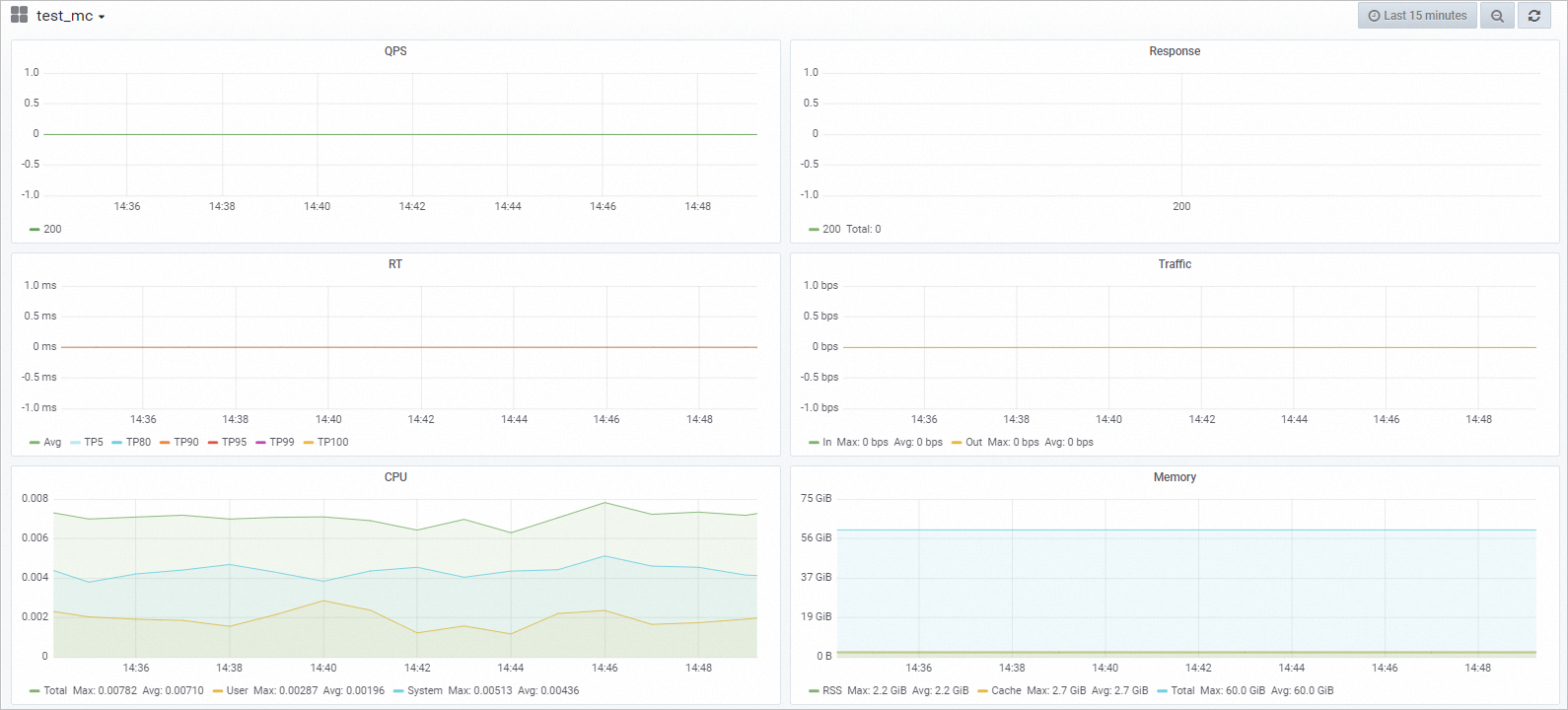
Monitor service metrics. After calling the model service, you can view relevant metrics, including QPS, RT, CPU, GPU, and Memory.
-
On the Model Service - EAS page, find the service and click the
icon in the Log/Monitor column. -
On the Monitoring tab, you can view the model invocation metrics. Your actual metrics may vary.
-
 In the prediction result,
  icon in the Log/Monitor column.