Train Transformer models to generate summaries and headlines from source documents.
Limitations
Runs only on DLC compute resources.
How it works
The component uses a standard Transformer encoder-decoder architecture. During training, the encoder reads the source text and the decoder generates the output summary.
Prerequisites
Before you begin, make sure you have:
Connected a Sentence Split component upstream to split source text into one sentence per line
Uploaded training and validation datasets to OSS
Parameters
Configure parameters in Designer after adding the component to your workflow.
Input ports
| Port (left to right) | Data type | Upstream component | Required |
|---|---|---|---|
| Training data | OSS | Read OSS Data | Yes |
| Validation data | OSS | Read OSS Data | Yes |
Field Settings tab
| Parameter | Default | Description |
|---|---|---|
| Input data format | target:str:1,source:str:1 | Column definitions in the input file. Each field is name:type:count. The default defines two columns: source (source text) and target (summary text). |
| Source column | source | Column name containing source text. |
| Summary Column Selection | target | Column name containing summary text. |
| Model save path | — | OSS directory where the trained model is saved. |
Data format details
The input file uses tab-separated columns by default. Each row is one training example:
| Column | Content | Example |
|---|---|---|
source | Source document text | Scientists discover new exoplanet... |
target | Expected summary or headline | New exoplanet found |
CSV format is also supported.
Parameter Settings tab
| Parameter | Type | Range | Default | Description |
|---|---|---|---|---|
| Pre-trained model | — | — | alibaba-pai/mt5-title-generation-zh | Pre-trained model to fine-tune. |
| Batch size | INT | >0 | 16 | Samples processed per training step. For multi-GPU instances, this is the per-GPU batch size. |
| Maximum text length | INT | 1–512 | 512 | Maximum input sequence length in tokens. |
| Number of epochs | INT | >0 | 3 | Number of full passes through the training dataset. |
| Learning rate | FLOAT | >0 | 3e-5 | Learning rate for model weight updates. |
| Steps to Save a Model File | — | >0 | 150 | Number of training steps between model evaluations and checkpoint saves. |
| Language | — | zh, en | — | Language of the training data. Use zh for Chinese, en for English. |
| Copy text from source | — | true, false | false | Whether to copy source text to the output. Set to true if your downstream pipeline needs both source and generated summary. |
| Minimum decoder length | INT | >=0 | 12 | Minimum output length in tokens. |
| Maximum decoder length | INT | >0 | 32 | Maximum output length in tokens. |
| Minimum non-repeated n-gram | INT | >=1 | 2 | Minimum n-gram length that cannot repeat in the output. Set to 1 to prevent repeated words (e.g., "day"). Higher values reduce repetition of longer phrases. |
| Beam search size | INT | >=1 | 5 | Search space size for candidate outputs. Larger values reduce prediction speed. |
| Number of returned candidates | INT | >=1 | 5 | Number of top-scoring candidates to return from beam search. |
Execution Tuning tab
| Parameter | Default | Description |
|---|---|---|
| GPU machine type | gn5-c8g1.2xlarge | GPU instance type for training. |
Output port
| Output port | Data type | Downstream component | Required |
|---|---|---|---|
| Output model | OSS path (SavedModel format) | Text Summarization Predict | No |
The model is saved to the OSS directory specified in Model save path on the Field Settings tab.
Run a text summarization training workflow
This example trains a Chinese summarization model using sample datasets.
Download the training dataset (cn_train.txt) and validation dataset (cn_dev.txt), then upload both files to OSS. Both files use TXT format with tab-separated fields.
CSV format is also supported. To upload datasets using MaxCompute, use Tunnel commands in the MaxCompute client. For details, see Connect using the client (odpscmd) and Tunnel commands.
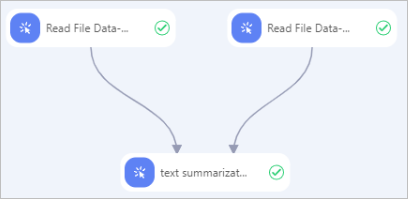
Add Read OSS Data-1 and Read OSS Data-2 components to the workflow. Set OSS Data Path on each component to the location of the training and validation datasets respectively.
Connect Read OSS Data-1 (training data) and Read OSS Data-2 (validation data) to the Text Summarization Training-1 component. Configure parameters as described in Parameters.
Click
 to run the workflow. After the workflow completes, the trained model is saved to the OSS path specified in Model save path.