x13_arima is a seasonal time series forecasting algorithm built on the open-source X-13ARIMA-SEATS package. It works like a filter: it separates the underlying signal in your data from noise and seasonal patterns, then projects that signal forward to generate forecasts.
Use x13_arima when your data has a known seasonal structure — monthly sales, quarterly revenue, weekly traffic — and you want full control over the model order. If you are not sure which orders to use, use x13_auto_arima instead. You provide only the upper bounds for each order, and x13_auto_arima searches for the optimal values automatically.
How it works
x13_arima fits a Seasonal ARIMA model, expressed as ARIMA(p,d,q)(P,D,Q)m:
| Part | Parameters | Meaning |
|---|---|---|
| Non-seasonal | (p,d,q) | Autoregressive order, differencing order, moving average order |
| Seasonal | (P,D,Q) | Seasonal autoregressive order, seasonal differencing, seasonal moving average order |
| Period | m | Number of observations per season (e.g., 12 for monthly data in a yearly cycle) |
ARIMA (Autoregressive Integrated Moving Average) was introduced by Box and Jenkins in the early 1970s and is also known as the Box-Jenkins model.
Limits
| Limit | Value |
|---|---|
| Rows per group | Maximum 1,200 records |
| Columns | One numeric column per run |
Configure the component
Method 1: configure in the PAI console (recommended)
On the pipeline page of Machine Learning Designer, add the x13_arima component and configure the following parameters.
Fields Setting tab
| Parameter | Required | Description |
|---|---|---|
| Time Series Column | Yes | Sorts the numeric column. Does not affect the values themselves. |
| Value Column | Yes | The numeric column to forecast. |
| Stratification Column | No | Comma-separated column names (e.g., col0,col1). A separate model is fitted for each group. |
Parameters Setting tab
| Parameter | Required | Range | Default | Description |
|---|---|---|---|---|
| Format (p,d,q) | Yes | Non-negative integers in [0, 36] | — | Non-seasonal ARIMA order. p: autoregressive order. d: differencing order. q: moving average order. |
| Start Date | No | year.season (e.g., 1986.1) | 1.1 | Start position of the time series. See Time series format. |
| Series Frequency | No | Positive integer in [1, 12] | 12 | Number of observations per unit period. 12 means monthly data in a yearly cycle. |
| Format (sp,sd,sq) | No | Non-negative integers in [0, 36] | Non-seasonal | Seasonal ARIMA order. sp: seasonal autoregressive order. sd: seasonal differencing. sq: seasonal moving average order. |
| Seasonal Cycle | No | (0, 12] | 12 | The seasonal period length. |
| Prediction Entries | No | Positive integer in (0, 120] | 12 | Number of future steps to forecast. |
| Prediction Confidence Level | No | (0, 1) | 0.95 | Confidence interval width for forecast bounds. |
Tuning tab
| Parameter | Description |
|---|---|
| Cores | Number of cores. Determined by the system by default. |
| Memory | Memory per core, in MB. Determined by the system by default. |
Method 2: run PAI commands
Use a SQL Script or ODPS SQL component to call x13_arima directly.
PAI -name x13_arima
    -project algo_public
    -DinputTableName=pai_ft_x13_arima_input
    -DseqColName=id
    -DvalueColName=number
    -Dorder=3,1,1
    -Dstart=1949.1
    -Dfrequency=12
    -Dseasonal=0,1,1
    -Dperiod=12
    -DpredictStep=12
    -DoutputPredictTableName=pai_ft_x13_arima_out_predict
    -DoutputDetailTableName=pai_ft_x13_arima_out_detail
Parameters
| Parameter | Required | Default | Description |
|---|---|---|---|
inputTableName | Yes | — | Name of the input table. |
inputTablePartitions | No | Full table | Partitions to read from the input table. |
seqColName | Yes | — | Time series column. Used only to sort the valueColName column. |
valueColName | Yes | — | Numeric column to forecast. |
groupColNames | No | — | Grouping columns, comma-separated (e.g., col0,col1). A separate model is fitted per group. |
order | Yes | — | Non-seasonal order as p,d,q. Non-negative integers in [0, 36]. |
start | No | 1.1 | Start position of the time series in n1.n2 format. See Time series format. |
frequency | No | 12 | Number of observations per unit period. Range: (0, 12]. A value of 12 means 12 months per year. |
seasonal | No | Non-seasonal | Seasonal order as sp,sd,sq. Non-negative integers in [0, 36]. |
period | No | Same as frequency | Seasonal period length. Range: (0, 100]. |
maxiter | No | 1500 | Maximum number of training iterations. |
tol | No | 1e-5 | Convergence tolerance (DOUBLE). |
predictStep | No | 12 | Number of future steps to forecast. Range: (0, 365]. |
confidenceLevel | No | 0.95 | Confidence level for forecast bounds. Range: (0, 1). |
outputPredictTableName | Yes | — | Output table for forecast results. |
outputDetailTableName | Yes | — | Output table for model details. |
outputTablePartition | No | No partition | Partition spec for the output tables. |
coreNum | No | System default | Number of cores. Must be a positive integer. Used together with memSizePerCore. |
memSizePerCore | No | System default | Memory per core, in MB. Range: [1024, 65536]. |
lifecycle | No | — | Lifecycle of the output tables in MaxCompute. |
Default resource allocation
| Condition | coreNum | memSizePerCore |
|---|---|---|
groupColNames not set | 1 | 4096 MB |
groupColNames set | floor(total rows / 120,000) | 4096 MB |
Time series format
The start and frequency parameters jointly define how your data maps to calendar time. Think of the data as a sequence of values placed into a two-level calendar: a major unit ts1 (e.g., year) and a sub-unit ts2 (e.g., month).
frequency— number ofts2sub-units perts1major unitstart— written asn1.n2, meaning then2thts2in then1thts1
| Granularity | ts1 | ts2 | frequency | start example |
|---|---|---|---|---|
| Monthly | Year | Month | 12 | 1949.2 = February 1949 |
| Quarterly | Year | Quarter | 4 | 1949.2 = Q2 1949 |
| Daily (weekly cycle) | Week | Day | 7 | 1949.2 = 2nd day of week 1949 |
| Custom single unit | Any | — | 1 | 1949.1 = the 1949th unit |
Example
This example uses the AirPassengers dataset, which records the monthly count of international airline passengers from 1949 to 1960. For dataset details, see AirPassengers (R datasets).
Prepare the input table
The input table has two columns: id (sequence number) and number (passenger count).
| id | number |
|---|---|
| 1 | 112 |
| 2 | 118 |
| 3 | 132 |
| 4 | 129 |
| 5 | 121 |
| ... | ... |
Create the table and upload the data using the MaxCompute client. For installation instructions, see MaxCompute client (odpscmd). For Tunnel command usage, see Tunnel commands.
create table pai_ft_x13_arima_input(id bigint, number bigint);
tunnel upload xxxx/airpassengers.csv pai_ft_x13_arima_input -h true;
This dataset uses monthly frequency starting from January 1949, so start=1949.1 and frequency=12. The table below shows how those 14 values [1, 2, 3, ..., 15] would map if start=1949.3 and frequency=12 (monthly, starting March 1949):
| Year | Jan | Feb | Mar | Apr | May | Jun | Jul | Aug | Sep | Oct | Nov | Dec |
|---|---|---|---|---|---|---|---|---|---|---|---|---|
| 1949 | 1 | 2 | 3 | 4 | 5 | 6 | 7 | 8 | 9 | 10 | ||
| 1950 | 11 | 12 | 13 | 14 | 15 |
The following examples show additional time series mappings for quarterly, weekly, and single-unit granularities using the same value sequence [1, 2, 3, ..., 15]:
Quarterly (frequency=4, start=1949.3)
| Year | Qtr1 | Qtr2 | Qtr3 | Qtr4 |
|---|---|---|---|---|
| 1949 | 1 | 2 | ||
| 1950 | 3 | 4 | 5 | 6 |
| 1951 | 7 | 8 | 9 | 10 |
| 1952 | 11 | 12 | 13 | 14 |
| 1953 | 14 | 15 |
Forecasting begins from the second quarter of 1953.
Daily with weekly cycle (frequency=7, start=1949.3)
| Week | Sun | Mon | Tue | Wed | Thu | Fri | Sat |
|---|---|---|---|---|---|---|---|
| 1949 | 1 | 2 | 3 | 4 | 5 | ||
| 1950 | 6 | 7 | 8 | 9 | 10 | 11 | 12 |
| 1951 | 13 | 14 | 15 |
Forecasting begins from the fourth day of the 1951st week.
Single unit (frequency=1, start=1949.1)
| Cycle | p1 |
|---|---|
| 1949 | 1 |
| 1950 | 2 |
| 1951 | 3 |
| 1952 | 4 |
| 1953 | 5 |
| 1954 | 6 |
| 1955 | 7 |
| 1956 | 8 |
| 1957 | 9 |
| 1958 | 10 |
| 1959 | 11 |
| 1960 | 12 |
| 1961 | 13 |
| 1962 | 14 |
| 1963 | 15 |
Forecasting begins in 1963.
Run the PAI command
Run the following command using a SQL Script or ODPS SQL component:
PAI -name x13_arima
    -project algo_public
    -DinputTableName=pai_ft_x13_arima_input
    -DseqColName=id
    -DvalueColName=number
    -Dorder=3,1,1
    -Dseasonal=0,1,1
    -Dstart=1949.1
    -Dfrequency=12
    -Dperiod=12
    -DpredictStep=12
    -DoutputPredictTableName=pai_ft_x13_arima_out_predict
    -DoutputDetailTableName=pai_ft_x13_arima_out_detail
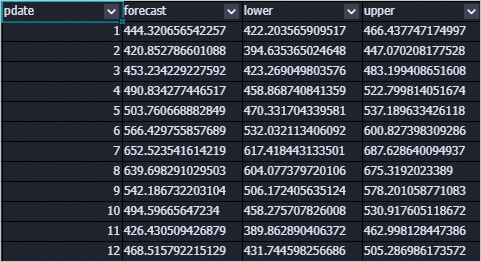
Output tables
outputPredictTableName — forecast results
| Column | Description |
|---|---|
pdate | Forecast date. |
forecast | Predicted value. |
lower | Lower bound of the confidence interval (default: 95%). |
upper | Upper bound of the confidence interval (default: 95%). |
outputDetailTableName — model details
| Column | Description |
|---|---|
key | Record type: model (model specification), evaluation (evaluation metrics), parameters (training parameters), or log (training logs). |
summary | Detail content for the corresponding key. |

FAQ
Why are all prediction results the same value?
The model fell back to a mean model, which outputs the training data mean for all forecast steps. This happens when training fails due to instability after temporal differencing, non-convergence, or zero variance. To see the exact error, open the Logview for the job and check the stderr file for individual nodes.
How do I choose p, d, q, sp, sd, and sq values?
If you are not confident in the parameter settings, use x13_auto_arima instead. Set only the upper limits for each order, and x13_auto_arima searches for the optimal values automatically.
Error: `Number of observations after differencing and/or conditional AR estimation is 9, which is less than the minimum series length required for the model estimated, 24`
The training data is too short for the specified model. Modify the frequency parameter or add more historical data.
Error: `Order of the MA operator is too large`
In most cases, this error occurs because the training data is insufficient. Add more training data.
Error: `Series to be modelled and/or seasonally adjusted must have at least 3 complete years of data`
When you specify seasonal parameters (seasonal), the input must contain at least three complete years of data.
What's next
x13_auto_arima — automatically selects SARIMA orders within upper bounds you specify
SQL Script — run PAI commands in a pipeline
MaxCompute client (odpscmd) — upload data to MaxCompute tables