The XGBoost algorithm is an extension and upgrade of the boosting algorithm. It is easy to use, robust, and widely used in various machine learning production systems and competitions. The algorithm supports both classification and regression. The XGBoost Predict component is built on the open source XGBoost. You can use this component to perform offline inference on models that are generated by the XGBoost Train component. This topic describes how to configure this component.
Limits
The supported computing engines are MaxCompute, Flink, and DLC.
Data formats
This component supports data in Table and LibSVM formats.
The following is an example of data in Table format:
f0
f1
label
0.1
1
0
0.9
2
1
The following is an example of data in LibSVM format:
Sample data
2:1 9:1 10:1 20:1 29:1 33:1 35:1 39:1 40:1 52:1 57:1 64:1 68:1 76:1 85:1 87:1 91:1 94:1 101:1 104:1 116:1 123:1
0:1 9:1 18:1 20:1 23:1 33:1 35:1 38:1 41:1 52:1 55:1 64:1 68:1 76:1 85:1 87:1 91:1 94:1 101:1 105:1 115:1 121:1
2:1 8:1 18:1 20:1 29:1 33:1 35:1 39:1 41:1 52:1 57:1 64:1 68:1 76:1 85:1 87:1 91:1 94:1 101:1 104:1 116:1 123:1
2:1 9:1 13:1 21:1 28:1 33:1 36:1 38:1 40:1 53:1 57:1 64:1 68:1 76:1 85:1 87:1 91:1 94:1 97:1 105:1 113:1 119:1
0:1 9:1 18:1 20:1 22:1 33:1 35:1 38:1 44:1 52:1 55:1 64:1 68:1 76:1 85:1 87:1 91:1 94:1 101:1 104:1 115:1 121:1
0:1 8:1 18:1 20:1 23:1 33:1 35:1 38:1 41:1 52:1 55:1 64:1 68:1 76:1 85:1 87:1 91:1 94:1 101:1 105:1 116:1 121:1
Configure the component using the GUI
In Designer, you can configure the parameters for the XGBoost Predict component on the canvas.
Parameter name | Type | Description | |
Fields Setting | Reserved Column Name | String array | The columns to reserve. |
Feature Columns | String array | The feature columns in the table-formatted data. This parameter is mutually exclusive with Vector Field. This indicates that the input data is in table format. | |
Vector Field Name | String | The column that contains data in LibSVM format. This parameter is mutually exclusive with Feature Columns. This indicates that the input data is in LibSVM format. | |
Parameters Setting | Prediction Result Column | String | The name of the output column for the prediction result. |
Execution Tuning | Number of Workers | Positive integer | Use this parameter with the Memory per Worker parameter. Valid values: [1, 9999]. |
Memory per Worker | Positive integer | The unit is MB. Valid values: [1024, 64 × 1024]. | |
Example
This example uses a preset Designer template for a Higgs boson event classification scenario to demonstrate how to use the XGBoost algorithm in Designer. For more information about how to create the Use XGBoost algorithm to explore Higgs boson event classification workflow, see Create a workflow from a preset template.
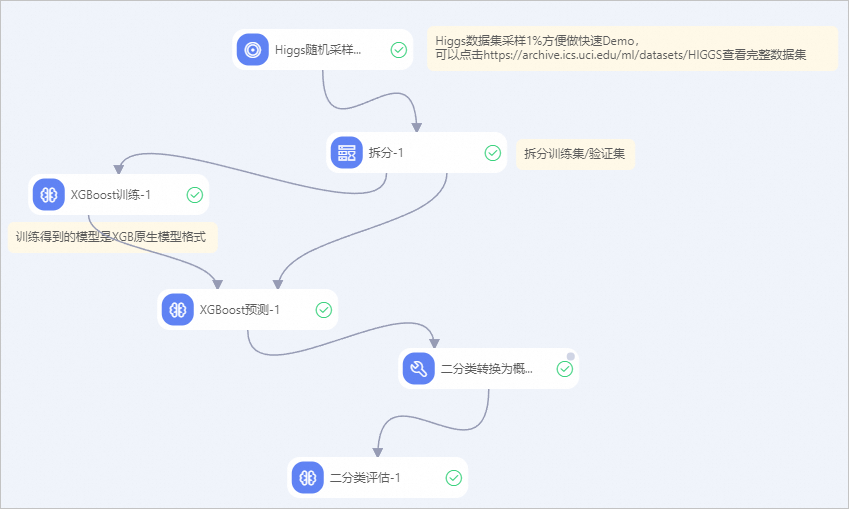
Where:
The XGBoost Predict component outputs data in the JSON serialization format from the native XGBoost library. If you want to use the Binary Classification Evaluation component in your workflow, add an SQL Script component downstream of the XGBoost Predict component. Then, configure the SQL Script component with the following code. This transforms the output from the XGBoost Predict component into the format required by the Binary Classification Evaluation component.
set odps.sql.udf.getjsonobj.new=true;

select *, CONCAT("{\"0\":", 1.0-prob, ",\"1\":", prob, "}") as detail
FROM (
select *, cast(get_json_object(pred, '$[0]') as double) as prob FROM ${t1})
References
The XGBoost Predict component is used with the XGBoost Train component. For more information about how to configure the XGBoost Train component, see XGBoost Train.
Designer provides various preset algorithm components. You can select a component for data processing as needed. For more information, see Overview of Designer components.