DDL physical replication optimization
PolarDB provides the Data Definition Language (DDL) physical replication optimization feature. The feature fully optimizes the critical path for writing physical logs on the primary node and applying them on read-only nodes. It significantly reduces the execution time of DDL operations on the primary node and the physical log replication delay for parsing DDL on read-only nodes. This topic describes how to use the DDL physical replication optimization feature.
Prerequisites
PolarDB clusters must run one of the following versions. You can Query the engine version to check your cluster version:
PolarDB for MySQL 8.0.1 with a revision version of 8.0.1.1.10 or later.
PolarDB for MySQL 5.7 with a revision version of 5.7.1.0.10 or later.
Limits
The parallel DDL physical replication optimization feature supports only DDL operations that create primary keys or secondary indexes. Full-text indexes and spatial indexes are not supported.
For DDL operations that modify only metadata, such as rename, this optimization is not required because these operations already run quickly.
This optimization feature is not supported in PolarDB for MySQL 8.0.2 or 5.6.
Background information
PolarDB uses a storage-compute disaggregation architecture so that the primary node and read-only nodes share the same stored data. This reduces storage costs and improves cluster availability and reliability. To implement this architecture, PolarDB uses physical replication technology. This ensures data consistency between the primary node and read-only nodes in the shared storage architecture and reduces the I/O overhead caused by binary log (Binlog) fsync operations.
InnoDB uses B-trees to maintain indexes. However, most slow DDL operations, such as adding a primary key, adding a secondary index, or running optimize table, often require rebuilding or creating B-tree indexes. This generates a large volume of physical logs. Operations on physical logs are often on the critical path of DDL execution, which increases the execution time of DDL operations. In addition, physical replication requires read-only nodes to parse and apply these newly generated physical logs. The large volume of physical logs generated by DDL operations can severely affect log synchronization on read-only nodes and can even make read-only nodes unavailable.
To address these issues, PolarDB provides the DDL physical replication optimization feature. The feature fully optimizes the critical path for writing physical logs on the primary node and applying physical logs on read-only nodes. It can reduce the execution time of a DDL operation that creates a primary key on the primary node by up to 20.6%. It can also reduce the replication delay for parsing DDL on read-only nodes to approximately 0.4% of the original time.
Usage
Set the following parameter to enable the DDL physical replication optimization feature.
Parameter | Level | Description |
innodb_bulk_load_page_grained_redo_enable | Global | The switch for the DDL physical replication optimization feature. Valid values:
|
Performance test
Test preparation
Test environment
PolarDB for MySQL 8.0 cluster with one primary node and one read-only node. The cluster uses the 16-core, 128 GB specification.
The cluster has 50 TB of storage space.
Test table schema
Run the following statement to create a table named
t0:CREATE TABLE t0(a INT PRIMARY KEY, b INT) ENGINE=InnoDB;Test table data
Run the following statement to generate random test data:
DELIMITER // CREATE PROCEDURE populate_t0() BEGIN DECLARE i int DEFAULT 1; WHILE (i <= $table_size) DO INSERT INTO t0 VALUES (i, 1000000 * RAND()); SET i = i + 1; END WHILE; END // DELIMITER ; CALL populate_t0();NoteWhen you run the test, replace
$table_sizewith the actual number of records in the table, such as1000000.This test uses tables that contain 1,000,000, 10,000,000, 100,000,000, and 1,000,000,000 records.
DDL operations used in the test
add primary keyadd secondary Indexoptimize table
Test methods
Test 1: Measure the time required to run different DDL operations on tables with different data volumes when the DDL physical replication optimization feature is enabled or disabled.
Test 2: When the DDL physical replication optimization feature is used together with Parallel DDL, measure the time required to run the
add secondary Indexoperation on a table that contains 1 billion records.Test 3: Measure read-only node performance, such as whether the node status is normal, peak CPU utilization, and replication delay, when the DDL physical replication optimization feature is enabled or disabled. The test uses a cluster that contains a table with 1 billion records and varies the number of concurrent DDL operations on the primary node (1, 2, 4, 6, and 8).
Test results
Test 1
When the innodb_bulk_load_page_grained_redo_enable parameter is enabled or disabled, the following figure shows the time, in seconds, required to run the
add primary key(a)operation on tables with different data volumes (1 million, 10 million, 100 million, and 1 billion).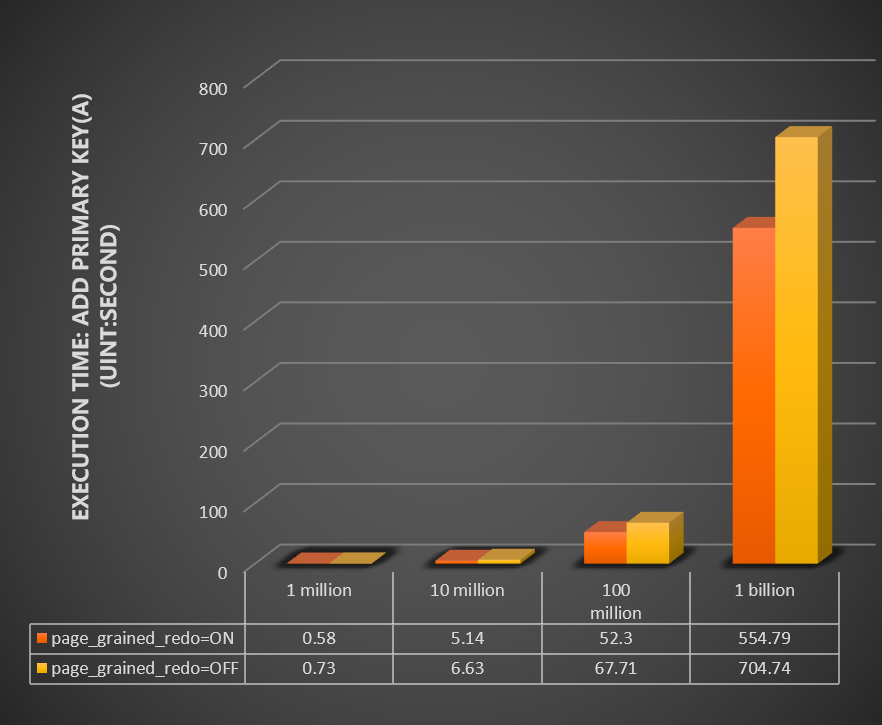
When the innodb_bulk_load_page_grained_redo_enable parameter is enabled or disabled, the following figure shows the time, in seconds, required to run the
optimize tableoperation on tables with different data volumes (1 million, 10 million, 100 million, and 1 billion).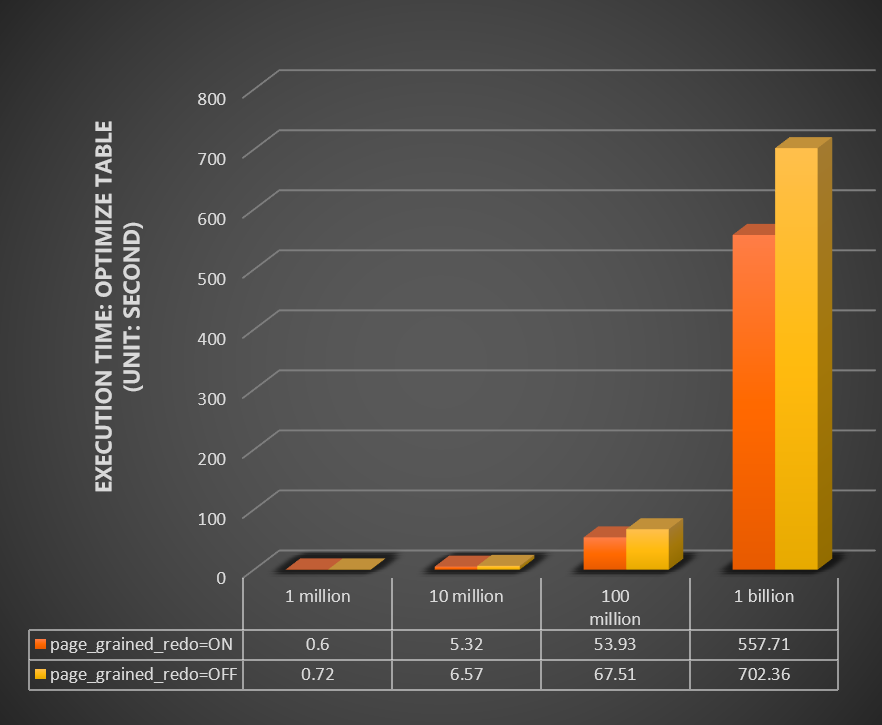
Test 2
Parallel DDL parameters innodb_polar_use_sample_sort and innodb_polar_use_parallel_bulk_load are enabled in this test. The test uses a table that contains 1 billion records and runs with the innodb_bulk_load_page_grained_redo_enable parameter enabled or disabled. It also uses different numbers of parallel threads (that is, the innodb_polar_parallel_ddl_threads parameter set to 1, 2, 4, 8, 16, and 32). The test measures the time, in seconds, required to run the
add secondary Indexoperation. The following figure shows the results.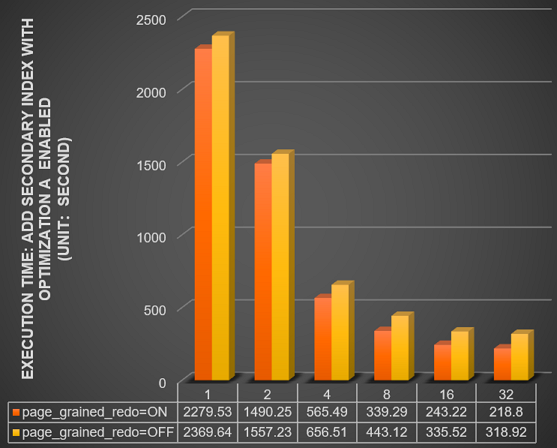
Parallel DDL parameters innodb_polar_use_sample_sort and innodb_polar_use_parallel_bulk_load are disabled in this test. The test uses a table that contains 1 billion records and runs with the innodb_bulk_load_page_grained_redo_enable parameter enabled or disabled. It also uses different numbers of parallel threads (1, 2, 4, 8, 16, and 32). The test measures the time, in seconds, required to run the
add secondary Indexoperation. The following figure shows the results.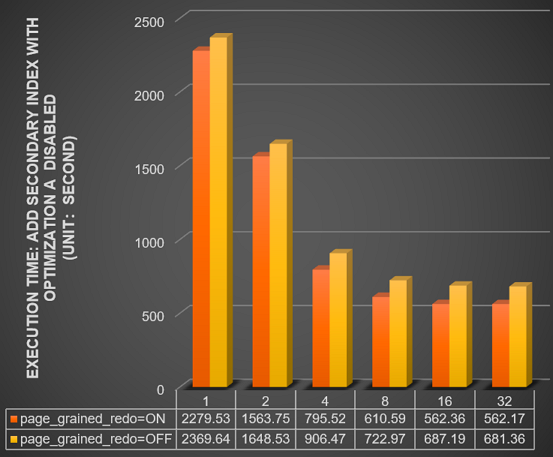
Test 3
innodb_bulk_load_page_grained_redo_enable is enabled in this test. The test uses a cluster that contains a table with 1 billion records. The following table shows read-only node performance for different numbers of concurrent DDL operations on the primary node (1, 2, 4, 6, and 8).
Number of concurrent DDL operations
1
2
4
6
8
Read-only node status
Normal
Normal
Normal
Normal
Normal
Peak CPU utilization (%)
1.86
1.71
1.76
2.25
2.36
Peak memory usage (%)
10.37
10.80
10.88
11
11.1
Peak read IOPS (operations/second)
10965
10762
10305
10611
10751
Peak replication delay (seconds)
0
0.73
0.87
0.93
0.03
innodb_bulk_load_page_grained_redo_enable is disabled in this test. The test uses a cluster that contains a table with 1 billion records. The following table shows read-only node performance for different numbers of concurrent DDL operations on the primary node (1, 2, 4, 6, and 8).
NoteThe data for four concurrent DDL operations was collected before the read-only node became unavailable.
The
-symbol in the table indicates that the related DDL operations could not run for the current number of concurrent DDL operations. Therefore, no test data is available.
Number of concurrent DDL operations
1
2
4
6
8
Read-only node status
Normal
Normal
Unavailable
Unavailable
Unavailable
Peak CPU utilization (%)
4.2
9.5
10.3
-
-
Peak memory usage (%)
22.15
23.55
68.61
-
-
Peak read IOPS (operations/second)
9243
7578
7669
-
-
Peak replication delay (seconds)
0.8
14.67
211
-
-
Contact us
If you have any questions about DDL operations, you can search for the DingTalk group number and join the group for consultation. You can directly @ the experts in the group with your questions. The group also has a PolarDB for MySQL assistant online 24/7 to answer your questions. DingTalk group number: 15375044501.