Fully refreshing a materialized view
A materialized view is a database object that optimizes complex queries by pre-calculating and storing the results. By storing these results, you can directly query the pre-calculated data. This avoids re-running resource-intensive operations and accelerates queries by trading storage space for query time.
Materialized views in PolarDB for MySQL clusters support full refresh. Both scheduled and manual refresh methods are supported. Materialized views use a background task mechanism for refreshes. You can use them with an IMCI to accelerate queries, which improves the efficiency of refresh tasks and reduces the load on read-only nodes. Built on the HTAP architecture of PolarDB, this feature further enhances analytical processing (AP) capabilities.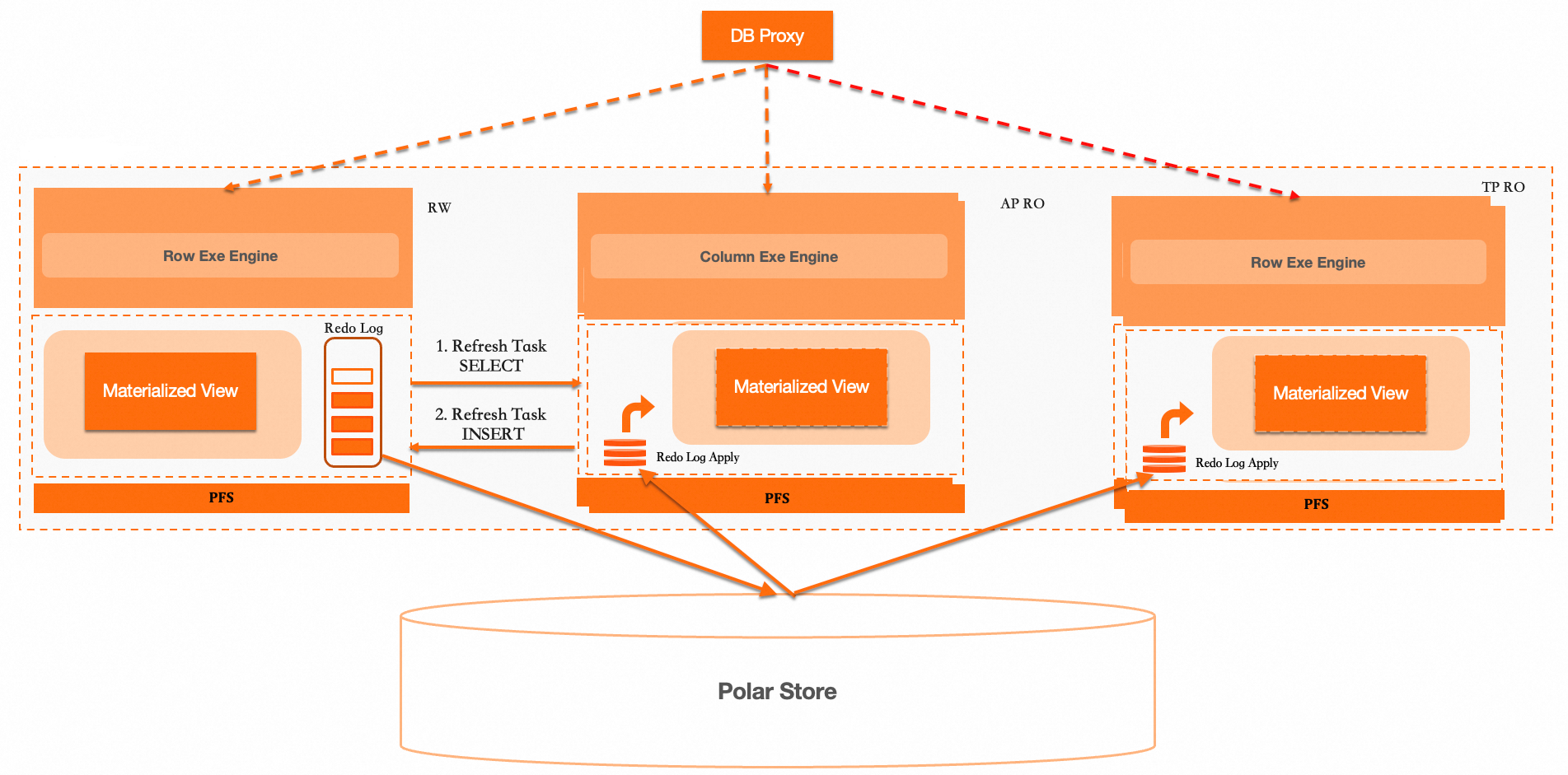
A materialized view differs from a regular view in that it contains a physical copy of the data that you can query directly. A materialized view consists of the view and its underlying physical base table.
-
Create a materialized view: Creating the view and materializing the data are two separate steps. The materialization process is an asynchronous operation pushed to a background task to populate the physical base table. The name of the physical base table is associated with the view. The materialization and refresh tasks include query and insert operations. The query operation can be offloaded to a read-only node with an IMCI to accelerate queries and reduce the impact on the primary node.
-
Query a materialized view: Queries on a materialized view are executed against its underlying physical base table.
-
Refresh a materialized view: The full refresh process creates a new, hidden physical base table. After the refresh statement is executed on the hidden table, the system switches the original and hidden base tables. This action updates the metadata table with the information of the latest physical base table and synchronizes it with the in-memory structure for queries.
-
Task monitoring and management: You can query the background refresh task queue to view task details. You can also monitor and manage tasks by pausing or restarting scheduled refresh tasks for a materialized view at the table, database, or global level.
Requirements
Your PolarDB for MySQL cluster must meet one of the following requirements:
-
MySQL 8.0.1, and the minor engine version must be 8.0.1.1.51 or later.
-
MySQL 8.0.2, and the minor engine version must be 8.0.2.2.31 or later.
Benefits
-
Avoid repeated calculations: For complex, resource-intensive queries, results are calculated once and reused multiple times, significantly improving query efficiency.
-
Data pre-aggregation: You can pre-aggregate data for daily, weekly, and monthly reports to accelerate report generation and data analytics.
-
Optimized queries on large datasets: Reduces direct scans of large amounts of raw data and accelerates response times for analytical queries.
-
Support for multidimensional analysis: You can pre-calculate aggregate data for different dimension combinations to provide efficient support for OLAP and other multidimensional analysis scenarios.
Use cases
Materialized views optimize query performance by pre-calculating and storing query results. They are especially useful for processing large-scale data and complex queries. They reduce the overhead of real-time computations and simplify complex query logic, which makes them ideal for rapid report generation and data analytics.
-
Avoid repeated calculations: Suitable for storing the results of frequently queried, resource-intensive calculations. Using materialized views avoids re-calculating the same data, which significantly improves query efficiency.
-
Data pre-aggregation: In report generation and data analytics, materialized views can pre-aggregate data, such as daily, weekly, or monthly sales data and user behavior data. Pre-storing calculation results reduces the time and resources required for real-time computation.
-
Optimized queries on large datasets: Directly querying large volumes of raw data can be time-consuming due to frequent, large-scale scans. Materialized views can reduce the need to directly access raw data, thereby accelerating queries and analysis.
-
Support for multidimensional analysis: Materialized views can pre-calculate aggregate data for different dimension combinations, enabling fast and efficient query responses for scenario-based multidimensional data analysis.
Parameters
The method for modifying PolarDB cluster parameters differs between the console and a database session. The differences are as follows:
In the PolarDB console
Compatibility: Some cluster parameters in the PolarDB console have the loose_ prefix for compatibility with MySQL configuration files.
Procedure: Find and modify the parameters that have the
loose_prefix.
In a database session (using the command line or a client)
Procedure: When you connect to the database and use the
SETcommand to modify a parameter, remove theloose_prefix and use the original parameter name.
|
Parameter |
Description |
|
loose_materialized_view_enabled |
Specifies whether to enable materialized views. Valid values:
|
|
loose_enable_materialized_view_parallel |
Specifies whether to enable the parallel query feature for materialized views. Valid values:
|
Create a materialized view
Syntax
CREATE
  MATERIALIZED VIEW view_name [(column_list)]
  [REFRESH [COMPLETE|FAST]]
  [ON [COMMIT|DEMAND]]
  [START WITH now()] [NEXT now() + interval 1 hour]
  [[DISABLE|ENABLE] QUERY REWRITE]
  [MATERIALIZED OPTIONS = 'json_options']
  AS select_statement
Permissions
-
The
CREATEpermission on the database where the materialized view is located. -
The
SELECTpermission on the relevant columns (or the entire table) of all base tables for the materialized view.
Parameters
|
Parameter |
Required |
Description |
|
view_name |
Yes |
The name of the materialized view. |
|
column_list |
No |
The columns to include in the materialized view. To assign specific names to the view columns, list them in the |
|
REFRESH |
No |
Specifies the refresh policy for the materialized view.
Note
This topic describes the full refresh policy. For information on the incremental refresh policy, see Incrementally refresh a materialized view. |
|
ON |
No |
Specifies the materialization type of the materialized view.
Note
Currently, only the asynchronous materialized view type is supported. |
|
START WITH |
No |
The start time for the automatic refresh of an asynchronous materialized view. |
|
NEXT |
No |
The refresh interval for an asynchronous materialized view. Note
If you do not specify NEXT, the view can only be refreshed manually. |
|
QUERY REWRITE |
No |
Specifies whether the materialized view supports query rewrite.
Note
Currently, query rewrite is not supported. |
|
MATERIALIZED OPTIONS |
No |
Specifies extended parameters for the materialized view. The value is a string, typically a JSON object. For details, see mv_options usage. |
|
select_statement |
Yes |
The query statement that defines the data for the materialized view. This statement retrieves data from the base tables and stores the result in the materialized view. |
mv_options usage
mv_options is specified by the MATERIALIZED OPTIONS = 'json_options' clause. The clause must appear before AS select_statement, and json_options should be a valid JSON object.
-
Supported versions:
-
MySQL 8.0.1, kernel minor version
8.0.1.1.55or later. -
MySQL 8.0.2, kernel minor version
8.0.2.2.35or later.
-
-
mv_optionssupports the following fields:Field
Type
Value
Description
order_keySTRING
A column name or expression text.
Sets the
order_keyof the container table of the materialized view.engineSTRING
-
InnoDB -
XEngine
Specifies the storage engine used by the container table of the materialized view. The value is case-insensitive.
table_formatSTRING
-
row -
column
Specifies the row-store or column-store format of the container table. The value is case-insensitive.
-
The
InnoDBengine supports onlyrow. -
The
XEngineengine supports bothrowandcolumn, and is typically used together withengine: "xengine".
refresh_policySTRING
-
MASTER -
PREFER_TPRO -
PREFER_IMCI -
FORCE_TPRO -
FORCE_IMCI -
COST
Specifies the push-down policy for the full refresh task. The value is case-insensitive. An empty string or an unknown value falls back to the default policy specified by the system variable.
-
MASTER: refresh on the primary node. -
PREFER_TPRO: prefer to refresh on a row-store read-only (RO) node. Refresh on the primary node if no row-store RO node exists. -
PREFER_IMCI: prefer to refresh on a column-store index RO node. Refresh on the primary node if no column-store index RO node exists. -
FORCE_TPRO: force refresh on a row-store RO node. Report an error if no row-store RO node exists. -
FORCE_IMCI: force refresh on a column-store index RO node. Report an error if no column-store index RO node exists. -
COST: choose between a row-store RO node and a column-store index RO node based on query cost to execute the refresh.
unique_checkINT
-
1 -
0
Used for XEngine column-store container tables.
-
0relaxes the uniqueness check during refresh. -
1or omitting the field keeps the default check.
Noteengine,table_format,refresh_policy, andunique_checkare supported only on MySQL 8.0.2 for now. -
-
Notes:
-
MATERIALIZED OPTIONS = ''is treated as no extended parameters being set. -
When
SHOW CREATE TABLEoutputs the materialized view definition, the configuredMATERIALIZED OPTIONSclause is included. -
The syntax layer only accepts a string. If subsequent parsing fails, a
WARNINGis recorded and processing continues with the default behavior, as if no corresponding parameter were parsed.
-
-
Example:
CREATE MATERIALIZED VIEW mv1
  REFRESH COMPLETE
  ON DEMAND
  START WITH now()
  NEXT now() + INTERVAL 1 hour
  MATERIALIZED OPTIONS = '{"engine":"xengine","table_format":"column","order_key":"col1"}'
  AS SELECT col1, col2 FROM tbl1;
Example
-
Create the
table1andtable2tables to use as base tables for the materialized view.-- Create the base tables. CREATE TABLE table1 (col1 INT PRIMARY KEY, col2 VARCHAR(20), col3 INT); CREATE TABLE table2 (col1 INT PRIMARY KEY, col2 VARCHAR(20), col3 INT); -- Insert data into the base tables. INSERT INTO table1 VALUES (1, 'A', 100), (2, 'B', 200), (3, 'C', 300), (4, 'D', 400); INSERT INTO table2 VALUES (1, 'X', 10), (2, 'Y', 20), (3, 'Z', 30), (5, 'W', 50); -
Create a materialized view.
CREATE MATERIALIZED VIEW mv1 REFRESH COMPLETE ON DEMAND START WITH now() NEXT now() + INTERVAL 1 hour AS SELECT SUM(t1.col3) AS sum_value, AVG(t1.col3) AS avg_value FROM table1 t1 JOIN table2 t2 ON t1.col1 = t2.col1; -
Create a materialized view with
mv_options.CREATE MATERIALIZED VIEW mv2 REFRESH COMPLETE ON DEMAND START WITH now() NEXT now() + INTERVAL 1 hour MATERIALIZED OPTIONS = '{"engine":"xengine","table_format":"column","refresh_policy":"FORCE_IMCI"}' AS SELECT t1.col1, t1.col2, t1.col3 FROM table1 t1 JOIN table2 t2 ON t1.col1 = t2.col1;
Query a materialized view
Querying a materialized view requires the SELECT permission for the view. You do not need the SELECT permission on the view's underlying base tables.
Query a materialized view
SELECT * FROM mv1;The expected output is:
+-----------+-----------+
| sum_value | avg_value |
+-----------+-----------+
|       600 |  200.0000 |
+-----------+-----------+
Query view definition
SHOW CREATE VIEW mv1;The expected output is:
+------+--------------------------------------------------------------------------------------------------------------------------------------------------------------------------------------------------------------------------------------------------------------------------------+----------------------+----------------------+
| View | Create View                                                                                                                                                                                                                                                                    | character_set_client | collation_connection |
+------+--------------------------------------------------------------------------------------------------------------------------------------------------------------------------------------------------------------------------------------------------------------------------------+----------------------+----------------------+
| mv1  | CREATE MATERIALIZED VIEW `mv1` REFRESH COMPLETE ON DEMAND START WITH ('2025-10-15 11:20:15') NEXT (now() + interval 1 hour)  AS select sum(`t1`.`col3`) AS `sum_value`,avg(`t1`.`col3`) AS `avg_value` from (`table1` `t1` join `table2` `t2` on((`t1`.`col1` = `t2`.`col1`))) | utf8mb4              | utf8mb4_0900_ai_ci   |
+------+--------------------------------------------------------------------------------------------------------------------------------------------------------------------------------------------------------------------------------------------------------------------------------+----------------------+----------------------+
Query from system table
SELECT * FROM mysql.view_materialized_info;Field descriptions
|
Field |
Description |
|
TABLE_SCHEMA |
The name of the database where the materialized view is located. |
|
TABLE_NAME |
The name of the materialized view. |
|
IS_DROPPED |
Indicates whether the view has been dropped.
|
|
FIRST_REFRESH_TIME |
If automatic refresh is configured, this is the time of the first refresh. |
|
TIME_ZONE |
The time zone setting. |
|
REFRESH_CONDITION |
The refresh trigger mechanism.
|
|
REFRESH_STRATEGY |
The refresh policy for the materialized view.
|
|
REFRESH_START_TIME |
The configured start time for the first refresh. |
|
NEXT_TIME_EXPRESSION |
The definition for the next refresh time of an asynchronous materialized view. |
|
LAST_START_TIME |
The time when the last refresh actually started. |
|
LAST_END_TIME |
The time when the last refresh actually ended. |
|
CONTAINER_TABLE_POSTFIX |
The suffix of the physical table used for data storage. |
|
EXPIRED_TABLE_POSTFIX |
The suffix of the physical table that holds expired data after a refresh. |
|
IS_STOPPED |
Indicates whether the scheduled refresh is stopped.
|
|
CREATE_TIME |
The time when the materialized view metadata was created. |
|
UPDATE_TIME |
The time when the materialized view metadata was last updated. |
The expected output is:
+-----+--------------+------------+------------+---------------------+-----------+-------------------+------------------+---------------------+---------------------------+---------------------+---------------------+-------------------------+-----------------------+------------+---------------------+---------------------+
| id  | table_schema | table_name | is_dropped | first_refresh_time  | time_zone | refresh_condition | refresh_strategy | refresh_start_time  | next_time_expression      | last_start_time     | last_end_time       | container_table_postfix | expired_table_postfix | is_stopped | create_time         | update_time         |
+-----+--------------+------------+------------+---------------------+-----------+-------------------+------------------+---------------------+---------------------------+---------------------+---------------------+-------------------------+-----------------------+------------+---------------------+---------------------+
| 471 | testmv       | mv1        |          0 | 2025-10-15 11:20:16 | +08:00    | DEMAND            | COMPLETE         | 2025-10-15 11:20:15 | (now() + interval 1 hour) | 2025-10-15 11:20:15 | 2025-10-15 11:20:16 |           2022929596417 |         2022929596417 |          0 | 2025-10-15 11:20:16 | 2025-10-15 11:20:16 |
+-----+--------------+------------+------------+---------------------+-----------+-------------------+------------------+---------------------+---------------------------+---------------------+---------------------+-------------------------+-----------------------+------------+---------------------+---------------------+
Refresh a materialized view
Currently, materialized views support only full refresh. This process uses an out-of-place method: it creates a hidden physical base table, runs the refresh statement on it, and then switches the original and hidden base tables. Therefore, a full refresh requires additional storage space. Its main advantage is its support for any SQL query.
Materialized views support two refresh methods: manual refresh and scheduled refresh.
Manual refresh
If a materialized view is not configured for scheduled refresh, or if the refresh interval is long, you can use the REFRESH MATERIALIZED VIEW command to refresh the data manually.
REFRESH MATERIALIZED VIEW <view_name>;Example
-
Insert new test data.
INSERT INTO table1 VALUES (5, 'E', 500), (6, 'F', 600); INSERT INTO table2 VALUES (7, 'U', 60), (8, 'V', 70); -
Manually refresh the materialized view.
REFRESH MATERIALIZED VIEW mv1; -
Query the materialized view.
SELECT * FROM mv1;The expected output is:
+-----------+-----------+
| sum_value | avg_value |
+-----------+-----------+
|      1100 |  275.0000 |
+-----------+-----------+
Scheduled refresh
When you create a materialized view, you can specify a start time for scheduled refreshes by using START WITH and configure an automatic refresh interval by using NEXT. The system automatically schedules the refresh task based on the specified settings.
CREATE MATERIALIZED VIEW mv1
REFRESH COMPLETE
ON DEMAND
START WITH now() NEXT now() + INTERVAL 1 hour
AS
SELECT
    SUM(t1.col3) AS sum_value,
    AVG(t1.col3) AS avg_value
FROM table1 t1
JOIN table2 t2 ON t1.col1 = t2.col1;
Drop a materialized view
Dropping a materialized view requires the DROP permission on the database where the materialized view is located.
Syntax
DROP MATERIALIZED VIEW <view_name>;Example
DROP MATERIALIZED VIEW mv1;Monitor and manage tasks
The scheduled refresh of a materialized view relies on the system's automatic scheduling mechanism. You may need to monitor and manage a large number of scheduled tasks. You can pause or restart scheduled refresh tasks for a materialized view at the table, database, or global level.
View task queue
You can query the information_schema.materialized_view_refresh_queue system view to view the refresh queue.
SELECT * FROM information_schema.materialized_view_refresh_queue;Pause task queue
By table
STOP MATERIALIZED VIEW task FOR TABLE mv1;By database
STOP MATERIALIZED VIEW task FOR DATABASE mv1;Globally
STOP MATERIALIZED VIEW task FOR ALL;Restart task queue
By table
RESTART MATERIALIZED VIEW task FOR TABLE mv1;By database
RESTART MATERIALIZED VIEW task FOR DATABASE mv1;Globally
RESTART MATERIALIZED VIEW task FOR ALL;